Official Tooling
@pixso/plugin-typings
TypeScript type declarations for the Pixso Plugin API.
@pixso/plugin-cli
@pixso/plugin-cli is a Pixso plugin scaffolding CLI. It works out of the box, hides most build configuration, and supports local hot reload and production builds.
Usage
npm install @pixso/plugin-cli -DCommands
// package.json - scripts
"build": "plugin-cli build" // production build
"dev": "plugin-cli dev" // local development
"pkg": "plugin-cli pkg" // package the plugin
Note: the UI started by
plugin-cli devis loaded in a Non-null origin iframe. If the packaged UI is loaded in a Null origin iframe, pay attention to the Web API differences.
Configuration
Create plugin.config.(j|t)s or .pluginrc in the project root.
| key | required | type | default | description |
|---|---|---|---|---|
| main | No | string | ./main.(js/ts) | sandbox entry file |
| ui | No | string | ./ui/index.(js/ts/jsx/tsx) | UI entry file |
| template | No | string | ./ui/ui.html | UI page template |
| frame | No | vue, react, preact, svelte, none | auto-detected when possible | framework used by the project |
Custom Build Configuration
import { defineConfig } from "@pixso/plugin-cli";
import { webpackPlugin } from "xxxx";

export default defineConfig({
  ui: "./ui/ui.js",
  main: "./ui/main.ts",
  frame: "svelte",
  template: "./ui/template.html",
  chainWebpack(config) {
    const svgRule = config.module.rule("svg");
    svgRule.uses.clear();
    return config;
  },
  configureWebpack(config) {
    config.plugins.push(webpackPlugin());
  },
});
For a lighter setup, use @pixso/create-plugin.
@pixso/create-plugin
Pixso plugin development templates. It can generate starter plugins for different frameworks and reduce project setup cost.
Usage
npm init @pixso/plugin
# or
npx @pixso/create-plugin
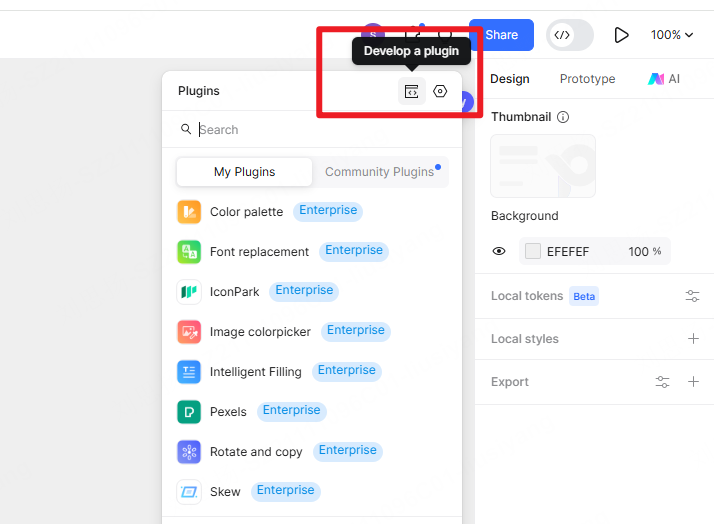
Select the template you need, install dependencies, and start the project. Then open the Pixso editor, open the plugin panel, and click the development plugin button in the upper-right corner to start local plugin debugging.