
Scott
I still have nightmares about the old way we used to review mockups. You probably know the exact drill I am talking about. Ten exhausted people sitting in a laggy Zoom call, staring at a screen share while someone tries to explain why a font looks "a little off." That setup is completely broken today. When half your crew logs in from their kitchen tables across three different time zones, forcing everyone onto a live call is just bad management. We have to lean hard into async work. If your team spends more time scheduling reviews than actually designing things, we need to talk about fixing your process. Let's look at how modern teams are ditching the meetings and making hybrid work actually function on a day-to-day basis.
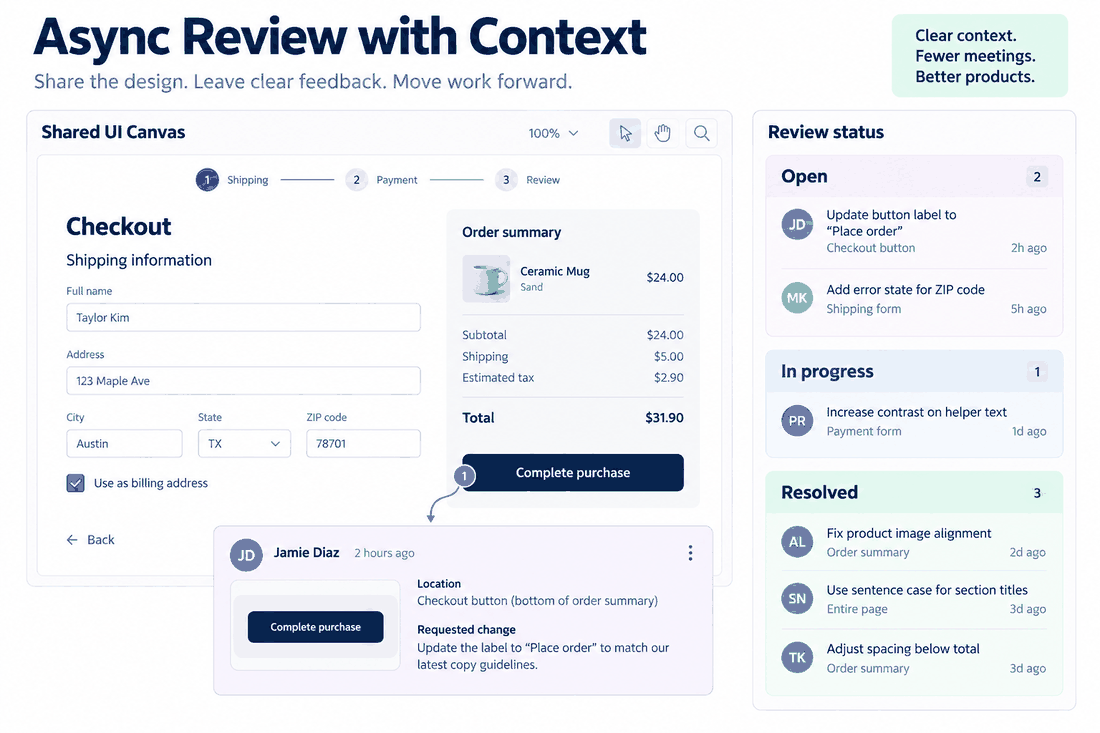
Part 1. The problem with chat apps and vagueness
Let's start by being brutally honest about why your current feedback loops are probably failing. When companies first sent everyone home a few years ago, the immediate reaction was to just move office conversations into Slack or Microsoft Teams. But trying to talk about visual problems in a text-based chat is a disaster waiting to happen.
Picture this: a product manager looks at a JPEG you dropped in a channel and types, "Can we make the header feel a bit more dynamic?" What on earth does that actually mean? Do they want a different color? A bigger font? An animation? Without a visual anchor, you end up wasting hours guessing what they want, sending back a bunch of variations, and waiting for them to come back online.
The market is totally flooded with generic collaboration tools for remote teams, but using a basic chat app for UI reviews creates incredible friction. You get a fragmented mess. The creative files live in one tab, the feedback lives in a chat window, and the actual task tracking is buried in a Jira board that nobody wants to open. People get frustrated, miscommunications happen, and deadlines slip. The only way out of this trap is to stop talking about designs in chat windows and start tying the feedback directly to the pixels.
Part 2. Finding your single source of truth
To fix this mess, you have to consolidate. You cannot expect a distributed group of people to juggle five different web apps just to approve a landing page. You need a platform that handles the creation, the review process, and the task tracking all in one single place.
I started pushing teams toward Pixso entirely out of frustration with this exact problem. If you are shopping around for asynchronous design collaboration tools, you have to look for something that bridges the gap between the people actually drawing the screens and the people paying for them. Pixso is brilliant because it does not force you to export flat images just to get an opinion. Everything happens live on the canvas, but it works perfectly when people are offline.
When you use Pixso, you stop worrying about who has the latest version of a file. It lives in the cloud, protected by seriously granular permission settings. You can invite your loud marketing director into the file, give them "view only" access so they don't accidentally delete your master component library, and let them leave their notes whenever they have free time. The audit trails track every single change, and the automated notifications mean nobody is left guessing if an update happened. Getting your tools sorted out early is the only way to stop the bleeding.
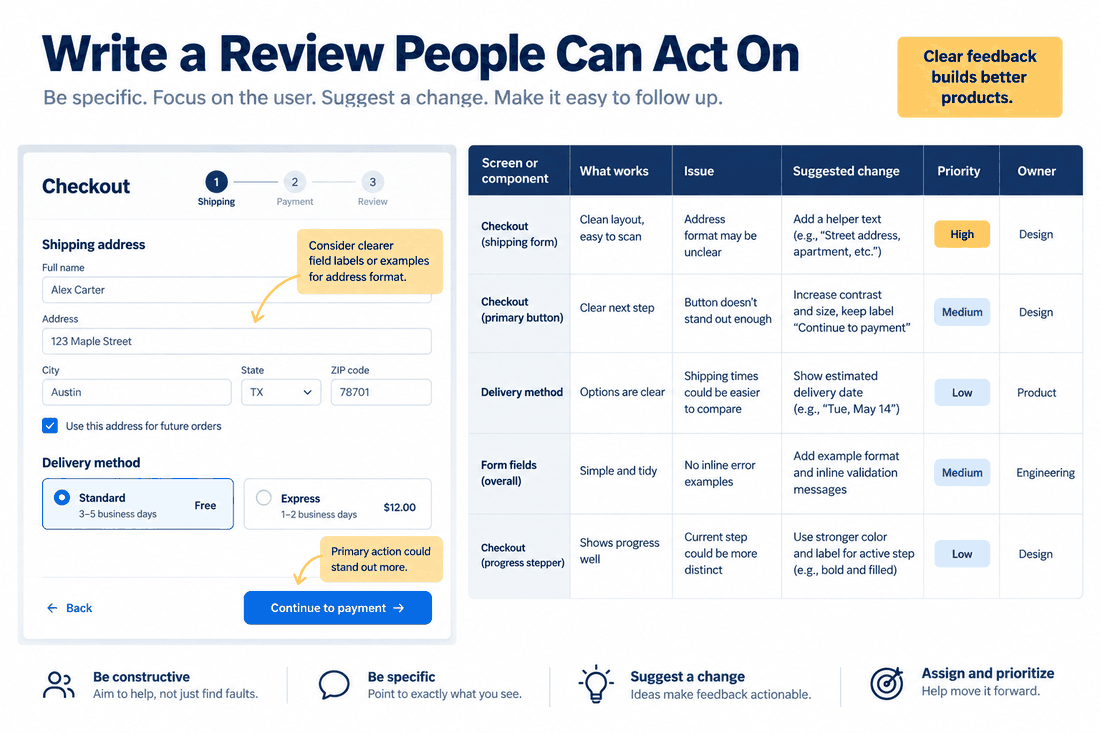
Part 3. Getting feedback that doesn't make you want to pull your hair out
The real secret to making async work actually succeed is demanding highly structured communication. You just can't afford vague comments when the person reviewing your file is logging off for the weekend. The absolute best thing about dedicated asynchronous design collaboration tools is their ability to anchor a comment to an exact spot on the screen.
Let's walk through exactly how this looks in Pixso, because the process is incredibly smooth. When you finish a draft, you don't export a PDF. You just hit the 'Share' button in the top right corner, set the link to "Can View and Comment," and drop that link to your stakeholders. That is it. No giant file downloads required.
When your reviewer opens the link, they do not need to understand how to use complex UI panels. They just press the letter 'C' on their keyboard. Their mouse cursor instantly turns into a little pin icon. If they think the padding on the primary checkout button is too tight, they physically drop that pin right on top of the button. They type, "Add 8px of padding here," and hit enter.
It completely eliminates the "wait, which button are you talking about?" game. Plus, the threads in Pixso support rich media. If the product manager saw a competitor doing something cool, they can paste a screenshot directly into the comment bubble. You can reply directly in that thread, keeping the entire argument neatly contained. It turns a messy opinion into a highly structured, actionable request.
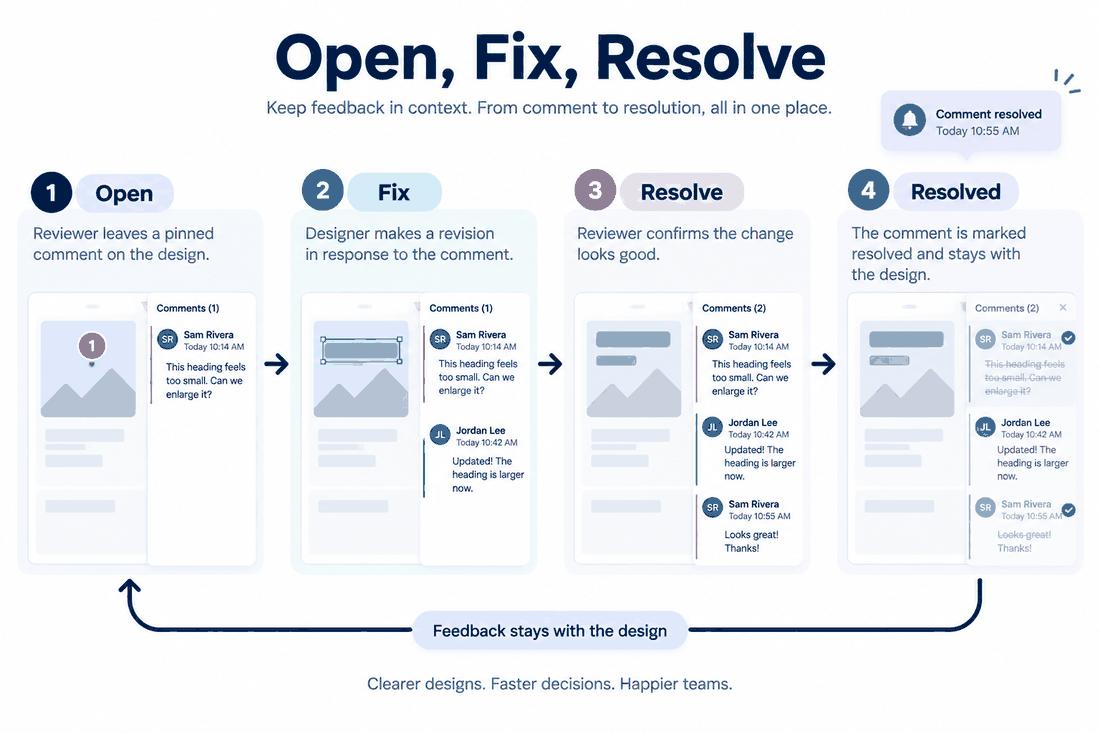
Part 4. Closing the loop without the anxiety
Gathering the feedback is really only half the battle. If those comments just sit there floating on your canvas forever, your project is going to stall. Moving to asynchronous design collaboration tools changes how you manage your day, but you still have to be ruthless about enforcing a closed-loop workflow.
A healthy process always follows a strict path: somebody submits the work, a stakeholder reviews it, they leave their notes, the designer fixes it, and the ticket gets closed. In an office, you might track this on a whiteboard. Online, you manage it through state tracking.
In Pixso, think of every single comment thread as a miniature task ticket. When a reviewer leaves that pin asking for a color change, it stays visible on the canvas. When you log in on Tuesday morning, you click the pin, read the note, and tweak the color. Once you are done, you click the little 'Resolve' checkmark on the comment box.
That action archives the thread. It visually clears the pin off your canvas so you can focus, and it automatically pings the reviewer to let them know their specific request was handled. You don't need to send them an email saying "I fixed it." The system does it for you. This creates a really lightweight, totally repeatable workflow. Roles are clear, the state of the project is obvious to anyone who logs in, and it takes the stress out of hybrid work because nobody is waiting around for a status update.
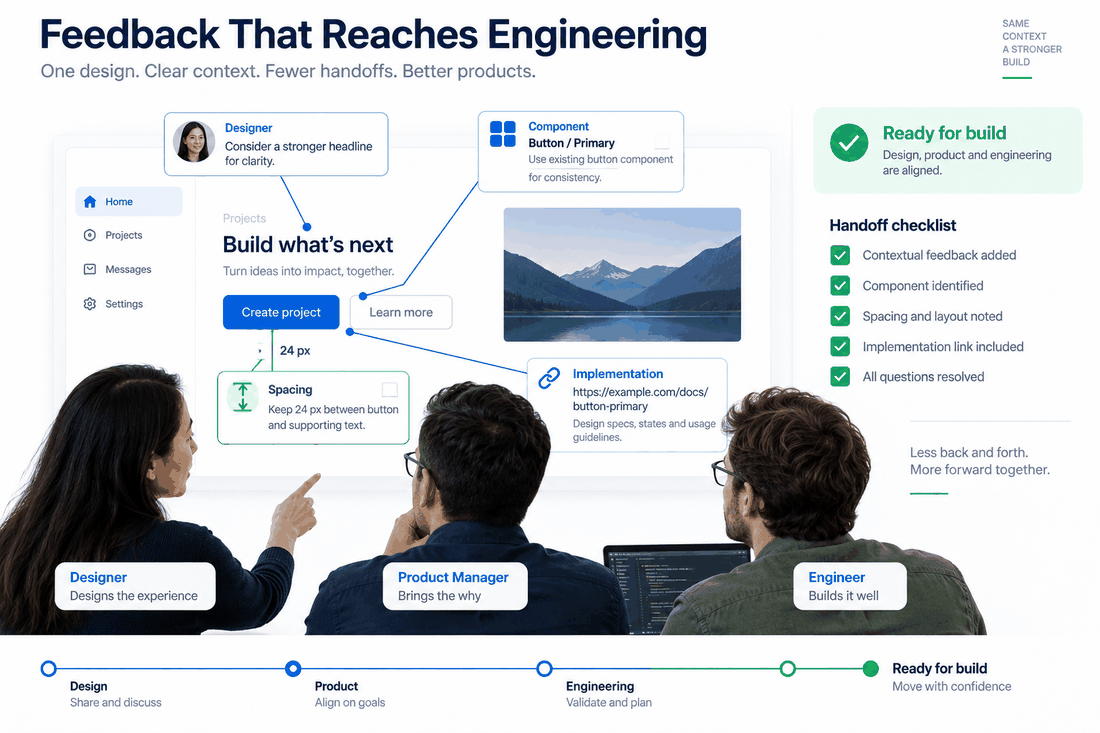
Part 5. Handing it over to the developers without a fight
Here is where most teams completely drop the ball. The design gets approved, everyone celebrates, and then the nightmare of developer handoff begins. So many collaboration tools for remote teams fall flat right here because they treat the approved mockup like a static painting.
Your critique process has to plug directly into your engineering pipeline. If you approve a new layout asynchronously, the developers shouldn't have to chase you down to ask for the hex codes. Because Pixso inherently connects your visual files to your larger design system, every single change you approve is backed by real code data.
When you resolve those feedback tickets and lock the layout, your developers just flip a switch in the top right corner to enter Dev Mode. They can click on that newly approved checkout button and immediately copy the exact CSS, iOS, or Android code snippets they need. The padding changes you argued about yesterday are already calculated in the code. This means your feedback loop does not just stop at making things look pretty. By using capable asynchronous design collaboration tools, you ensure that the decisions made offline translate flawlessly into the final product.
Part 6. Building a culture that respects time
You can go out and buy the most expensive software on the market, but I will tell you right now, if your company culture still demands instant replies, your new workflow will crash and burn. True optimization is a cultural issue, not just a technical one. Building a team that respects async work takes patience and leadership that is willing to set strict boundaries.
First off, you have to build psychological safety. One unexpected benefit of async reviews is that they democratize the room. The quiet junior designer who gets talked over in Zoom meetings suddenly has the quiet space to compose a really thoughtful, structured critique. You need to actively encourage this. When someone leaves great written feedback, praise them for it publicly.
Second, you have to break the habit of back-channeling. If an account manager sends you a direct message asking for a "quick little visual tweak," you have to train them to use the system. Gently tell them, "Hey, can you please drop a pin on the Pixso file so I don't forget to track this?" It feels awkward the first few times, but eventually, the entire team learns that the main platform is the only source of truth.
When you enforce this, you start getting real data. You can look at the built-in tracking and see exactly how long your review cycles are actually taking. You spot the bottlenecks. When people finally trust the system and realize they don't need to panic-ping each other to get things done, the anxiety of remote collaboration just melts away. You get a much calmer, happier team.
Wrapping it up
Let's be honest: changing how a whole team communicates isn't going to happen overnight. But moving away from live, forced meetings is the only way to keep your top talent happy right now. When you bring in the right asynchronous design collaboration tools, you stop policing people's schedules and start trusting them to do great work on their own time. It takes some practice, sure. But once you get that first taste of logging in with your morning coffee and seeing all your feedback neatly organized, you will wonder why you didn't ditch the live critique sessions years ago. Give it a shot. Your calendar will definitely thank you.
![How to Make a Prototype Rapidly [Must-Read]](https://pixso.net/assets/media/how-to-make-a-prototype-cover-205bbbcd4021321f.webp)


