Every software professional knows the exact feeling of a sprint gone wrong. It usually starts with a single Slack message: “Hey, what’s the hover state for this button supposed to look like?” Before you know it, a developer is blocked, a designer has to dig through old files, and your supposedly rapid release cycle comes to a grinding halt. We talk a lot about moving fast, but the truth is that the gap between a mock-up and a live application is where product timelines go to die. Closing this gap requires a complete overhaul of how we handle the design to code transition. It is no longer about throwing static screens over a virtual wall. Today, we are going to break down exactly how you can build a D2C pipeline that actually works, eliminating communication friction and keeping your entire product organization moving in absolute sync.

Part 1: The core objective: fixing the agile bottleneck
Let’s be honest about how a lot of companies operate. They claim to run an agile team, but their production pipeline is just an old-school waterfall process dressed up in modern terminology. The design department spends three weeks perfecting a user interface, exports a bunch of assets, drops a link in a group chat, and moves on to the next project. The engineering squad is then left to decipher a massive file with zero context.
This sequential, one-step-at-a-time mentality is exactly what breaks cross-functional collaboration. You cannot adapt to quick, iterative sprints if developers have to wait for the creative work to be 100 percent finished before they write a single line of CSS.
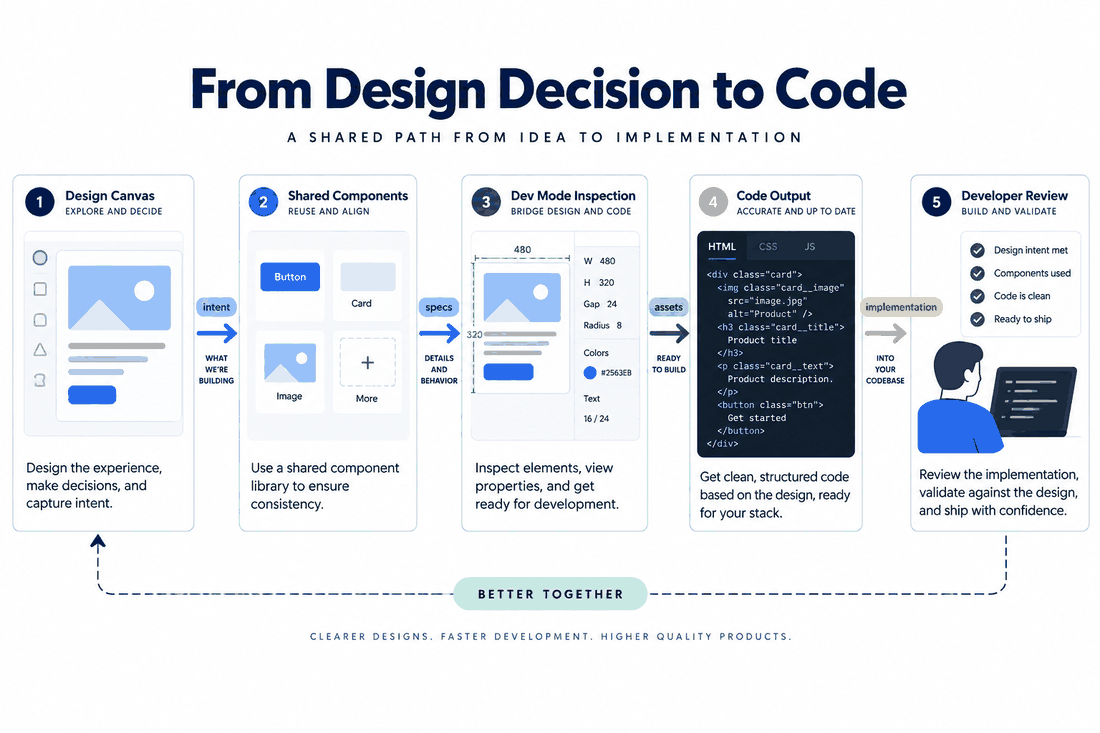
The primary goal of a mature D2C strategy is to completely shatter this linear dependency. You need to enable parallel workflows where the creative and technical folks operate concurrently. When execution is actually fluid, you hit a zero-friction environment. Front-end engineers stop guessing margin sizes or hex codes. They don’t have to hunt down someone to explain how a modal window is supposed to animate. By attacking these traditional delivery pain points head-on, the whole concept of a handover shifts from a stressful, rigid event at the end of a sprint into a continuous, quiet conversation that happens every single day.
Part 2: Why Pixso is the ultimate catalyst for your pipeline
Before we get into the checklists and the behavioral rules, we have to talk about your tooling environment. You absolutely cannot build a modern workflow if your tech stack looks like a patchwork quilt. Five years ago, it was normal to create visuals in one app, sync those screens to a separate prototyping tool, and then buy yet another third-party plugin just to generate developer specifications. Every time data moves between different software, information gets lost and somebody gets frustrated.
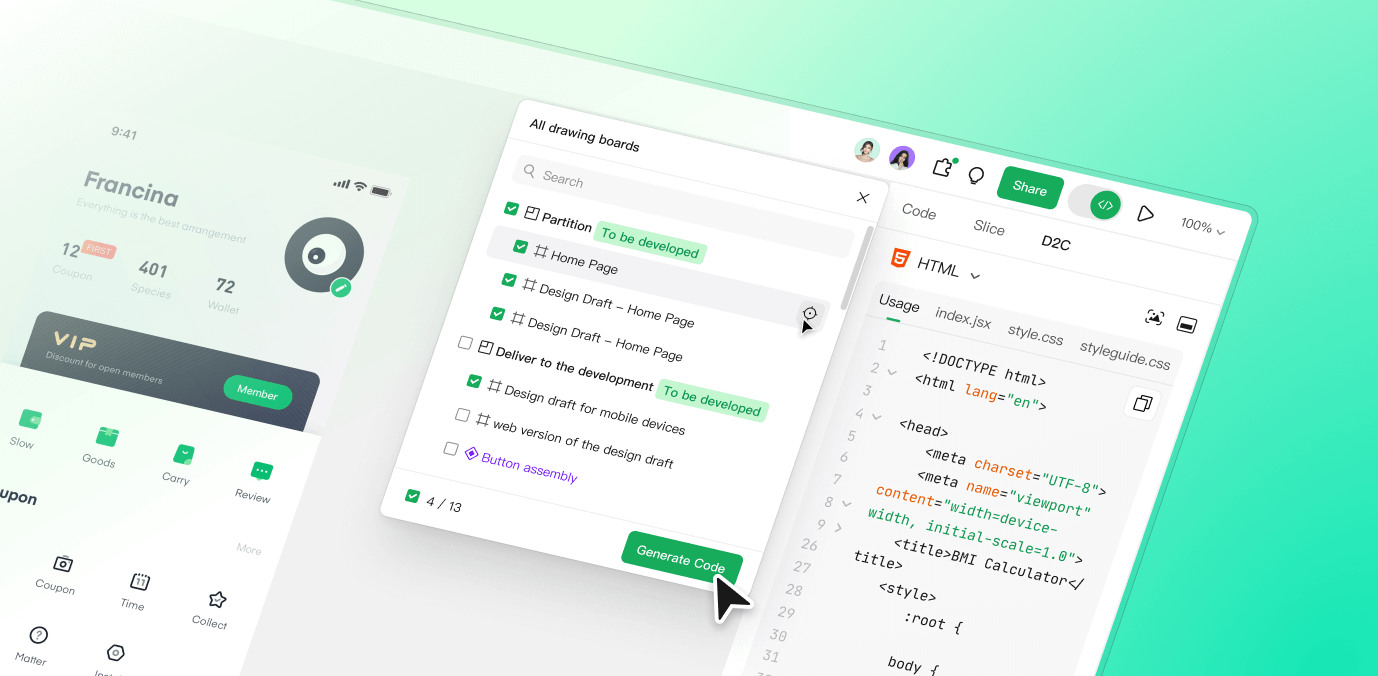
This fragmentation is why integrated platforms like Pixso have quietly taken over as the central nervous system for highly efficient tech organizations. Pixso is an all-in-one UI design tool that natively bridges the gap between the creative brainstorming phase and the technical implementation phase. By stripping away the need for three overlapping tools, Pixso steps in as the single source of truth for your entire D2C process.
For the folks actually writing the code, the value of this is wildly apparent within the first five minutes. Instead of wading through a chaotic layer panel trying to find out what font weight was used, developers just open the Pixso link and immediately toggle on the built-in Dev Mode. Suddenly, visual elements are translated directly into actionable data. Because the platform runs a real-time synchronization engine, there are no version control nightmares. If a creative lead decides to tweak the corner radius of a navigation card on a Tuesday morning, the engineer sees the updated CSS, Swift, or Android code variables populate instantly. Centralizing your design collaboration into one native environment fundamentally kills the friction of asset management.
Part 3: Information delivery: killing the guessing game
Ask any front-end developer what their biggest pet peeve is during a sprint, and they will almost always say the same thing: lack of context. A beautiful, static mock-up shows you exactly how a screen looks when everything is perfect. But it rarely explains how that screen behaves, or why certain layout decisions were made in the first place. For design to code execution to happen without endless back-and-forth messaging, the information delivery has to be annoyingly precise.
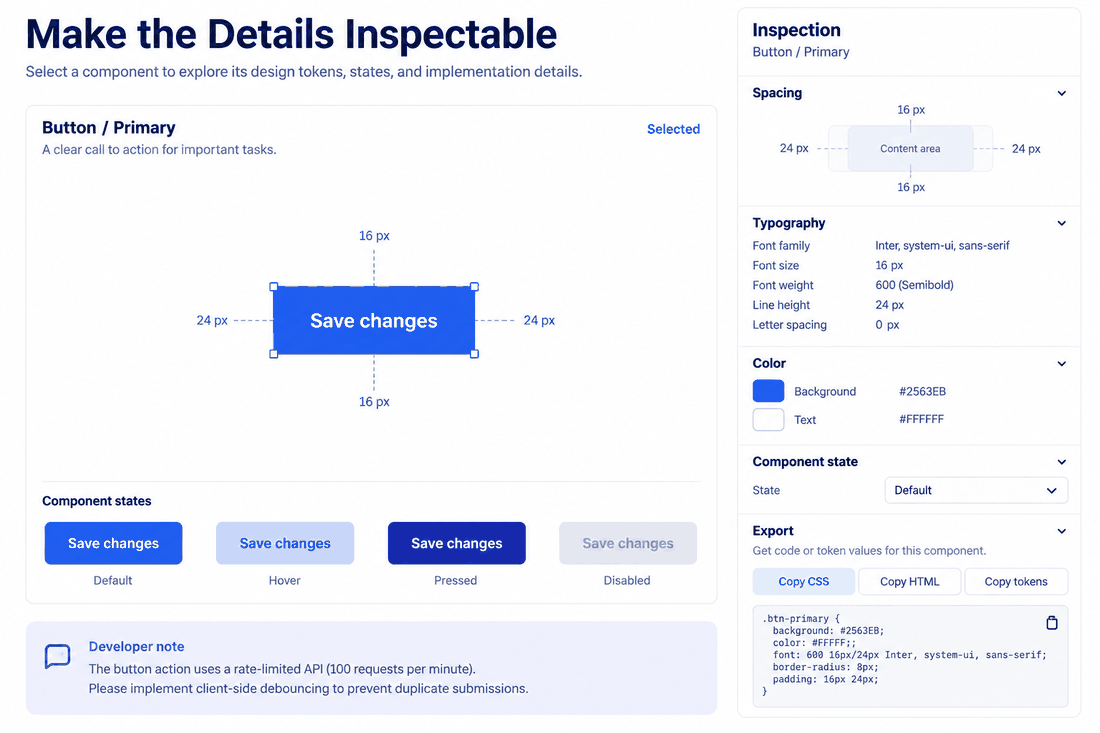
When your team uses Pixso, you stop relying on humans to write out physical specification documents. Automated redlining takes over. The second an engineer clicks on an element within Dev Mode, the right-hand panel spits out the exact measurements, padding details, margin variables, and typography rules. It eliminates the human error of eyeballing a layout.
But raw numbers are only one piece of the puzzle. Complete interaction logic is what actually makes an interface usable. Instead of writing a three-paragraph Jira ticket explaining how a dropdown menu should slide onto the screen, creatives can use Pixso’s native prototyping features. They can map out hover states, active states, loading spinners, and error alerts directly on the canvas. The developer can literally click through the prototype and inspect the exact timing curves of the animation.
On top of the math and the motion, transparent decision-making is incredibly important. Sometimes a layout looks weird because it has to accommodate a messy backend database constraint. Pixso allows your team to leave contextual comments pinned directly to specific UI components. A designer can leave a note saying, "We kept this table width fixed because the legacy API doesn't support pagination yet." The developer reads that note exactly where they are writing the code. They instantly understand the intent, and a twenty-minute Slack debate is completely avoided.
Part 4: System support: componentization is your best friend
A workflow might survive a few small feature updates using scattered, isolated screens. But as your product scales, maintaining visual consistency across thousands of pages becomes a nightmare. If you want a D2C strategy that actually scales, you cannot rely on drawing fresh rectangles every time you need a submit button. The foundation of an efficient pipeline is a ruthlessly maintained system centered entirely around componentization.
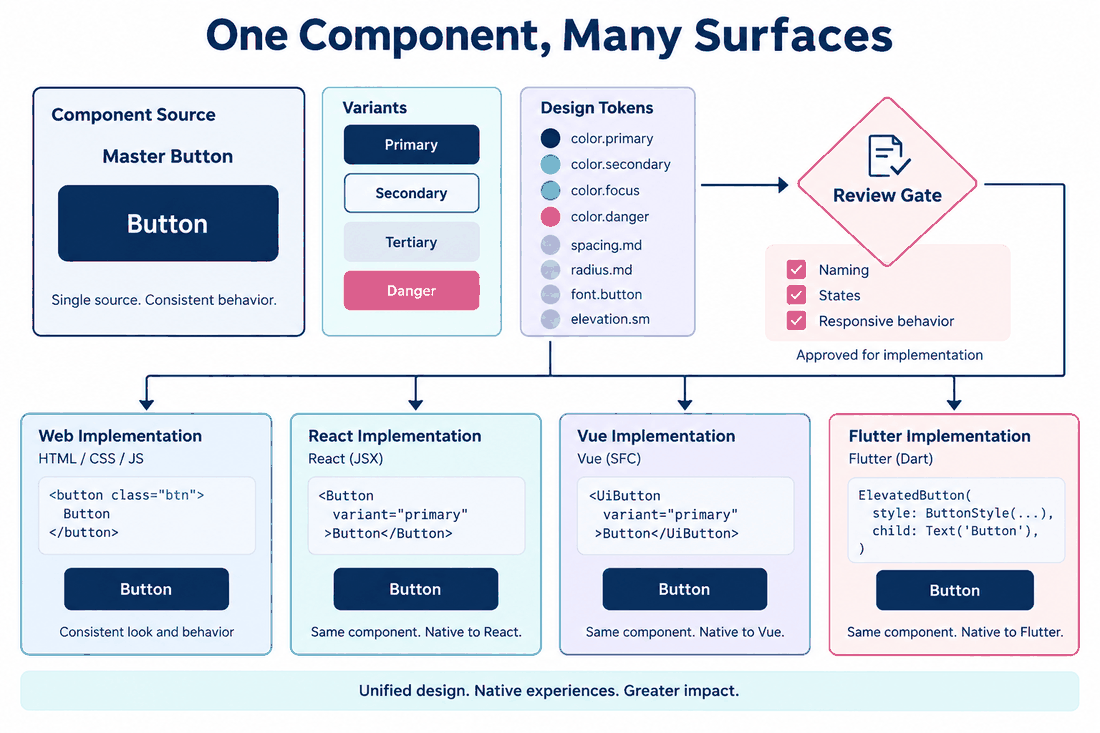
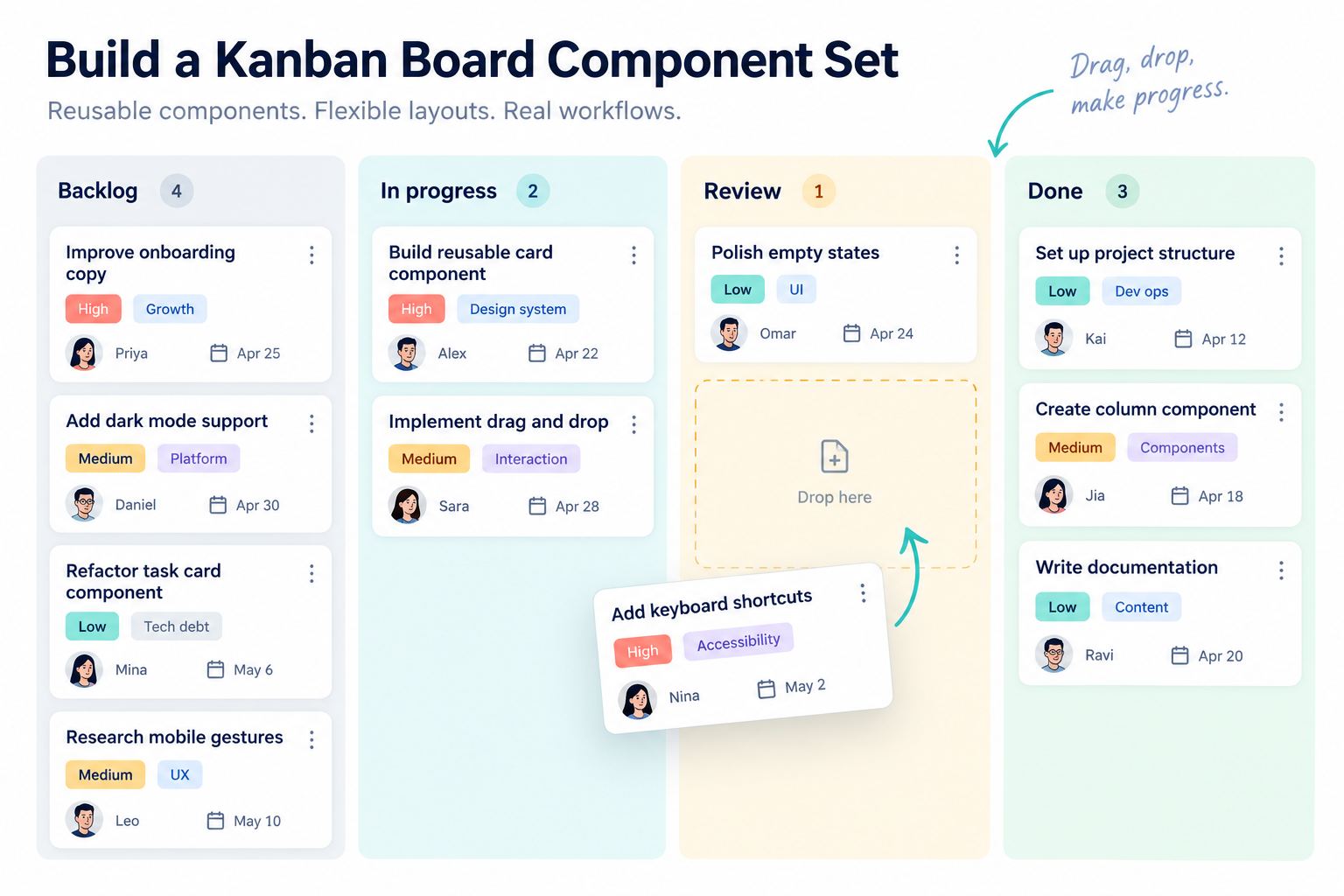
Pixso happens to be exceptionally good at helping teams build and govern these systems. Rather than reinventing the wheel, a user interface expert creates a master component in Pixso that holds all the possible variants—primary, secondary, outlined, disabled, and hovered. When the time comes for the actual design handoff, the person building the front-end isn't looking at a random vector shape. They are inspecting a clearly named component that deliberately matches a reusable element sitting inside their React, Vue, or Flutter codebase.
This one-to-one mapping between creative assets and code repositories is the absolute holy grail of cross-functional collaboration. It acts as a safety net, guaranteeing multi-platform adaptation and ensuring that your iOS app feels visually identical to your web platform. When the marketing department decides to rebrand and updates the primary corporate color, nobody panics. You simply update the core token inside Pixso. That single change ripples across thousands of artboards instantly, and the engineering squad simply pulls the newly updated token values into their stylesheet. Your agile team can scale their output without drowning in an ocean of design debt.
Part 5: Execution guarantee: standardizing the messy human stuff
Here is the harsh reality: you can buy the best software in the world, but if your team has bad habits, your sprint is still going to fail. Tools facilitate the work, but human agreements are what actually govern it. To ensure your new pipeline is realistic and actionable, you have to sit down and establish a standardized workflow.
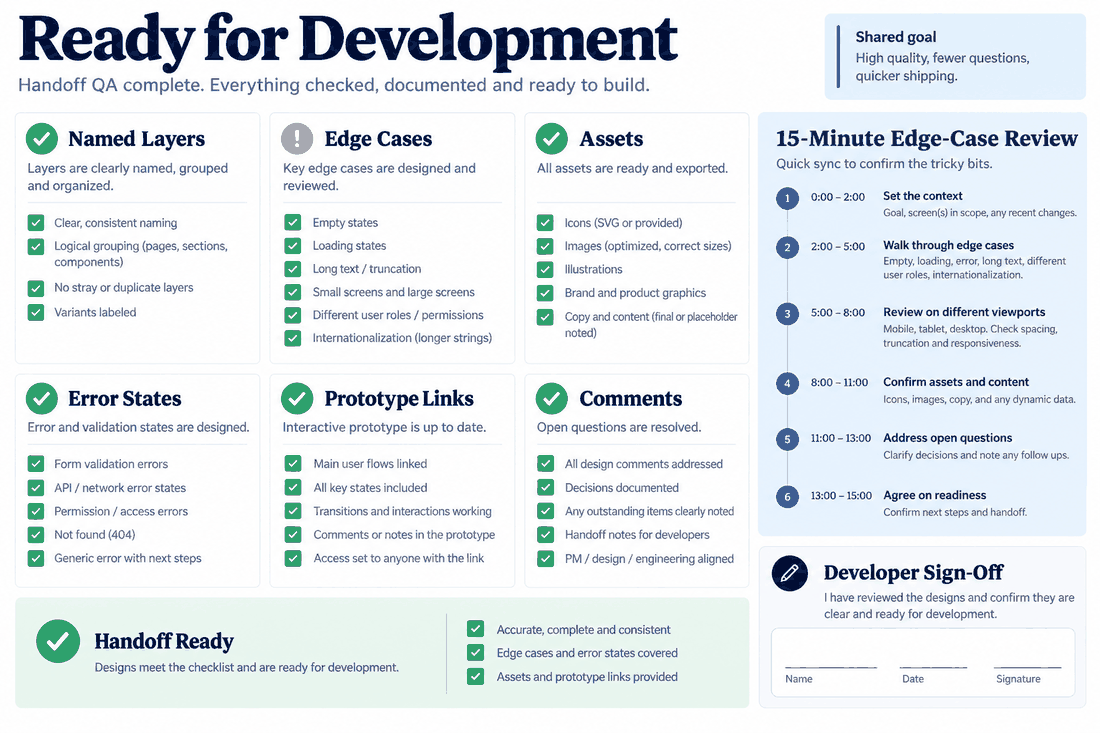
First, you need a mandatory pre-delivery hygiene routine. Before any link is ever handed over to engineering, the creative side needs to clean house. Nobody wants to open a file and see fifty hidden layers named "Rectangle copy 4 final." Teams must properly name their frames, group their icons correctly, and set up clear boundaries on the canvas. Have a dedicated page for "Explorations" and a completely separate, locked-down page called "Ready for Dev."
Next, change how you handle the actual design handoff sync. Stop booking hour-long meetings where someone just reads a screen out loud. Keep it to a heavily focused 15-minute conversation between the lead creative and the lead engineer. Use this time exclusively to hunt for edge cases. What happens when a user's name is sixty characters long? What does this screen look like in German when the text expands by thirty percent? What does the empty state look like when a brand new user logs in? Finding and solving these weird edge cases before anyone touches a code editor saves days of frustration later on.
Finally, write out a literal quality self-check checklist for both sides of the aisle. The creative folks should verify that all their exportable assets (like SVGs for icons or WebP files for hero images) are properly marked in Pixso, allowing developers to batch-download them with a single click. Meanwhile, the developers should verify that they have checked the prototype flow for missing error states before they start building. Turning these behaviors into an unskippable checklist ensures the delivery process stays incredibly tight, no matter how chaotic the current sprint gets.
Part 6: Measuring the real-world efficiency and long-term ROI
Changing the way your entire product department operates takes time. There is an upfront cost in training people to stop using old methods and start trusting a unified system. But the long-term return on investment is frankly undeniable. The most immediate and obvious benefit your organization will see is a massive reduction in the length of your development cycles.
When engineers don’t have to pause their music every forty-five minutes to ask for a missing asset or demand clarification on how a card component behaves, they write better code, and they write it significantly faster. The absolute precision of having automated specifications right inside Pixso heavily reduces your quality assurance testing time. You are no longer spending the Thursday afternoon before a major launch arguing in a bug ticket over whether a border stroke is two pixels wide or three pixels wide. The source of truth is established, and everyone respects it.
Beyond just avoiding arguments, this level of D2C efficiency unlocks a massive amount of hidden capacity inside your engineering department. By drastically reducing the need for UI rework, you are freeing up highly expensive developer hours. Those hours don't just disappear; they get reallocated to the hard stuff. Your team can finally focus on optimizing backend database queries, squashing long-standing technical debt, or building out that complex machine learning feature the executives keep asking for.
At the end of the day, succeeding in the software industry comes down to velocity and quality. The ability to take a rough product concept, turn it into a high-fidelity interface, and push it to production rapidly without breaking things is not just an operational metric. It is a massive competitive advantage.
Conclusion
Nailing the design to code transition is the ultimate cheat code for speeding up your product development lifecycle. When you tear down the artificial walls separating your creative thinkers from your technical builders, you empower your agile team to focus entirely on shipping exceptional user experiences. By leaning hard into a centralized platform like Pixso, maintaining strict component systems, and refusing to compromise on your internal delivery checklists, you can turn a traditionally chaotic bottleneck into a well-oiled machine. Genuine cross-functional collaboration isn't a myth. It is entirely possible, and it starts the moment you decide to treat your delivery pipeline as one continuous, unbroken ecosystem.