Scott
The integration of artificial intelligence into product development is no longer a futuristic concept; it is happening right now on our canvases. As teams scramble to automate tedious tasks and generate layouts faster, deciding between the heavy hitters becomes absolutely critical. The debate usually comes down to Figma AI and its massive community ecosystem versus Pixso AI and its highly integrated developer handoff pipeline. Choosing the wrong platform can trap your entire team in expensive subscriptions or clunky, disjointed workflows. In this complete breakdown, we will examine both platforms closely to help you figure out which one actually aligns with your budget, your technical stack, and your long-term production goals without the usual marketing fluff.
Part 1: The core goal of choosing the right assistant
Every product manager, technical lead, and creative director is facing the exact same headache right now. They are all trying to figure out how to maximize AI design efficiency without breaking the bank or completely disrupting their existing team workflows. The objective here is not just to pick a software tool that generates pretty vector pictures based on a text prompt. If that is all you need, a basic image generator would do the trick.
Your core goal must be selecting a robust platform that perfectly matches your team's specific technical stack, collaboration model, enterprise budget, and security compliance requirements. Blindly jumping on a hype train just because a tool is popular often leads to fragmented processes where visual elements look great in a mockup but completely fail to translate into actual, functional code. To realize true long-term value, you have to look way beyond the flashy landing pages. You have to evaluate how these ai design tools handle the gritty, everyday realities of product production, cost management, and design system alignment across different departments.
Part 2: Why Pixso AI leads in R&D collaboration and code export
Before we get into the side-by-side comparison, it is essential to understand why so many modern product teams are actively migrating their operations to Pixso. While some legacy platforms still treat developer handoffs as an annoying afterthought, Pixso is engineered from the ground up specifically to close the gap between visual ideation and frontend execution. If your team highly prioritizes seamless R&D collaboration, accurate code export, and secure localized deployment, Pixso AI is incredibly hard to beat.
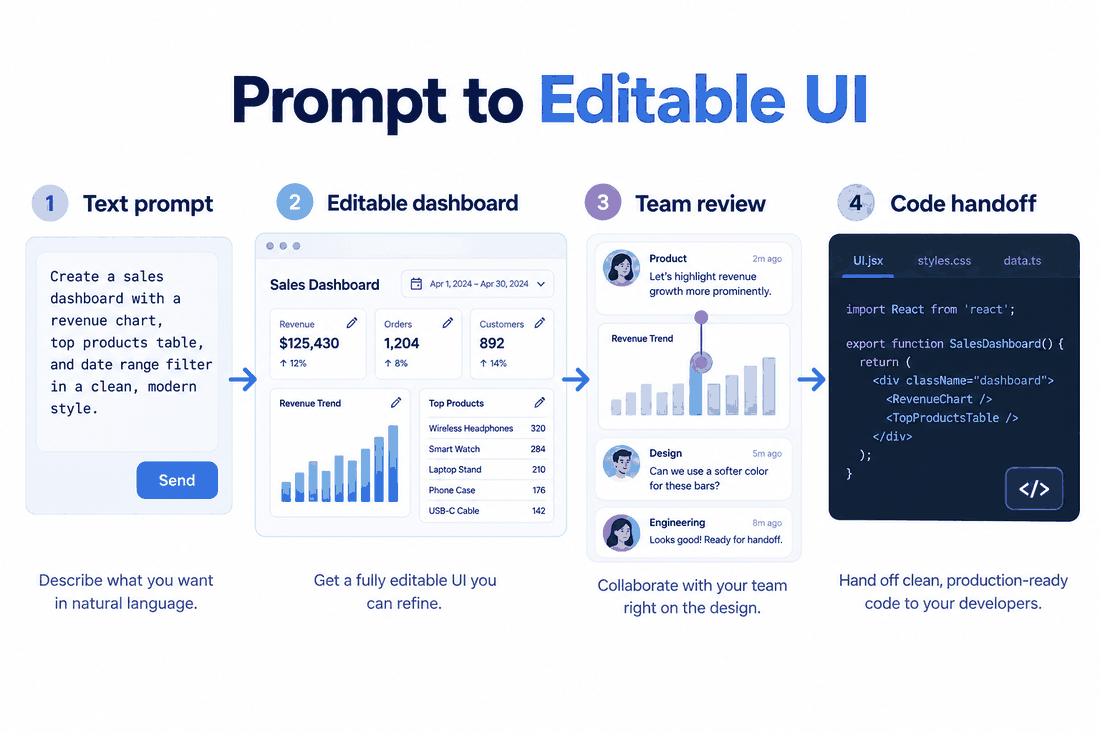
Let us look at a very practical, everyday workflow to see how this platform actually solves daily production bottlenecks. Imagine you are tasked with generating a complex data dashboard for a new SaaS product.
Step 1: Open your Pixso workspace and trigger the smart assistant from the top toolbar.
Step 2: Instead of typing a vague, unhelpful prompt, you utilize the structured layout generator. You can specify exact technical constraints, asking the system to build a responsive user profile widget while strictly using your company's existing design system tokens and color variables.
Step 3: Once the layout populates on the canvas, you do not just get a flat, useless static file. The generated elements are automatically and intelligently structured using native auto layout principles, meaning the padding, margins, and flex behaviors are already mathematically correct.
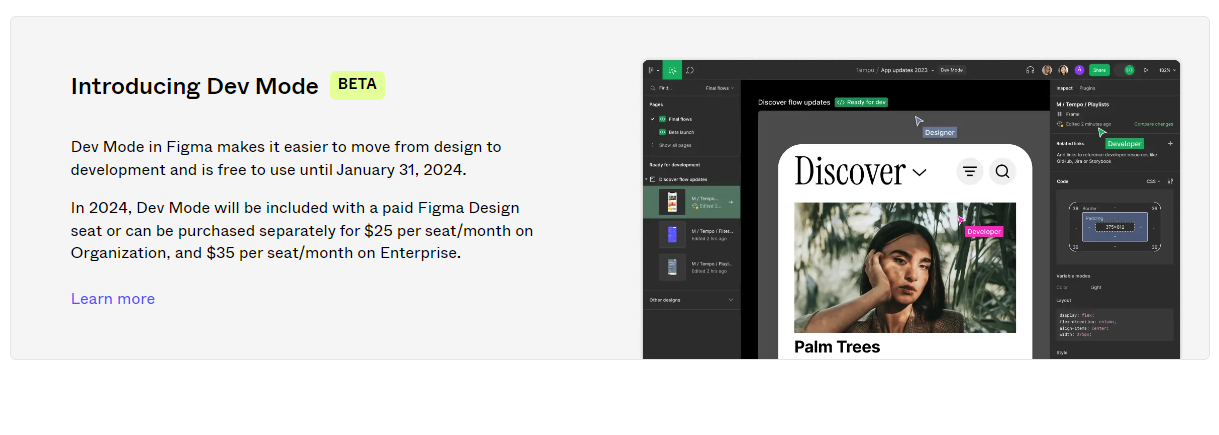
Step 4: This is where the real magic happens for the engineering team. You switch the interface over to Dev Mode. Because Pixso natively links its generated visual outputs directly to code structures, a frontend developer can click on that new dashboard and instantly extract clean, production-ready React or Vue snippets. They get the exact CSS variables and structural logic instantly. It bridges the entire gap from a raw text prompt to a fully functional frontend component, completely eliminating the manual pixel-pushing that usually slows down sprints.
Part 3: Feature priority: creative exploration vs. technical execution
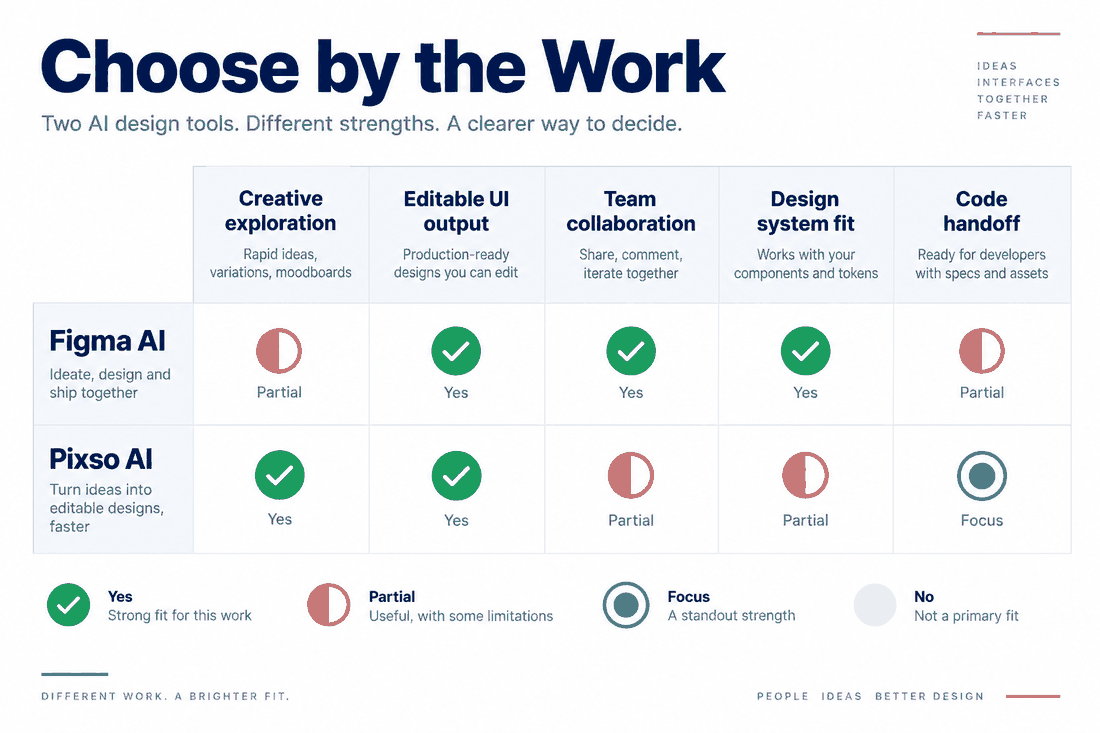
When comparing Figma AI to its top-tier alternatives, you have to take a hard, honest look at your team's daily functional priorities. If your primary focus is purely on rapid creative exploration and your team relies heavily on a massive ecosystem of third-party plugins to get your daily work done, Figma AI is a fantastic choice. It absolutely excels at broad, conceptual layout generation. Because it has such deep integrations with community-built resources, it allows for virtually endless stylistic experimentation and brainstorming. If you are an agency pumping out wildly different visual concepts for different clients every week, that ecosystem is highly valuable.
However, if your daily priority shifts away from abstract brainstorming and moves toward practical, rigid product development, you need a very different kind of engine. For teams deeply invested in tight R&D collaboration and highly accurate code extraction, Pixso AI naturally takes the lead. It focuses a lot less on abstract art generation and significantly more on generating usable, modular, logic-based UI components that software developers can actually ingest without rewriting everything from scratch. The robust localized capabilities of Pixso also mean it adapts significantly better to specific regional workflows, making it the much more pragmatic choice for strict, fast-paced production environments where code accuracy matters more than artistic flair.
Part 4: The cost factor: budgeting for your AI strategy
Budget is usually the silent dealbreaker in any major software negotiation, even if nobody wants to admit it. You have to look at the total cost of ownership over a few years, not just the initial monthly sticker price. Figma AI is undeniably powerful and slick, but its free tier is notoriously limited when it comes to truly advanced generation features. Once you inevitably hit those usage limits, upgrading to the enterprise licensing and maintaining the long-term ecosystem investments can quickly become a massive financial burden. For smaller agencies or bootstrapped startups, those recurring per-seat licenses eat into the runway fast.
On the flip side of that coin, cost management is a major competitive advantage for Pixso. It intentionally offers a very generous free tier, allowing users to run extensive prompts and workflow tests before they ever have to pull out a corporate credit card. Because it is a unified, all-in-one tool that handles everything from initial whiteboarding to native code extraction, your overall software maintenance cost is drastically lower. You are not paying for five different subscriptions. For startup teams or independent studios looking to aggressively test the waters of automated layout generation without risking their entire operating budget, prioritizing Pixso AI is simply the smartest financial move you can make.
Part 5: Compliance, deployment, and seamless migration
Enterprise teams cannot just adopt new software because it looks cool on Twitter; they have to clear rigorous, months-long IT and security audits. Figma AI benefits heavily from a very mature, globally recognized compliance structure. If your massive global enterprise is already heavily entrenched in that specific ecosystem and you have thousands of files sitting on their servers, the zero migration cost makes turning on their newly released artificial intelligence features a relatively frictionless process for your IT department.
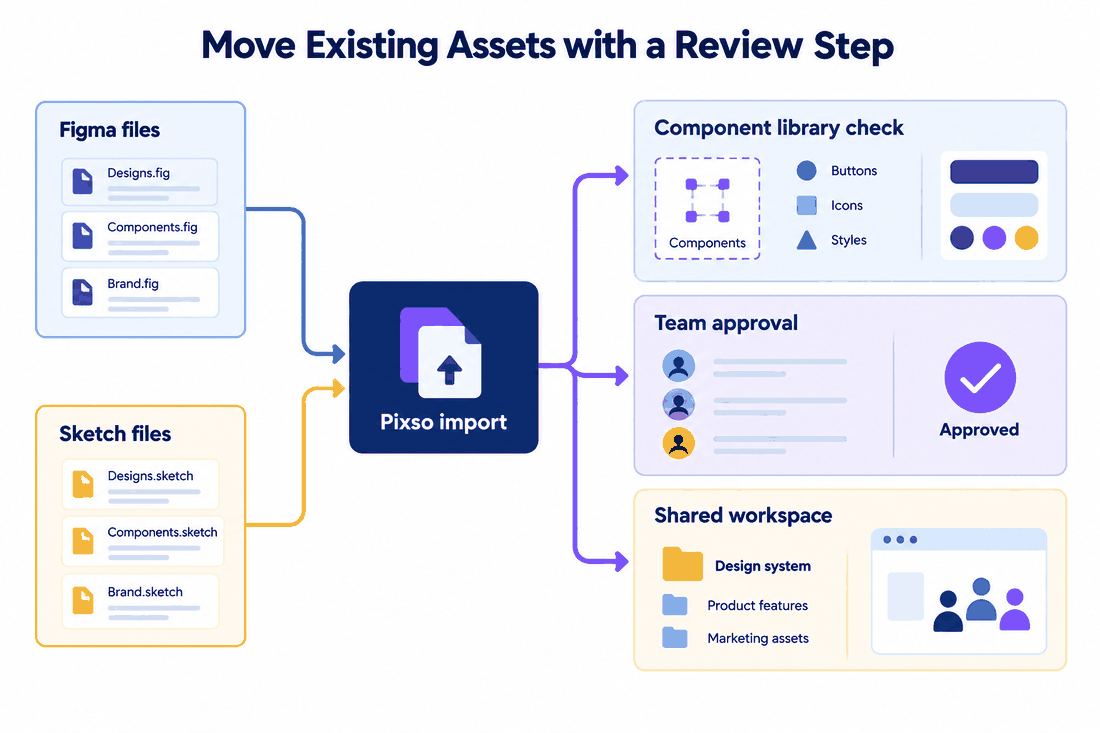
But what happens if your company requires much stricter data control? This is exactly where Pixso shines. It actively supports localized deployment options. For companies handling highly sensitive financial user data, healthcare records, or operating under strict national data security laws, being able to host your collaborative design environment entirely on your own local servers is a strict, non-negotiable requirement. Furthermore, if you are worried about the nightmare of vendor lock-in, Pixso offers incredibly high cross-tool file compatibility. You can easily import your existing legacy files directly into Pixso without losing your complex layer structures, naming conventions, or nested component states. This makes the daunting migration process surprisingly smooth for enterprise teams looking to finally switch over to a more secure system.
Part 6: Long-term value and implementation advice
At the end of the day, maximizing the long-term value of your software stack depends entirely on your specific organizational structure and goals. Figma AI will likely always win on the sheer breadth of its community ecosystem. It is a sprawling network of creative potential that is hard to match if you rely on community files. But Pixso AI secures its long-term value by offering a much tighter, significantly more efficient design to code closed loop. Its deep, native integration with company design systems makes it uniquely suited for scaling teams that care a lot more about long-term cost reduction and efficient engineering handoffs than they do about community plugins.
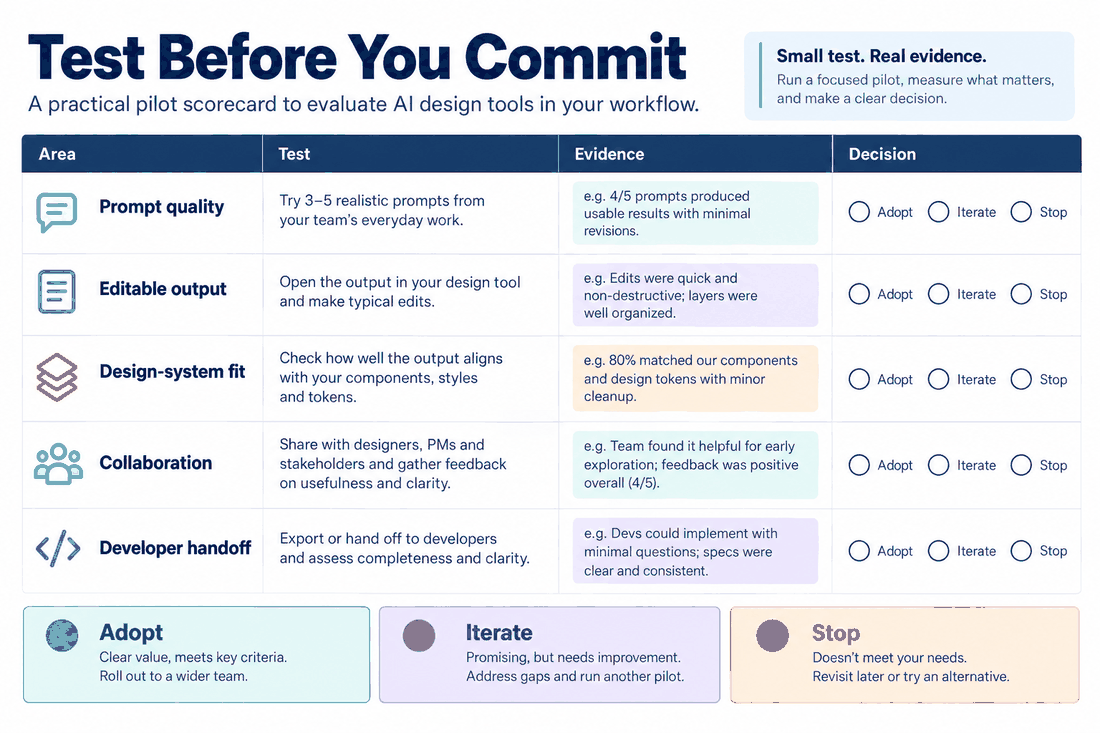
My genuine advice for software implementation is straightforward: do not make a blind selection based on a slick marketing video or a trendy blog post. You need to start by actually utilizing the free tiers of both platforms. Have your team run a real-world stress test on your core daily scenarios. Ask one of your designers to use ai design prompts to align a newly generated component with your strict existing design system. Then, ask your lead developer to evaluate the exported code from that exact component. Measure the actual return on investment based on those practical tests. Avoid the hype and pick the ai design tools that actually save your team the most time.
Conclusion
Navigating the rapidly evolving landscape of artificial intelligence in product creation requires a healthy dose of pragmatism. While both platforms offer exceptional features, your final choice ultimately comes down to your organizational priorities. If your agency needs boundless creative exploration backed by a massive community ecosystem, Figma AI remains an absolute industry heavyweight. However, if your ultimate goal is to build a highly efficient, budget-friendly pipeline that connects visual mockups directly to frontend code seamlessly, Pixso AI emerges as the clear winner. By carefully assessing your specific budget, compliance needs, and daily developer workflows, you can confidently adopt the right platform to future-proof your product development cycle without adding any unnecessary friction.