Scott
Let me guess. Your product group just crossed the 100-person mark, and suddenly, managing UI assets feels like herding cats. What worked perfectly for a small squad totally breaks down at scale. Buttons are inconsistent. Developers are guessing margin sizes. You do not just have a communication problem; you have a massive scaling problem. Growing a design system across a large department requires way more than just building prettier components. It demands ruthless governance, smart asset control, and infrastructure that actually supports the heavy lifting. If you want to stop the daily chaos and get everyone pulling in the exact same direction, you have to change how you operate. Here is how you actually make that happen.
Scale the operating model before the library
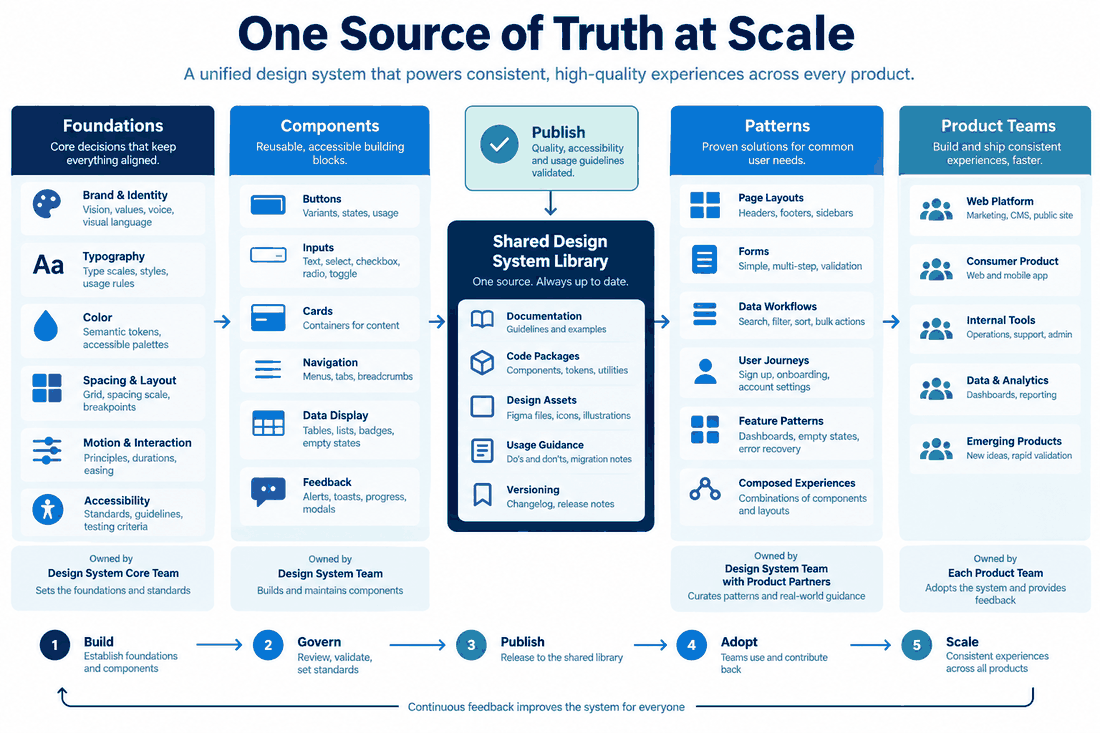
Large teams usually struggle with ownership and decision latency before they run out of components. Make contribution paths visible, define which group approves foundations, and publish a release note when a shared component changes. Track adoption and exceptions without treating every local need as a failure. A design system scales when teams know how to reuse, request, adapt, and retire assets without creating hidden forks.
- Ownership: name maintainers and escalation paths.
- Contribution: make requests reproducible with context and evidence.
- Release: version changes and explain migration impact.
- Adoption: review real product usage instead of counting published components.
Part 1. The enterprise infrastructure trap (and the Pixso advantage)
Before we even start arguing about naming conventions or button padding, we have to talk about your tech stack. Most teams start out using whatever lightweight cloud app is trendy at the moment. That is fine when you have five people. But when you throw a hundred active editors into a shared environment, those consumer-grade apps start to crumble. We are talking about severe lag spikes, infinite loading screens, and version histories that get so tangled you end up losing a week of work.
If you are building an enterprise design system, your underlying infrastructure needs to handle serious weight without breaking a sweat. I always point scaling teams toward Pixso for exactly this reason. It is genuinely built for heavy-duty, large-scale deployment. What really sets Pixso apart from standard team collaboration tools is how it treats non-negotiable enterprise requirements.
Let's say you work in a highly regulated industry like finance, banking, or healthcare. Determine whether your data, contracts, jurisdiction, and security requirements permit the proposed cloud deployment. Involve your compliance and security teams in that decision. With Pixso, you get real private deployment options. You can host it entirely on-premise or in your own secure cloud environment. You lock down your data sovereignty from day one, but your team still gets that snappy, real-time multiplayer editing experience they expect.
Beyond just hosting, it hooks directly into your existing corporate identity management and CI/CD pipelines. Evaluate the deployment’s controls and automation alongside the design workflows your team needs. Test performance with representative files, libraries, and concurrent users before expanding deployment.
Part 2. Governance first to fix the wild west
Okay, so assuming your software is not crashing, the next biggest threat to a massive team is absolute anarchy. When a hundred people have unrestricted edit access to your core libraries, things go off the rails incredibly fast. Someone decides to tweak a global navigation component for their specific edge case, and suddenly fifty other live screens break across the company.
You cannot run a massive group like a free-for-all public sandbox. You have to build a layered governance architecture. Think of it like running a city. You need a dedicated core team, the maintainers. These folks act as the ultimate gatekeepers for the design system. Their only job is ensuring the foundation stays solid. Then, you establish domain leads. These are people embedded in specific product areas who manage specialized patterns. Finally, you have the general contributors.
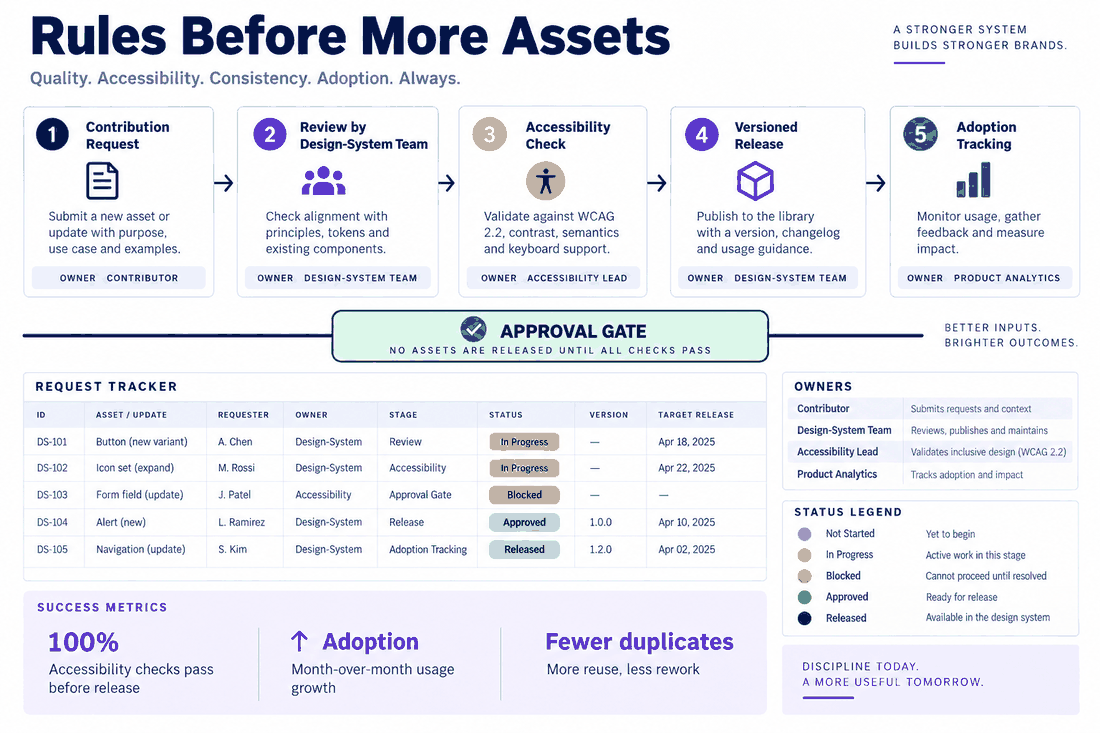
Here is the trick. Every single person on the team should be allowed to propose updates. But there has to be a painfully clear, standardized process for doing so. If a squad invents a totally new data table because the old one did not fit their needs, they cannot just quietly publish it to the master file. There needs to be a documented path to submit that table to the core team for global review.
On top of this human layer, you have to start treating your UI library exactly like actual software. That means enforcing strict semantic versioning. When you push an update to the library, your developers and product managers need to know immediately if it is a major breaking change, a minor feature addition, or just a tiny visual patch. Clear versioning eliminates the fear and friction of hitting the update button.
Part 3. Locking down the single source of truth
All that governance does not mean a thing if people are still pulling hex codes from an outdated company wiki page or, worse, just eyeballing colors from a screenshot. An enterprise design system will completely fall apart without a rigid single source of truth.
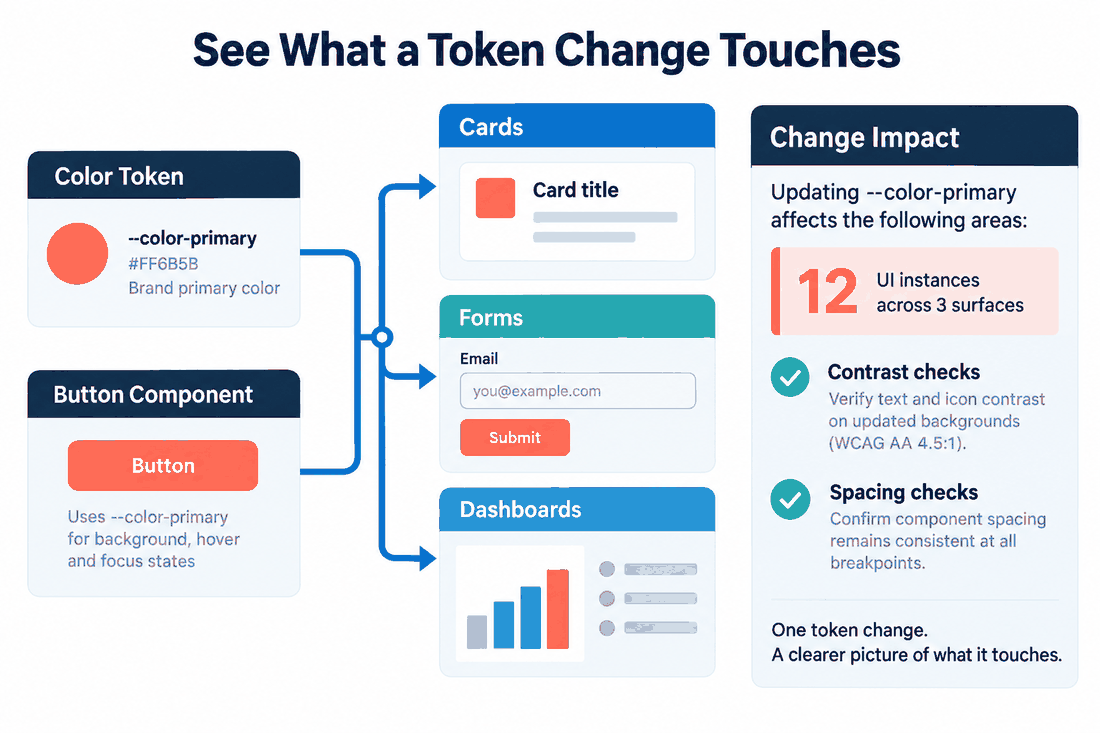
You have to centralize every single asset. I am talking about building a master component library that is deeply tied to a robust, exhaustive set of design tokens. These tokens store the raw, foundational data of your brand—your exact spacing values, typography scales, corner radii, and color palettes. Why does this matter? Because if the marketing VP suddenly decides your primary brand color needs to be a shade darker, you do not want to hunt down 500 individual files. Updating that single token should automatically ripple through every file and code repository in the entire company.
But centralization brings a terrifying new risk. If everything lives in one central place, one careless intern can accidentally ruin the entire company's UI in a single click. That is why you absolutely need granular asset control. By using platforms like Pixso, you can enforce strict, fine-grained permission levels. You lock the master tokens down so tightly that only the core maintainers can actually alter them. Everyone else in the building just gets view and pull access. Combine access controls with reviewable activity logs so maintainers can investigate changes and support the design workflow.
For the product features behind this approach, review Pixso's shared design systems for growing teams before deciding how to structure your libraries and ownership rules.
Part 4. Stripping the friction out of collaboration
So you have your strict rules and your locked-down libraries. Great. But if the actual daily process of using them is a massive headache, your team is going to ignore them. Human beings are inherently lazy. If jumping through your official compliance hoops takes too much time, they will just build a rogue, off-brand component from scratch to hit their Friday sprint deadline.
This is exactly why your daily workflow has to be completely frictionless. You need design collaboration tools that actually make the job faster, not harder. Real-time syncing and multiplayer editing are obvious must-haves, but you really need to think about how new hires experience your setup. In a 100-person department, someone is always onboarding. They do not have three weeks to decipher your complex folder structures.
A highly functional setup leans heavily on reusable templates and lightning-fast asset searching. A brand new designer should be able to open up their team collaboration tools, spin up a pre-approved page layout, and drag in officially verified components within their very first hour on the job. Make the approved workflow easy to follow, then monitor adoption and address exceptions. You do not have to police people when the tools do the heavy lifting for them.
Part 5. Bridging the canvas to code divide
Here is the graveyard where most scaling efforts go to die: the developer handoff. You can have the most visually stunning, perfectly organized design system on the planet. But if the engineering department cannot easily translate those pixels into code, the whole thing is basically an expensive art project. At this scale, tossing static PDFs or messy redlines over the fence to the dev team is a recipe for absolute disaster and endless bug tickets.
You have to physically connect your design collaboration tools to your development environments. The days of front-end engineers manually typing out CSS variables by looking at a mockup are over. You need to establish a workflow where your design tokens are automatically exported as JSON, XML, or CSS variables directly into the dev team's GitHub repository.
When you automate this translation, you effectively eliminate the delivery gap. Think about how powerful this is. If a lead designer changes the border radius of a global card component in the master file, that change triggers an automated pull request for the front-end team. This two-way synchronization ensures that the UI sitting on the creative canvas is the exact same UI rendering in the live browser. It forces total alignment between departments that historically love to argue with each other.
Part 6. Driving real adoption and the feedback loop
Building the machine is really only half the battle. Now you actually have to convince a hundred stubborn people to use it. You cannot just blast out a company-wide email with a link to a new library and expect absolute adoption overnight. You have to sell it internally.
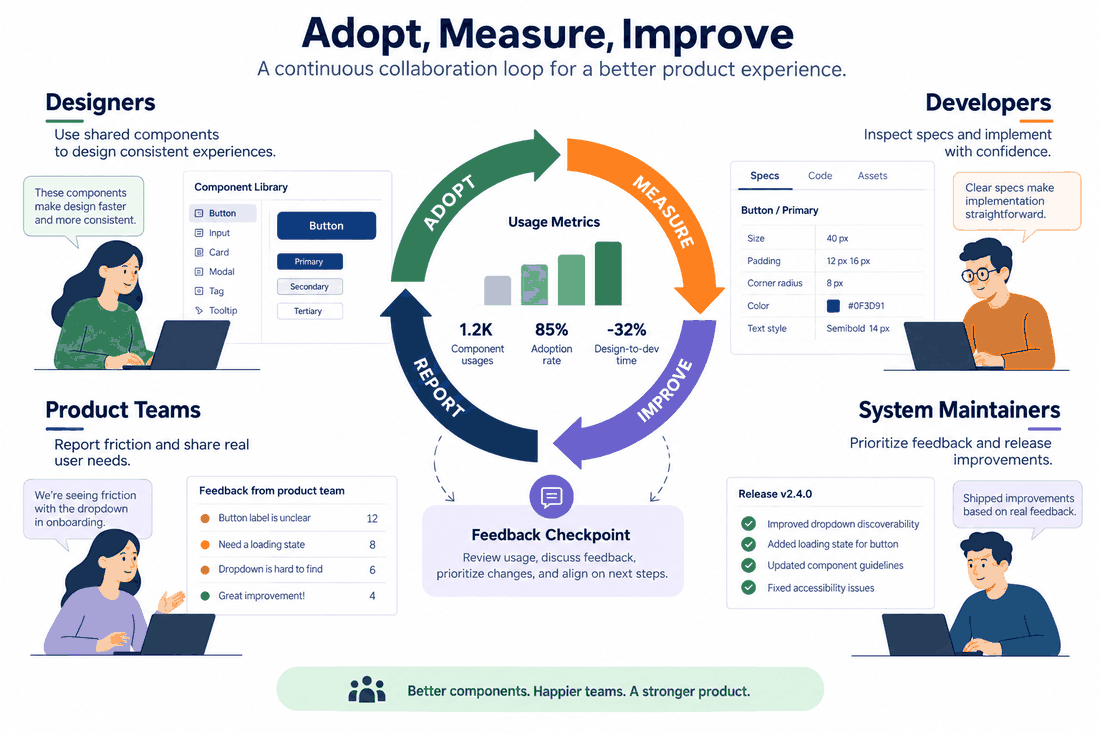
Start by finding the loud, influential people in the different product squads. Turn them into your evangelists. Sit down with them and show them exactly how many hours of repetitive, boring work this new system is going to save them every week. Once they buy in, they will naturally pressure their specific teams to adopt the new standard. And when a squad successfully migrates a messy legacy product over to the new, clean framework, make a huge deal out of it. Celebrate those wins loudly.
Most importantly, do not treat the system as a finished, untouchable product. It has to evolve based on real user pain points. If people keep complaining that a certain form field pattern is way too restrictive for their specific data needs, listen to them. Utilize the commenting features inside your team collaboration tools to gather constant, informal feedback. When your team sees that you are actively updating and fixing the platform based on their actual daily needs, they will stop fighting the design collaboration tools. They will switch from seeing the workflow as a set of handcuffs to seeing it as a foundation they want to contribute to.
Conclusion
Scaling up is rarely a painless process. Transitioning from a loose group of creatives to a structured, 100-person production machine requires a massive shift in mindset. You have to stop thinking like individual artists and start operating like strict systems engineers. By setting up layered governance, fiercely protecting your single source of truth, and completely automating the handoff to your developers, you create a foundation that actually scales. Combine that necessary culture shift with powerful, enterprise-ready infrastructure like Pixso, and those growing pains start to fade. Building an enterprise design system takes work, but you finally get everyone moving fast, staying perfectly on brand, and actually enjoying the process of building massive products together.