Scott
Every designer knows the drill. You sketch a beautiful layout, realize you don't have the actual content yet, and drop in some classic lorem ipsum just to see how the typography balances. But relying on dummy text is a massive trap. It creates a brutal disconnect between how a page looks and how it actually communicates with users. Instead of keeping a tab open for an outdated lorem ipsum generator, top product teams are shifting toward native tools that write real words as they design. We are going to look at how platforms like Pixso use an integrated AI text generator to pull authentic text directly onto the canvas, saving you from broken layouts.
Part 1: The actual cost of faking your content
Let's be honest about how most product teams handle text during early-stage wireframing. We treat it as someone else's problem. You draw the containers, realize marketing hasn't finalized the brand messaging, and fall back on the exact same Latin placeholder the print industry has used for decades.
The immediate issue is that real languages simply don't behave like lorem ipsum. When you use dummy text, you are essentially lying to yourself and your clients about how the interface works in reality. A perfectly balanced call-to-action button that looks stunning with a two-word Latin phrase will almost certainly break, wrap onto a second line, or bleed right out of its container when the actual "Subscribe to our newsletter" copy drops in a month later. This usually happens at the absolute worst possible time, typically right before developer handoff. You end up burning late-night hours tweaking padding, adjusting margins, and resizing UI cards just to accommodate the real words that should have dictated the layout from day one.
Beyond the mechanical headaches, placeholder text completely derails stakeholder presentations. UI design is about guiding a user through a deliberate journey. If that journey is paved with incomprehensible text, you cannot run a proper usability test. Users can't tell you if a pricing tier is confusing if the features are written in a dead language. To build products that actually convert, you need real context.
Part 2: Bringing the words inside the canvas with Pixso
So, what is the practical alternative here? Waiting three weeks for a copywriter to hand over a final document before you even start moving pixels around? Nobody working in an agile environment has time for that.
While you might be used to constantly jumping between your main design file, a browser tab for a random lorem ipsum generator, and a messaging app, there is a much smoother way to work. If you haven't integrated it into your workflow yet, Pixso is a collaborative design tool that rivals the usual industry heavyweights, but it handles content generation entirely differently. It treats text as a core structural element. Instead of forcing you to hunt down an external AI text generator, Pixso builds the intelligence right into the interface you are already using.
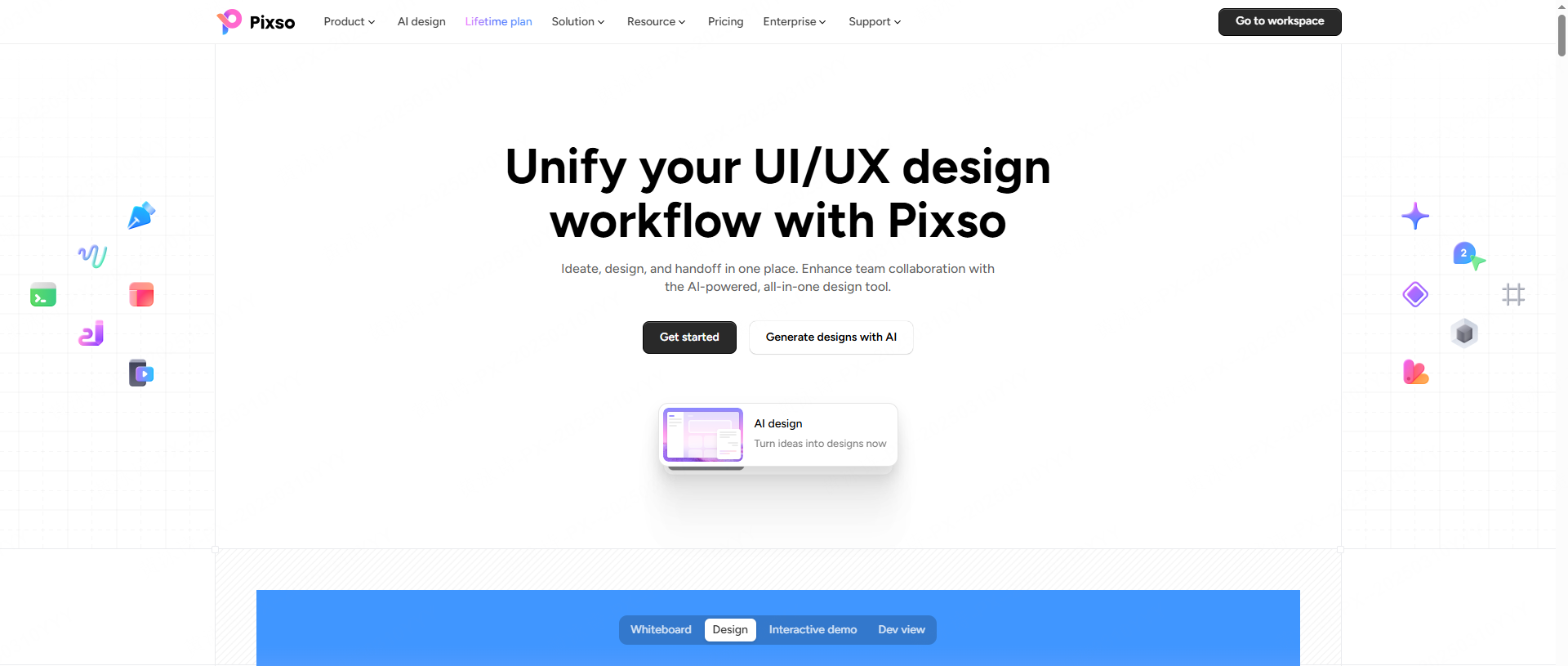
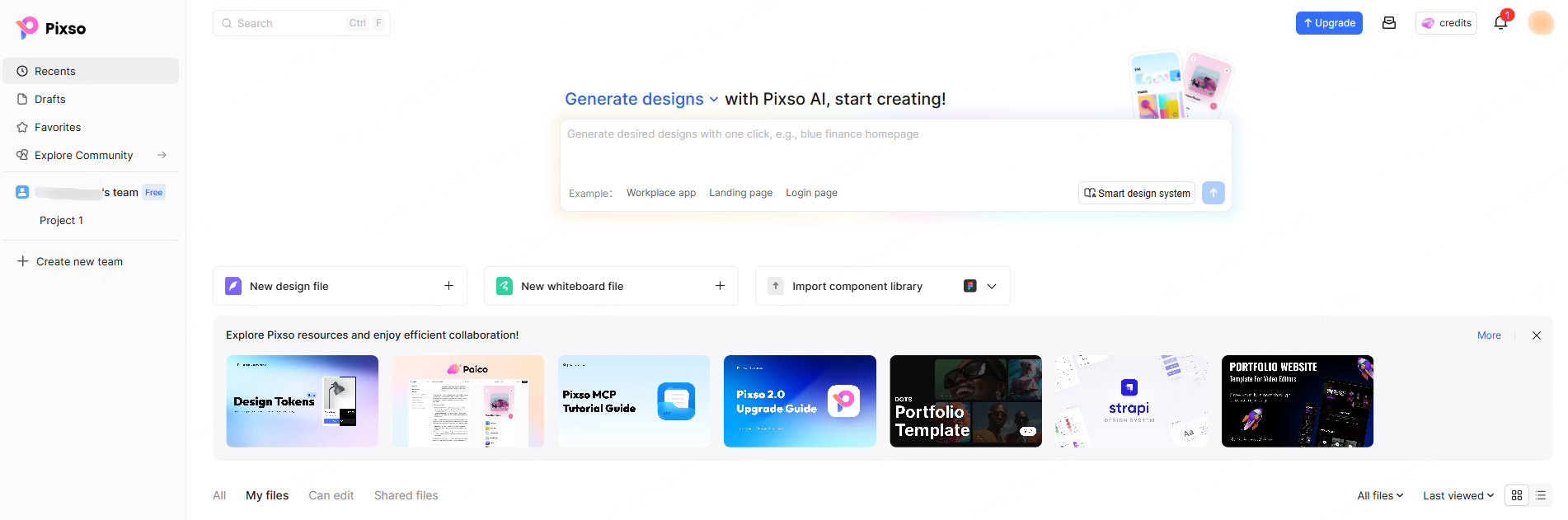
From the second you open a new file, the platform pushes you to build with context. You will spot a prompt bar asking you to "Generate designs with Pixso AI." You don't even have to start from a blank screen. If you type a prompt like "blue finance homepage," the system doesn't just spit out empty gray wireframes. It generates a structurally logical layout already populated with relevant, industry-specific text. This feature alone eliminates hours of tedious setup. By weaving an AI text generator directly into your workflow, Pixso ensures you are evaluating the relationship between typography, spacing, and messaging all at exactly the same time.
Part 3: The step-by-step guide to smart text on your canvas
How does this actually play out when you are deep in the weeds of a project? Let's say you have a rough draft going, but it is currently littered with placeholder text because you were rushing to get the initial layout approved. Fixing this in Pixso is incredibly straightforward, and you never have to break your creative focus.
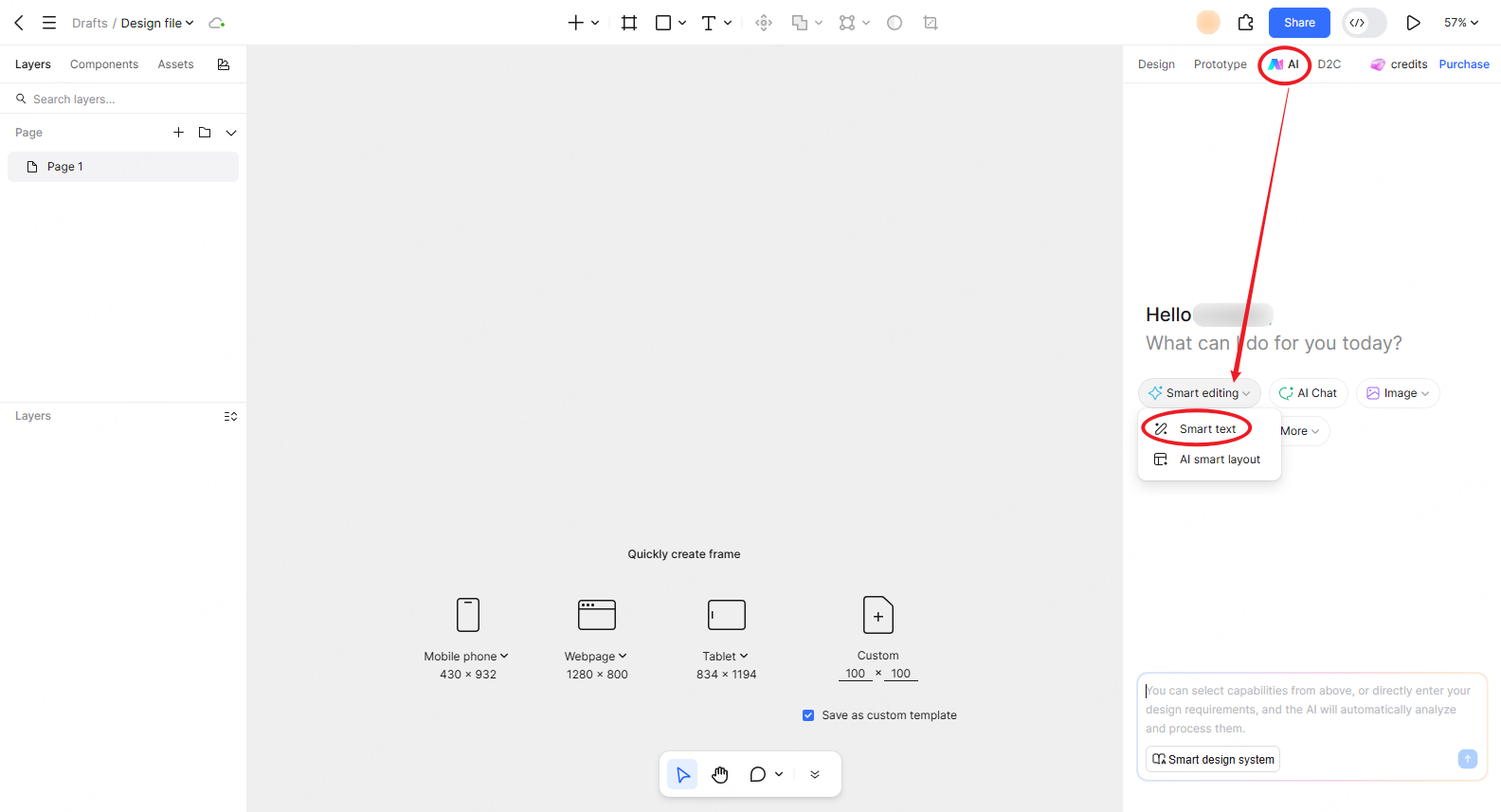
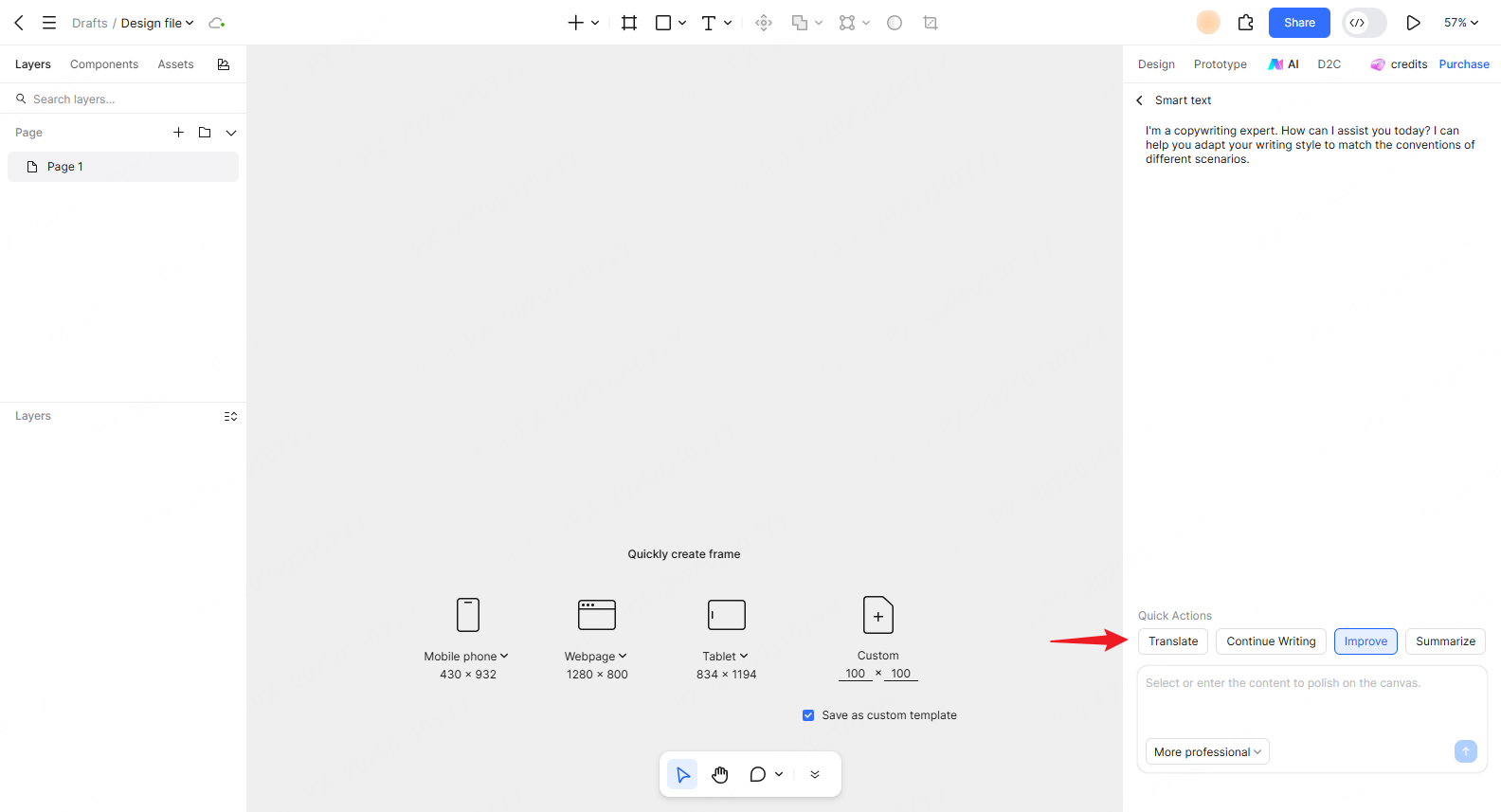
Look up at the top navigation bar of your workspace, right next to your standard Design and Prototype tabs. You will see a dedicated AI tab. Click that, and an assistant sidebar slides smoothly into view. From here, you want to click on the "Smart editing" dropdown menu.
This is where the heavy lifting happens. Under this menu, select the smart text tool. You have essentially just activated a built-in UI copywriting expert. The interface gives you a clean input area where you can type a rough idea, or you can just select any existing text layer on your canvas to modify. Let's say you have a boring placeholder headline that just says "Good App." Select it, and look at the quick actions below the input field: Translate, Continue Writing, Improve, and Summarize.
Hit "Improve." Within a couple of seconds, the engine analyzes your layout and suggests something punchy like "Streamline Your Workflow in One Click." Need a three-paragraph product description but you only have half a sentence in your head? Use the "Continue Writing" feature, and the AI will effortlessly expand your thought to fill the required space perfectly. This is a brilliant application of smart editing principles. You edit the visual layout and the narrative simultaneously without ever leaving the file.
Part 4: Nailing the context and keeping your brand voice alive
One major reason designers hesitate to use random AI tools online is the severe lack of context. Generic chat tools usually sound robotic. They don't know if you are designing a high-end luxury fashion marketplace or a playful educational game for toddlers. The output usually ends up being bland, overly formal, and totally disconnected from the visual vibe of the project. This is another reason people default back to a lorem ipsum generator.
Pixso bypasses this hurdle completely by actively recognizing the environment you are working in. The AI understands the module, the specific page type, and the industry vertical. When you ask it to generate copy for a pricing table in a B2B SaaS dashboard, it gives you crisp, professional business terminology. If you ask it to fill out a 404 error page for a streetwear brand, it gives you something casual and edgy. This level of contextual matching solves the disconnect that lorem ipsum creates.
If your company has a very distinct tone of voice, you can set parameters to replicate it. You can dictate the style, tone, and specific industry jargon so every screen feels perfectly aligned. You can even toggle between American and British English. Need to make sure "localization" is spelled with an "s" for a London-based client? The smart text system handles it instantly. This level of control makes your UI copywriting incredibly consistent across hundreds of artboards.
Part 5: Translating vs. true localization
If you have ever worked on a global product rollout, you already know the absolute headache that is localization. Designing a tight interface in Chinese, for example, and then trying to adapt it for an English-speaking market is brutal. Chinese characters are incredibly dense and convey a lot of meaning in very little space. A button that perfectly fits two Chinese characters might need a heavily abbreviated, awkward-sounding English phrase just to fit inside the exact same pixel dimensions.
Standard translation tools usually make this situation much worse by offering literal, word-for-word translations. You end up with weirdly aggressive or strangely polite button copy that ruins the user experience and breaks the trust of the local audience. It simply sounds wrong to a native speaker.
Because Pixso's features are deeply context-aware, it doesn't just translate; it truly localizes. When moving from Chinese to English, the AI generates phrasing that sounds completely natural to an English-speaking audience while respecting the cultural and compliance norms of that region. It gives you authentic English text that actually fits your design constraints, completely outperforming a generic AI text generator. This goes way beyond what a simple browser translation plugin can do, allowing your team to launch in new international markets much faster.
Part 6: Skipping the blank page with ready-to-use templates
Even with the best tools at your disposal, staring at a blank artboard can kill your momentum. Sometimes you just need a solid starting point to get the gears turning. To make things friendly for beginners and speed things up for senior designers on a tight deadline, Pixso comes packed with a rich library of templates designed specifically for high-frequency scenarios.
Let's say you need to design a complex multi-step checkout flow. Instead of building the whole thing from scratch and using random filler to arbitrarily populate the shipping details, payment methods, and order summaries, you pull directly from the template library. Pixso offers pre-built, structurally sound layouts for things like onboarding carousels, complex settings menus, SaaS pricing tiers, and user profiles.
Because these templates are already populated with highly professional, context-appropriate English text, you hit the ground running. You drop the template into your file, use the smart text tools to slightly tweak the wording to match your specific product offerings, and you are done. This dramatically lowers the barrier to entry for designers who might not be confident in their writing skills, allowing them to produce work that looks and reads like a premium, finished product right out of the gate. Utilizing smart editing tools on pre-built templates saves hours of manual labor.
Part 7: Legal compliance, teamwork, and polishing the final product
Let's talk about the administrative side of things. If you are doing freelance work or working for a large enterprise, you cannot just scrape text from a competitor's website and use it in your mockups. There are massive copyright issues there. Even using a random text generator can sometimes accidentally spit out trademarked slogans or protected phrasing without you realizing it.
Pixso's engine is specifically designed to generate entirely original content that is safe for commercial use. You don't have to worry about GDPR or CCPA compliance issues regarding the placeholder data in your user tables. It creates realistic but entirely fictional names, addresses, and data points, which keeps your legal team and your clients happy.
On top of that, design is inherently a team sport. Pixso allows your entire department to share these AI settings and custom templates. If the lead designer establishes a specific tone of voice and template structure for a project, the junior designers can use those exact same settings. This ensures the workflow remains perfectly consistent, no matter who happens to be opening the file that day.
Finally, because you are working with real words from day one, you can actually test your designs properly. You can use the AI to generate three different versions of a hero headline, duplicate your frame, and run a quick A/B test with your team to see which one flows better. You can ask the AI to optimize your paragraphs for better readability or higher conversion rates before you ever hand the file over to the developers. It takes the guesswork completely out of the equation.
Conclusion
Clinging to dummy text is a habit that actively hurts the quality of your final product. It hides fatal layout flaws, frustrates clients, and strips all the meaning out of your user experience. By shifting to an integrated solution like Pixso, you completely bypass the need for an external lorem ipsum generator. You get to build designs around real, persuasive UI copywriting from the very first click. Embracing these built-in smart editing capabilities means your prototypes will be emotionally engaging, structurally sound, and ready for development instantly. Stop trying to design in a vacuum. Bring real words into your creative process and watch your delivery speed soar.

![[NEW] How to transfer photo styles with an AI photo editor](https://pixso.net/assets/media/ai-image-style-transfer-9fe25f62d2130e50414c-b771b1704762f9a3.webp)