Scott
Every UI professional knows the familiar, sinking feeling of opening a shared folder only to be greeted by a chaotic list of files named "Homepage_Final," "Homepage_Final_v2," and the universally dreaded "Homepage_Absolute_Final_USE_THIS." Managing complex user interface iterations has historically been a messy, unstructured process of duplicating entire artboards, losing track of specific changes, and accidentally overwriting a colleague's hard work. Software engineers solved this exact headache decades ago with tools like Git, but bridging that specific gap for visual workflows has proven notoriously difficult. Today, relying on file duplication is no longer just annoying; it is a massive liability for product teams. In this guide, we will unpack how to abandon those messy file management habits and adopt a streamlined workflow to manage UI iterations securely within your workspace.
Part 1: The True Cost of Unmanaged UI Iterations
Let's be completely honest about how most design teams operate when things get busy. When a solo freelancer works on a small mobile app, duplicating a local file to try out a fresh color palette is perfectly manageable. You save a copy, play around with the hex codes, and if the client hates it, you simply open the old file. But what happens when you drop that exact same workflow into a corporate environment?
Imagine a scenario where five product designers are working on a global e-commerce platform simultaneously. Without proper design version control, absolute chaos ensues within days. Designer A decides to update the global navigation bar while Designer B is actively restructuring the footer on the exact same screen. If they are working in separate duplicated files, merging those concepts later requires someone to manually copy and paste pixels, hoping they don't break auto-layout constraints in the process.
Worse still is the lack of traceability. If a critical interactive component suddenly breaks on the live staging site, tracking down who changed the padding, when they actually did it, and what user feedback prompted the change is next to impossible. You are left scrolling through a visual graveyard of detached components. Teams end up accumulating massive amounts of design debt simply because they are terrified to delete old files "just in case." They need a system that tracks changes logically. They need an environment where experimenting does not mean risking the integrity of the master file.
Part 2: Defining True Version Control for Designers
So, what does this concept actually look like when applied to a visual canvas? In the software engineering realm, developers rely heavily on systems that allow them to branch off from a main code repository, experiment in a totally isolated sandbox, and merge their work back into the main line only after a strict peer review. Adapting this exact philosophy for visual assets means tracking the evolution of pixels, layers, layout constraints, and components rather than just lines of JavaScript or Python.
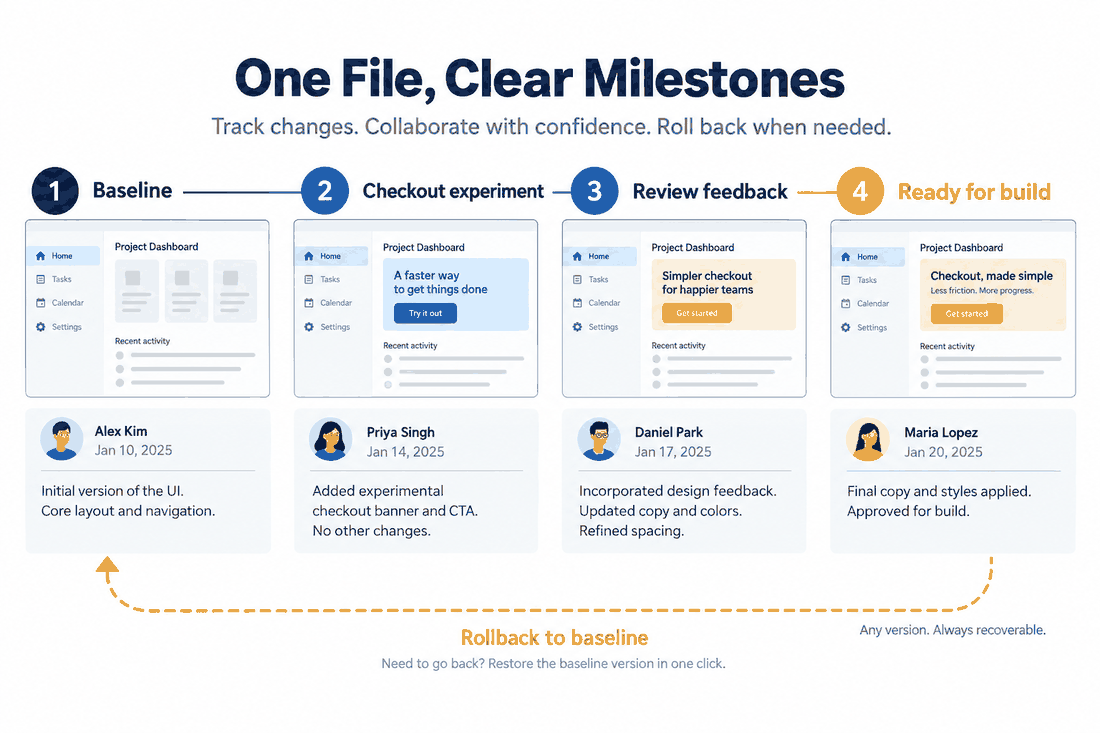
Effective version control for designers involves establishing a single, immutable source of truth that captures every single iteration chronologically. It means you have the power to snapshot a massive project at a highly specific moment in time, attach a human-readable description of what exactly was modified, and safely explore radical new layout ideas without altering the currently approved baseline. If an experimental checkout flow fails during user testing, the team should not have to hunt for an old backup file; they should simply hit a button to revert to a previous state.
When evaluating modern tools to handle this, you cannot just look at a text-based activity log. You need to see exactly which vector shapes, brand colors, or typography styles were modified. This visual transparency is exactly why search queries surrounding Figma version control for design systems have exploded recently. Large enterprise teams are actively hunting for ways to bring strict developer-style order to their highly creative, often messy digital workspaces.
Part 3: Enter Pixso – The Ultimate Native Solution
If you are completely exhausted by managing conflicting files, disjointed workflows, and endless Slack messages asking "which file is the right one," it is time to shift your perspective. Instead of duct-taping third-party plugins together, you need a platform built from the ground up to handle this native complexity. Pixso is a next-generation UI design tool that has fundamentally reimagined how modern product teams collaborate.
Rather than relying on convoluted workarounds, Pixso offers native, built-in design version control that operates seamlessly directly in your cloud workspace. With Pixso’s powerful Version History tracking, your product team can finally, permanently say goodbye to "Final_v2_final.design".
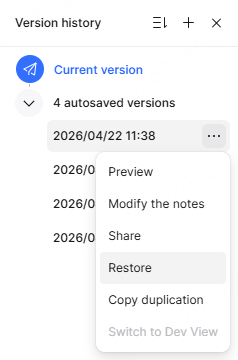
The platform automatically provides a complete, traceable history of your entire project without you having to think about it. But the real power lies in manual milestones. You can manually commit a version of your file, tying it directly to specific authors, precise timestamps, and contextual descriptions (like "Updated hero banner for Q3 marketing push"). If a stakeholder suddenly pivots and decides they actually preferred the minimalist layout you pitched three weeks ago, you do not need to panic. Pixso allows you to execute a clean, one-click rollback. Alternatively, you can fork that specific historical version into an entirely new, separate project file. Because this functionality is baked directly into the platform, there is zero learning curve. You do not need to learn command-line prompts. There are no local files to sync, no conflicting offline save errors, and absolutely no messy file duplication. Pixso operates as your team's secure, centralized nervous system.
Part 4: Git-Style Branching and Visual Design Diffs
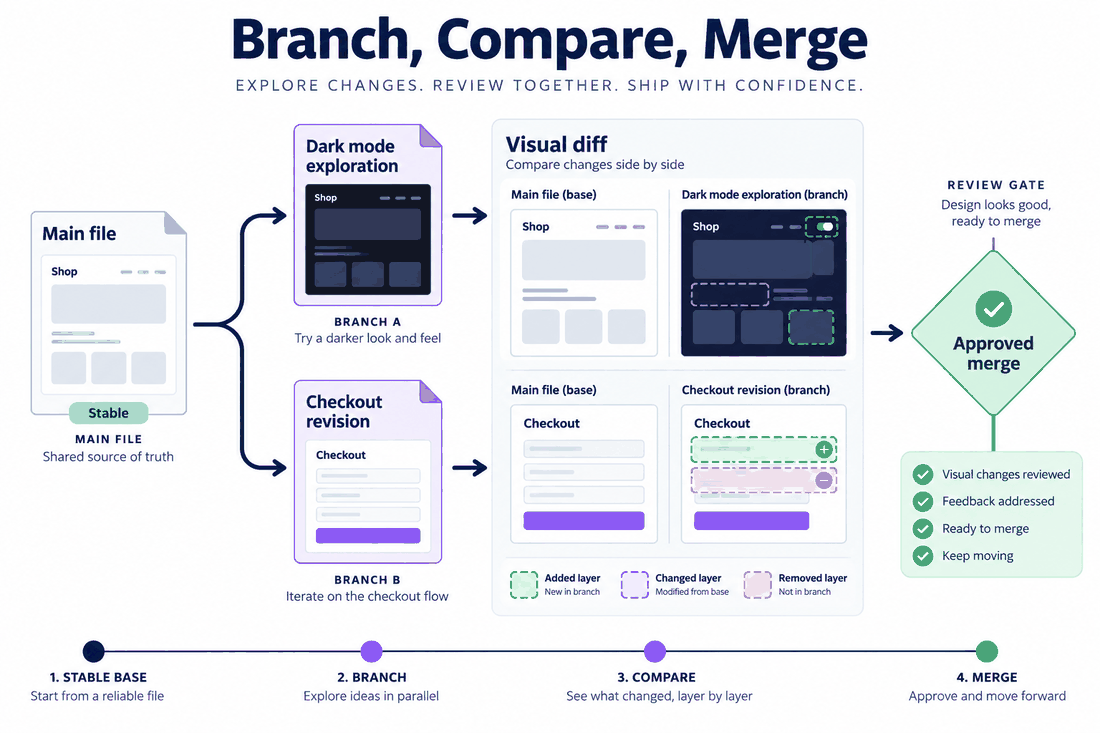
The most impressive aspect of Pixso is how intuitively it adapts hardcore developer logic for visual creatives. When multiple designers are actively iterating on the same user interface, they desperately need isolation. Pixso tackles this head-on by enabling Git-style branching and merging.
Think about how liberating this is. Your mainline design file remains completely stable, acting as the production-ready source of truth. If a junior designer needs to build an experimental dark mode interface, they simply spin up a feature branch. This sandbox isolation guarantees safe, parallel iteration without the fear of breaking the master file. Once their dark mode exploration is polished, they initiate a merge request.
But how do senior designers or art directors actually review those changes before approving them? This is where standard workflows usually fall apart, and where Pixso absolutely outshines legacy methods. Instead of forcing reviewers to play a frustrating, manual game of spot-the-difference between two massive artboards, Pixso provides an advanced visual diff interface. The tool actively highlights added, modified, or deleted layers, components, and styles using distinct color overlays. Reviewers can instantly see that a button was moved four pixels to the right, or that a drop shadow opacity was reduced by ten percent. This capability works across entire project files, specific pages, or even granular individual component libraries. Many agencies actively searching for a reliable way to manage versions of a Figma design system are specifically looking for this exact level of pixel-perfect, visual comparison to ensure no accidental layout tweaks slip into production code.
If two designers happen to alter the exact same screen on different branches, Pixso does not just overwrite the data. It flags the collision and offers intelligent conflict resolution, guiding the team to review both options side-by-side and choose the correct layout safely.
Part 5: Mastering Design System Level Control
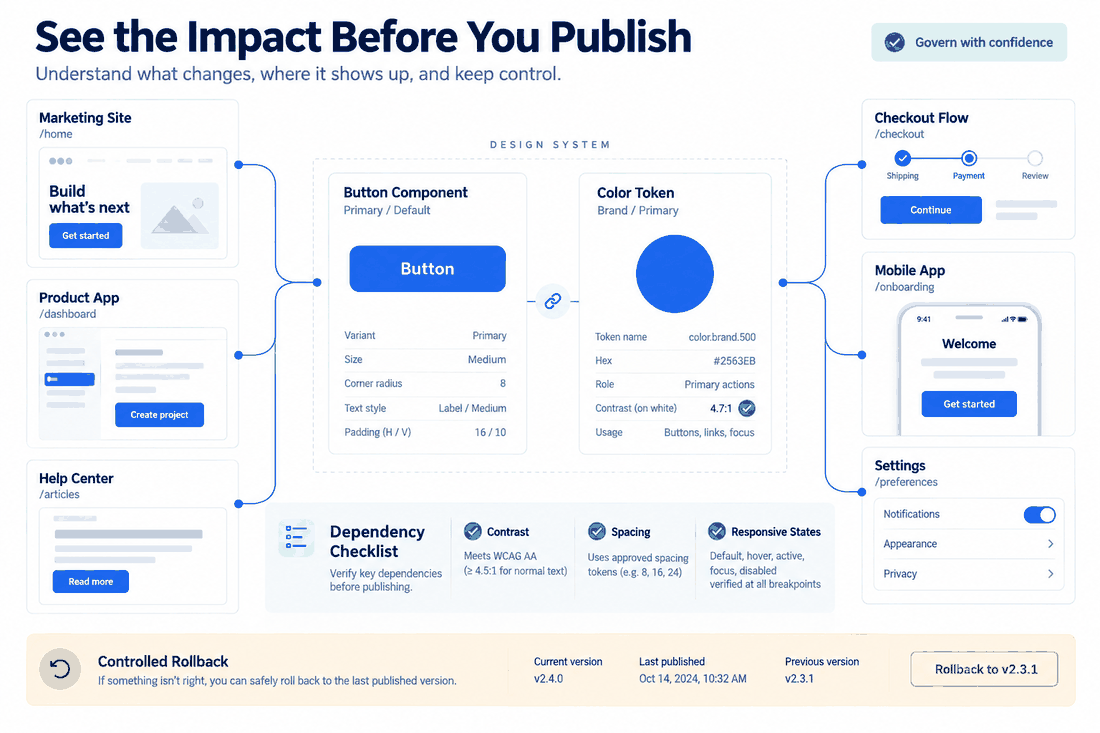
For mid-market and enterprise organizations, the design system is the undisputed holy grail. It is the foundational architecture that dictates the visual language across dozens, sometimes hundreds, of different digital products. Managing iterations at this macro level is incredibly high stakes. A single, unauthorized change to a primary call-to-action button component can immediately break the layout of fifty different live interfaces.
This is exactly why robust version control is critical not just at the screen level, but at the system level. Pixso delivers unparalleled governance here. Every single component, typography style, and design token variable is strictly versioned. When a UI engineer publishes an update to the core library, the platform provides deep dependency tracking. Managers can clearly see exactly which downstream project files will be affected before they ever push the update live.
Imagine a scenario where a newly introduced color variable inadvertently causes severe accessibility contrast issues across your entire mobile application suite. With Pixso, administrators can execute a system-level rollback instantly, reverting the library to yesterday's state and neutralizing the design debt immediately. When you truly examine how complex scaling a product can be, you quickly realize that having a clear approach to version control for a Figma design system is not optional anymore. Pixso inherently provides this rigid structure right out of the box. It ensures your core design system remains a highly protected, immutable source of truth, while still allowing for controlled, safe evolution over time.
Part 6: Closing the Feedback Loop and Securing the Handoff
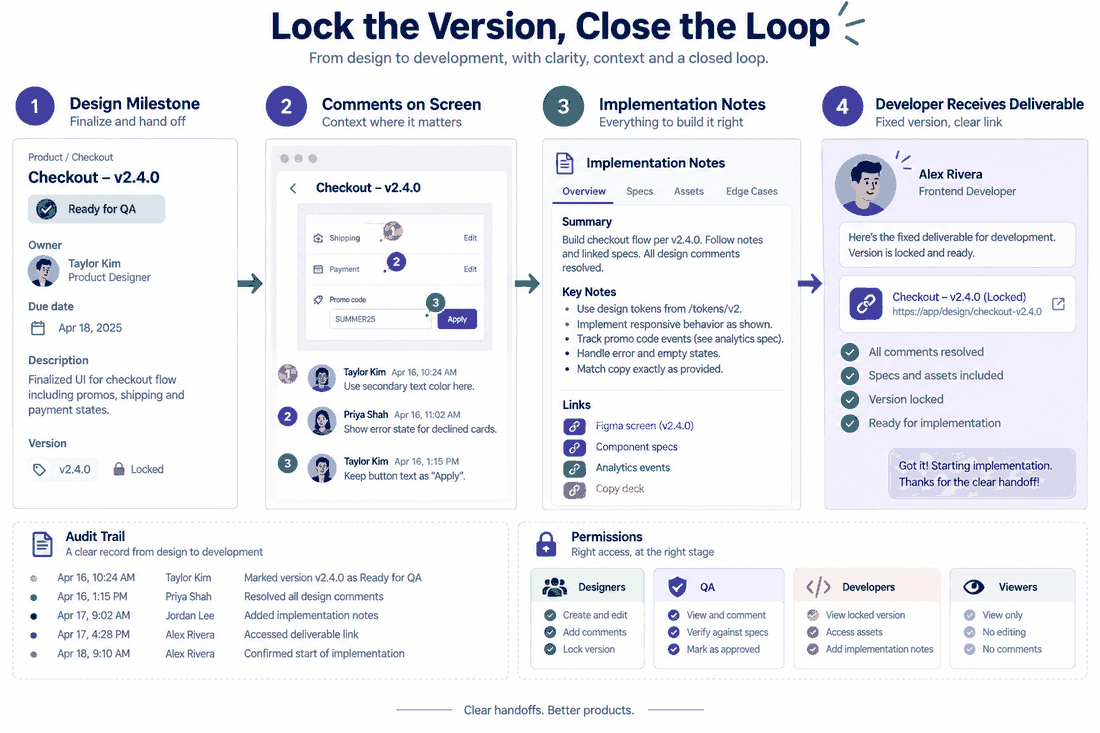
Great design version control cannot exist in an isolated silo; it absolutely must connect to the broader product development lifecycle. Pixso excels at creating a closed, highly visible version-feedback loop.
In a traditional setup, feedback lives in scattered Slack threads or lengthy email chains, completely disconnected from the design file. Pixso fixes this by allowing every saved version or branch to be bound directly to specific canvas comments, project task trackers, or even Jira tickets. This means product managers can track UI iterations based directly on user feedback. They can easily tag specific milestones with clear statuses like "Ready for QA," "In Active Development," or "Deprecated Concept."
Furthermore, large companies require stringent enterprise-level security and permission management. A messy file system usually means anyone with a link can accidentally delete crucial work. Pixso provides highly granular read, write, and merge permissions. You can invite external freelance contractors into your workspace and isolate them to specific feature branches, so they cannot affect the main production file. Detailed internal audit logs and enterprise compliance support give IT departments total peace of mind, knowing every single action is recorded, traceable, and secure.
Finally, we have to talk about the ultimate end goal of managing UI iterations: achieving a flawless developer handoff. Absolutely nothing frustrates front-end engineers more than spending a week building a complex user dashboard only to find out the lead designer changed the layout yesterday without telling anyone. Pixso eliminates this friction entirely by locking deliverable versions. Once a specific version is officially tagged for development, it freezes. It then aligns perfectly with Pixso’s native redlining specs and code repository integrations. This eliminates the dreaded version discrepancy entirely. While many tech agencies spend weeks attempting to configure a version-control setup for a Figma design system to achieve this specific alignment, Pixso users enjoy this seamless, stress-free design-to-development bridge naturally.
Conclusion
Managing continuous UI iterations absolutely does not have to mean drowning in a deep sea of duplicated files, broken components, and endless team confusion. By adopting true, native version control for designers, your entire product team can collaborate fearlessly. You can innovate rapidly knowing that every single change is tracked, visual diffs are crystal clear, and your mainline production file remains pristine at all times. Whether you are managing a massive corporate component library or simply preparing a flawless, locked developer handoff for your engineering team, the right infrastructure makes all the difference. Pixso provides a seamless, powerful environment that brings Git-level logic to visual workflows without the steep learning curve. Delete "Final_v2" from your hard drive forever, protect your design system, and empower your team to build better digital products with total confidence.