Scott
Scott

Published on Apr 29, 2026, updated on May 09, 2026

Expanding your digital product to international markets is an exciting milestone, but it brings a massive logistical headache: ui localization. When targeting a global audience, your interface needs to speak the user's language flawlessly. However, the traditional process of exporting text, sending it to external agencies, and pasting it back into mockups destroys design efficiency. Layouts break, context is lost, and developer handoffs become chaotic. This is exactly where an integrated ai translator changes the game. By natively embedding ai translation into your workflow, you can generate precise multilingual ui design assets in seconds. Let us explore how modern platforms, specifically Pixso, are revolutionizing global design by bridging the gap between localized copywriting and seamless developer handoffs.

Part 1: The Hidden Bottlenecks of Traditional UI Localization

Anyone who has ever worked on a major global design rollout knows that translating a user interface is never a simple one-to-one word swap. Languages vary drastically in character length, grammatical structure, and cultural nuance. When you export your carefully crafted English interface into a massive spreadsheet and run it through a generic online tool, the results returned to you are almost always disastrous for the actual interface.

A generic ai translator completely lacks visual and functional context. It does not know if a three-word phrase is meant for a sprawling, full-width hero banner or a tightly constrained, pill-shaped call-to-action button. As a result, you get literal translations that sound robotic or, worse, completely shatter your layout. German or Russian words might bleed awkwardly out of their designated containers, while compact Japanese or Chinese characters might leave unbalanced, empty spaces that ruin your visual hierarchy.

Historically, fixing these structural issues required a painfully slow back-and-forth cycle between product designers, localization teams, and front-end developers. You would have to manually adjust font sizes, tweak paddings, and redraw component constraints for every single language variation. When you are using legacy design tools that lack native translation features, doing this for ten different regional markets means multiplying your manual workload by ten. This fragmented, highly repetitive workflow kills creative productivity and creates massive friction during the QA and developer handoff phases.

Part 2: Enter Pixso: The Ultimate Native AI Translator

To truly succeed in global design, product teams need a platform that fundamentally understands the specific, rigid constraints of interface creation. This is precisely where Pixso shines. While you might be highly familiar with traditional industry staples like Figma, Sketch, Adobe XD, or Invision, Pixso distinguishes itself by deeply integrating powerful artificial intelligence directly into the native workspace. It effectively and elegantly bridges the native capability gaps found in those competing platforms, which usually force you to buy and install clunky third-party plugins just to handle basic text swapping.

Pixso acts as your built-in ai translator, eliminating the need to constantly switch tabs, manage API keys for external services, or rely on disconnected web apps. It provides UI-specific precision that generic tools simply cannot match. Instead of treating your text as isolated strings of data, Pixso understands the interface context. It knows the fundamental difference between a high-stakes destructive error message, a subtle informative tooltip, and a primary navigation link. This contextual awareness ensures that the ai translation feels native, natural, and highly appropriate to the target region's digital habits.

ai translation

Furthermore, enterprise-level product teams need to know their proprietary data is safe. Pixso offers a secure, legally compliant environment where your unreleased product copy remains strictly confidential. The translations generated within the platform are fully cleared for commercial use. This means you can confidently deploy your multilingual ui design to international markets without waking up in a cold sweat worrying about hidden copyright infringements or strict data privacy violations.

Part 3: Step-by-Step: Localizing Directly on the Canvas

The true power of Pixso lies in how completely frictionless the user experience is. You do not need to be a prompt engineer or a localization specialist to use its built-in ai translator. Let us walk through the exact, simple steps to localize a complex screen natively, without ever once leaving your artboard.

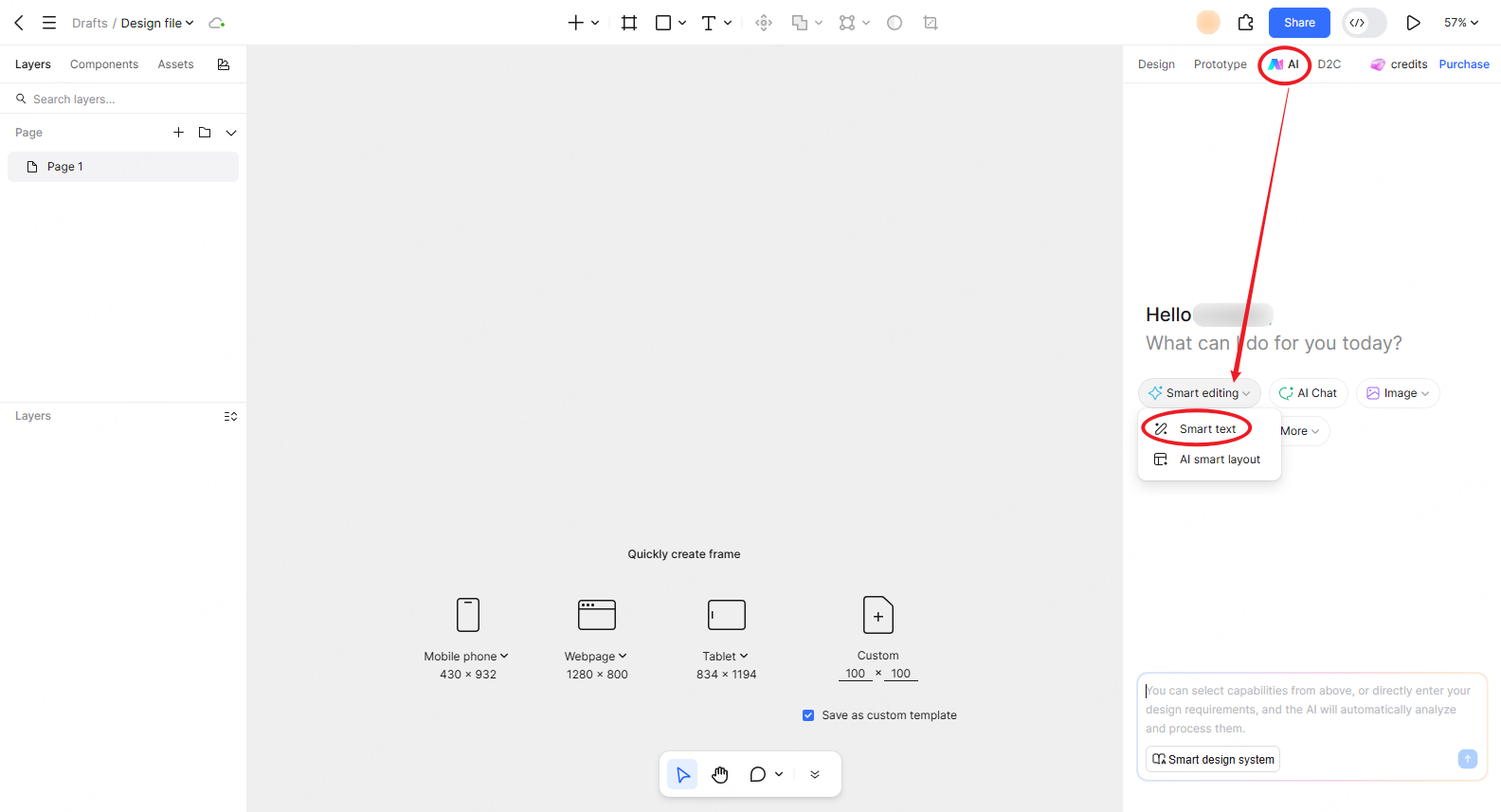
When you are looking at your completed English wireframe or high-fidelity mockup in Pixso, shift your attention to the top navigation bar. Right next to the standard Design and Prototype tabs, you will clearly see a dedicated AI tab. Clicking this immediately opens your smart assistant panel on the right side of the screen. The assistant greets you and offers a few core functions visually. Click on the "Smart editing" dropdown menu, and select the "Smart text" option.

ai translation

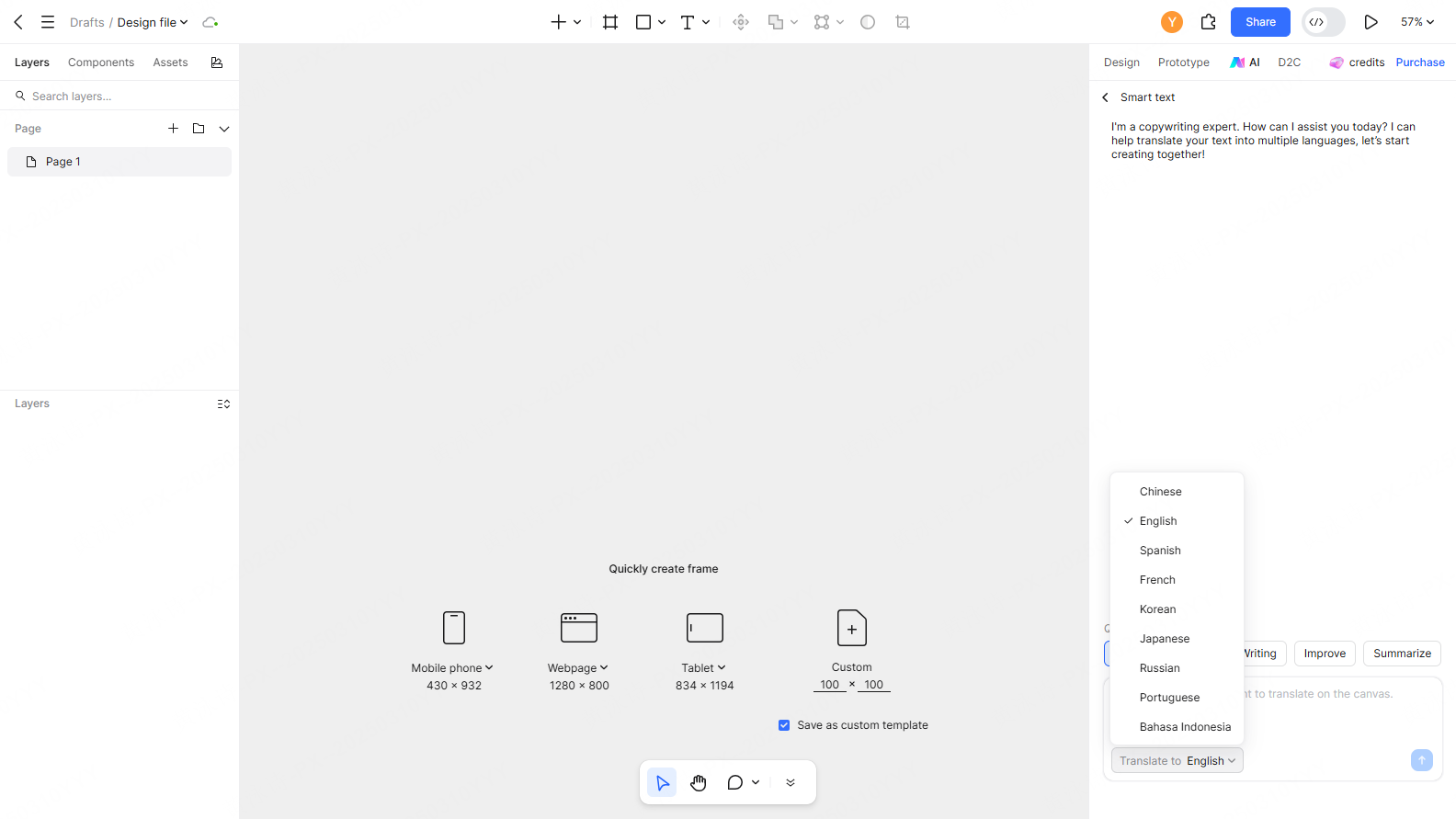
You have now successfully activated your built-in copywriting and localization expert. To translate your interface, simply select the specific text layers on your canvas that need ui localization. This could be a single isolated button, a complex data table, or an entire page layout selected all at once. In the smart text assistant panel, you will see a row of Quick Actions. Click on "Translate."

ai translation

A dropdown menu will appear allowing you to select your exact target language. Pixso supports a wide array of high-value global markets, including Chinese, Spanish, French, Korean, Japanese, Russian, Portuguese, and Bahasa Indonesia. Select your desired language, hit the blue upward arrow button to execute the command, and watch as the text on your canvas transforms instantly. This native batch processing allows you to create a localized version of your app in mere seconds, directly in the flow of your work.

Part 4: Smart Adaptation: Keeping Your Layouts Flawless

Generating the correct translated words is only half the battle in any ui localization project. The other, arguably harder half is making sure those new words actually fit into the boxes you drew. This is the biggest pain point when switching from English to a more verbose language like French, which can expand text length by up to thirty percent, or a highly compact language like Chinese.

Pixso's integrated ai translator is engineered with smart character and typography adaptation logic. When the ai translation is applied to your active canvas, the system actively works to control the length of the translated text so it makes sense visually. It intelligently respects the predefined boundaries of your existing UI components. If you have auto-layout enabled, it works in perfect harmony with those rules. It ensures that your buttons do not stretch awkwardly off the mobile screen viewport, your navigation bars do not wrap into unreadable secondary lines, and your carefully planned visual hierarchy remains perfectly intact.

Moreover, the system automatically preserves your original typography styling. The font weight, brand color, line height, and text alignment remain perfectly consistent across the swap, so you do not have to spend hours re-styling the translated text manually. For teams designing for Middle Eastern markets, managing Right-to-Left (RTL) specific layouts is a notorious, headache-inducing challenge. A comprehensive multilingual ui design strategy requires tools that can handle these massive structural shifts naturally, and Pixso provides the flexible, intelligent environment needed to manage these complex regional variations smoothly and without panic.

Part 5: Brand Consistency and Specialized UI Terminology

When building a digital product for a global design initiative, maintaining a fiercely consistent brand voice across all targeted regions is absolutely critical for user trust. A playful, highly casual consumer fitness app should not suddenly sound like a rigid, ultra-formal corporate banking platform just because it was translated into Spanish or Korean.

Generic translation web tools fail spectacularly here because they do not learn your brand rules. Pixso solves this by allowing product teams to manage shared translation glossaries and centralized brand guidelines. The native ai translator can be explicitly guided by your specific, approved team vocabulary. If you have a unique, trademarked branded term for your main software feature, the system learns it. It then applies the correct, approved localized equivalent consistently across the entire project ecosystem.

This advanced capability ensures that every single button, pop-up window, success modal, and empty state uses the exact same approved terminology. Whether a user is logging into your platform from an office in Tokyo or a cafe in Madrid, the brand personality feels cohesive and intentional. This unified, systematic approach completely eliminates the disjointed, Frankenstein-like copy that often plagues rapidly localized software products, ensuring a high-quality multilingual ui design output every single time you hit publish.

Part 6: Seamless Handoffs: Connecting Design Directly to Development

The final and undeniably most important hurdle in global design is the developer handoff. Having six beautifully translated, perfectly laid-out versions of an application is completely useless if the engineering team cannot easily access and implement those localized text strings into the codebase. Traditional handoff workflows involve incredibly messy, error-prone spreadsheets mapping English string keys to translated values, inevitably leading to endless copy-paste errors and broken staging environments.

Pixso deeply and seamlessly integrates the ui localization process into the final technical delivery phase. Because the translation happens directly within the native design file, the localized text is inherently and permanently tied to the exact design components. When you share the final Pixso file with your front-end developers, they do not just see a static visual layout; they get direct, inspectable access to the translated strings mapped perfectly to the UI elements they need to build.

Designers can easily manage and present side-by-side multilingual artboards, allowing project stakeholders and developers to compare the English master file directly with the localized regional versions instantly. This native ecosystem automatically generates reliable multilingual design specifications. Developers can extract the exact language packs they need directly from the developer inspector panel without constantly tapping the design team on the shoulder for updated spreadsheets. By automating this tedious data transfer, Pixso drastically lowers cross-functional communication costs, noticeably speeds up the engineering sprint cycle, and ensures that the final coded product matches the approved ai translation flawlessly.

Conclusion

Successfully launching a digital product across international borders requires much more than just access to a good dictionary; it requires a flawless, scalable operational workflow. By ditching clunky external tools and fully embracing a native ai translator, product teams can permanently eliminate layout breaks, ensure strict brand consistency, and drastically speed up their developer handoffs. Pixso proves to be an invaluable, powerful asset for global design, bringing highly accurate, context-aware ai translation directly onto the active canvas. It transforms the historically painful, manual process of ui localization into a rapid, seamless, and enjoyable experience. Master your multilingual ui design process today, streamline your global delivery pipeline, and ensure your digital product resonates perfectly with users no matter where they happen to live in the world.

go to back
twitter share
facebook share