
Scott
For years, the bridge between product design and mobile development has been plagued by friction. Designers spend hours perfecting vector layouts, only for developers to spend days manually recreating those exact same paddings, margins, and component states in their editor. This back-and-forth communication drains resources and delays product launches. Fortunately, modern development pipelines are shifting toward automation. Instead of relying on manual spec sheets and static mockups, teams are now converting layout layers directly into usable flutter code on demand. This comprehensive guide walks you through the step-by-step process of automating your mobile handoff using Pixso.
Part 1. Pixso: The Ultimate Design-to-Code Pipeline
When developing a modern mobile app design, you have to plan for diverse device viewports, state changes, and unified style libraries. Pixso serves as an all-in-one collaborative workspace that simplifies this process. Rather than acting as a simple graphics editor, it is built with an engineering-first mentality. This is where Pixso’s dedicated D2C (design to code) workspace comes into play. It acts as an integrated compiler that translates vector layout constraints directly into clean, standardized developer assets.
How Pixso Processes Design to Code Workflows
| Pipeline Stage | Platform Action | Output Value |
| 1. Visual Input | Designers construct screens using Auto Layout rules, global design tokens, and components. | Establishes a highly structured visual blueprint with clear spacing and parent-child hierarchies. |
| 2. Code Settings | Users configure specific preferences, such as whether to extract individual styles, global tokens, or custom components. | Prepares the code generator to organize the output assets logically. |
| 3. Review output | Export the supported target code and assets for the selected frame. | Inspect the package, resolve dependencies and run build and device checks before integration. |
Check whether Flutter output is available in the D2C workflow for your account and product version. Export a representative frame, then have developers inspect the generated structure, dependencies and assets. Generated code is a starting point and may require modification before it can be built or shipped.
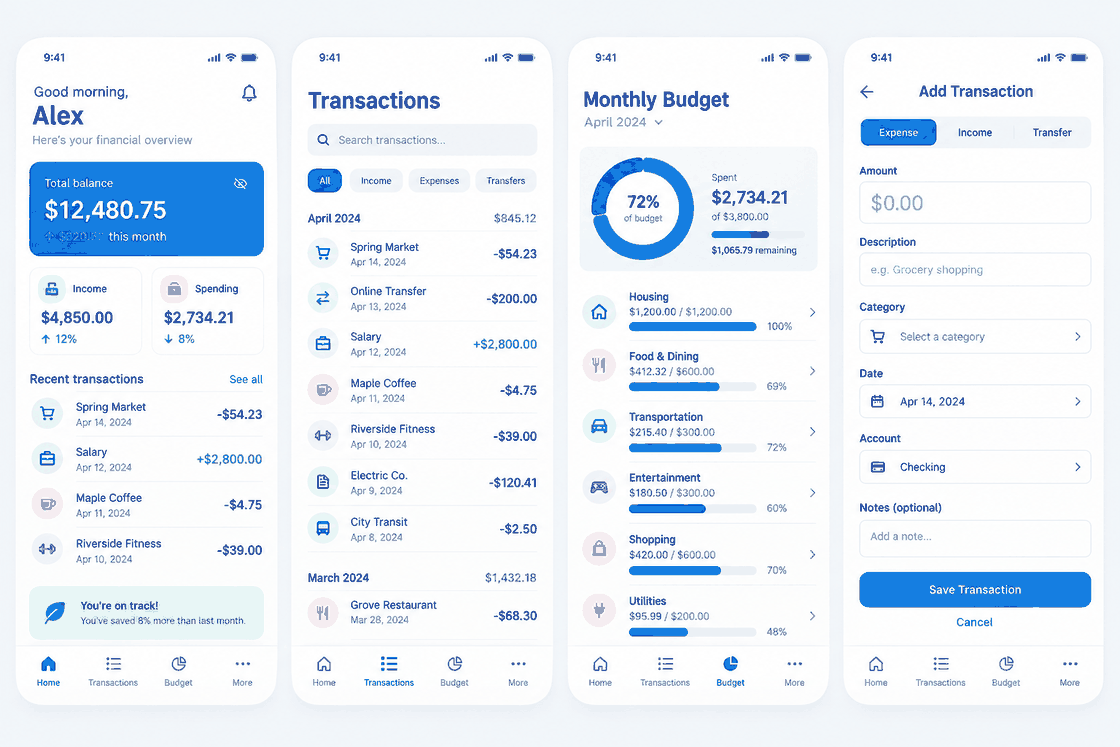
Part 2. The Traditional Handoff Bottleneck vs. Modern Automation
In standard product development, a finished mobile app design gets handed over to the development team via static inspect tools. While these inspectors show absolute pixel dimensions, they do not communicate the underlying design logic. Developers are left guessing how the layout should adapt to different screen sizes. They have to write complex flexboxes, paddings, and media queries by hand, often leading to visual discrepancies between the canvas and the final application.
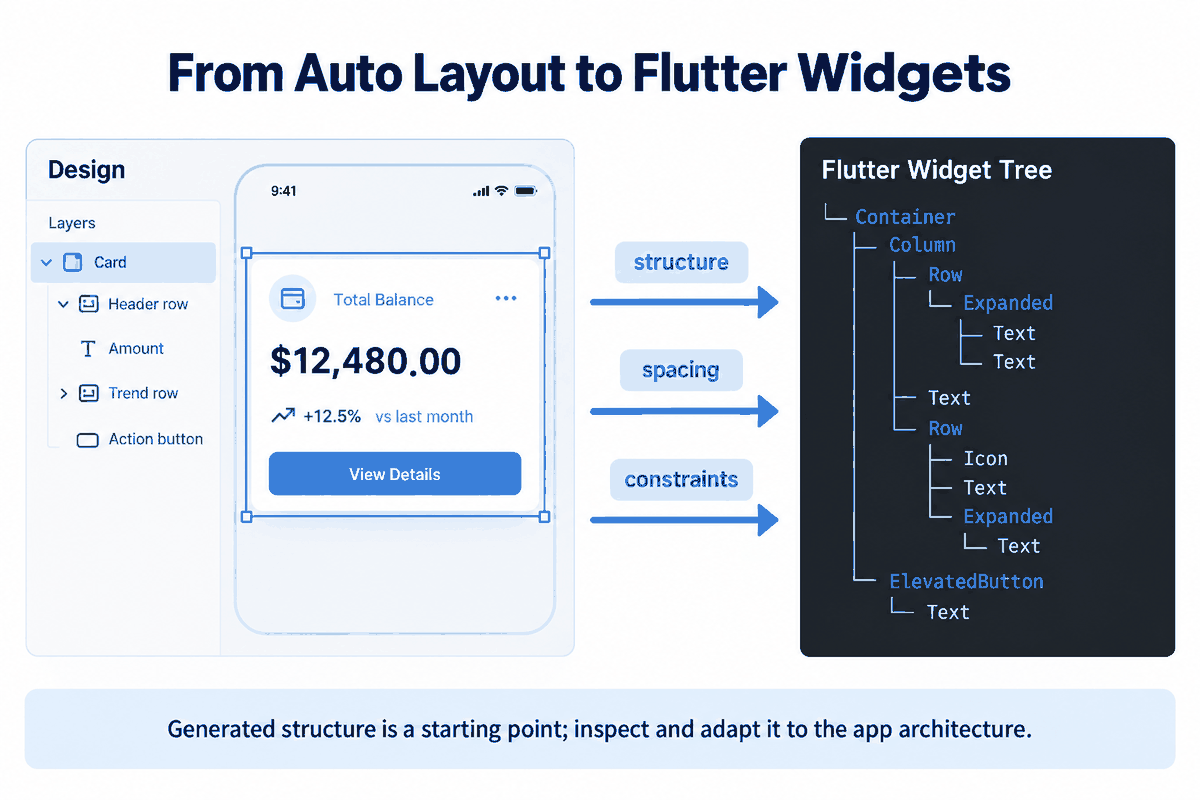
Early design to code tools were famous for spitting out messy absolute-positioned divs and hardcoded pixel values that were impossible to maintain in real-world software. This is where modern design to code tools step in to redefine the workflow. By recognizing auto-layout hierarchies, modern platforms output flexible, structured frameworks instead of absolute coordinate maps.
With the rise of smart automation, ai design to code platforms have promised to solve this handoff barrier completely. The difference between basic converters and advanced ai design to code engines is structural intelligence. A basic tool simply converts individual shapes into separate assets, while an advanced engine analyzes design patterns to construct logical parent-child hierarchies. This ensures your margins, flexible columns, and dynamic rows translate into readable, nested widgets that maintain high-fidelity rendering on any mobile screen.
To understand how modern tools compare to legacy development pipelines, here is a quick overview of the two approaches:
| Handoff Characteristic | Legacy Hand-Coded Handoff | Automated D2C Handoff (Pixso) |
| Handoff Output | Static spec sheets and asset exports | Directly generated code frameworks (Flutter/React) |
| Layout Integrity | Manual recreation of paddings and grids | Direct translation of Auto Layout into rows/columns |
| Consistency | High risk of visual bugs across viewports | Built-in responsive constraints and variables |
| Delivery time | Measure design interpretation, implementation and review on a representative task. | Measure generation, repair, integration and review on the same task. |
| Maintenance | Manual updates across design and code bases | Global sync via synchronized design tokens |
Part 3. Step-by-Step Guide: How to Generate Flutter Code Natively in Pixso
Open a representative design file and confirm the supported output options. Generation time varies with the file, service load and configuration. The following workflow should be validated against the interface available to your account.
Step 1: Open Your Workspace and Prepare the Canvas
Start by opening your design file in Pixso. Ensure that your mobile frames utilize Auto Layout constraints. Auto Layout provides the structural foundation that allows the compiler to understand which elements should behave as flexible columns, rows, or stacked layers.
Step 2: Switch to the D2C Panel
In the top header bar, click on the "D2C" tab. This shifts the platform from the vector design workspace into the code generation and inspection workspace. In the left-hand configuration dropdown, select "Flutter" from the list of target languages (which also includes Vue, React, HTML, and ArkUI).
Step 3: Configure Your Basic Settings
Click on the "Code settings" icon next to the language selection to open the Basic Settings panel. Here, you can define exactly how your project assets are parsed:
Key D2C Configuration Settings
| Configuration Option | What It Does | Developer Benefit |
| Extract styles | Check which styling properties the exporter supports. | Review the generated styles and adjust spacing, layout and effects where needed. |
| Extract Design Tokens | Compiles color schemes, typography variables, and spacing systems into global design variables. | Ensures global variables are centrally managed, allowing easy updates to brand colors or fonts. |
| Extract Components | Isolates reusable UI elements (like buttons, navigation bars, or inputs) into distinct classes. | Prevents repetitive code, allowing developers to reuse core components efficiently. |
Step 4: Select Your Target Frame and Compile
Click on the specific frame, component, or section you want to convert. By leveraging intelligent ai design to code systems, Pixso analyzes layer groups and structural rules to compile your assets, letting you inspect and export compiled flutter code directly inside your browser. Once satisfied, click the export icon to download your clean, structured code package complete with asset subfolders.
Part 4. Production-Ready Engineering and Deep Customization
Real-world engineering demands more than a basic design to code translation. When developers receive a code package, they need to know that it is clean, structured, and compliant with official industry standards. Pixso's export engine is designed to meet these exact requirements, delivering high-fidelity developer files that integrate smoothly with your existing repository.
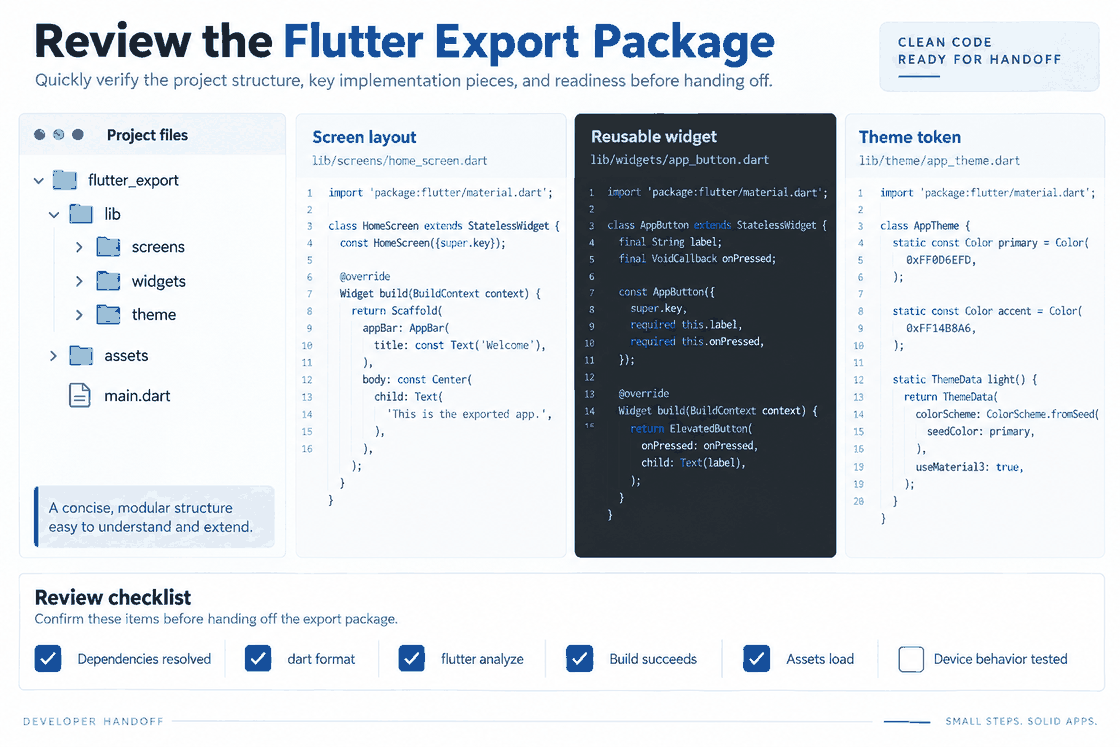
Understanding the Exported Directory Structure
When you download your generated package, Pixso organizes the files into a clean folder structure designed to match real-world development environments:
- The Core Lib Folder: Houses your primary layout components and application files, ensuring the main workspace remains tidy.
- The Components Folder: Contains your extracted, reusable widgets such as buttons, cards, and text fields, which prevents code repetition.
- The Styles Folder: Groups all static visual designs, including shadows, custom shapes, and borders, into easy-to-reference files.
- The Design Tokens Folder: Stores global color, spacing, and typography variables so that the brand's visual identity can be updated centrally.
- The Layout Code File: Contains the main compiled screen file that references your styles and components to present the complete visual interface.
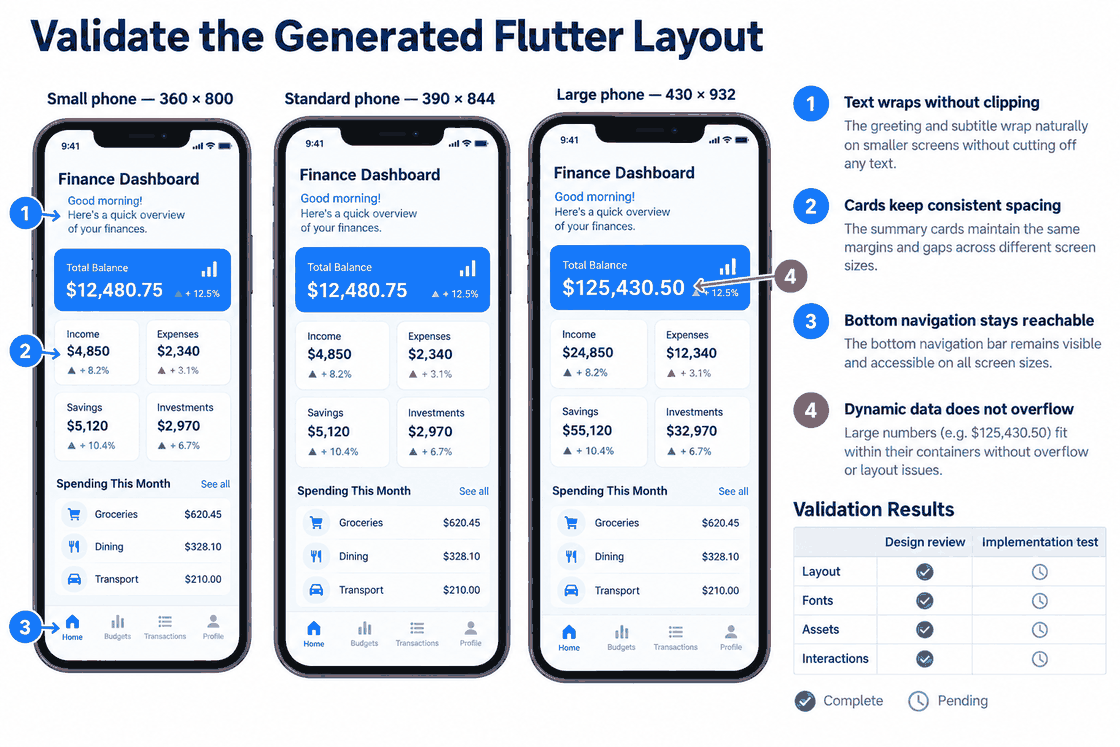
Validate the generated layout
After export, compare layout, spacing, text, icons and assets against the design at the intended viewport sizes. Check Auto Layout translation, font availability and unsupported effects. Record any fixes needed; the generated result should not be assumed identical or production-ready.
Standardized Dart and Flutter Architecture
Developers should inspect the generated Dart and Flutter files for structure, dependencies, readability, reusable widgets and state handling. Run formatting, analysis and build checks, then adapt the output to the project’s conventions.
Design System and Multi-Theme Linkage
Large mobile applications depend on cohesive design systems. Pixso links your visual design tokens directly to your code variables. When you export your styles, variables for typography, spacing, and color schemes are compiled into unified theme files. If your design system supports both light and dark themes, Pixso compiles both schemas simultaneously, saving devs from recreating custom design elements in their local flutter code manually.
Dynamic Interaction and Animations
A high-quality mobile app design is rarely static. Within Pixso, you can map page transitions, button clicks, scrolling behaviors, and swipe actions directly on the canvas. When compiling, the D2C engine translates these prototype connections into programmatic page routing and interactive gestures, such as gesture detector widgets and standard animations. This trims down front-end engineering time, letting developers focus on integrating APIs and business logic.
Part 5. Enterprise-Grade Collaboration, Deployment, and Ecosystems
As product teams scale, managing software licenses, keeping files organized, and meeting strict enterprise security regulations become major priorities. Pixso provides a comprehensive ecosystem built to support large design teams, agencies, and enterprise clients.
While most cloud-only design to code tools require an active internet connection, Pixso supports both cloud and on-premises private deployments. This is an essential feature for government organizations, financial institutions, and security-conscious enterprises that must keep proprietary mockups and user data safely behind a secure internal firewall.
To help teams get started without a steep learning curve, Pixso offers a rich ecosystem of resources. This includes professional tutorials in English, a community library packed with ready-to-use templates, and practical optimization guides. These resources help designers learn how to construct developer-friendly layouts, such as structuring auto-layouts correctly to avoid rendering errors or performance drops in production code.
Furthermore, Pixso is built to fit seamlessly into multi-tool workflows. It supports importing files from competitor tools like Figma, Sketch, and Adobe XD, allowing you to bring legacy assets into Pixso and run them through the D2C engine immediately. With its clean folder structures, clear code comments, and robust collaboration features, Pixso serves as a highly reliable, professional workspace for modern digital product development.
Conclusion
Design-to-code output can help start a mobile interface, but it does not replace engineering review. Verify the generated layout, accessibility, state handling, API integration, security and device behavior before release. Measure any time saving on a representative task instead of assuming a fixed conversion time.

![[Ultimate Guide] Adaptive Web Design VS Responsive Design](https://pixso.net/assets/media/adaptive-web-design-cover-adc36662b7b63061.webp)

![[iOS 16] Differences Between Android and iOS UI Design](https://pixso.net/assets/media/ios-ui-vs-android-ui-30761c3d91978132.webp)


