Scott
With the recent explosion of automated layout platforms, more product teams are experimenting with visual generation tools to build user interfaces. However, typical visual generation engines operate purely on a pixel level. They might output stunning screens, but because the underlying files lack structured frameworks, code configurations, and component properties, developers cannot use them for actual production.
True enterprise design needs a structured approach. By linking generative algorithms with established open-source design setups, you can output consistent layouts that meet strict organizational guidelines from the start. This guide explains how to use Paico alongside the arco design system to bridge the gap between plain text descriptions and actual frontend files. This setup helps teams build quickly while keeping layout code stable and standardized.
Part 1. Why Visual-Only AI Fails in Enterprise Environments
In the rush to adopt automated design tools, it is easy to prioritize raw speed over quality standards. This is where many teams run into a wall.

1.1 The Visual Mirage vs. Engineering Reality
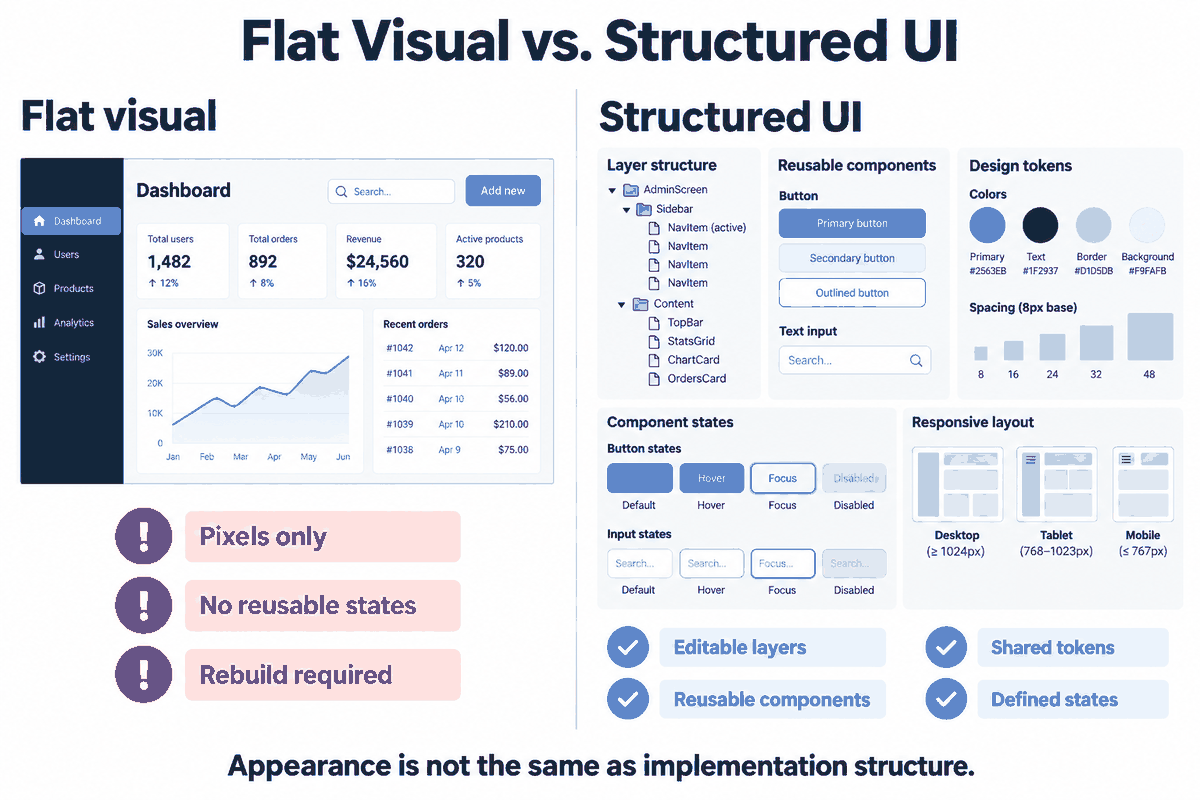
Most automated generators that rely on pure visual modeling are essentially predicting pixels. They work well for creating illustrations, marketing materials, or conceptual art. But when you ask them to build an interactive dashboard, they struggle with structural logic.
These visual tools output designs with no underlying grids, no concept of dynamic sizing, and no interactive states like hover, focus, or disabled. They also fail to account for basic web practices like minimum text contrast and clear navigation pathways. For a frontend developer, these beautiful mockups are just flat, unusable images that require a complete manual rewrite.
1.2 Three Critical Standards for Production-Ready UI
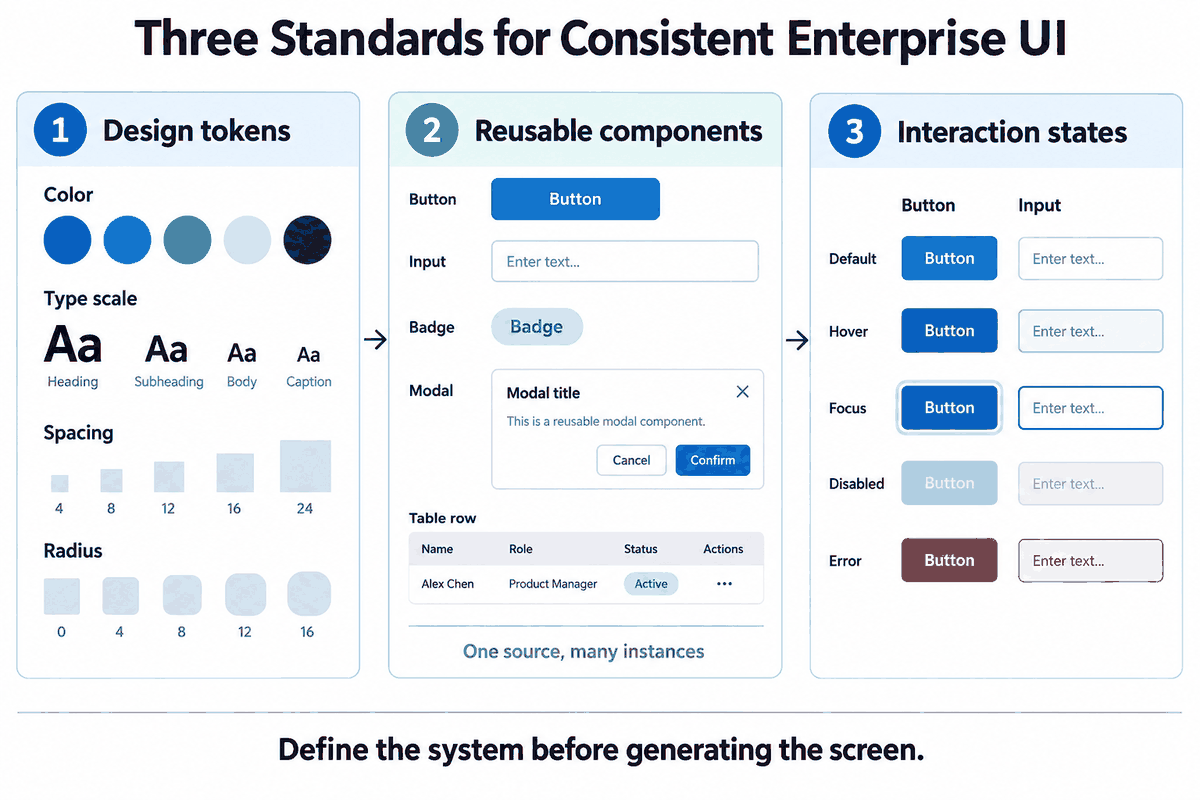
To work in a production environment, an interface design must follow a strict set of structural rules:
- Global Variable Consistency: Properties like theme colors, font scales, box shadows, and border radii must be mapped to central design tokens that update globally.
- Atomic Component Organization: Layouts should be built using reusable building blocks, nesting basic elements like buttons, inputs, and badges inside more complex layout panels.
- Standardized Interaction Patterns: Core behaviors, such as opening drawer overlays, triggering modals, and displaying loading spinners, must behave consistently across every view.
This structural consistency is why systems like arco design have become popular frameworks for building robust admin portals and enterprise tools.
1.3 The Transition to Standardized Workflows
Because manual assembly is expensive and raw pixel generation is messy, the design process is moving toward structured generation systems. Rather than letting AI systems generate layouts without boundaries, modern pipelines configure the generation engine to build inside a defined system of rules.
This is the approach behind the Paico workspace. Instead of focusing on wild visual concepts, the platform uses an established UI component library as its structural foundation. Users can write requests in plain language and receive high-fidelity mockups that automatically align with standard coding rules. Placing structure before raw creativity makes it much easier to transition from initial mockups to active codebases.
Part 2. Traditional UI Workflows vs. Paico + Arco Design
Before looking at the setup steps, let us see how this workflow compares to traditional layout design and handoff methods.
2.1 The Overhead of Manual Component Assembly
Even when a team uses a modern system like arco design, building views manually requires significant time. Designers must sift through documentation, drag elements onto a canvas, manually edit placeholder labels, check spacing guides, and ensure they are not breaking global style variables.
Once the designs are ready, developers must inspect each screen to check alignment, padding values, and responsive behaviors. This manual QA process takes away valuable hours that your team could spend on core system architecture and overall user flow.
2.2 Workflow Comparison
The table below breaks down the differences between traditional methods, pixel-based generators, and structured, rule-based generation:
| Workflow Step | Manual Design Assembly | Pixel-Based Generators | Paico Standardized AI Design |
| Interface Construction | Slow; designers manually align elements and components | Fast; generates single-layer images from text | Fast; assembles structural screens using a pre-mapped component library |
| Grid & Spacing Compliance | Dependent on the designer's manual attention to detail | None; elements are placed on random, non-grid coordinate paths | High; elements align automatically to system grid rules |
| Interactive State Verification | Requires manual styling of separate screens for hover/active states | None; generates static, single-state mockups | Automatic; components inherit default states from the underlying library |
| Design-to-Code Handoff | High friction; requires manual inspection and asset exporting | Impossible; developers must reconstruct the layouts from scratch | Direct; exports clean React or Vue code files |
| Global Theme Updates | Slow; requires updating components across multiple local files | Impossible; changes require generating entirely new layouts | Fast; updating theme variables changes all components instantly |
This comparison highlights how setting rules for your generation engine saves time during layout creation without creating technical debt.
Part 3. Step-by-Step Guide to Generating Standardized UIs
Now, let us walk through how to use the platform to generate a standardized administration interface.
Step 1: Initialize Your Workspace and Design Rules
Log into your account at Paico and open a new project workspace. Before typing any layout requests, go to the project configuration panel and select the arco design library as your foundation. This activates the platform's core layout matrix, ensuring all generated elements align with the system's structural rules.
1. Select Arco Design as the Base System
2. Enter Functional Layout Request
3. System Matches Prompts to Components
4. Export Standard React/Vue Codebases
Step 2: Write Your Layout Instructions
When describing your target page, use clear, descriptive language rather than vague adjectives like "modern" or "sleek." Focus on the functional elements you want to include.
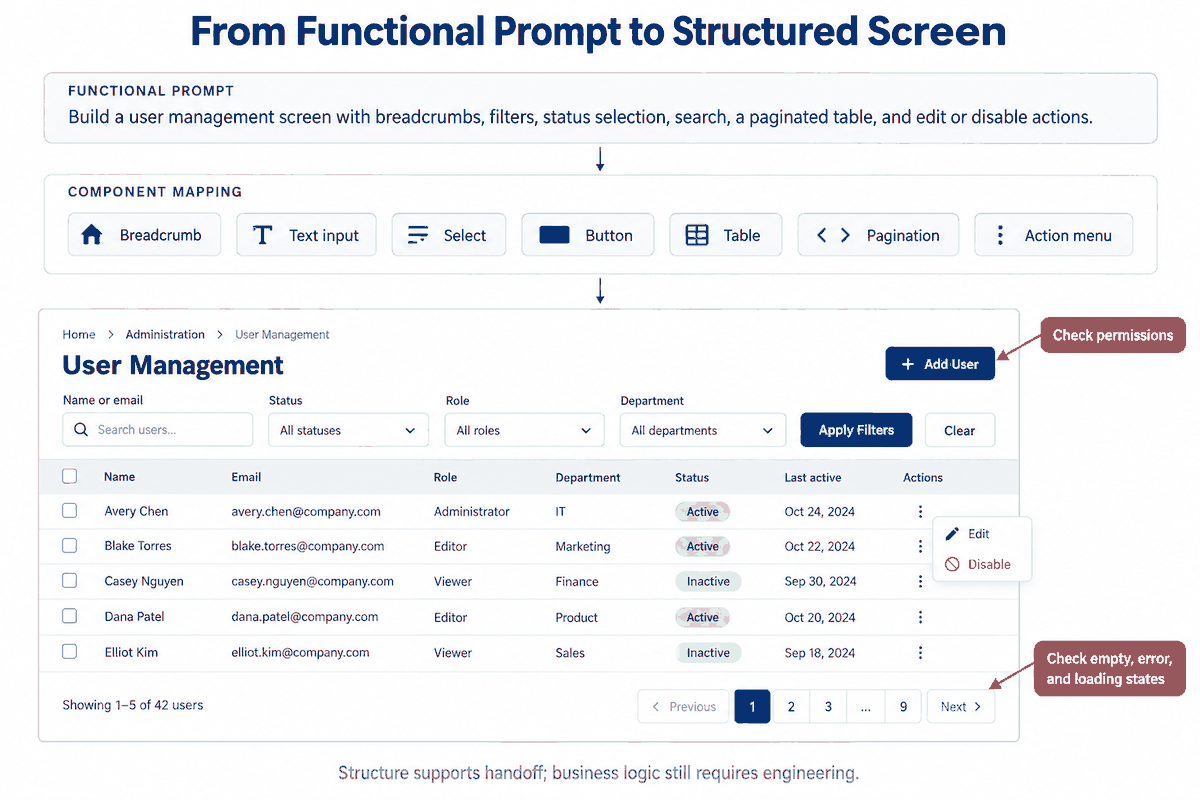
For example, you could write: Build an enterprise user management screen. Include a header breadcrumb trail, a filtering block with an input text field, a status dropdown menu, and a query button. Below the filters, add a paginated data table showing active user accounts, with action items for editing and disabling profiles.
Step 3: Structured Processing and Component Mapping
Once you submit your instructions, Paico references its database of UI elements to pull the exact components required by your prompt. Instead of drawing shapes, the system arranges verified buttons, inputs, breadcrumbs, and tables directly on the workspace canvas. The resulting layout features organized layer hierarchies and proper spacing that matches the framework's default grid values.
Step 4: Fine-Tuning Styles and Editing Layouts
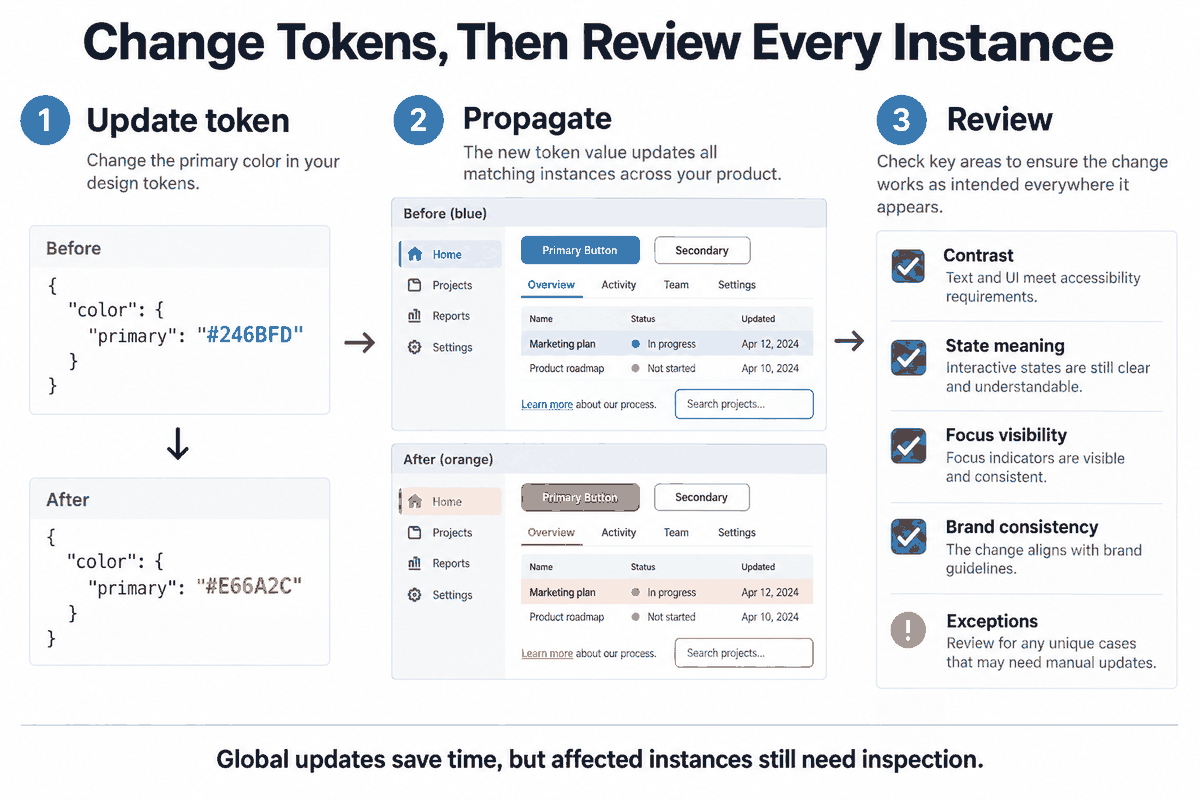
If you need to make changes to the layout, you can write adjustments directly in the chat panel or edit elements on the workspace canvas. For instance, if you want to update your brand identity from blue to orange, you can enter: Update the primary brand color to orange. The assistant will update the variable globally, changing the colors of all active buttons, navigation tabs, and selections across all views while preserving your component structures.
Step 5: Exporting and Developer Handoff
Once the interface meets your requirements, you can share the project link with developers for review. Because the visual elements are mapped directly to code components, the platform can output clean files ready for your repository. Developers can check properties or run the arco design build process to export structured React or Vue code, allowing you to move from mockup to production much faster.
Part 4. Protecting Layout Integrity in Enterprise Environments
Building software for enterprise environments requires systems that can handle dense data and complex user flows without breaking.
4.1 Handling Dense Layouts with Automatic Layout Constraints
Enterprise tools often include complex visual modules like nested tab layouts, deep filtering forms, or expansive data tables. Simple visual generators often struggle with these high-density layouts, resulting in overlapping text, broken boundaries, and misaligned buttons.
Paico addresses this by calculating structural boundaries as it generates layout blocks. If text exceeds a container's size, the system applies text-overflow rules; if a form contains too many input fields, it organizes them into responsive multi-column layouts. Using rules as functional boundaries ensures that generated mockups remain stable, even with complex requirements.
4.2 Supporting Custom Design Systems
While many teams use standard open-source frameworks for their projects, larger organizations often customize these frameworks to match their specific brand guidelines.
To support this, the platform allows you to upload custom design tokens and private asset configurations. By mapping your custom styles to the generation engine, you can ensure that any layout created by your product managers or designers automatically uses your team's specific colors, components, and variables, helping you keep your design library consistent across different teams.
FAQ
Q1: What is the main difference between pixel-based generators and Paico?
Visual-only generators output flat images without structured layers or component relationships. Because these files lack clean code connections, developers must recreate the designs from scratch. Paico, on the other hand, outputs structured, vector-based files. The platform references a real component library during generation, meaning every button, table, and form element is an editable component that you can modify, move, and export directly as development-ready files.
Q2: How reliable is the code output, and does it support typical build setups?
The exported output is designed to match the styling conventions of the underlying framework. When you run an arco design build, the system generates clean frontend components with organized style definitions, avoiding the bloated inline styles and absolute position coordinates common in automated tools. This clean structure allows developers to integrate the code directly into existing projects with minimal refactoring.
Q3: Can non-designers use this setup to build clean, consistent interfaces?
Yes, this is one of the main benefits of using a structured system. In traditional setups, non-designers often struggle to align elements or keep spacing consistent. By locking the design system's spacing rules, layout grids, and components in the background, the platform handles the layout logic automatically. Non-technical team members can describe their needs in plain language, and the system will output clean, structured interfaces that follow professional design standards.
Q4: How does using a pre-configured design system help teams avoid technical debt?
Using a standardized system helps prevent design drift, where teams write custom CSS classes for every new page. By basing your ai ui design generation on an established system of reusable components and tokens, you ensure every new screen uses the same foundation. This consistent setup makes your codebase easier to maintain, reduces duplicate styling files, and allows you to update your product's styling globally by changing a few core variables.
Conclusion
Automating your frontend design process using structured layouts helps teams spend less time on visual maintenance and more time on core features. This standardized approach provides a reliable path to build, share, and code your application interfaces. Set up your workspace at Paico to start creating consistent, production-ready mockups for your next project.

![[Full Review] Ant Design VS Material UI](https://pixso.net/assets/media/ant-design-vs-material-ui-e85acb360e96ca74.webp)