Scott
Spend five minutes exploring interface design forums, and you will notice how quickly visual trends come and go. One season we are stripping away every drop of color to make things look completely flat, and the next, we are stacking multiple drop shadows to mimic physical clay. Among the loudest movements in recent years are glassmorphism, neumorphism, and claymorphism. But as we navigate the landscape of UI design trends in 2026, which of these styles actually solve user problems, and which are just self-indulgent concepts? Understanding where these ui/ux design trends excel, and where they fail, is essential for building products that look clean and work well. Let's look at what separates these three styles and see which ones will stand the test of time.
Part 1: Visual experimentation and design workflows in Pixso
When you are building interfaces that rely on complex lighting, subtle shadows, and layered transparency, your design workspace needs to do the heavy lifting. This is where Pixso excels. As a collaborative UI and UX tool, Pixso offers the rendering speed, responsive layouts, and smart automated workflows needed to explore experimental ui/ux design trends without slowing down your computer or cluttering your design files.
If you have ever tried to align multi-layered shadows or manage background blurs across dozens of screens, you know how quickly traditional files can slow down. Pixso solves these practical headaches by optimizing how styles are created, applied, and updated.
With Pixso AI, you can generate beautiful background gradients, draft realistic copy, and build placeholder visual assets directly inside your project canvas. This means you do not have to leave your workspace to find inspiration or look for sample content when testing a new design idea.
Beyond asset generation, Pixso’s robust layout engine lets you nest frames and configure automatic resizing rules. If you change a text block inside a styled card, the rest of your layout adjusts naturally, maintaining your gutters and margins without any manual work.
You can save your complex shadow styles, frosted glass values, and custom colors into global style libraries. These assets can then be shared with your entire product team instantly.
When it is time to hand your design over to the engineering team, Pixso translates these visual effects into clean layout properties. Developers can inspect your project, see the exact blur values, and build your design exactly as intended.
Part 2: Under the hood: textures, shadows, and lighting physics
To use these styles successfully, we must look past the buzzwords and understand the physical lighting rules that define their visual properties. If you do not understand how these layers interact with light, your designs will look messy.
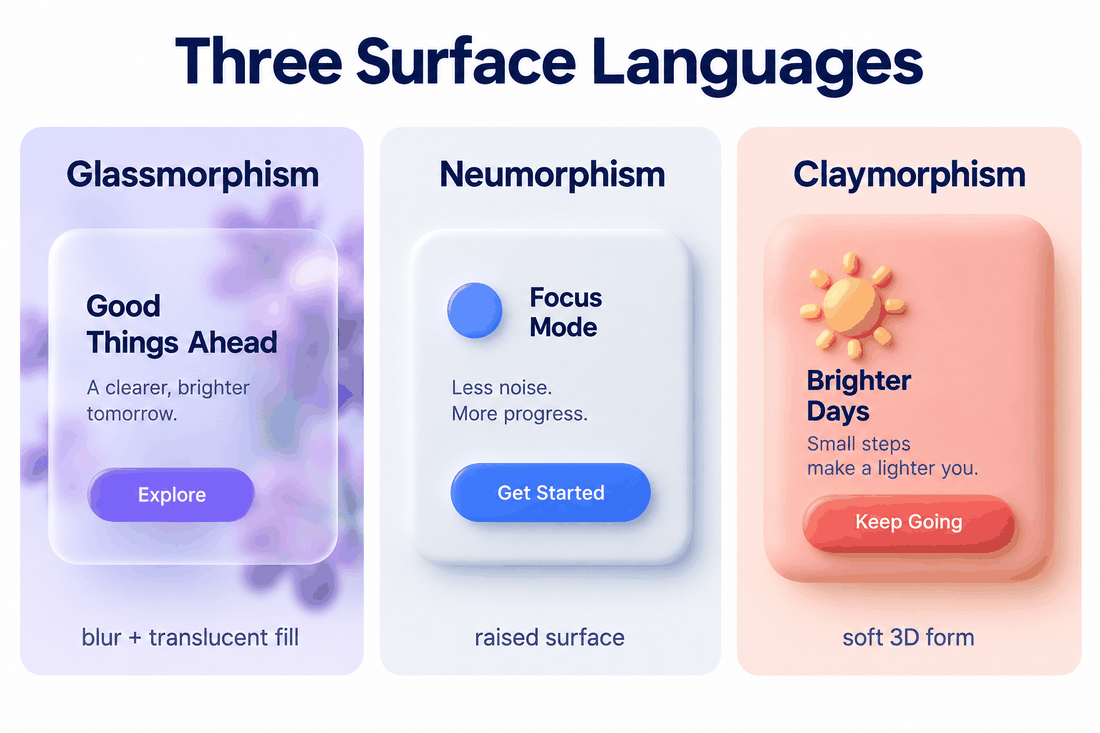
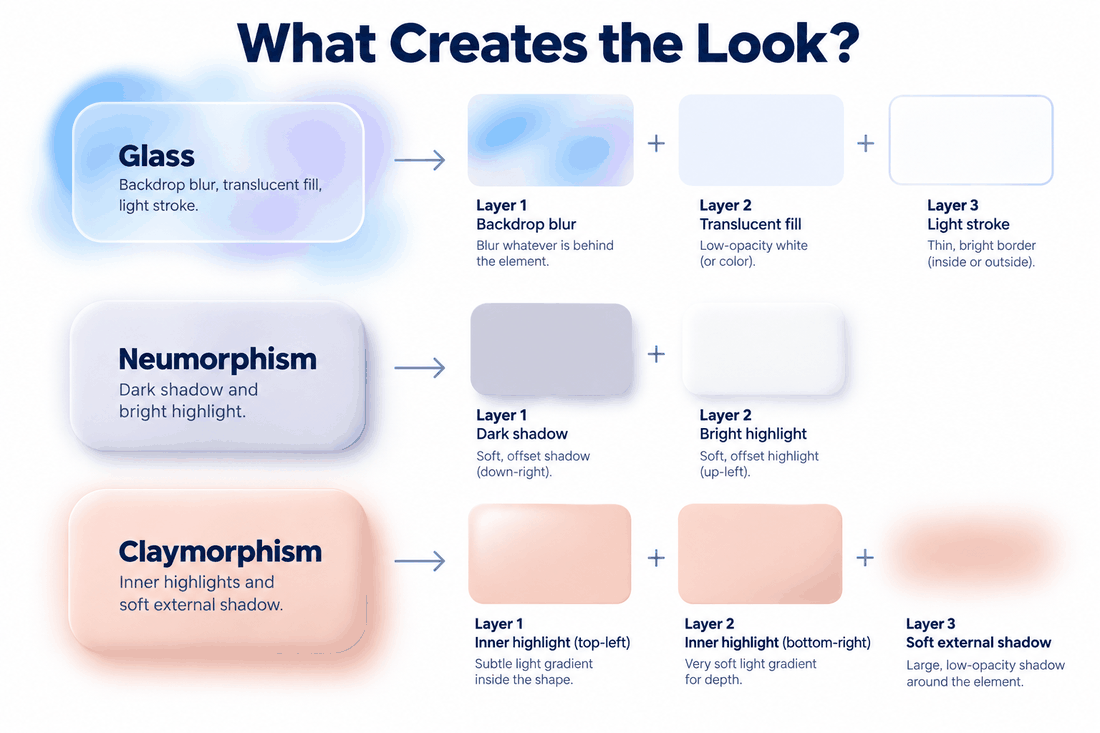
The design style known as glassmorphism simulates a sheet of frosted, semi-transparent glass floating over a colorful, dynamic background. This look is created by using semi-transparent white or black container fills combined with a high background blur value. This combination diffuses the colors underneath, making them look soft and out of focus.
To make the card pop against the background, a very thin, semi-transparent light stroke outlines the card's edge. This acts as a specular reflection, giving the impression of physical depth and making it clear which elements sit on top of the layout hierarchy.
In contrast, neumorphism treats the interface as a single, continuous, physical surface where buttons and cards are extruded from or pushed into the background. Rather than using layered sheets, this style is completely flat and relies on a monochrome look where the card color matches the canvas background color perfectly.
The shape is defined solely by a dual-shadow system. A soft dark drop shadow is placed on the bottom-right corner, and a bright soft highlight is placed on the top-left corner. This creates the illusion that a soft overhead light source is hitting a raised button, making it look tactile and physically integrated with the screen.
Then we have claymorphism, which moves away from flat or extruded surfaces entirely. This style is designed to look like soft, playful, inflatable 3D plastic objects. Instead of relying on external shadows alone, it utilizes nested inner highlights and shadows.
A bright inner shadow sits at the top-left of the card to mimic a soft reflection, and a dark inner shadow is applied to the bottom-right to represent core shadow depth. When combined with bright pastel background fills and soft external drop shadows, the card looks like a friendly, tactile toy hovering in space.
Part 3: Longevity analysis and scalability in UI design trends for 2026
As we evaluate where the industry is heading and map out the dominant UI design trends for 2026, it is clear that not all visual styles are built to last. Some have evolved into reliable, industry-standard frameworks, while others are proving to be temporary fads because they are too difficult to scale.
The design style known as glassmorphism is no longer a temporary aesthetic choice. It has matured into a highly functional layout standard backed by major operating systems, including macOS, Windows Fluent Design, and Apple’s visionOS.
Because it relies on transparency and background blur, it does not disrupt established design systems. It integrates easily with existing components, allowing you to create clean depth hierarchies that work over dynamic backgrounds. It is visually neutral, easy to maintain, and scales perfectly across large enterprise software platforms.
The future looks very different for neumorphism. Despite its popularity on design showcase sites, it has largely failed to survive in practical production environments. Because it relies on soft light and shadow play to define shapes, it is highly dependent on specific color balances and flat background surfaces.
This makes it incredibly difficult to scale across complex design systems, highly problematic for dark mode transitions, and difficult to manage across different screen widths. In modern workflows, it is widely viewed as an experimental styling choice that is generally avoided for major commercial products.
Meanwhile, claymorphism has carved out a highly stable, creative niche for itself. It is a popular choice for gamified educational sites, onboarding screens, Web3 platforms, and interactive mobile apps. Its friendly, cartoonish look makes complex systems feel approachable and playful, helping brands build strong emotional connections with their users. It is not meant for enterprise dashboards, but it remains a reliable choice for creative branding.
Part 4: Accessibility and usability: navigating the contrast trap
A beautiful interface is a complete failure if your users cannot navigate it. When evaluating modern design styles, accessibility must be your primary consideration. We must measure these styles against Web Content Accessibility Guidelines, or WCAG, to ensure they work for everyone.
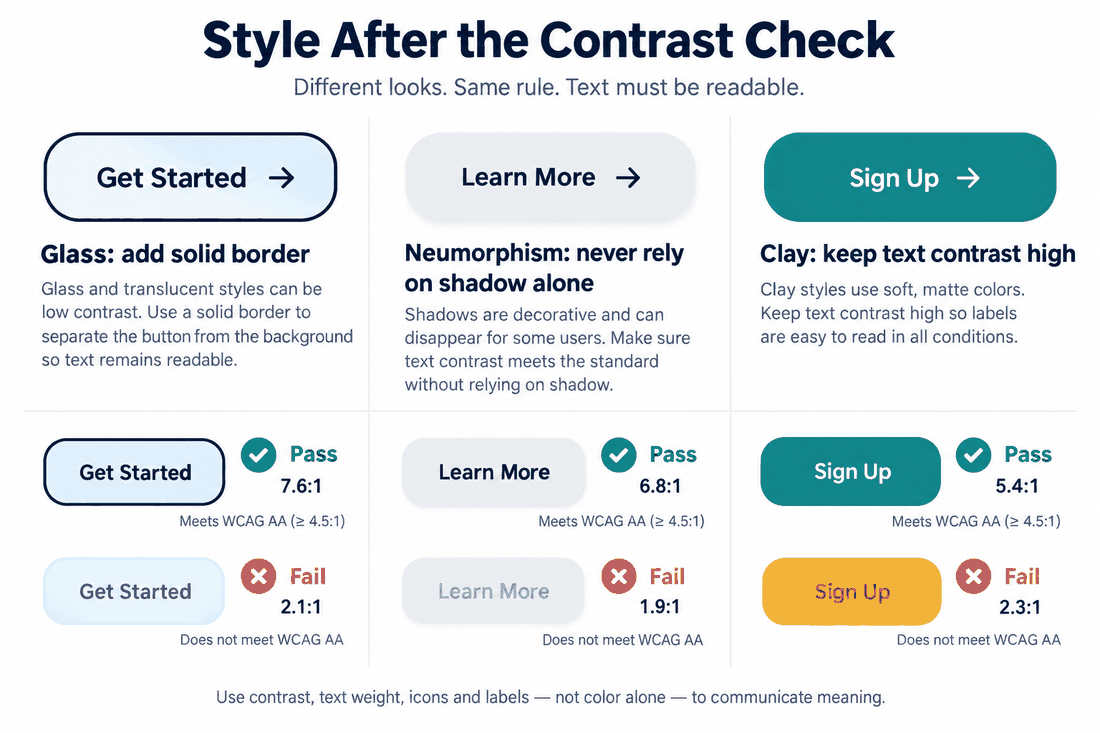
The greatest risk of using neumorphic layouts is the accessibility trap. Because the style relies on soft, low-contrast shadows to show interactive states, users with low vision, color blindness, or low-quality monitors will struggle to see where elements begin and end. If your buttons are only separated from the background by a tiny contrast shadow, you are locking out a massive segment of your target audience. Relying solely on shadows to denote interactive fields is a major usability risk.
To make glassmorphic cards accessible, never allow critical text to sit directly over a raw, unblurred, colorful background. Always ensure the backdrop blur is set high enough to diffuse the shapes underneath, and pair the frosted card with a solid, high-contrast border.
For claymorphic items, keep the typography simple and bold. Ensure that any interactive icons or labels maintain a high contrast ratio against their pastel backgrounds, and use clear outlines to make active states obvious.
Part 5: Scenario-based selection: choosing the right style for your product
Choosing the wrong style for your digital product can alienate your audience and damage your brand’s credibility. It is helpful to analyze your product's requirements and match them with the right visual style based on your audience, data density, and core goals.
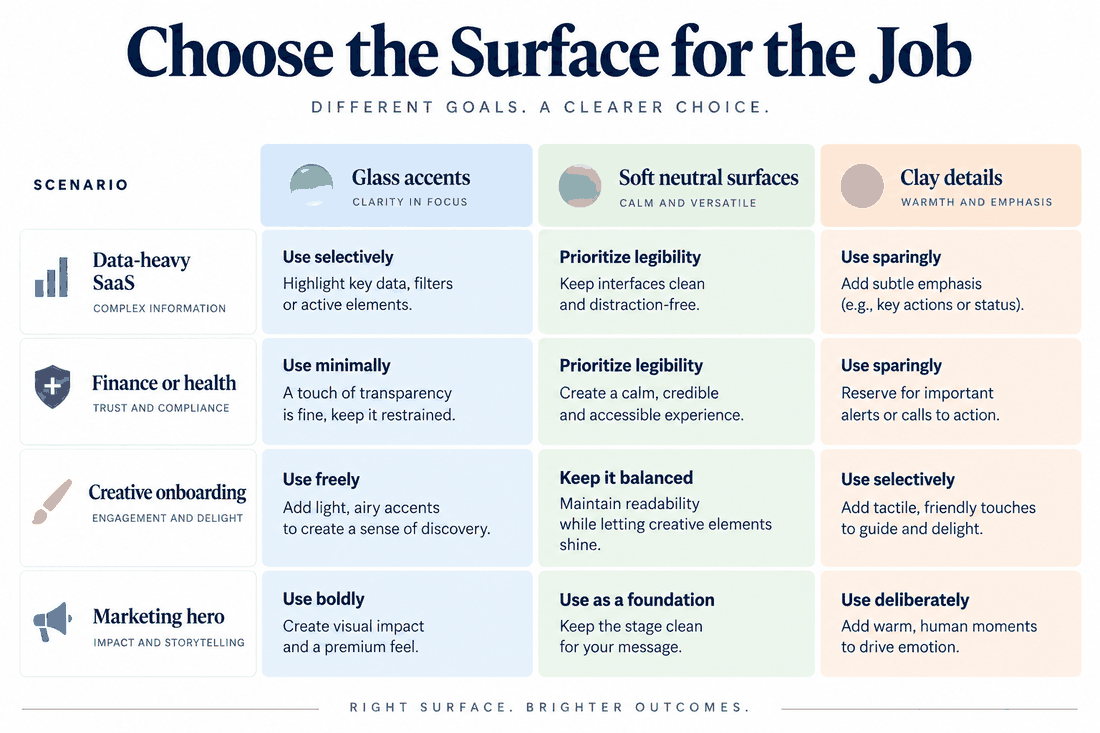
For SaaS platforms, analytics portals, and complex data systems, choose glassmorphic layouts. The ability to stack semi-transparent layers makes it easy for users to understand which windows, modals, or side panels are active. This visual stacking creates a clear hierarchy, helping users navigate dense interfaces without feeling overwhelmed. Avoid soft shadow layouts here, as they will quickly turn a data-heavy page into an unreadable, flat mess.
For finance apps, health platforms, and professional B2B software, stick to highly organized, clean layouts with subtle glass accents. These industries rely on trust, precision, and clarity. A playful, cartoony clay-style card can make a banking app feel like a toy, while a low-contrast layout can raise unnecessary concerns about data accessibility and readability.
For creative portfolios, Web3 sites, and mobile onboarding flows, claymorphic details are highly effective. The bright, friendly 3D elements add an emotional pop that sets your brand apart. Use these tactile cards for onboarding screens, feature showcases, and interactive elements where you want to encourage click-through rates. This approach makes your interface feel welcoming and interactive, which is ideal for engaging younger audiences and creative communities.
Part 6: Production realities, performance optimization, and common pitfalls
To make your designs easy to code and highly performant on actual devices, you must understand how these styles translate to web standards. Here is how to keep your implementation costs low while avoiding common design mistakes:
- Avoid Over-Stacking Blur Filters: Applying heavy background blur effects to dozens of cards on a single page will crush the device's graphics processing unit, leading to stuttery scrolling. Use glass styles selectively for primary containers like navigation bars, side sheets, and modal popups, rather than every individual button on the screen.
- Control the Blur Range: Keeping your background blur range between fifteen and thirty pixels is usually the sweet spot. Going higher doesn't improve the aesthetic and can cause rendering delays on older mobile devices.
- Use Shadows Sparingly: Complex claymorphic inner shadows can look muddy on smaller displays. Keep your card scales moderate and make sure your light directions align across all elements on your page to avoid a chaotic, inconsistent look.
Conclusion
As we evaluate the evolution of UI/UX design trends and shape UI design trends for 2026, choosing a visual style is about balancing aesthetics with usability, accessibility, and performance. While glassmorphism remains the most scalable and universally accepted style, claymorphism offers a reliable creative alternative, and neumorphism should be handled with extreme care. Whichever style you choose for your next project, platforms like Pixso provide the robust vector tools, intelligent AI assets, and developer-friendly handoff features you need to design beautiful, user-centered digital products with ease.