On this page

Scott
An audit-log interface should help an authorized person reconstruct an event: who acted, what they changed, which object was affected, when it happened, and whether it succeeded. A row reading “Updated settings” is rarely enough. It conceals the distinction between a completed change, an attempted change and a background process.
A reusable data-table component can supply the layout, but the log also needs an event contract. Decide what each field means and what the system can actually prove before choosing icons, severity colors or a detail-panel layout.

Start with a question the log should answer
Consider a fictional support application. An administrator is investigating why new conversations now go to Billing rather than General. Routing rule RR-17 appears to have changed. The useful question is not “How many events happened today?” but “Which recorded action changed this rule, and what did it change?”
Use two deliberately different events in the design:
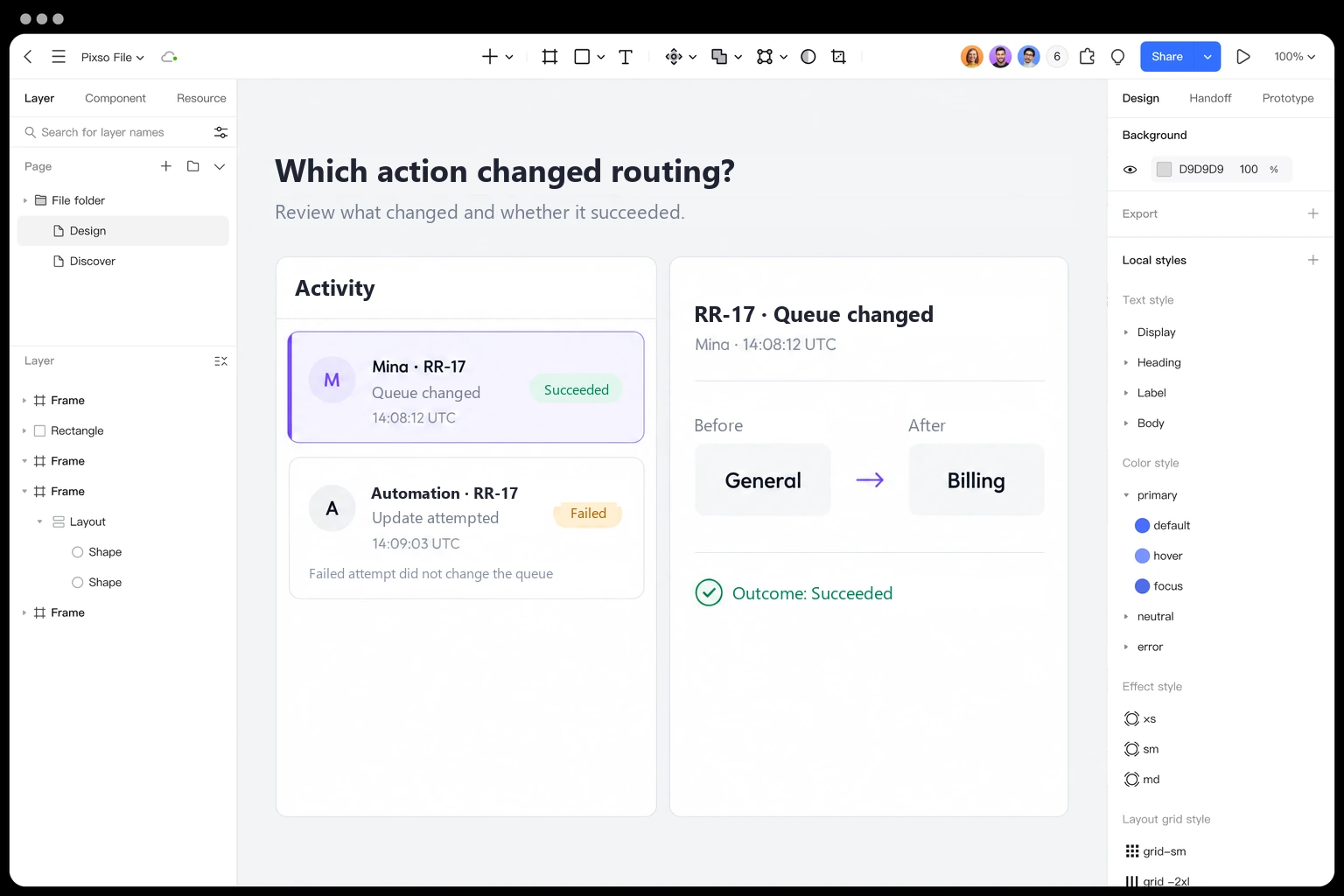
- At 14:08:12 UTC on 6 October 2026, administrator Mina changed RR-17's destination from General to Billing. The change succeeded.
- At 14:09:03 UTC, Routing automation attempted another update to RR-17. The attempt failed, and the destination remained Billing.
The second event must not read like another successful change. It also does not undo the first. Keeping those distinctions visible is more important than making every row the same short sentence.
Write a row that separates actor, action and object
A concise event sentence can provide the scanning layer: “Mina changed routing rule RR-17.” Supporting fields show outcome and time. The detail view supplies the permitted changes and event reference. Avoid forcing the main list to display every raw attribute.
| Field | Example | Meaning to preserve |
|---|---|---|
| Actor | Mina · administrator | The identity attributed to the action, not the person viewing the log. |
| Action | Changed routing destination | A readable action corresponding to a defined event type. |
| Object | Routing rule RR-17 | A stable record reference, even if its display name later changes. |
| Outcome | Succeeded | The recorded result, distinct from an attempt or a queued request. |
| Event time | 6 Oct 2026, 14:08:12 UTC | The time assigned to the event by the stated source. |
| Event reference | EV-2041 | A reference for investigation and support, not an additional editable object. |
All names, IDs and events here are invented for the design exercise. For a real log, the source determines whether an actor is a person, service account or automation. Label that distinction rather than substituting a human avatar for every event.
GitHub's organization audit-log documentation is a concrete example of separating actor, action, affected context and time. Its defined search qualifiers also illustrate why the interface should expose filters that the underlying event data can reliably support, not promise unrestricted search that does not exist.
Show a change only when the event supports it
For EV-2041, the useful detail is short: Destination changed from General to Billing. Show the field name once, label the old and new values, and make the direction readable without color. A narrow layout can stack Before and After vertically while retaining both labels.
Do not manufacture an old value by comparing the current record with an unrelated snapshot. If the event only records that the rule was updated, say which detail is unavailable. Current state answers “What is true now?”; event detail answers “What was recorded about this action?” They are not interchangeable.
For the failed automation event, show the attempted action and recorded failure reason at the appropriate level of detail. Do not present an uncommitted proposed value under an unqualified “After” heading. A separate “Requested change” label can be useful when the source includes that information and the viewer is permitted to see it.
A change view also needs distinct representations for empty, removed, unknown and restricted values. An empty string can be a legitimate value. “Not recorded” means the event lacks data. “Restricted” means the viewer cannot see it. Displaying all three as a dash creates false certainty.
Make time and range explicit enough to investigate
Relative labels such as “2 minutes ago” help with recency, but an investigation needs a precise timestamp. Provide the date, time and time-zone context in an accessible, reachable place. Do not make a mouse-only tooltip the sole source of exact time.
If ingestion can be delayed, distinguish event time from the time the log received the event. Agree on the default sort and how ties are resolved. A newly received event may belong earlier in the sequence. The UI should not imply that display order alone proves causality between two changes.
Show the active time range and the relevant zone beside the filter. “Today” can mean different intervals to colleagues in different regions. Where a filter uses exact boundaries, document whether the end is inclusive or exclusive in the implementation contract and render a readable interval for users.
Keep filters when someone opens an event and returns. Preserve their place in the results where feasible, so investigating EV-2041 does not force a fresh search. When new events arrive, avoid unexpectedly moving the row they are reading.
Design the route from event row to useful detail
In a Pixso file, create an event table for the support application and an adjacent detail panel for EV-2041. Keep RR-17, Mina, 14:08:12 UTC and General → Billing consistent between them. Add the later failed automation attempt as a separate row with a different outcome, not merely a different icon.
Make the selected row and the panel's event identity easy to associate. Test a narrow-screen version in which the detail becomes a focused view with a clear return path. Ask a reviewer which action changed the destination and whether the later attempt succeeded. If they have to infer either answer from row color, improve the text.
Design an event-to-detail audit view in Pixso →
Do not turn missing history into “nothing happened”
There are several reasons an event list can be empty. The current filters may match no events. The selected period may be outside retention. The viewer may lack access. A source may not have reported events, or the service may have failed to load them. These conditions need different explanations.
“No events match these filters” is appropriate only after a successful query within the available scope. For a retention boundary, explain the available period rather than presenting an apparently complete empty history. For unavailable data, offer the supported recovery action without claiming that there was no activity.
A restricted view should not leak the existence or identity of hidden resources through counts, filter options or a supposedly harmless preview. Coordinate visible details with the permission model. The permission UX guide covers the related distinction between a missing resource and one the current user cannot access.
More detail is not always better evidence
The OWASP Logging Cheat Sheet distinguishes logging purposes and recommends event attributes that support investigation. It also identifies data that generally should not be recorded directly, including passwords, access tokens and sensitive personal information. A visually rich diff is not a reason to include those values.
Apply the same boundary to details and exports. Hiding a field in the table while exposing it through Download CSV does not protect it. Where masking is appropriate, show that a value is restricted rather than suggesting the underlying value was blank. Have security and data owners define what each audience may inspect.
Keep history and recovery actions distinct. A log entry saying that a rule changed does not necessarily offer a safe one-click rollback. The record may have changed again, and restoring an old destination may require permissions and current validation. Link to the authorized management workflow only when that action is actually supported.
Judge the interface by what it lets someone establish
For RR-17, the administrator should be able to identify the successful change, read the allowed before-and-after values, distinguish the later failed attempt, and state the period and scope they inspected. They should also recognize any unavailable detail rather than fill the gap with an assumption.
A readable log does not by itself prove completeness, immutability or regulatory compliance. Those depend on collection, storage, access and operational controls. The interface contributes something narrower and valuable: it helps people interpret the evidence the system actually has.
Design an audit log around evidence
A trustworthy audit log lets a reviewer answer who changed what, when it happened, and whether the record is complete. Start with an event row that names the actor, action, target, timestamp, and result; move technical details into an expandable panel instead of hiding the decision behind a generic label.
| Event state | Visible row | Detail view |
|---|---|---|
| Success | Actor, action, target, time | Before/after values and source. |
| Partial | Completed and skipped counts | Rows that need a retry. |
| Failed | Failure reason and next action | Request id and technical context. |
| Unknown | Last known state | Why the event cannot be confirmed. |
In Pixso, prototype the collapsed and expanded rows together, then hand off the field names and empty states with the component.