Scott
The rise of artificial intelligence has fundamentally shifted how product teams approach user interface design and front-end development. Rapid prototyping engines have gained substantial traction by demonstrating how text prompts can instantly output working components. Developers and designers have increasingly relied on these platforms to quickly visualize and generate web structures.
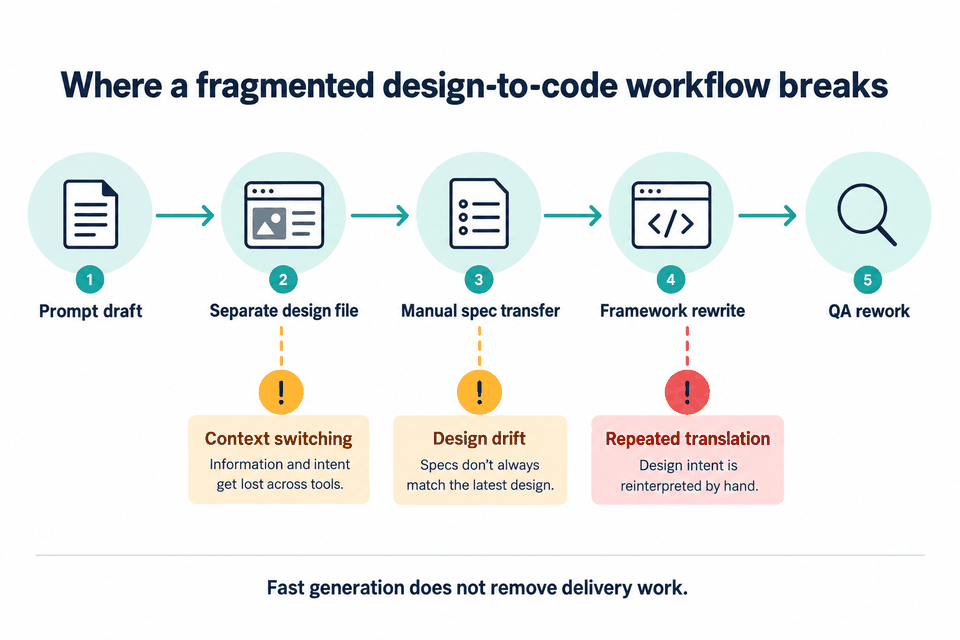
However, as projects move past initial mockups, teams often hit a wall. When isolated code snippets must be adapted for different tech stacks or synchronized with a central design system, a fragmented pipeline emerges. This article explores the limitations of disjointed generation pipelines and explains why switching to an integrated platform is the logical step to optimize your design-to-code workflow.
Part 1: Why Teams are Searching for a Practical v0 Alternative
Generative code tools are highly effective for producing quick, isolated component drafts. Yet, when scaled to professional software development, several workflow bottlenecks become apparent. Understanding these operational gaps is the first step toward building a more stable system.
The Problem of Tool Fragmentation
In a typical modern setup, designers build interfaces in specialized design tools like Figma, while developers utilize external generators to spit out code blocks. This constant context-switching creates a disjointed workspace. Teams are forced to bounce back and forth between separate apps, manually copying specifications, recreating layouts, and struggling to maintain a single source of truth.
Technology and Framework Lock-in
Many popular AI-powered UI generation engines are built to support a single ecosystem—most commonly React paired with Tailwind CSS. While this is great for modern web apps, it leaves teams that use Vue, Angular, Flutter, or native mobile languages in a difficult position. Having to manually refactor React components into other code frameworks defeats the purpose of an automated pipeline.
Loss of Design Precision and System Integrity
When an AI model generates raw front-end code from a text prompt, designers lose direct visual control over the layout layers. If a spacing value, typographic weight, or color variable needs adjustment, it must be edited within the code. This makes it incredibly tedious to align the generated output with an existing design system, often leading to visual inconsistencies.
Part 2: Introducing Pixso as a Complete Design-to-Code Platform
To address these limitations, product teams need a system that integrates collaborative design tools with production-ready code outputs. This is where Pixso enters the picture as a comprehensive v0 alternative. Pixso is a collaborative UI/UX design tool designed to support entire product development lifecycles in one place.
By combining vector editing, interactive prototyping, built-in whiteboarding, and advanced AI-driven generation, Pixso allows product managers, designers, and developers to work on the same canvas. It acts as an integrated workspace that keeps visual design files and developer handoff data aligned.
Here is how Pixso stacks up against traditional, fragmented setups:
| Capability | Fragmented Setup (e.g., v0 + Design Tool) | Pixso Integrated Solution |
| Workspace Setup | Multiple distinct apps with different subscriptions | One platform for whiteboards, design, and code |
| Output Formats | Strictly locked to React/Next.js architectures | Vue, React, Flutter, CSS, and HTML |
| Design Integrity | Generates flat code; difficult to edit visually | Full vector control; canvas-native AI generation |
| Hosting & Security | SaaS cloud-only; public data processing | On-premise deployment; private secure hosting |
| Cost Structure | Multiple subscription fees per user seat | Single unified fee; flexible seat allocation |
Part 3: Consolidating the All-in-One Workflow
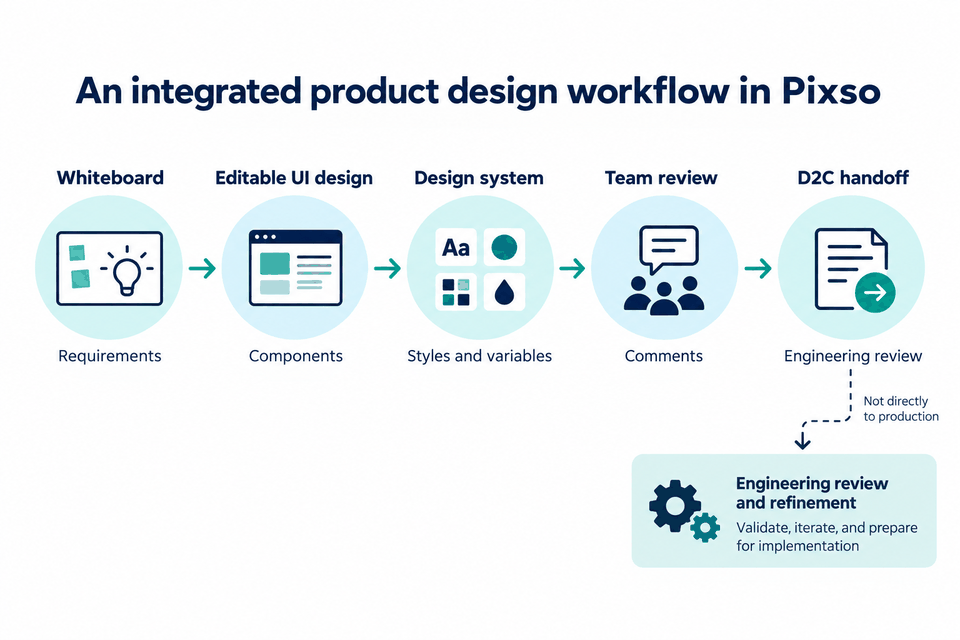
A primary benefit of choosing Pixso is the elimination of fractured pipelines. Instead of juggling multiple applications, teams can manage their entire workflow inside a single interface.
Integrating Whiteboards, UI Design, and Prototyping
Before writing any code, product teams need to align on requirements. Pixso features a built-in whiteboard where teams can wireframe, brainstorm, and outline user journeys.
From the same canvas, designers can instantly transition to high-fidelity UI design and build interactive prototypes. This eliminates the need to export assets to external testing platforms.
Connecting AI Generation to Code Exports
Instead of generating layout structures on an external web page and then figuring out how to import them into your design system, Pixso brings generation directly to the design environment.
You can use AI assistance to draft layouts, refine them visually with precise vector controls, and then inspect the resulting code on the same screen. This unified system removes the friction of maintaining two separate environments for design and development.
Part 4: Multi-Framework Output to End Tech Stack Lock-In
One of the biggest pain points of working with first-generation code generators is their reliance on specific front-end architectures. While React and Tailwind CSS are popular, they do not fit every enterprise project.
Breaking the React Monoculture
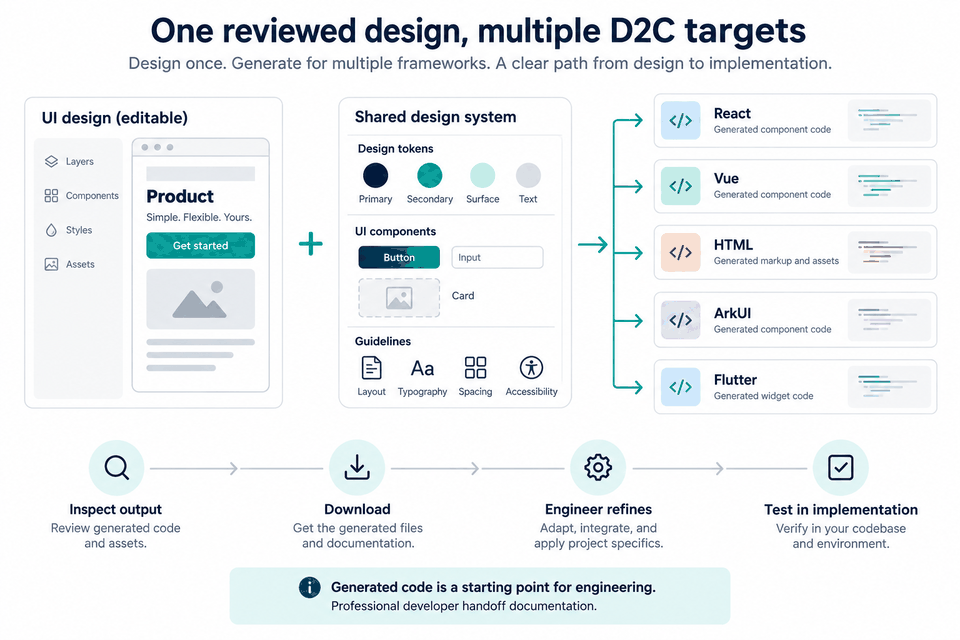
Pixso is built to support a much broader development ecosystem. Rather than tying your operations to React or Next.js, Pixso provides clean design-to-code outputs for several major frameworks, including:
- Vue.js: Clean, modular components ready for Vue web projects.
- Flutter: Structured layout files to help you accelerate native iOS and Android application development.
- React: Production-ready components styled for modern web architectures.
- HTML & CSS: Standard, clean layouts that can be adapted for any custom stack or legacy system.
Versatility Across Diverse Projects
Whether your organization is maintaining a cross-platform mobile application, a progressive web application, or a legacy website, Pixso ensures your D2C output is compatible. This level of versatility ensures you are never forced to change your development framework just to fit the limitations of your design tools.
Part 5: Native Design System Linkage and Controllable Vector AI
An automated layout is only useful if it matches your product’s design standards. If an AI generator ignores your design system, it creates more work for your front-end developers, who must clean up mismatched styles.
Complete Parse of Tokens and Interactive States
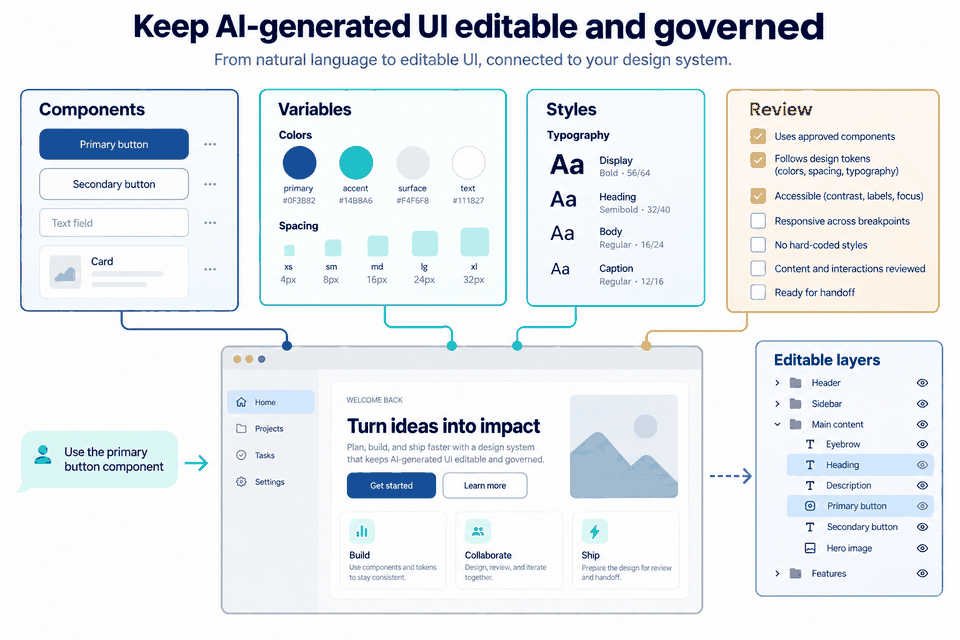
Pixso’s design-to-code engine fully understands the parameters of your design systems.
- Design Tokens: Colors, typography scales, and padding definitions are translated into clean variables rather than hard-coded inline values.
- Component Variants: Complex components with multiple states—such as interactive hover menus, toggle switches, or dropdowns—are parsed correctly.
- Automatic Synchronization: When a designer adjusts a button’s padding or changes a brand color in the design library, the changes automatically update the code parameters inside the developer inspection panel. This keeps styles uniform and reduces manual rework.
Canvas-Native, Controllable AI
Many standard code generators output layouts as flat code, making manual visual edits incredibly tedious. Pixso approaches generative AI differently by keeping designers in control.
- English Prompt-to-Vector UI: Designers can enter plain English descriptions directly inside the canvas to generate fully layered, scalable vector interfaces.
- Complete Visual Control: Because the generated output is composed of standard vector paths and layers, designers can easily edit, resize, and restyle the components. This prevents generic, AI-generated designs and ensures unique user interfaces.
- No Hidden Credit Costs: Pixso’s built-in generative AI runs without complex, individual credit-deduction structures. This predictable model allows your team to experiment and iterate without worrying about unexpected charges.
Part 6: Enterprise Compliance, True Collaboration, and Long-Term Value
Deploying new software tools across an enterprise requires a careful look at data security, teamwork features, and cost. Pixso is built to handle the security and budgetary demands of modern business operations.
Localized On-Premise Deployment
For organizations handling sensitive user data, public cloud platforms present compliance risks. Pixso offers secure private deployment models.
- Data Sovereignty: Host Pixso on your own private cloud or local intranet, keeping your design files, intellectual property, and code bases completely secure.
- Regulatory Compliance: Designed to meet strict standards like GDPR and HIPAA, Pixso includes Single Sign-On (SSO) integration, fine-grained access controls, and administrative audit logs to ensure your files remain secure.
Real-Time Developer Handoff
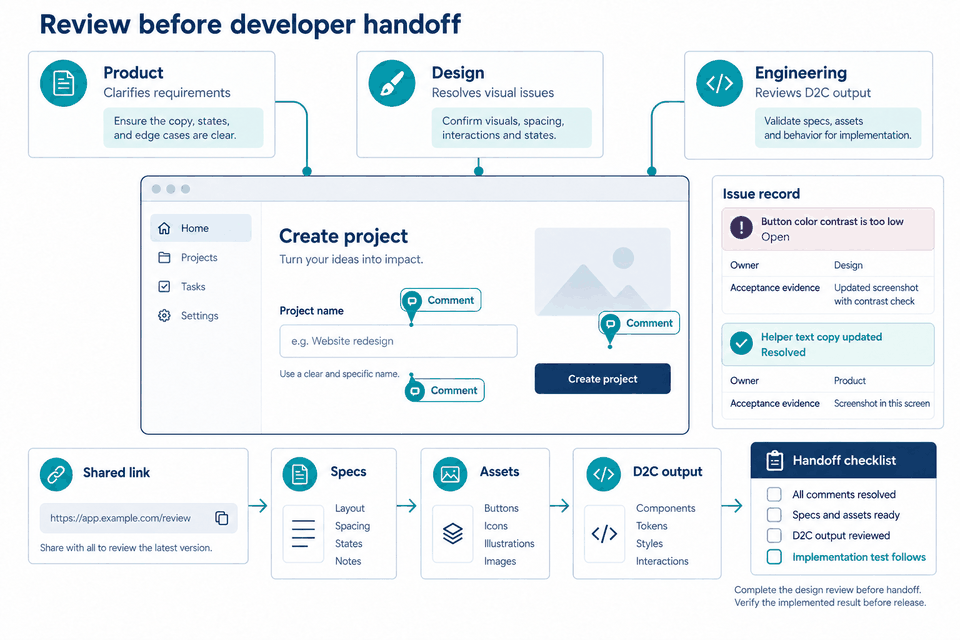
A successful D2C pipeline requires seamless communication across your team. Pixso features real-time, multiplayer collaboration where designers, developers, and product managers can work together. Developers can easily inspect layout specs, export assets with a single click, and copy clean styling components directly from the browser.
Predictable, Low-Cost Subscriptions
Combining multiple single-purpose tools, such as a whiteboard app, a design vector tool, a separate prototyping program, and an external code generator, leads to high software costs. Pixso offers an all-in-one subscription with clear pricing and no hidden fees. For teams choosing on-premise hosting, Pixso supports flexible user seat scaling, offering a lower total cost of ownership compared to maintaining a disjointed toolset.
Conclusion
While early text-to-code generators changed how we think about fast prototyping, they often complicate structured production environments. Transitioning to an integrated platform like Pixso helps teams build a reliable, secure, and flexible D2C pipeline. By combining design tools, native system linking, multi-framework code exports, and in-canvas AI, Pixso simplifies the entire product development process. Explore how Pixso can help you save time, improve collaboration, and build better digital products today.