Scott
Undo and redo are safety controls for creative work. They should make the last reversible change obvious, preserve the user’s place, and explain what will be restored. Begin with a clear history model, then test compound actions and collaboration conflicts. A shared UI design collaboration workspace helps teams review the before-and-after states instead of debating an abstract rule.
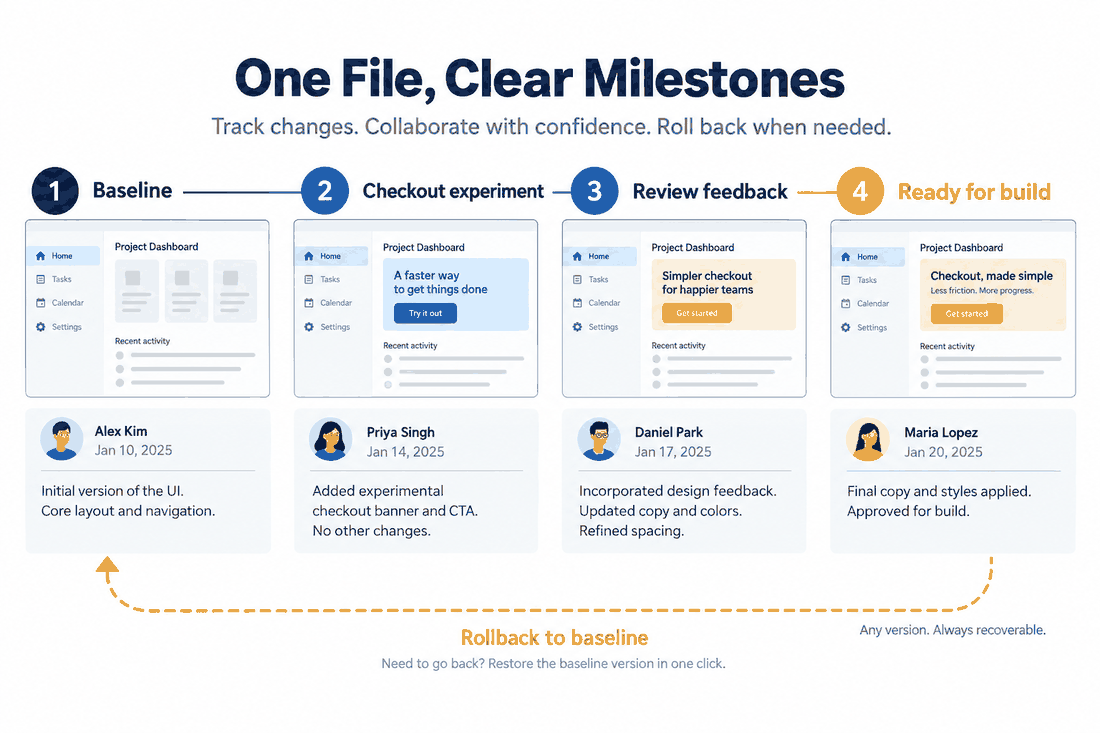
Model the change history users can predict
Users do not need an implementation diagram; they need to know what one undo will remove. Group actions by the user’s intention, not every low-level property update. “Move card and update its label” can be one history step when both changes came from a single gesture. Keep the label concrete enough to identify the affected object.
- Show the action name and the object or area it affects.
- Keep undo and redo available while the history has a valid next state.
- Do not silently discard a branch when a new edit is made; explain what happens.
Design recovery for destructive or expensive edits
For deletion, bulk replacement, or a long-running generation, offer a reversible path close to the action. A toast can restore a small change; a confirmation dialog is useful when the consequences are broad or the action cannot be undone. Do not use a confirmation dialog to compensate for an unclear button label.
When undo restores a previous state, keep the viewport, selection, and focus stable whenever possible. If the user cannot see what changed, show a short highlight or a before-and-after preview. Recovery should reduce investigation, not create a second mystery.
Handle branches, shortcuts, and collaboration
Keyboard shortcuts should match the visible controls and work with the user’s platform conventions. If a new edit after undo creates a new branch, tell the user whether redo is still available. In a collaborative file, distinguish a local undo from reversing another person’s change; never imply that a personal undo rewrites the whole team’s history without confirmation.
- Test a single edit, a grouped edit, and a bulk edit.
- Test undo after switching frames, pages, or selection.
- Test a concurrent change and a reconnect after offline work.
- Test the empty-history and end-of-history states.
Make the branch rule visible
Consider a user who moves a card, presses Undo, and then changes its title. The title edit starts a new branch. If the earlier move is no longer available through Redo, say so in the history and keep the restored card position intact; if both branches can be recovered, show which one the next action selects. Test the sequence as a visible story: move, undo, edit, inspect Redo, reload, and reconnect. A user should never discover the branch rule only after losing work.
Check the boundary states
| State | Expected feedback |
|---|---|
| Empty history | Undo is unavailable and no stale action label is shown. |
| End of history | Redo is unavailable after the newest state is restored. |
| Reconnect after offline work | The user can tell which local changes were kept, merged, or need review. |
| Concurrent edit | Undo identifies the local change and does not imply that a teammate’s edit was erased. |
Review the recovery path in the prototype
Use a prototype to walk through the accidental-change story: make the edit, undo it, verify the restored state, and redo it. In Pixso, place the history states beside the main screen and leave a comment that names the expected recovery result. This gives reviewers a concrete path to inspect before the control is handed to development.
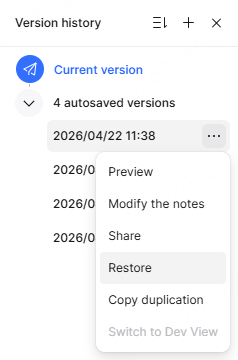
Measure success by recovery confidence: can someone identify the affected change, restore it, and continue without losing unrelated work? If not, simplify the history language or move the recovery affordance closer to the consequence.