On this page

Scott
A remote lookup field contains three things that can look deceptively similar: the text someone has typed, the suggestion they are exploring, and the record they have actually selected. Keep those states separate. Otherwise, an invoice can appear to name one customer while submitting another customer's ID.
Define the form's field contract first. In this example, a billing-customer field accepts one existing customer ID, not arbitrary text. Search helps the user find that record; typing a convincing name is not itself a valid selection.
Design for identity, not only matching words
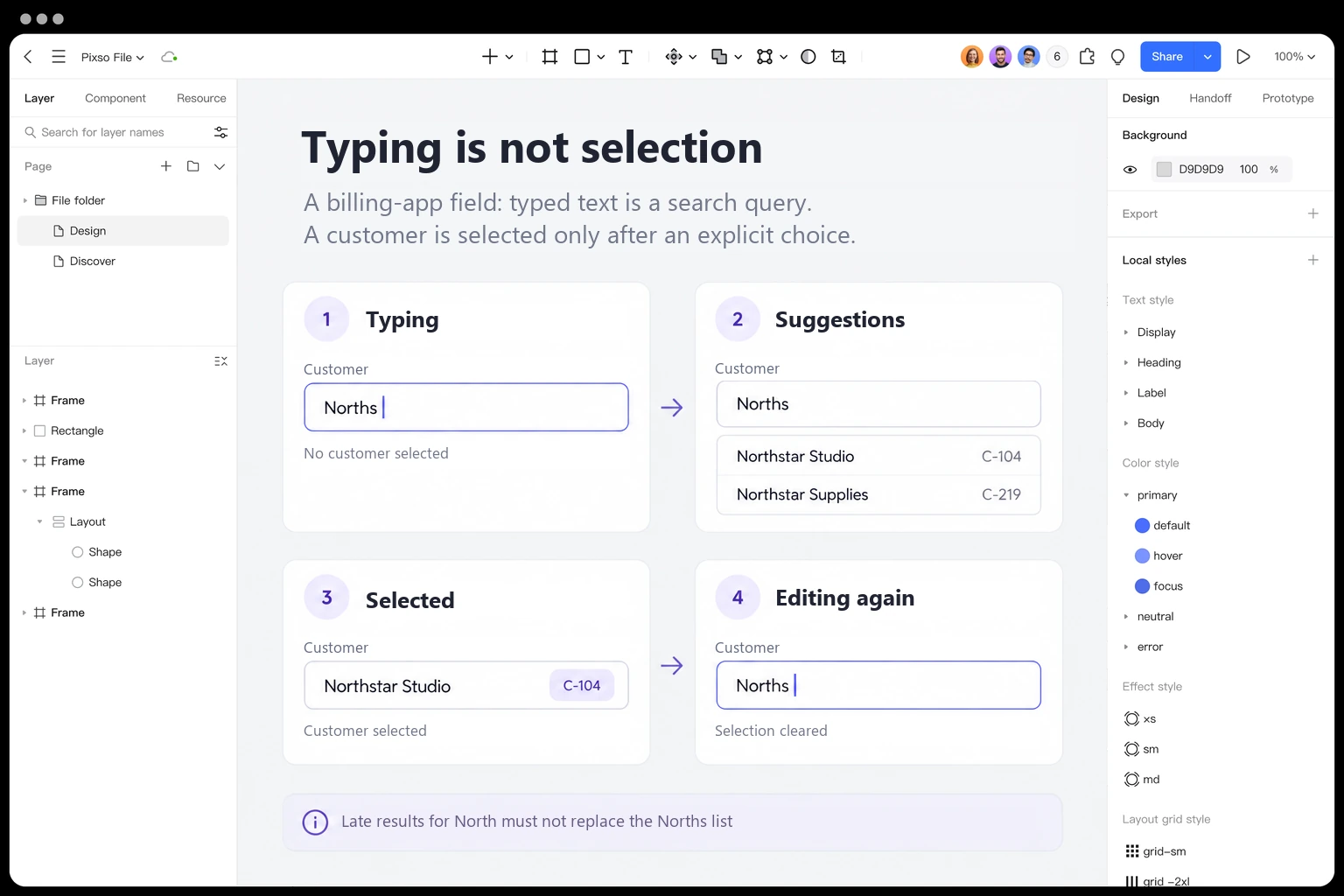
Imagine a fictional billing application with two customers: Northstar Studio, ID C-104, and Northstar Supplies, ID C-219. The person preparing an invoice types “North.” Both customers match. The dropdown needs enough permitted context to distinguish them before one is chosen.
Show the customer name prominently and a useful secondary identifier beside it. Here the customer ID is sufficient for the exercise. In a real product, a permitted location or account reference might be more recognizable. Avoid exposing private details just to make search easier, and do not rely on a tiny avatar to distinguish similar records.
Once Northstar Studio is chosen, the field should represent C-104 clearly. The display name can change over time; the relationship belongs to the selected record. Product and engineering teams need to agree how that identity is stored and what happens if the record later becomes unavailable.
Separate query, active suggestion and committed selection
| State | What is visible | What the field may submit |
|---|---|---|
| Editing a query | North, with matching suggestions when available. | No customer ID has been selected. |
| Exploring a suggestion | Northstar Studio is the active option in the popup. | Exploring alone does not commit C-104 under this design's manual-selection rule. |
| Selection accepted | Northstar Studio, with its identifying detail. | C-104, subject to final server validation. |
| Editing after selection | The user changes the displayed text to search again. | The previous C-104 selection is cleared; a new record must be selected. |
The last row prevents a subtle mismatch. If the user replaces Studio with Supplies but the form quietly retains C-104, the interface and submitted data disagree. Either make the selected record an explicit object with a Change action, or specify exactly how editing invalidates the previous selection. Do not leave the behavior implicit.
The WAI-ARIA combobox pattern distinguishes editable fields, allowed values, and manual or automatic autocomplete behavior. This example chooses manual acceptance for a single record. That choice is not a specification for every multi-select token field or command menu.
A suggestion list belongs to a particular query
Remote search adds a timing problem. The user types “North,” triggering request A, and then adds an “s,” triggering request B for “Norths.” If B finishes first and A finishes later, the field must not replace the current list with stale results for North.
Record this sequence in the design's interaction notes. The visible suggestions and result count must describe the current query. Engineering may cancel obsolete requests, ignore outdated responses, or use another reliable strategy; the design should specify the observable result rather than assuming that a loading spinner solves the race.
Choose whether previous results remain visible while the new query loads. Keeping them can preserve context, but only if they are clearly not presented as a fresh answer to the new query and cannot lead to accidental selection. Clearing them can be simpler for a short customer picker. Neither choice justifies showing a completed “No customers found” state before the request has returned.
Debouncing can reduce unnecessary requests, but no single delay is right for every data source, device and task. Coordinate response behavior with engineering and test realistic latency. A polished immediate response in the design file should not be the only condition reviewed.
Zero matches and an unavailable service need different actions
For a completed search with no permitted matches, use precise wording such as “No customers match ‘Norths’.” Keep the query available to edit. An unavailable search service should instead say that customers could not be loaded and provide a retry path if supported. Failure does not prove that the customer does not exist.
Do not add “Create customer” merely because the result list is empty. Creating a record is a separate operation with its own permissions, required fields and duplication rules. If the billing application supports it, keep that action distinguishable from selecting an existing customer and return only after creation has been confirmed.
Likewise, a missing result may reflect access restrictions. Avoid disclosing hidden records through error messages. The lookup should search and return only information the person is authorized to receive; a disabled suggestion is not an authorization boundary.
Make acceptance and dismissal predictable
Document the chosen keyboard behavior alongside the states. In the manual-selection design, arrow keys explore suggestions, Enter accepts the active suggestion, and Escape closes the popup without committing a different record. Tab moves through the form according to the chosen implementation pattern rather than turning every suggestion into a separate tab stop.
The APG manual-selection example is a reference for interaction and semantics, not a production-ready accessibility certificate. Test the final component with the browsers and assistive technologies your product supports.
Keep normal text editing intact. Cursor movement, selection, paste and input-method composition must remain usable. In particular, do not treat every intermediate composition keystroke as a completed customer name or let a shortcut accept a suggestion while the user is still choosing characters.
When results update, avoid unexpected focus movement. An active suggestion that disappears needs a defined reset behavior, not a highlight left on a different record at the same screen position. Announce loading, results or failure appropriately without reading every transient request as a separate interruption.
Review the field as a sequence in Pixso
Create four states of the billing-customer field in a Pixso file: typing North, current suggestions, selected Northstar Studio / C-104, and editing again with no committed ID. Reuse the field's layout while changing the state-specific text and feedback. Keep Northstar Supplies / C-219 visible in the suggestions so that reviewers must make a real distinction.
Beside the frames, add the North → Norths request sequence and mark the late North response as obsolete. That annotation belongs to the proposed billing application's behavior, not to the Pixso editor's own features. Ask a reviewer what ID would be submitted at each point, and whether typing Supplies is enough to change the customer.
Design a customer lookup flow in Pixso →
Selection is not the last validation
Between selection and submission, a customer can be archived, merged or made unavailable to the current user. The final operation still needs server-side validation. If C-104 is no longer valid for this invoice, explain the specific recoverable problem and keep the other invoice fields intact where policy permits.
A display-name refresh should not silently choose a different ID. A failed refresh should not erase a valid selection unless the product rule requires it. Define whether the UI can keep showing a last-known name while verifying the record, and make any uncertainty visible before committing the invoice.
Review the lookup with two similar names, a slow response, an out-of-order response, no matches, a service failure, keyboard selection, editing after selection and an unavailable record at submit. These cases all answer the same question: does the visible field accurately represent the record the application is about to use?