Scott
For solo developers and indie creators, validation speed is everything. Getting a high-quality product mockup or landing page live is the fastest way to see if an idea actually flies. But there is a common belief that you have to master complex visual tools like framer to build a polished, high-end web page. In reality, the complex layer hierarchies and component variant logic in these systems can eat up days of your time.
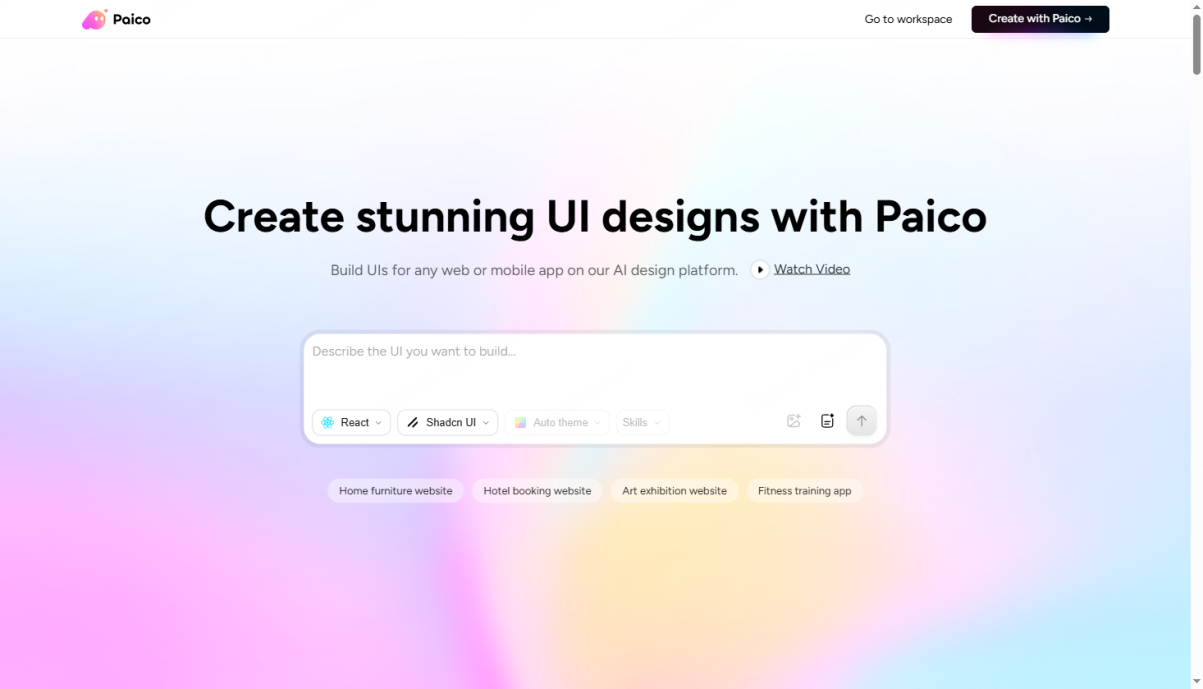
Instead of losing hours in pixel-level vector tools, full-stack creators can now use a modern, conversational ai website builder to get things done. As one of the most practical framer alternatives on the market, Paico lets you generate clean vector files and responsive code through plain text. It acts as an intelligent ai ui generator, cutting down the time it takes to go from a product concept to raw code.
Part 1. Why traditional design workspaces can slow you down
When you are running a solo software business, your biggest competitive advantage is speed. But when it comes to launching a marketing site or building an application layout, setting up professional design software can quickly turn into a massive time sink.
1.1 The Complexity and Hidden Learning Curves
Even though visual tools like framer produce great results, their interfaces are still modeled after professional, heavy vector software. If you don't have a formal design background, just setting up a basic homepage means spending days figuring out Flexbox, absolute positioning, nested layer directories, and hover state variables. This learning overhead takes you away from your actual job: building the core logic of your software.
1.2 The Interaction Design Bottleneck
Slick, modern interactive web design animations are great for making a brand look trustworthy. But configuring parallax scrolling, micro-interactions, and transition speeds inside traditional design workspaces requires constant pixel-level adjustments.
When you are already juggling database management, API routes, and customer service, you simply don't have the bandwidth to spend hours adjusting timing curves. Many developers end up compromising on stiff, static landing pages that fail to convert visitors.
Part 2. Why this new platform fits the solo developer workflow
To get past the trade-off between great visuals and fast execution, solo creators are turning to automated platforms that bridge the gap between layout and code.
Paico uses natural language prompts to turn product requirements directly into clean, editable vector designs and production-ready frontend code. It is an ai website builder built specifically for rapid, design-to-code execution.
2.1 A Smarter Approach to Interactive Web Layouts
Paico replaces manual canvas building and complex layer transitions with simple text prompts. You just describe your product’s features, pricing structure, and desired aesthetic, and the platform’s layout system generates a structured, modern layout in about 30 seconds. This makes it incredibly easy to experiment with clean, professional ai web design styles without starting from a blank canvas.
2.2 A Straightforward Breakdown: Comparing Your Options
Let’s look at how standard vector builders compare to Paico’s automated workspace:
- Using complex vector systems: These design-to-code platforms are powerful but have steep learning curves. Configuring responsive behaviors, nested layouts, and interactions requires manual configuration. It works well for large product teams but takes too long for solo creators.
- Using Paico: This platform operates as a direct conversational design workspace. You get instant layout generation, automatic mobile responsive grids, clean component logic, and simple vector editing on a single canvas, completely bypassing manual setup.
| Framer vs Paico | ||
| Comparison Metric | Traditional Visual Builder: Framer | AI-Native Workspace: Paico |
| Learning Curve | High; requires a deep understanding of layer nesting and component variant logic. | Minimal; allows zero-barrier site creation from natural language or rough sketches. |
Generation Speed | Fully manual design and configuration; builds typically take several days. | Automated intelligent generation; delivers high-fidelity pages in under 30 seconds. |
| Interactions & Components | Requires manual imports and individual debugging of animation triggers and keyframes. | Built-in industry-standard components; automatically applies modern, lightweight interactions. |
| Canvas Editing Flexibility | Manual layer property adjustments; high rework costs for large-scale changes. | Edit-on-generation; supports multi-turn chat adjustments and vector-level modifications. |
| Dev Collaboration & Handoff | Outputs proprietary tool formats; frontend developers must manually recreate layouts. | One-click transition to Code View; directly extract or export production-ready code. |
| Overall Time Investment | High; best suited for established teams with dedicated visual designers. | Minimal; a highly efficient Framer alternative for independent developers to rapidly validate ideas. |
Part 3. How polished visuals help support premium pricing
First impressions matter. Many generic template systems output pages that look cheap and repetitive, which can make a new software product look unpolished and hard to trust. Paico’s generation model is trained on modern visual layouts and international design standards, ensuring clean spacing, balanced type scales, and soft card shadows.
Because every generated component and icon uses clean vector paths, your layouts will stay sharp on any screen resolution. If you want to see how this workflow can speed up your product launches, you can set up a free account and try out the generator tools directly at Paico’s official portal.
Part 4. Build your landing page in five steps
You don't need to spend hours learning vector software. Here is how to use Paico’s ai ui generator features to build and export a clean layout.
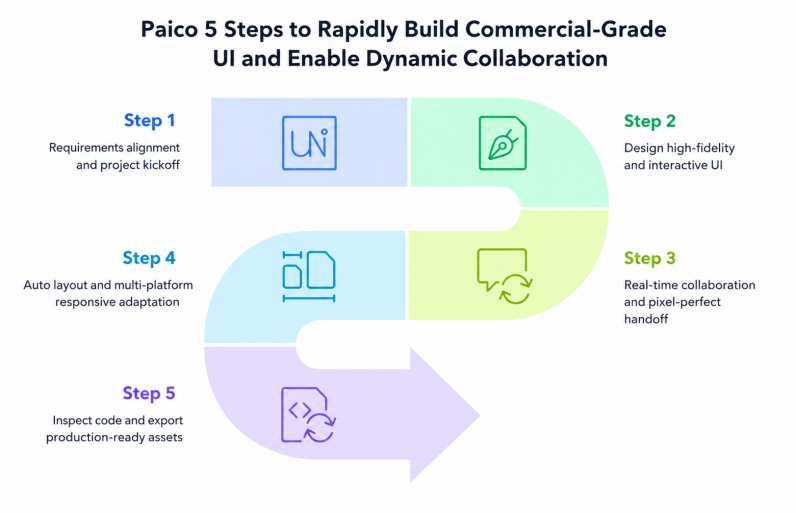
Step 1: Describe Your Vision
Once you log into the platform, enter your layout goals directly into the chat prompt. For example: "Build a dark-mode SaaS landing page with a top nav bar, a hero section with a gradient button, a three-column features list, a clear pricing table, and a newsletter sign-up form." The system will draft a structured layout with high-fidelity visual elements in seconds.
Step 2: Convert Screenshots or Sketch Files
If you have a competitor screenshot or a rough sketch on a napkin, you can upload the image directly. The AI reads the visual structure and converts it into a clean, fully editable vector layer system on your canvas.
Step 3: Edit with Conversational Prompts
You don't have to manually adjust layers to change details. Simply tell the assistant: "change the navigation bar to a light scheme" or "add more padding around the pricing cards." The system will pull components from established library structures like Ant Design or Arco Design, keeping your visual system clean and cohesive.
Step 4: Automatic Responsive Alignment
Traditionally, designing for different viewport sizes means manually setting up breakpoints for desktop, tablet, and mobile. Paico's layouts use clean auto-layout structures, so containers adjust automatically when you rewrite copy. The system also generates adapted views for mobile screens without requiring manual adjustments.
Step 5: Inspect and Export Clean Code
When the design looks ready, switch over to Code Mode. You can click on any layer to inspect CSS properties or export clean, production-ready HTML, Tailwind, Flutter, or Harmony ArkUI code. This smooth dev handoff makes it easy to integrate layouts directly into your existing backend.
Part 5. Releasing products faster
Using an automated ai website builder changes how you approach product validation.
5.1 Rapid Product Validation
For solo creators, time is your most important resource. By compressing layout and front-end design tasks from days into minutes, you can spend your energy on core database logic, product features, and customer research. This allows you to launch and test multiple ideas in parallel, lowering your initial risk.
5.2 Clean, Readable Code Under the Hood
Code quality is critical for search visibility and site performance. Paico exports clean, semantic HTML and Tailwind structures instead of the bloated code common in typical visual builders. This clean file structure helps search crawlers index your pages easily and ensures fast load times across all viewports.
FAQ
Q1: Can I edit the generated code after exporting?
A: Absolutely. The platform outputs clean React, Tailwind, and HTML elements that are easy for any front-end developer to understand. You can easily copy individual CSS styles or export complete layout packages to merge with your own codebase.
Q2: How does this compare to standard prompt-to-image tools?
A: Standard image engines generate flat, static mockups that you can't edit. Paico outputs structured vector layers on an interactive canvas, keeping individual text boxes, colors, and components fully editable.
Q3: Does it support custom team guidelines?
A: Yes. Teams can define custom brand guidelines, color scales, and typography styles to keep the output consistent with their brand.
Conclusion
In 2026, building software is all about speed and focus. Spending days manually aligning layers or learning heavy design tools can cause you to miss market opportunities. Leveraging automated design tools allows you to handle front-end layout tasks quickly, so you can focus on building core features. If you are tired of complex visual setups, check out Paico to start building.