Scott
A notification inbox needs to distinguish “I have seen this” from “I have dealt with this.” Opening a design-review thread does not resolve its comments. Clearing an unread badge does not stop future updates. When those actions are collapsed into one control, people lose their place or silence work they still need to follow.
This guide uses a team’s design-review inbox to show how read state, personal triage, and subscriptions can work together. The aim is a queue that people can leave and return to with confidence—not a badge that stays at zero for a moment.
Read, done, and following answer different questions
Before designing the row actions, define what each state means. Read state answers whether this person has seen the relevant update. Triage state answers whether they want the item in their active queue. Following answers whether they should receive future updates. The underlying review or task has its own state, which may be shared with the team.
| Question | State in this inbox | What it must not imply |
|---|---|---|
| Have I seen the current update? | Unread or read | Reading does not resolve the review or remove it from the active queue. |
| Do I still need this in my queue? | Active or done for me | Personal completion does not close the team’s discussion. |
| Should future updates reach me? | Following or not following | Stopping updates does not delete the review or change anyone’s access. |
| Do I want a persistent reference? | Saved or not saved | Saving does not necessarily make an item unread, active, or followed. |
These are separate dimensions, not four mutually exclusive statuses. A review can be read, active, saved, and followed at the same time. The design does not need to display every dimension as a badge, but the actions must preserve the distinction.
GitHub’s notification documentation illustrates separately named read, done, save, and unsubscribe controls, but some effects are coupled: unsubscribing also removes the current notification. GitHub may notify the person again after a direct mention, a team mention, or a review request. Use those documented consequences as a reference when defining your own inbox policy; do not assume that separate controls have independent effects.
Choose what one inbox row represents
In the review example, one row represents one discussion thread: “Checkout error message.” Three new comments in that discussion update the same row. The row shows the latest activity and identifies why this person received it, such as “You were mentioned” or “You are following this review.”
This grouping keeps a busy conversation from occupying the whole inbox, but it creates a counting decision. A badge of “3” could mean three unread threads, three unread events, or three items requiring action. Pick one unit and explain it. Here the badge counts unread threads in the active queue, excluding Done threads. Moving an unread thread to Done removes it from this count without having to change its read state. Three comments on the same active unread discussion count as one thread, not three.
Keep related counts explicit. “12 active · 3 unread” tells the person that reading three discussions will not empty the work queue. Do not label a mixed count “Tasks” if it includes informational updates and conversations that require no response.
If your product uses one row per event instead, define what happens to older events after the same object changes again. Grouping is a design choice; silently switching between threads and events is a source of confusion.
Give each row enough context to choose the next action
A useful row answers four questions without making the reader open everything: what changed, where it happened, who caused the update when relevant, and why it reached this inbox. For the checkout discussion, a row might show the thread title, the project name, “Maya mentioned you,” and a short comment excerpt.
Use the excerpt to reveal useful context, not to repeat the title. “Can we explain which card details to check?” helps a designer decide whether to open the review now. “New comment on Checkout error message” adds little beyond the other fields.
Distinguish unread state with more than a subtle color change. A readable label, dot with an accessible description, or typographic treatment can work together. Keep the title and important context readable after the row becomes read; lower emphasis should not become low contrast.
A relative time can support scanning, but “Yesterday” should not be the only way to understand the sequence. Provide a precise local time when needed, and do not rewrite the event’s meaning merely because the viewer is in another time zone.
Define when reading changes the state
Does selecting a row mark it as read immediately, after its detail pane loads, or only after an explicit action? The answer must match what the interface can actually establish. Keyboard focus moving over a row is not evidence that the person read its content.
For this example, selecting a row loads the discussion in a detail pane. Mark the currently available update as read after that content is displayed successfully. If loading fails, keep the unread state and show a retry route. Do not clear the badge merely because a network request started.
A new comment can arrive while the person is reading. Track which update was displayed, not just a boolean set when the panel opened. If the panel has shown comments through event 18 and event 19 arrives, the old read acknowledgement must not hide the new event. The product may show the new comment immediately or indicate that another update is available; either choice needs a consistent read rule.
Keep “Mark unread” available when people use it as a reminder. Its effect should be personal and predictable. In a team review, marking a thread unread should not notify the author that their contribution has been rejected or undo another person’s read state.
Make “done for me” recoverable
After responding to the checkout question, the designer marks the notification done. In this inbox, that removes the thread from their active queue and places it in a personal Done view. It does not resolve the discussion for everyone, approve the screen, or delete the comments.
The label can be shortened to “Done” if the surrounding product makes the personal scope clear. If the same interface also has a team-wide “Resolve discussion” action, distinguish them in wording and placement. Two checkmarks with different consequences are easy to confuse.
Provide an immediate undo and a later route back through the Done view. When the row disappears, move keyboard focus to a sensible neighboring item or the empty queue heading. Do not leave focus on a control that no longer exists.
Decide whether a new relevant event reactivates a done item. For the example, a new mention brings the discussion back as unread; an unrelated background update does not. That is an explicit policy chosen for this queue, not a universal rule. Show why the item returned so “Done” does not appear unreliable.
Unsubscribe should describe future delivery
“Stop following” changes future notification delivery. In this design-review inbox, it stops ordinary updates but leaves the current thread in its existing Active or Done view. Marking it done remains a separate action. State that consequence near the control so people do not mistake it for clearing today’s queue.
For this example, a future direct mention still brings the thread into the active queue as unread, even after ordinary updates have been stopped. The confirmation can say, “Stop ordinary updates? You will still be notified when someone mentions you.” Other products may also make exceptions for team mentions or assigned reviews; describe only the rules that the product actually supports.
Do not use a generic unsubscribe control for updates that cannot be disabled under the product’s rules. Explain the available preference instead. Equally, a subscription setting does not grant permission to see a private thread; delivery and access are separate concerns.
Follow one review through the queue
The following sequence makes the policy visible. It is a proposed behavior for the design-review inbox, not a description of Pixso’s own notification system.
| Event or action | Personal inbox result | Shared discussion result |
|---|---|---|
| Maya mentions the designer in “Checkout error message.” | The thread appears active and unread, with the mention as the reason. | The comment is part of the existing discussion. |
| The designer opens the thread and its current content loads. | The displayed update becomes read. The thread remains active. | No resolution or approval occurs. |
| The designer replies and marks the notification done. | The thread moves to the personal Done view. | The reply is added; the discussion stays open unless separately resolved. |
| A new mention arrives while the designer is still following. | The thread returns as active and unread under this inbox’s policy. | The new comment is added to the same discussion. |
| The designer stops following ordinary updates. | Ordinary updates stop. The current row stays in its existing view; a future direct mention still makes it active and unread. | The discussion and other participants’ subscriptions remain unchanged. |
Keep these outcomes consistent across the list, detail pane, and any email links. A person returning from an email should land on the relevant discussion or update, not an unexplained empty inbox because the item moved to Done.
Preserve place when an action fails or access changes
A row action may fail after the interface has optimistically removed the item. If marking done is not confirmed, restore the row with a clear message or otherwise keep it reachable while showing the unresolved action. Do not present a disappearing row as durable completion when the server rejected it.
When an item no longer exists, explain that the target is unavailable and allow the notification to be dismissed. When access was removed, avoid continuing to expose a cached private excerpt. The recovery route must respect current authorization; a notification link is not a workaround for permissions.
In an Unread filter, reading a row may remove it from the list. Avoid making the detail pane vanish before the person can finish. You can keep the opened discussion visible while updating the list, with a clear selection state. Returning to All should preserve a useful place rather than jumping to an unrelated item.
Review the inbox model in Pixso
Build a list-and-detail layout in Pixso with a few realistic review threads. Include one unread mention, one read but active discussion, one done item that returns after a new mention, and one failed action. Use separate annotations for the personal queue state and the shared discussion state.
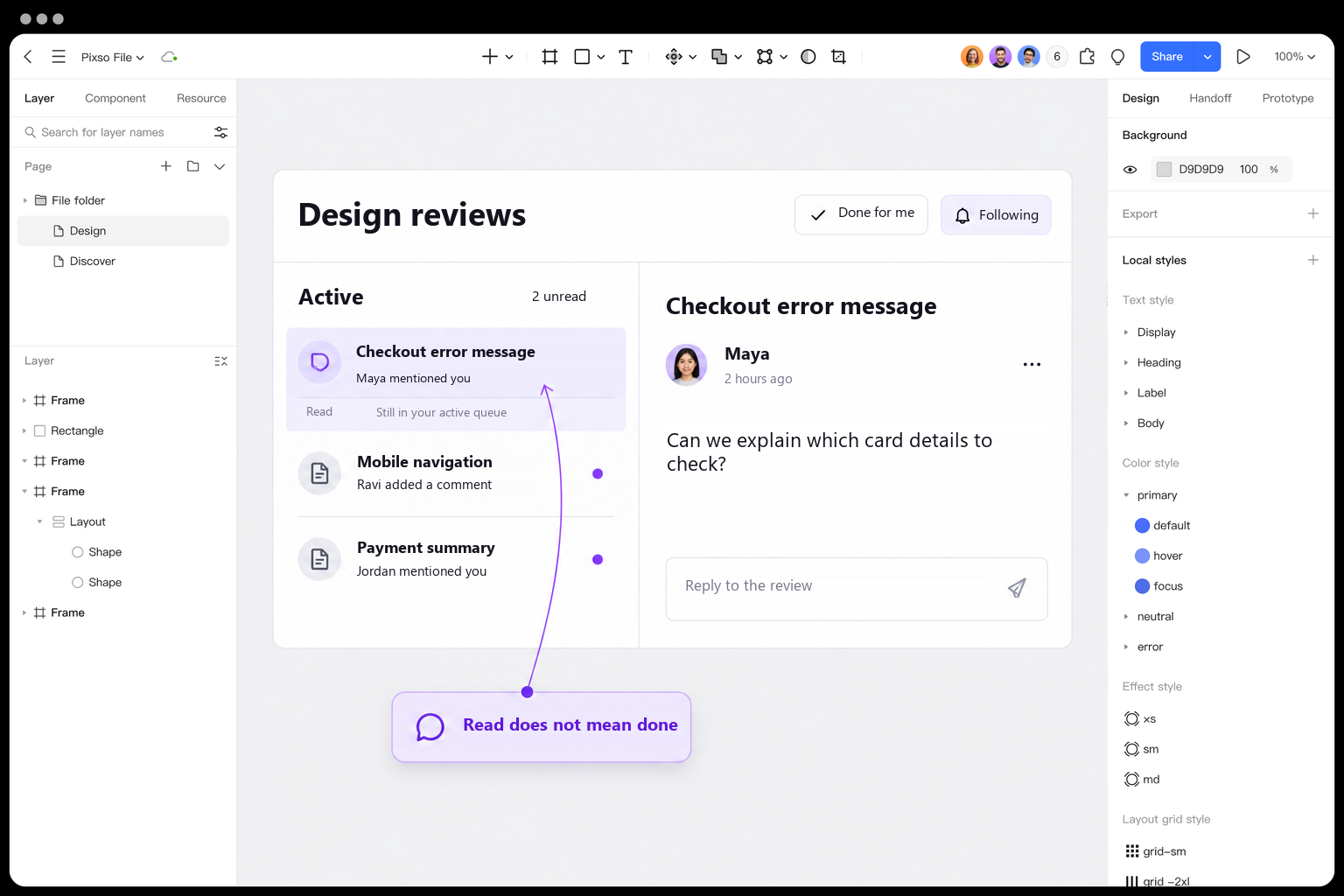
Ask a reviewer to read Maya’s question without clearing it from their queue, then deal with it and stop ordinary updates. Listen to what they expect each action to change. If “Done” is interpreted as approving the design, improve the wording or separate the shared action before polishing the icons.
Connect the key screen states for review and annotate behavior that requires implementation: version-aware read acknowledgements, focus after removal, subscription exceptions, and authorization changes. A clickable prototype can communicate the intended sequence; it does not prove that these underlying rules have been implemented.
Design a clearer notification inbox in Pixso →
Design a queue people can trust
Unread counts show attention, personal completion organizes work, and subscriptions control future delivery. Keep those promises distinct, make changed states recoverable, and explain why an item returns. An inbox becomes useful when people can predict where their work will be—not simply when they can clear a badge.