Scott
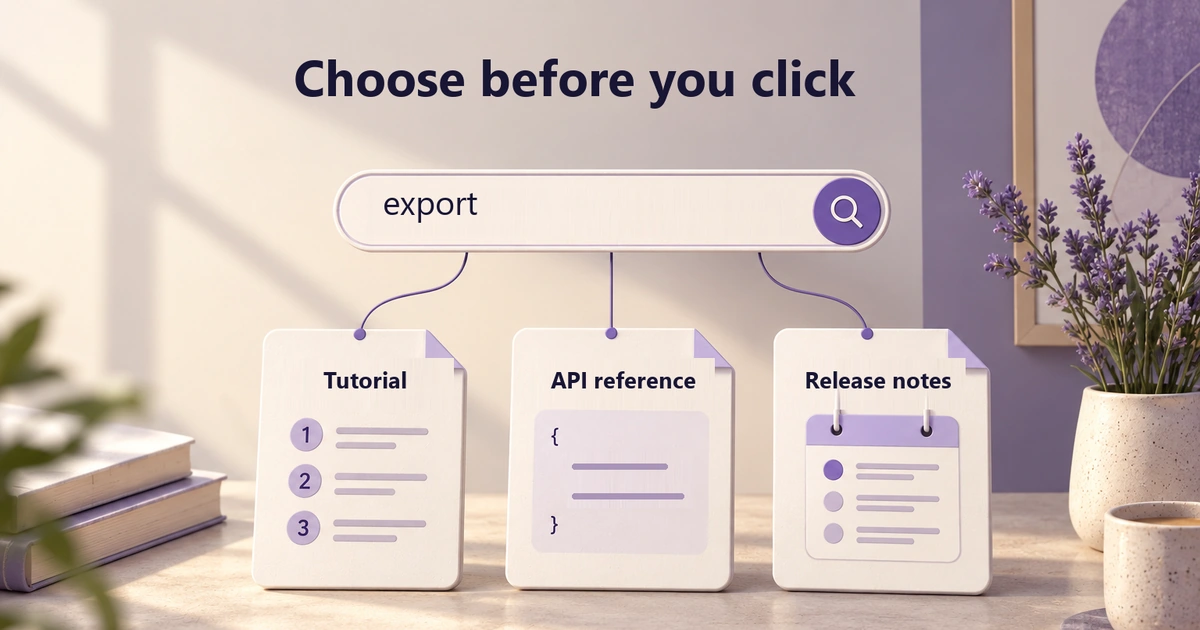
Three search results can contain the same word and answer three different questions. Someone who searches for “export” might need a browser tutorial, an API endpoint, or confirmation that a feature changed in the latest release. A list of matching titles does not necessarily reveal which one will help.
Search result card design is the work of making that choice possible before the click. Give each result a recognizable document type, a useful destination, and enough matching context to explain its relevance. The goal is not to decorate a search engine's ranking; it is to help the reader judge what a ranked result actually contains.
Start with three matches and one real task
Consider a fictional reporting product. A support specialist needs to download a filtered report as a CSV file in the browser. They search its documentation for “export” and receive these three results. The titles and passages below form one example content set; keep them unchanged when comparing layouts.
| Document type and title | Path | Matching passage |
|---|---|---|
| Tutorial — Export a report as CSV | Guides › Reports › Exporting | Open a report, choose Export, then select CSV. You need permission to download this report. |
| API reference — Create an export job | API v2 › Reports › Exports | Create an export job with POST /v2/report-exports. The response contains a job ID, not the CSV file. |
| Release notes — Report export changes in 2.8 | Releases › 2.8 | CSV export now preserves applied filters. This release does not add scheduled exports. |
The tutorial is the appropriate starting point for this task. The API reference describes a programmatic operation, and the release notes explain a change without teaching the complete workflow. A developer asking what an export request returns would make a different choice from the same list. Neither result is universally “better.”
This is a nonempty-results problem. Changing filter controls or explaining zero results solves a different part of the journey. If those are the blockers, use the filter UI design guide or the empty-state patterns; here, the candidate documents already exist and the reader needs to distinguish them.
Put document type and destination beside the title
Use a short type label that describes how the document works: “Tutorial,” “API reference,” or “Release notes.” An icon can reinforce that label, but a generic page symbol cannot carry the distinction. Do not add “Recommended” to the tutorial merely because it is first; that would claim an assessment the card has not explained.
The path supplies a second kind of context. “API v2 › Reports › Exports” locates the endpoint in a particular API version. “Guides › Reports › Exporting” places the instructions in a user-facing workflow. A long hostname repeated on every internal result uses space without distinguishing these destinations. Show a domain when results genuinely cross sites and that source matters to the choice.
Keep the title as the primary destination link. A row full of identical “Open” links creates avoidable ambiguity when people navigate by links. W3C's link-purpose guidance allows purpose to come from link text or programmatically determined context; visual proximity alone is not that relationship. Give the implementation a semantic grouping for each result, and keep the destination page's title consistent with the promise made in the list.
For this example, the path is descriptive text, not three additional navigation links. That keeps the main choice focused on opening the document. If the product also offers browsing by category, design that as an explicit secondary action instead of silently turning every small path segment into a separate target.
Show why the result matches without changing what it says
A document description and a query-dependent excerpt have different jobs. A description summarizes the resource as a whole; an excerpt shows a relevant passage within it. The tutorial's “Open a report” sentence is useful because it identifies the browser workflow. Repeating “Learn everything about report exports” underneath its already descriptive title adds little evidence.
Algolia's highlighting and snippeting guide describes emphasizing matched terms and returning nearby words. Those mechanisms can reveal where the query occurs. They do not establish that a document answers the user's question, is current, or outranks another result for a good reason.
Protect the qualifying sentence when shortening a passage. The API result must retain “a job ID, not the CSV file”; otherwise, the specialist could mistake it for a direct-download instruction. The release note must retain “does not add scheduled exports.” Cropping it after “does” or extracting only “scheduled exports” changes the information the reader needs.
Choose a complete sentence or another coherent passage that fits, rather than cutting a fixed number of characters and appending an ellipsis. If a safety condition or limitation still cannot fit, allow another line or select a shorter, faithful passage. Where the index has no usable excerpt, fall back to a genuine document description and present it as a summary, not a fabricated quotation or a claimed keyword match.
Use highlighting sparingly enough that the sentence remains readable. A query term's appearance in the title and snippet is not a reason to paint the entire card. MDN describes the mark element as contextually relevant text, and notes that most screen readers do not announce that highlighting by default. The visible passage must make sense without its colored marks; essential distinctions belong in words.
Decide which fields earn their space
A useful card is not a miniature document dashboard. Specify what each field helps the reader decide and which part must survive a smaller layout. The following rules apply to the reporting example; a catalog of downloadable files would need different information.
| Field | Question it answers | Content and space rule |
|---|---|---|
| Title | What will I open? | Keep the specific action or subject visible. Allow “Export a report as CSV” to wrap instead of reducing it to “Export a report…” |
| Type | What kind of help is this? | Retain the text label when tutorials, reference pages, and release notes share one list. |
| Path | Where does this belong? | Preserve the branch that distinguishes the document. If a longer path needs shortening, do not hide the API version or the final meaningful section. |
| Passage | Why might this answer my query? | Keep a coherent excerpt and its relevant limitation. Do not replace the matching passage with the title repeated in smaller text. |
| Version | Does it apply to my product or API? | Show it when applicability differs, as with API v2 and release 2.8. Do not manufacture a version for unversioned guidance. |
| Date | When did this change or get reviewed? | Use a labeled, meaningful date when time affects the task. An indexing timestamp is not proof that the instructions were reviewed. |
Avoid repeating identical information across fields. The API path already carries “v2”; it does not automatically need another version badge. Conversely, do not remove a distinction just to make every row the same height. A release note's version can be more consequential than a tutorial's update date.
Keep empty metadata slots out of the rendered card. If a document lacks a reviewed date, omitting that field is more honest than displaying an arbitrary ingestion time under “Updated.” Missing classification is also a content-model issue to fix upstream, not an excuse to infer a document type from a decorative icon.
Reflow the evidence, not just the card border
On a narrow screen, start with the title and type, then retain the distinguishing path and a coherent passage. Reduce repeated decoration before removing the words that separate the three export documents. A single gray line containing type, date, author, path, and version becomes difficult to parse even when it technically fits.
Let longer titles wrap and test the actual strings. A two-line snippet is a useful starting layout, not a promise that every language and every qualifying sentence fits into two lines. In the release note, the negative statement about scheduled exports is more important than keeping all three cards exactly equal in height.
Algolia's published account of its documentation-search redesign offers a concrete comparison: its desktop design combined a results list with a preview, while its mobile and tablet design used a short description instead of that preview. The account also describes grouping results by content type. These are choices from that implementation, not evidence that every search interface needs a preview or identical groups.
For three results, inline type labels may be enough; separate sections could add more headings than useful organization. If a larger list benefits from groups, make their labels and traversal order clear. An optional preview must add detail, not become the only place to discover what a result is. People should be able to choose and open a useful result without hovering.
Make the fields trustworthy at the moment of selection
The card's title, passage, path, and version should describe the same destination. Combining a current title with an excerpt from an older edition can produce a convincing but misleading result. If the example API result says “API v2,” opening it should not silently lead to documentation for a different version. Define how moved, replaced, or outdated documents are represented with the people who own the index and content.
Do not expose a restricted title or matching passage just because the search index still contains it. OWASP recommends validating permissions on every request. Applied to search, that means defining which metadata may be disclosed and enforcing that policy when results are returned, not only when a document opens. Access can also change after the list loads; opening a result must respect current permission and show an appropriate recovery state without revealing protected excerpts.
Keep the primary action faithful to the resource. Opening “Export a report as CSV” should open instructions, not begin a download. A direct “Export now” control would be a different, potentially consequential product action requiring its own authorization and state handling. The word in the query does not grant permission to execute it.
Review the same content in Pixso before polishing the cards
Create a result-card component in a Pixso design file, with separate text layers for title, type, path, and passage. Populate three instances with the exact example content above. Keep an initial title-only frame, an enriched results frame, and a narrow-screen frame. Comparing the same documents makes it easier to see what the added context contributes; changing the titles between versions would confound that comparison.
Use the narrow frame to resolve content decisions, not just spacing. Let the tutorial title wrap, keep the API's response limitation, and retain the release note's sentence about scheduled exports. Annotate any conditional field and truncation rule beside the component so that the implementation is not left to guess which words can disappear.
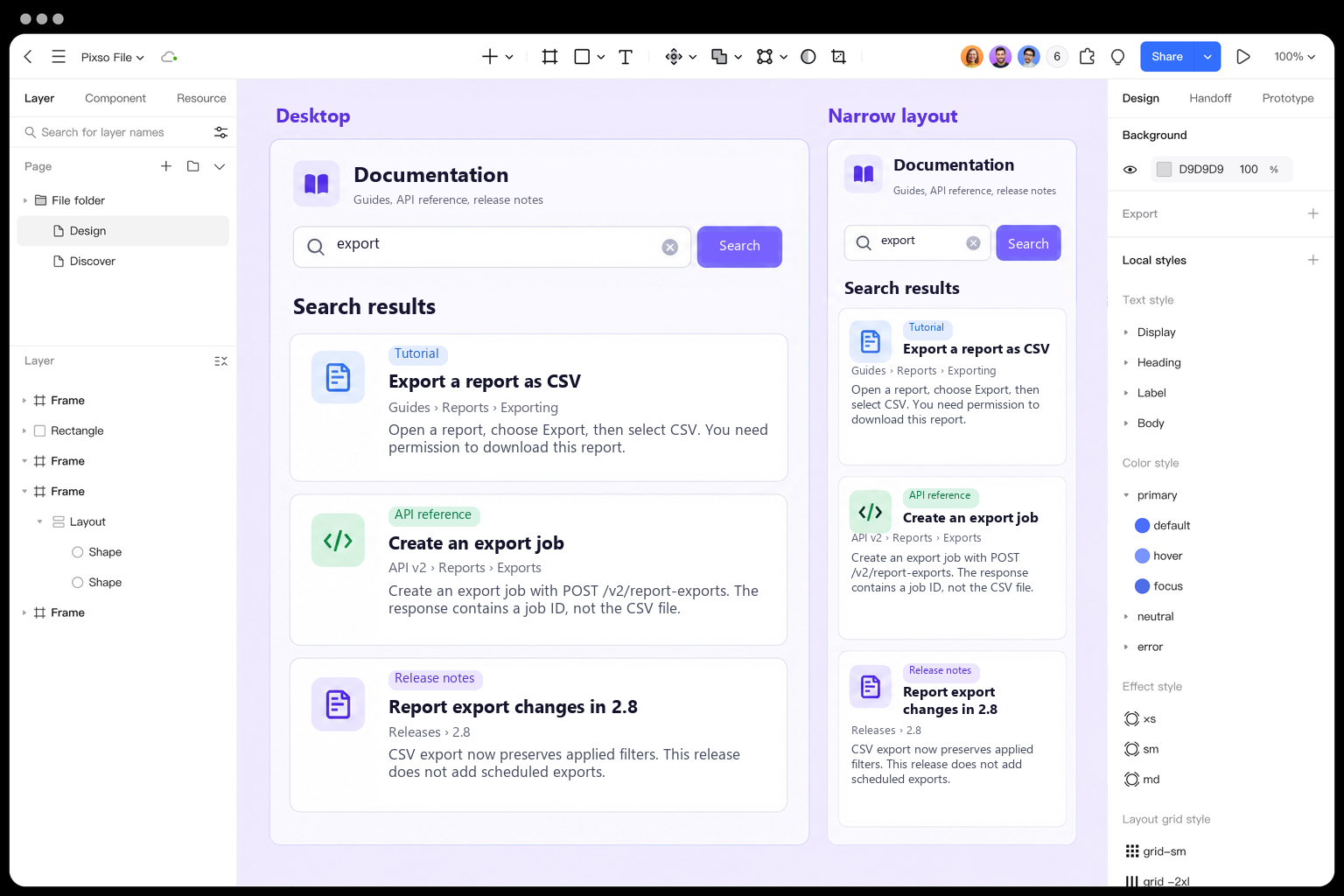
Connect the result titles to corresponding document frames in a prototype and provide a way back that retains the query. This models a navigation decision, not a working search index. The reporting application on the canvas is the design being reviewed; it is not a claim about Pixso's own search behavior.
Ask a teammate to choose a document for downloading a filtered report as CSV in the browser, then use another task to find what the API returns, and another to determine whether release 2.8 introduced scheduled exports. Listen to which field supports each choice. A click on the correct card for the wrong reason—such as assuming that the newest-looking date always means the best answer—still reveals a design problem.
Finally, inspect the same route with keyboard navigation and at a larger text size. Can the reader identify the destination, follow the complete limitation, and return without reconstructing the query? Refine the field or passage that failed. Success is a defensible choice between these documents, not merely a more colorful row or a higher click count.