Scott
The aesthetic landscape of digital interfaces is shifting rapidly toward organic, fluid visuals. Among these trends, the aurora effect stands out as a premier choice for brands seeking a futuristic, high-end look. However, creating these vibrant, glowing, and liquid-like backdrops historically meant juggling multiple programs. Designers would generate a raster gradient in a photo editor, export a heavy image file, and import it into a vector layout workspace. This fragmented process disrupts creative flow, bloats file sizes, and restricts real-time editing. Mastering aurora design natively within a single, unified environment is no longer just a luxury; it is a necessity for modern UI/UX workflows.
Why Native Design Tools Change the Game for Aurora Designs
The rise of aurora design has transformed how we think about background visuals in UI design. However, creating scalable aurora designs used to require a trade-off between visual fidelity and browser performance. Standard vector tools often struggle with multi-layered, highly blurred objects, causing lagging canvas performance and heavy exports. Pixso addresses this directly by providing a highly optimized vector rendering engine that handles complex gradients and live effects natively, allowing you to stay focused in one tool.
When we talk about native aurora design, the core advantage is total non-destructive editability. Unlike static raster illustrations, modern aurora design requires ongoing tweaking and adjustment during the layout process. Building your entire aurora liquid background directly on the Pixso canvas means you do not have to jump back and forth between external photo editors. Every single vector point, gradient stop, and blur radius remains fully adjustable. You can tweak color values, reshape the liquid flows, and observe the changes through a live preview instantly.
Beyond pure aesthetics, the true power of a native workflow lies in design system integration. Within Pixso, you can easily bind the colors used in your aurora background to global brand colors and design tokens. If your brand guidelines change, a single update to your token library will instantly sync across all instances of the aurora background. Because these backgrounds are built natively on the canvas, they support responsive resizing and layout constraints out of the box. This guarantees that your aurora designs stay responsive and beautifully aligned on any viewport.
Finally, native vector implementation paves the way for developer-friendly handoff. When it is time to transition from canvas to production code, Pixso's Dev View translates your visual styling into clean, standard CSS and SVG code. This ensures high-fidelity rendering on the live site without forcing developers to load massive, slow-loading image files. By utilizing lightweight vector shapes and CSS-based blur properties, you ensure your design retains its fluid beauty on any screen resolution while maintaining fast loading speeds.
Leveraging Pixso AI: The Shortcut to Generative Aurora Web Design
For many product designers, starting a complex, fluid UI style from a completely blank canvas can feel daunting. Many tools struggle to render complex aurora designs cleanly, leaving designers frustrated before they even begin. Pixso AI eliminates this creative barrier by introducing a suite of specialized design skills built directly into the editor interface. Within the Pixso AI panel, you can access the "Skills" menu, which features tailored generators designed to automate specific aesthetic trends.
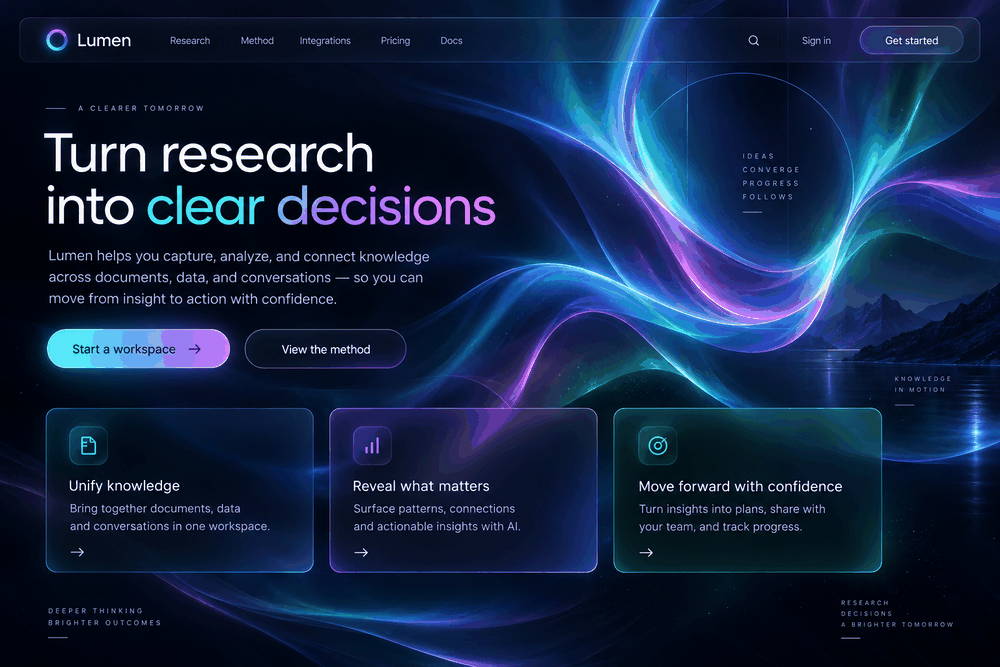
One of the most powerful features in this toolkit is the Aurora Liquid generator. This specialized AI skill is specifically tuned to create a premium, futuristic UI style characterized by glass panels, fluid gradients, soft glows, large corner radii, light typography, and floating layers. It is an exceptional starting point for modern interfaces in AI platforms, fintech dashboards, complex web forms, and visual discovery pages.
Whether you are working on minimal landing pages or futuristic aurora designs, Pixso AI provides efficient AI assistance. You can input simple English prompts directly into the Pixso AI interface and instantly generate layered, fully structured vector layouts. The generative AI does not merely output a flat image; it structures actual frames, vector layers, and text elements onto your workspace. Because the output is native vector, you can immediately select individual layers, adjust the gradient paths, customize the typography, or modify the layout constraints.
This workflow lowers the creative entry barrier significantly. Designers no longer need to spend hours manually plotting vector coordinates and layering blend modes just to see if a visual concept works. Instead, Pixso AI acts as an advanced collaborative partner, delivering a highly polished, fully editable foundation in seconds. You can then focus your energy on the strategic aspects of the interface, such as detailed user experience flows, content hierarchy, and branding alignment.
Step-by-Step Tutorial: Crafting the Perfect Aurora Effect Natively
To replicate a realistic aurora effect natively, it helps to understand how light and depth behave in a digital workspace. By combining vector networks, multi-stop gradients, and professional blur properties, you can build a stunning fluid background step by step. Mastering this specific style of aurora design requires a careful hand with color theory.
Step 1: Prepare Your Workspace
Begin by creating a new frame on your Pixso canvas. Set a dark or deeply saturated base color for your frame, such as a deep navy, charcoal, or midnight blue. The signature glow of the aurora effect is created by high contrast; vibrant gradients will pop beautifully against a dark background, whereas they can look washed out on pure white.
Step 2: Draw the Fluid Shapes
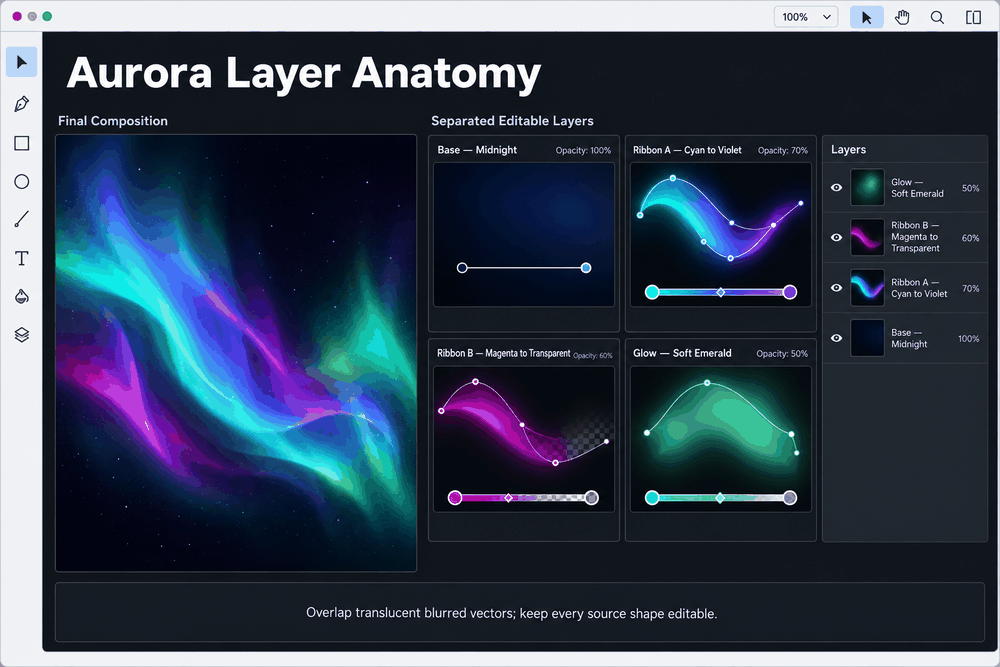
Instead of using standard circles or rectangles, use the pen tool or vector network tool to draw several organic, irregular shapes. These shapes will act as the individual bands of light. Make some shapes long and sweeping, while keeping others smaller to act as intense focal points of light.
Step 3: Apply Rich Gradients
Select one of your custom vector shapes and change its fill type from a solid color to a radial or linear gradient. To achieve the fluid, liquid look, use vibrant, high-contrast colors. For example, a gradient transitioning from a brilliant cyan to a deep purple, with a third stop of transparent pink, works wonderfully. Ensure that at least one of your gradient stops is set to 0% opacity; this allows the shape to blend seamlessly into the dark background frame.
Step 4: Use Layer Blur
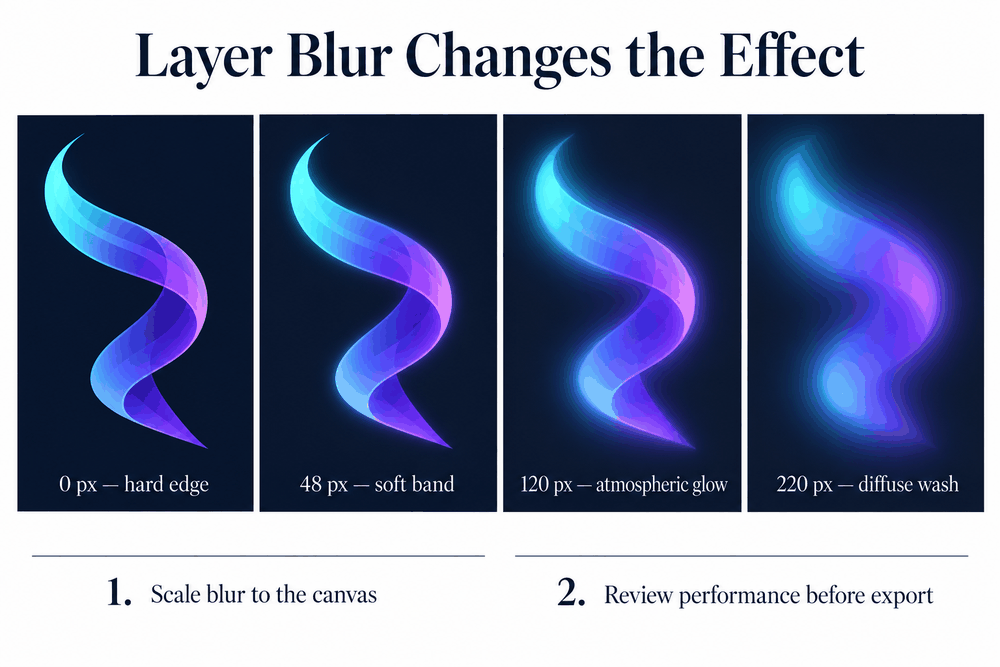
With your shape selected, navigate to the Effects panel in the right sidebar and apply a Layer Blur. To achieve the soft, ethereal glow characteristic of the aurora designs, you will need a high blur value—often between 100px and 250px depending on your canvas size. Repeat this process for each of your custom vector shapes, overlapping them slightly to create new color mixtures where the glows intersect.
To help you choose the best approach for your timeline, here is a quick comparison of the manual crafting process versus using the AI generator:
| Feature / Metric | Manual Vector Crafting | Pixso AI (Aurora Liquid Skill) |
| Initial Creation Time | 15 - 30 minutes | Under 10 seconds |
| Asset Structure | Custom drawn vector paths | Layered, grouped vector frames & components |
| Aesthetic Consistency | Requires a designer’s eye for color theory | Pre-tuned for high-end, futuristic styles |
| Editability | 100% editable vector points and gradients | 100% editable vector points and gradients |
| Learning Curve | Moderate (requires vector and blur mastery) | Very low (simple English prompt input) |
Prioritizing native vector workflows makes an aurora design a highly scalable asset rather than a rigid graphic. This workflow allows you to preview the aurora effect in real time, making precise adjustments to the layout without leaving the editor canvas.
Designing for the Web: Elevating Your Aurora Website Design
When planning a high-end aurora website design, balancing aesthetics and load times is critical. While a glowing fluid background looks breathtaking, it must never overshadow the core content or degrade the performance of the actual web page.
In the realm of modern aurora web design, performance is a major consideration. Many web pages suffer from high loading latencies because their backgrounds rely on massive, uncompressed image files. To make a mark in aurora web design, contrast is your most important tool, and keeping assets lightweight is key. Instead of exporting the entire background as a massive PNG, leverage Pixso's clean SVG export capabilities. By utilizing inline SVGs with standard Gaussian blur filters, you allow the browser's graphics card to render the curves and glows smoothly, resulting in faster load times and responsive scaling across different screen sizes.
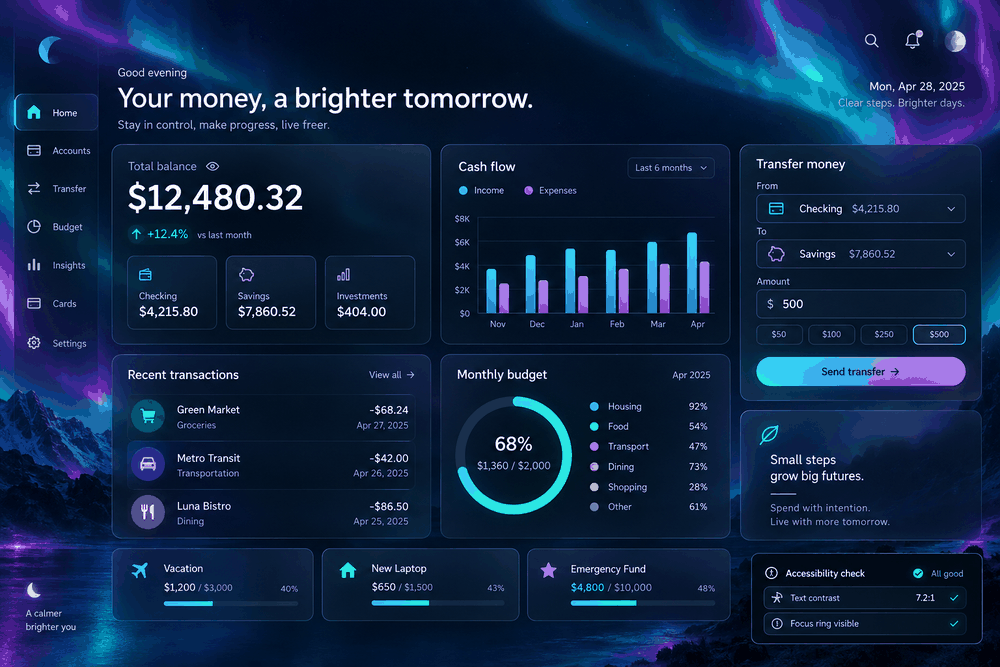
A successful aurora website design depends heavily on readability. Because your background contains bright, glowing sections, place your text content inside structured containers rather than directly on the colorful gradient. Utilizing glassmorphism, specifically, semi-transparent glass panels with a high backdrop-filter blur and a large corner radius, creates a readable "shield" for your text. This separates the text visually from the moving gradients behind it.
Understanding the visual hierarchy is vital for effective aurora web design. Pair the colorful background with crisp, light typography. White or off-white sans-serif fonts in bold weights work best over soft glows. Additionally, place floating layers, such as interactive buttons and key data widgets, on top of the glass panels to create a sense of physical depth. Rather than treating the aurora effect as a static backdrop, consider it an interactive canvas where layers dynamically respond to user scrolling. Applying these rules ensures that your aurora web design remains highly functional, accessible, and beautiful.
Solving Enterprise Pain Points: Collaboration, Design Systems, and Compliance
For growing agencies and large product teams, executing a consistent aurora design style across multiple digital products introduces several operational challenges. Keeping design files organized, ensuring team members have the right software skills, and meeting strict enterprise security regulations are all part of the daily workflow.
To support teams in mastering these styles, Pixso provides a rich learning ecosystem. This includes dedicated, professional UI tutorials in English, a vibrant community hub packed with free, open-source templates, and detailed pitfalls guides. These guides help designers avoid common mistakes, such as over-applying high-value blurs that can cause performance drops in design files or live code. With access to these free community resources, even junior team members can quickly master advanced design trends without a steep learning curve.
When you are ready to deliver your finished designs, Pixso Dev View ensures a seamless developer handoff. This allows developers to inspect the exact properties of your aurora website design, copy standard CSS or SVG code with a single click, and view interactive prototypes. Using these tools to execute an efficient aurora website design reduces communication friction and guarantees that what developers build looks exactly like your canvas.
For larger organizations with strict compliance standards, Pixso offers enterprise-grade collaboration and security. It supports private cloud deployment, allowing you to keep all of your proprietary product mockups, user data, and design assets safely behind an enterprise firewall. Along with robust version history tracking to prevent accidental file loss, Pixso provides clear commercial licensing and role-based permissions management. This ensures that your team can collaborate in real time with absolute peace of mind, knowing that your data remains secure and fully compliant.
Conclusion
Mastering fluid, glowing interfaces no longer requires an over-complicated design pipeline. By utilizing a native vector workspace, you can design, prototype, and deliver stunning aurora designs seamlessly under one roof. Pixso removes the friction of jumping between external applications, while its built-in Pixso AI features, like the specialized Aurora Liquid skill, provide an instant, highly polished starting point for your creative concepts. From initial vector layout to clean, developer-friendly CSS code, you have all the tools necessary to elevate your next project. Open your canvas today, explore the possibilities of Pixso AI, and transform your design workflow.