Scott
Presenting enterprise-level data in an accessible manner is one of the most demanding tasks in modern product development. A high-performance b2b dashboard must host massive amounts of complex information while maintaining visual simplicity. However, executing a successful b2b dashboard design is a complex undertaking for product teams. Traditional workflows often disconnect design teams from development, making smart dashboard ui tooling essential. Fortunately, Paico, a design-first AI UI companion, provides an integrated system designed to bridge this divide. By transforming complex requirements into functional interfaces, Paico optimizes dashboard ui design from the ground up, providing stable layouts and developer-friendly outputs.
Part 1: The Practical Usability Bottlenecks of Dashboard UI Design
Designing functional interfaces for complex B2B systems presents obstacles that are completely different from consumer-facing mobile applications. Enterprise users rely on analytical screens to make critical financial, operational, or technical decisions under high-pressure conditions.
Traditional processes struggle with dashboard ui design, leading to several common issues:
- Excessive Cognitive Load: When design teams try to cram dozens of datasets, tables, and visual charts onto a single screen without a structured layout hierarchy, users suffer from information paralysis.
- Static Mockup Limitations: Presenting analytical interactions, such as drilling down into charts or applying advanced data filters, using static vector design files is slow and makes it difficult to preview real-world workflows accurately.
- Fragility in Competitor AI Tools: Many product teams have experimented with AI generators like Lovable to speed up development. However, these tools often struggle with the complexity of deep iterative updates. When adjusting a specific section of a generated screen, the overall layout easily breaks or collapses. Furthermore, Lovable features expensive credit structures and its visual aesthetic is often plain and unpolished, making it difficult to use for enterprise applications.
Designing a cohesive b2b dashboard requires a modern design toolset that prioritizes visual elegance, layout stability, and technical feasibility.

Part 2: What Is Paico, and How Does It Redefine the Design-to-Code Workspace?
To address the limitations of traditional, disjointed design-to-development setups, Paico offers an integrated ecosystem. Developed by the team behind the professional design tool Pixso, Paico acts as an AI UI companion that converts complex product requirements into clean, functional screens and production-grade code.
Rather than treating design and development as two isolated processes, Paico brings them onto a single path. Users can enter plain English business descriptions in the text-to-UI generator, and the AI outputs high-fidelity, structured interfaces in about 30 seconds. This allows product teams to bypass the time-consuming phase of drawing basic boxes and grids, letting them focus immediately on refining user flows and optimizing data hierarchies.
Furthermore, Paico is built with a deep design-first philosophy. Unlike competitor tools that prioritize raw code generation at the expense of visual aesthetics, Paico ensures that every generated element conforms to modern layout standards, making it highly customizable, visually polished, and technically sound.
Part 3: Deep Comparison: Paico vs. Traditional AI Code Tools
To see how Paico addresses the vulnerabilities of current front-end generation platforms, it helps to compare it to standard development pipelines and competitor tools like Lovable.
Stable isolated local layout edits
| Evaluation Metric | Standard Manual Coding | Lovable (AI Competitor) | Paico (AI UI Platform) |
| Visual Aesthetic Quality | High, but requires days of manual design work | Often plain or generic, requiring substantial custom CSS | Professional, design-first aesthetics tailored for B2B |
| Layout Stability | High, but slow to adapt and build | Prone to collapsing or breaking during complex iterative prompts | Extremely stable; supports targeted local edits |
| Workflow Integration | Disjointed handoffs between design tools and code | Closed ecosystem; difficult to sync back to vector design tools | Seamless sync to Pixso and other professional vector editors |
| Interaction Support | Manual coding required for state management | Simple static links; complex linkages often require custom code | Native, out-of-the-box support for filters, links, and drills |
| Operating Cost | High manual development and design hours | Expensive credit-based plans that scale up fast | Highly competitive, cost-effective billing structure |
By integrating the visual precision of Pixso with advanced code generation, Paico bridges the gap between layout creation and development implementation.
Part 4: Key Usability Principle 1: Lightweight and Professional Data Representation
When building an analytical b2b dashboard, the primary goal is to present complex data structures cleanly. Paico addresses this challenge by integrating intelligence directly into the layout process.
Automated Information Density Control
To maintain high readability on a dashboard ui, information density must be tightly managed. Paico's AI automatically analyzes layout structures to optimize text spacing, padding, and grid alignment. This ensures data cards look organized and clean, giving users visual breathing room while still displaying critical high-density data.
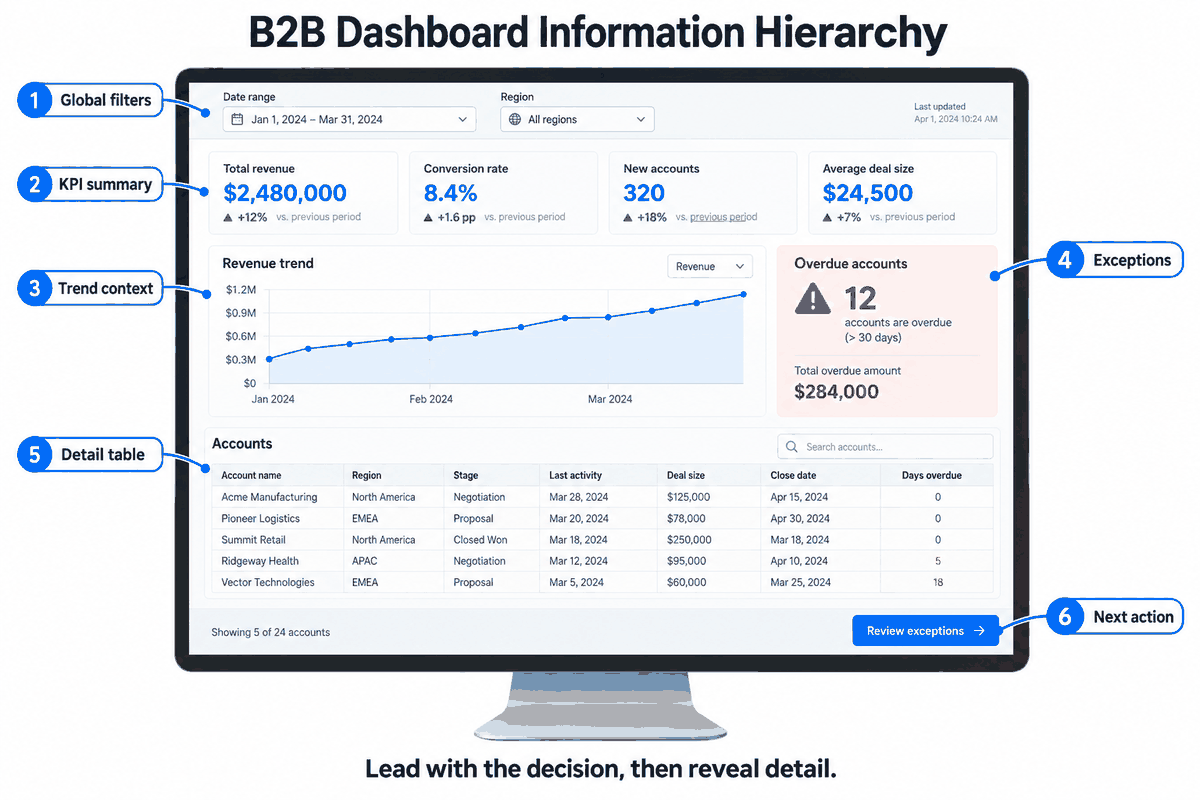
Standardized Chart Matching
Instead of using random, complex visuals that confuse users, Paico pairs data types with standardized charts. Bar graphs, line charts, and pie charts are rendered in clear, consistent styles that business users understand immediately. This standardized visualization builds data credibility and lowers cognitive friction.
Compare these chart choices with data visualization examples for interface design to check whether each visualization suits the question the user needs to answer.
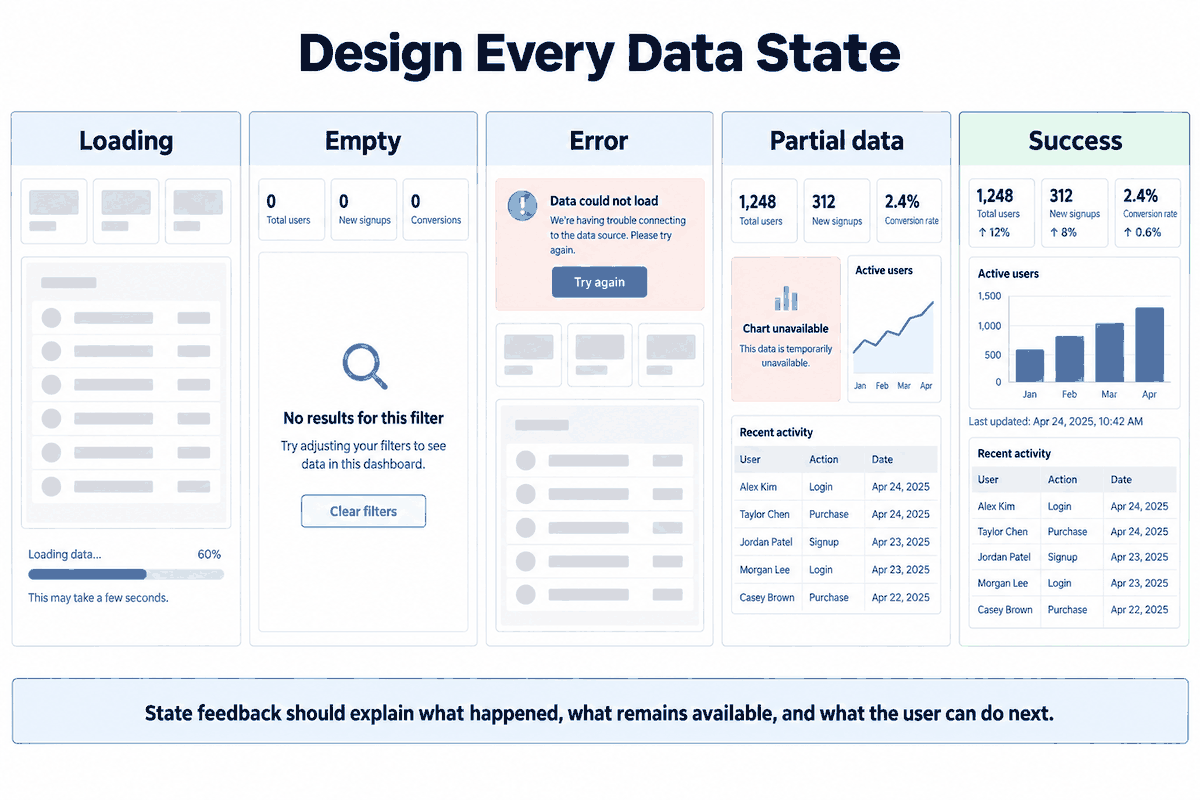
Full-Scene Data States
A robust dashboard UI design must account for every possible screen state. Paico automatically generates layouts for different scenarios, including:
- Loading States: Clean placeholder skeletons to manage load times smoothly.
- Empty States: Clear illustrations and calls to action for when no data is available.
- Error States: Clear, helpful error displays that maintain the professional look of the application.
Hierarchical Drill-Down Visualizations
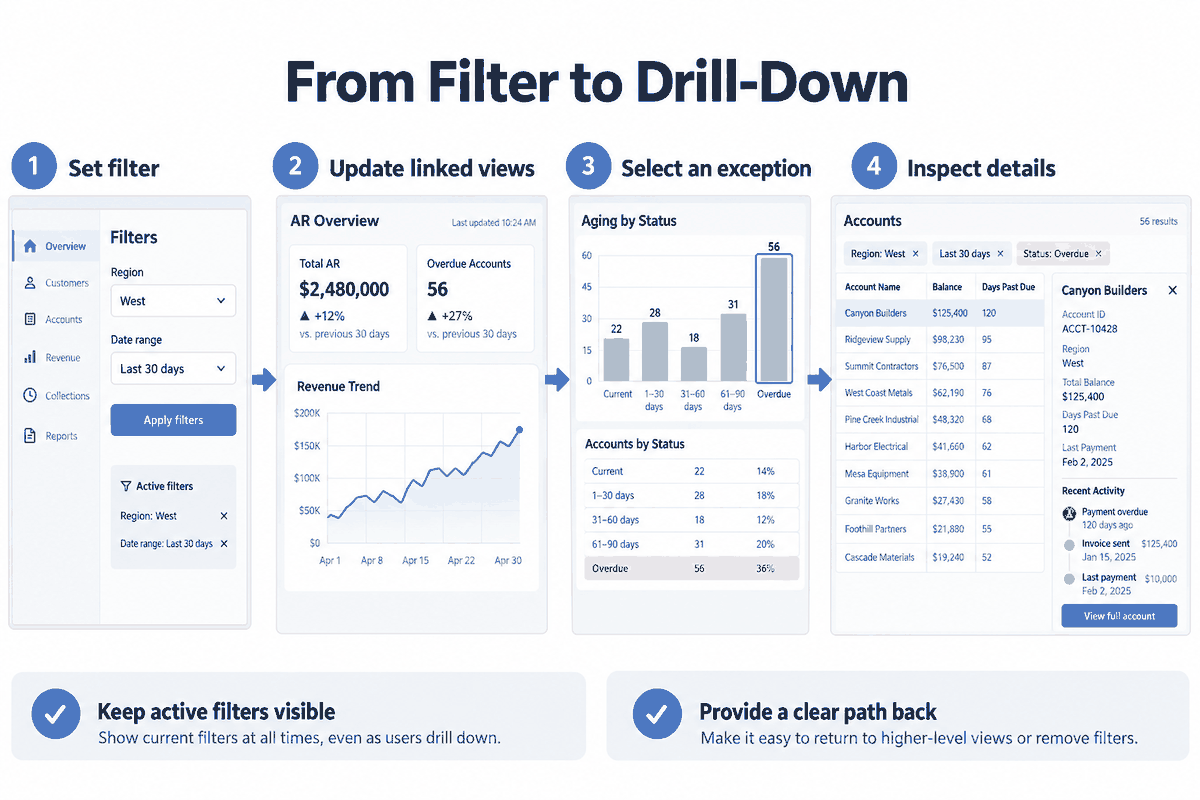
By mapping out data hierarchies clearly, users can drill down into granular analytics step-by-step. This professional structural mapping lowers the cognitive load of decision-makers, making complex data easier to comprehend and utilize.
Part 5: Key Usability Principle 2: Conversational Iteration and Native Support for B2B Business Interactions
A high-quality b2b dashboard design is never a static snapshot. It relies on active, interconnected controls that let users parse through data. Paico includes native support for these complex interactive components, making it easy to model real-world business workflows.
Out-of-the-Box Interactive Features
To support authentic operations, a b2b dashboard must feel like a functional application, not a static image. Paico natively supports complex enterprise-level interactive behaviors, including:
- Advanced Filtering Systems: Multi-select dropdown menus, date pickers, and search inputs that simulate live data operations.
- Dynamic Chart Linkage: Interactions where clicking a category in one chart automatically updates the analytics displayed across the rest of the page.
- Data Drill-Down Flows: Smooth transitions that let users click on high-level metrics to open detailed, nested analysis views.
- Multi-Role Views: Easy configuration of user views based on roles, such as hiding administrative system panels for basic team members.
- Real-Time Alerts: Built-in alert headers and notification badges designed to draw attention to critical events immediately.
Precise Conversational Iteration
To build a reliable b2b dashboard, design teams need a flexible editing process. Traditional design iterations are incredibly repetitive, but Paico simplifies this via precise conversational prompts.
By utilizing precise English prompts, teams can generate a b2b dashboard customized for specific industries or roles in seconds. If a certain component needs adjustment, you can ask Paico to modify that specific area of the dashboard ui design without breaking the global layout structure. Additionally, Paico keeps a traceable version history, allowing you to compare layout concepts, roll back to previous iterations, and save custom assets as reusable templates for future projects.
Part 6: Technical Ecosystem Compatibility and Seamless Team Collaboration
In professional product environments, design assets cannot exist in isolation. They must align with the development team's technology stack and fit into the company's deployment pipeline.
Native Integration with Mainstream Component Libraries
Paico-generated layouts are built to be highly compatible with modern frontend frameworks.
- Standard Library Compatibility: Natively matches mainstream UI component libraries like Shadcn UI, Ant Design, and Material UI, ensuring clean, standardized code.
- Respects Design Systems: Adheres to established corporate design systems, preserving brand guidelines and global styles.
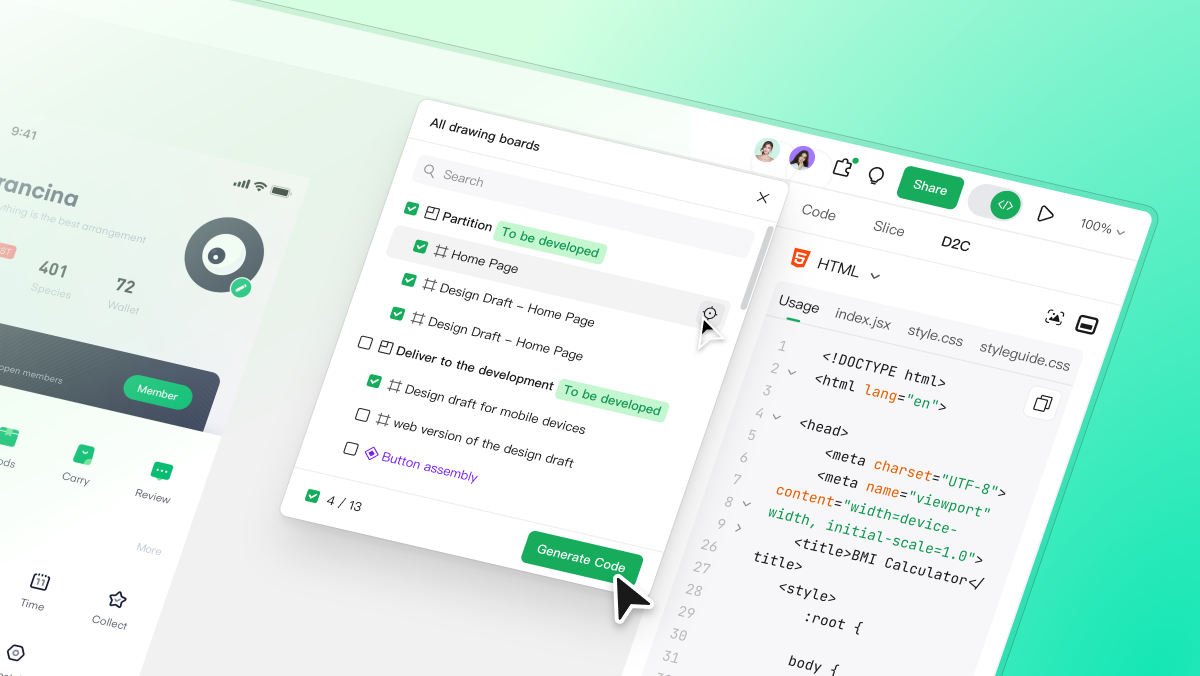
- Clean React Code Output: Generates clean, production-grade React code that front-end developers can integrate directly into their projects without extensive refactoring.
- Multi-Device Responsiveness: Every generated component is responsive by default, automatically adapting to mobile, tablet, and desktop screens.
Streamlined Collaborative Delivery
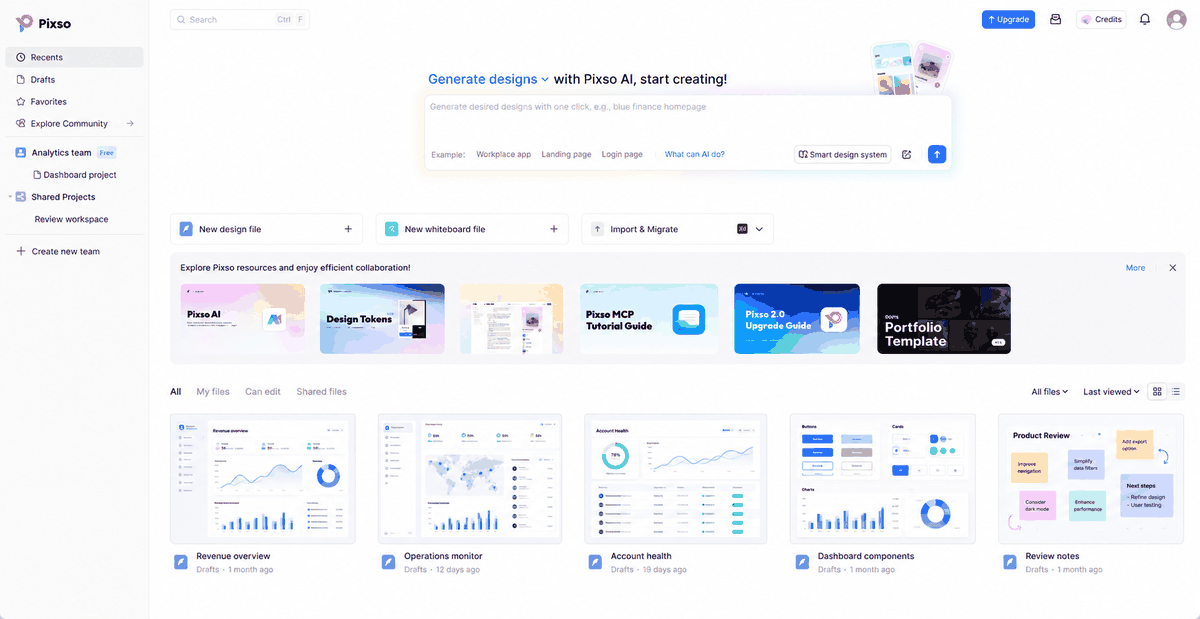
Because Paico is fully integrated with Pixso, generated files transition directly into a collaborative design workspace.
- Real-Time Multiplayer Collaboration: Designers, developers, and product managers can collaborate on the same canvas in real time.
- Online Previews and Sharing: Generate secure, interactive web links to preview the dashboard, making it easy to collect feedback from external clients or remote team members.
- Handoff with No Platform Lock-In: Developers can easily inspect spacing, copy CSS, and export assets in multiple formats with no platform restrictions. This streamlined workflow is perfect for cross-border and remote teams.
FAQ
When evaluating a b2b dashboard tool, developers look for stability, speed, and cost-effectiveness. Here are answers to the most common questions about designing high-performance analytics interfaces with Paico.
Q1: How does Paico prevent layouts from collapsing during iterations?
Unlike traditional code generators that rebuild screens from scratch for every prompt, Paico uses a modular layout system. This structure allows the AI to perform targeted local edits. If you modify a single data card or table, the AI adjusts that specific element independently, keeping the rest of your page layout stable.
Q2: Is the code generated by Paico production-ready for React applications?
Yes. Paico generates clean, modular React components that follow modern CSS layout guidelines. Because it is designed to be compatible with popular libraries like Shadcn UI, developers can drop the code straight into their production environments with minimal cleanup.
Q3: How does Paico ensure generated dashboards match my existing Shadcn UI setup?
Paico is built to be natively compatible with mainstream UI libraries like Shadcn UI and Material Design. When generating components, the AI conforms to the structural rules and variable naming conventions of these libraries, allowing you to easily integrate the generated code with your existing corporate design systems.
Q4: How cost-effective is Paico compared to standard credit-heavy AI design platforms?
Competitors like Lovable rely on expensive credit-based models that can quickly drain budgets during complex, iterative design projects. Paico offers a highly cost-effective billing structure with a generous free tier. Additionally, because it is integrated directly with Pixso, you do not need to purchase separate subscriptions for whiteboarding, prototyping, and layout generators.
Conclusion
Building high-density analytical interfaces does not have to involve fractured workflows, fragile layout structures, or costly design subscriptions. A professional b2b dashboard design demands an ecosystem that balances visual refinement with technical performance. Paico bridges the traditional gap between layout visualization and clean component code, giving product teams a stable, design-first alternative to rigid code-generation systems. By consolidating visual intelligence with flexible multi-framework outputs, Paico ensures that your project remains highly functional, secure, and ready for deployment. Visit paico.ai today to optimize your digital workspace and build smarter B2B interfaces.