Scott
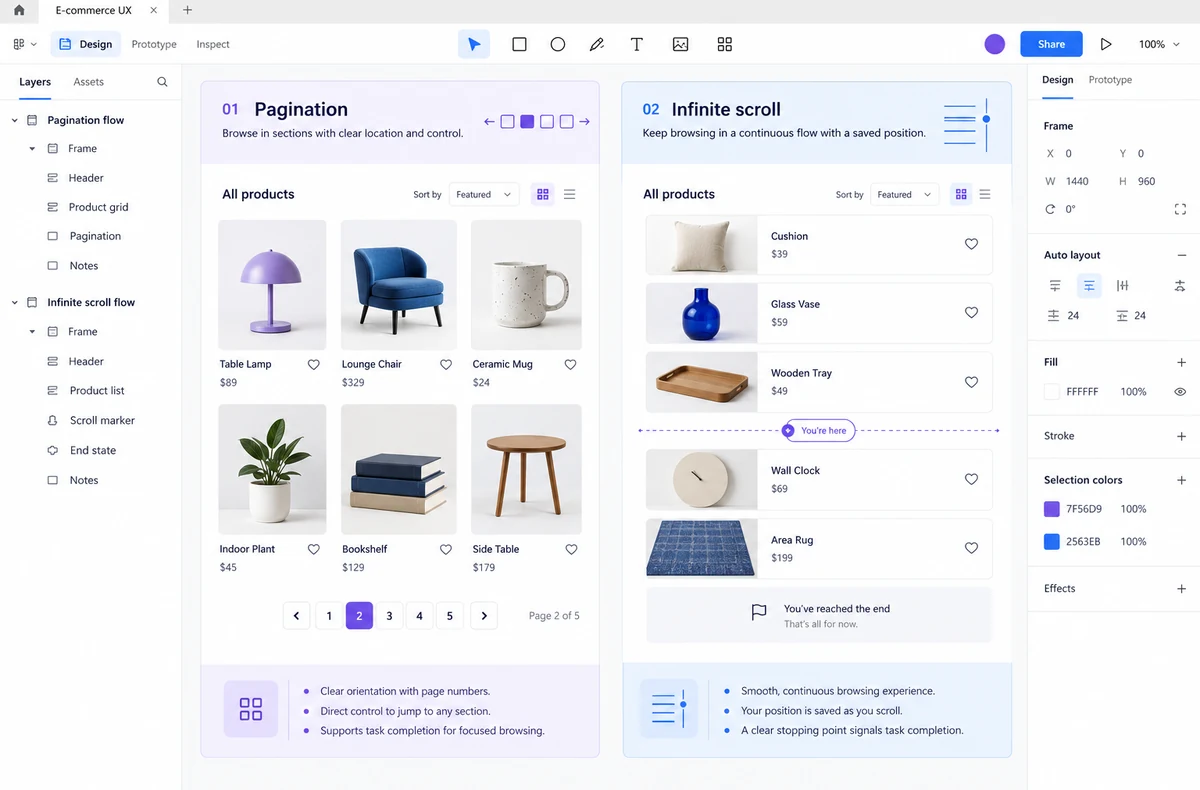
Pagination, Load more, and infinite scroll are not interchangeable loading tricks. Choose the pattern by the job the person came to do. Use pagination when people need a stable place to return to, compare a known range, or share a result. Use infinite scroll when the main job is browsing a changing stream and the next item is more valuable than a precise location. Use Load more when people want to expand a collection deliberately without losing the current context.

Before drawing the controls, map the collection's states in a UI design collaboration workflow in Pixso. Keeping the list, loading state, filters, item detail, and return path in connected frames lets a team review the decision as one experience instead of debating a loading pattern in isolation.
Choose the pattern by the task
Start with the user's next decision, not the number of records in the database. A large collection can still need pagination if someone is comparing pages of results. A small collection can benefit from Load more if the first view should stay focused. The table below is a starting point; the surrounding workflow decides the final choice.
| User task | Best starting pattern | Why it fits | Non-negotiable states |
|---|---|---|---|
| Find a known record or return to a saved place | Pagination | Pages create a stable position that can be revisited or shared. | Page size, current page, previous/next, filter and sort persistence. |
| Browse a stream of recommendations | Infinite scroll | Continuous discovery keeps the next item close and removes repeated page decisions. | Loading boundary, end of feed, retry, back-button restoration and a way to reach navigation. |
| Review more items while keeping the current comparison visible | Load more | Expansion is explicit and does not replace the context already on screen. | New-item count, progress or completion message, focus behavior and duplicate protection. |
| Process records in batches or act across a result set | Pagination or Load more | Operational work needs selection scope and a predictable result more than endless novelty. | Selection scope, filter changes, partial results and recovery after an action. |
If two patterns appear equally suitable, prefer the one that makes position, scope, and recovery easiest to explain. Do not choose infinite scroll merely because a page has many records, and do not add numbered pages where the collection is a short, intentionally ordered feed.
When pagination is the safer choice
Pagination is useful when the collection has a meaningful order and people need to reason about where they are. Search results, admin queues, reports, documentation indexes, and comparison lists often fit this model. A page boundary gives the interface a compact contract: these are items 51–75 under the current query, filter, and sort.
Make the position stable
- Show the current page and the total only when the total is reliable. If the count is still being calculated, say that rather than showing a guessed total.
- Keep query, filters, sort order, and page size visible or recoverable when a person moves between pages.
- Use descriptive previous and next labels in addition to icon cues. Disable a control when there is no adjacent page, rather than making a dead link appear active.
- When a person opens an item and returns, restore the page and the result position when the collection has not materially changed.
Stable pagination does not require a fixed dataset. If records can be inserted or removed while someone is reviewing them, state what the ordering means and how the interface handles a page that has changed. A quiet “results updated” message with a deliberate refresh action is easier to trust than silently moving the person to another record.
For a public content collection, give each meaningful result state a stable, shareable route when that supports the task. Do not hide the only path to older content behind a script-controlled scroll position; people and search systems need a dependable way to reach the same collection state. The route should still reflect the real filter and sort rules rather than promising a page that no longer exists.
Treat page size as a task decision
A larger page reduces navigation but increases scanning, rendering, and selection cost. A smaller page makes comparison easier when each row is dense. Offer a page-size choice only if it helps the task and preserve it across the current collection. If the choice resets every time a filter changes, people cannot build a reliable browsing rhythm.
On mobile, do not compress a desktop table until its labels and row actions become unreadable. Move secondary fields to a details view or a well-labelled expansion, then keep the page controls close to the result summary. A responsive data table should preserve the decision a row supports, not every column.
When infinite scroll supports discovery
Infinite scroll suits a stream in which the next item is part of the value: visual inspiration, activity updates, or recommendations that are evaluated one at a time. The pattern removes a repeated “next page” decision, but it also removes a natural stopping point. The design must replace that lost orientation with clear boundaries.
Design the boundaries, not just the loading trigger
- Show a loading state close to the point where more items will appear. Do not make a person guess whether the feed is still working.
- Provide a clear end-of-feed state. “You are all caught up” and a useful next action are better than an empty gap.
- Keep a retry path for a failed batch. Preserve the items already read and do not duplicate them when the request succeeds on a second attempt.
- Restore the previous position when someone returns from an item. If restoration is not possible, offer a visible return path and explain what changed.
- Keep footer content and important navigation reachable. A feed that always inserts another request before the footer makes those links effectively unavailable.
On keyboard and assistive-technology paths, inserting content must not move focus unexpectedly. Place new items after the current content in the reading order, announce meaningful progress without repeating every item, and provide a control that lets someone request more content deliberately. Respect reduced-motion preferences when new content enters the viewport.
Why Load more is often a useful middle ground
Load more keeps the first set of results stable and makes expansion explicit. It works well for a catalogue or gallery where people want to scan a manageable batch, then decide whether to continue. The button also gives the product a natural place to communicate how many items will appear and whether the next request succeeded.
Keep the control in the reading order after the current items. After loading, place focus on the first new item or return focus to the control with a short status message, depending on whether the person is reviewing each item or repeatedly expanding the collection. Do not move the button so far down the page that it becomes hard to find after every request.
“Load more” is not a substitute for pagination when people need a deep link to a range or must compare a known page. If the collection has a useful URL for its current state, preserve that state in the address or provide a shareable alternative. If not, explain the limitation before someone invests time in a long scan.
Worked example: a component library with three ways to browse
Imagine a design team reviewing a library of 240 component examples. The library supports a search field, a category filter, a sort control, and a detail view. Three people use it for different jobs:
- Find a known pattern: a designer searches for “date picker,” checks the filter state, opens one result, and returns to compare another. Pagination preserves the query, sort, and result position without forcing an endless replay of earlier cards.
- Scan for inspiration: a designer browsing “navigation” has no single target and wants a continuous visual stream. Infinite scroll can work, but each batch needs a retry state, a visible end, and position restoration when a detail view closes.
- Review a category: a design lead compares the first 24 cards in “forms,” then chooses whether to see more. Load more keeps the reviewed cards in place and makes the decision to expand explicit.
These are different tasks over the same data. Do not force the entire library into one pattern because the backend returns one collection. The right design may use pagination for search, Load more for a curated category, and a deliberately bounded stream for inspiration, as long as the transitions and labels make the change in behavior clear.
| State to prototype | What the person should understand | Acceptance question |
|---|---|---|
| Initial collection | Scope, order, item count or loading status. | Can someone tell what set they are browsing? |
| Filtered collection | Which filters and sort rules still apply. | Does changing the pattern preserve the same query and scope? |
| Loading next batch | Whether the request is pending and what remains usable. | Can the person continue reading or retry without losing work? |
| End of collection | That no more items are available in the current scope. | Is there a useful next action instead of an unexplained blank? |
| Return from detail | Where they were and whether the collection changed. | Can they continue the same comparison without starting over? |
Prototype the decision in Pixso
Build one connected flow for each task rather than a single “happy path.” Start with the query or entry point, then connect the initial collection, the loading transition, the next batch, the empty or end state, the detail view, and the return path. Add a filter or sort change to the same flow so reviewers can see whether position and scope remain understandable.
Keep the UI state and the design decision next to the frames. A note such as “pagination for known-record search; Load more for category review” gives the developer a reason for the pattern, while a state label shows what must happen when the request fails. In a collaborative Pixso file, teammates can review the connected screens and comment on the exact transition instead of inferring behavior from one static card.
For each pattern, hand off the smallest contract that prevents ambiguity:
- what triggers the next request and whether it can be repeated safely;
- how query, filter, sort, selection, and scroll position are preserved;
- what appears during loading, failure, retry, and completion;
- where focus goes after new content is inserted or a detail view closes; and
- how the state is represented on a narrow screen.
Avoid the common pattern mistakes
Infinite scroll for a transactional queue. People processing records need scope, selection, and a reliable stopping point. Use pagination or an explicit batch expansion unless discovery is genuinely the task.
Pagination with a moving order. If the collection reorders while someone is changing pages, records can appear twice or disappear between views. Define the sort and update behavior, or use a cursor strategy that matches the product's data contract.
Load more that loses the button. If the control jumps below a long list, the person cannot tell how to continue. Preserve its location in the reading order and show a concise count or completion message.
Resetting context on every change. Changing a filter, returning from a detail view, or retrying a request should not erase the query and progress unless the product clearly explains why. Context is part of the pattern, not a convenience added later.
A concise decision rule
Choose pagination when position, comparison, sharing, or repeat visits matter. Choose infinite scroll when continuous discovery is the primary value and the product can preserve orientation, recovery, and access to navigation. Choose Load more when people should decide when to expand a collection while keeping the current context visible.
Then prototype the first view, one successful expansion, one failed request, the end state, and the return path. If a reviewer can explain what changed, what remains, and how to get back without asking the designer, the loading pattern is doing its job.