Scott
The rapid evolution of generative artificial intelligence has fundamentally altered the digital design landscape. Traditional workflows that once relied on tedious vector plotting, manual layout adjustments, and repetitive asset slicing are being replaced by intelligent automation. We are witnessing a shift in the fundamental skills required for digital creators, as the gap between raw concept and functional code continues to shrink.
At the center of this transformation is the integration of specialized artificial intelligence modules directly into collaborative design spaces. Modern product teams no longer view automation as a threat to creativity, but rather as an amplifier of human capability. By automating the mechanical aspects of layout creation, design tools allow teams to focus on user psychology, system architecture, and product strategy.
Part 1. What Are Skills in the Modern Design Era?
Before diving into tools, we must ask ourselves: what are skills in the era of artificial intelligence? Traditionally, professional capability was defined by mechanical mastery of specific design software, drawing tablets, or coding syntax. In the past, traditional design skills were measured by how quickly you could draw vectors, manage Bezier curves, or organize nested layers. However, when we ask what skills are in the context of modern product development, the definition shifts from execution speed to systemic thinking.
To understand this shift, we first need to ask: what are skills in the age of automation? Today, professional capability is measured by your ability to direct intelligent agents, structure context-rich prompts, and manage complex system parameters. These cognitive skills allow designers to manage complex projects without getting bogged down by repetitive manual labor. The introduction of generative ai skills has completely disrupted traditional wireframing, enabling designers to generate functional layouts through plain text. To explain what skills are today, we have to look beyond drawing shapes to decision-making, curation, and the synthesis of automated outputs.
Part 2. Changing the Game: How Pixso AI Redefines the Canvas
With the launch of pixso ai, designers are no longer forced to start their projects from a blank canvas. Unlike standard generative tools that output static flat images, this platform generates highly structured, production-ready assets. The true magic of pixso ai lies in its deep integration within a collaborative design workspace, allowing teams to instantly translate conceptual sketches into layered UI mockups.
This is where the unique concept of Pixso skills steps in to redefine the design pipeline. Using specific pixso skills allows you to transform static prompts into dynamic, system-aligned interfaces. These customized workflows are powered by pixso ai skills, which act as specialized design agents working directly within your active workspace.
Solving Critical Design Pain Points
By leveraging specific pixso skills, you can automate repetitive tasks and focus on the strategic side of product design. The platform addresses several critical industry bottlenecks through the following specialized capabilities:
- Generate editable vector source files: Most AI image generators output flat raster graphics that cannot be modified. Pixso AI generates fully layered, editable vector UI structures. You can input plain English prompts to output clean UI layouts, bypassing static images entirely. Furthermore, the generated layouts feature one-click multi-device adaptive responsiveness out of the box.
- Full-canvas in-situ AI editing: You do not need to generate designs in an external window and copy-paste them back. Pixso allows you to box-select any section of your existing or new drafts directly on the canvas to optimize it. These modified elements automatically sync with your active design tokens to maintain visual consistency.
- Deep binding with private DSM: To prevent style chaos, the platform links directly with your team’s private Design System Manager (DSM). Any AI-generated components or layouts automatically adhere to your established color swatches, typography rules, and component libraries.
- Multi-lingual and accessibility adaptation: Creating products for global audiences requires careful copy adaptation. Use AI to draft localized copy, then review terminology, text expansion, accessibility, and any market-specific legal requirements with the relevant specialists.
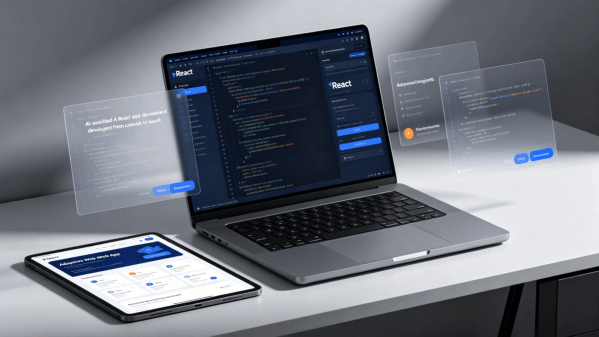
- One-stop prototype handoff: Bridge the gap between design and development. The platform automatically generates micro-interactions, layout transitions, and clean, standardized frontend code (such as CSS or React components) directly from your visual assets.
- Enterprise-grade compliance: Large organizations require strict security. Evaluate the proposed Pixso deployment, access controls, AI data flows, and usage terms against your organization’s requirements.
- Lightweight learning curve: To prevent generic, homogenized designs, the interface provides built-in English industry prompt templates. This establishes a clear division of labor between human intuition and machine execution.
How Pixso AI Compares to Traditional Workflows
| Feature / Workflow | Standard Raster Generators | Pixso AI Vector Workspace |
| Output Format | Flat PNG / JPEG images | Fully layered, editable vector assets |
| Workspace Integration | External generation, manual import | Full-canvas in-situ editing & optimization |
| System Consistency | Ignores existing team design systems | Deeply bound with private DSM & design tokens |
| Developer Handoff | Manual redrafting from scratch | Auto-generated interactions & clean frontend code |
| Compliance & Security | Public cloud only, licensing risks | Private-deployment options; assess controls and applicable obligations |
Part 3. Essential Skills for UI/UX and Web Designers Today
As automated tools become standard in product pipelines, the competitive landscape for digital creators is shifting. The most valuable skills for UI/UX designers are no longer limited to wireframing or adjusting spacing values. While technical execution remains important, modern design skills require a blend of aesthetic intuition, user research synthesis, and prompt engineering. When building modern portfolios, demonstrating key skills for UI/UX designers means showing how you address user difficulties through rapid, AI-assisted prototyping.
Similarly, the technical skills for web design have transitioned from static layouts to responsive frameworks. Developing modern skills for web design requires an understanding of semantic spacing, fluid grids, and automated design tokens. When building responsive websites, having the right skills for web design means knowing how to scale design systems efficiently. Collaborative system management and automated asset generation are now essential skills for UI/UX designers, requiring professionals to think like systems architects rather than static layout artists.
Ultimately, valuable skills for UI/UX designers include understanding user psychology and directing AI tools to execute the details. Mastering the fundamental skills for web design ensures that your layouts remain clean and accessible across all device screens. Acquiring practical ai skills is no longer optional; it is a necessity for staying competitive in the tech industry. Measure whether AI-assisted tasks reduce manual work in your workflow and use the time saved for the broader user journey.
Part 4. Step-by-Step Guide: How to Unleash Pixso AI Skills
Learning to configure your pixso ai skills is the fastest way to scale your digital product production. The platform uses a modular setup that lets you toggle specific design capabilities depending on your project needs.
Below is the complete functional guide on how to integrate and utilize these capabilities within your active design canvas.
Unleash endless creativity with Pixso AI, smart features that bring your designs from inspiration to reality in one seamless flow.
Introduction to AI Smart Search
When you want the AI to handle a task with a specific capability or workflow, you can enable the corresponding skill.
Once enabled, the skill will be displayed in the input field and remain active for the current conversation. The AI will automatically apply the enabled skill to analyze, generate, or modify based on your prompt.
How to use:
- Click "Skills" below the input field.
- Search for or select the desired skill from the list.
- Toggle the switch on the right of the skill. It will appear in the input field, indicating it is ready to use.
- Enter your prompt and send. The AI will use the enabled skill to generate or modify the design.
Scope of application:
- Enabled skills are active within the current conversation and are suitable for various tasks such as web design, UI styling, and content generation.
- Once a skill is disabled or removed from the input field, the AI will no longer process subsequent prompts using that skill.
Note: Using Skills will increase AI credit consumption; choose the skills needed for your task.
- Select "Skills" in the AI panel.
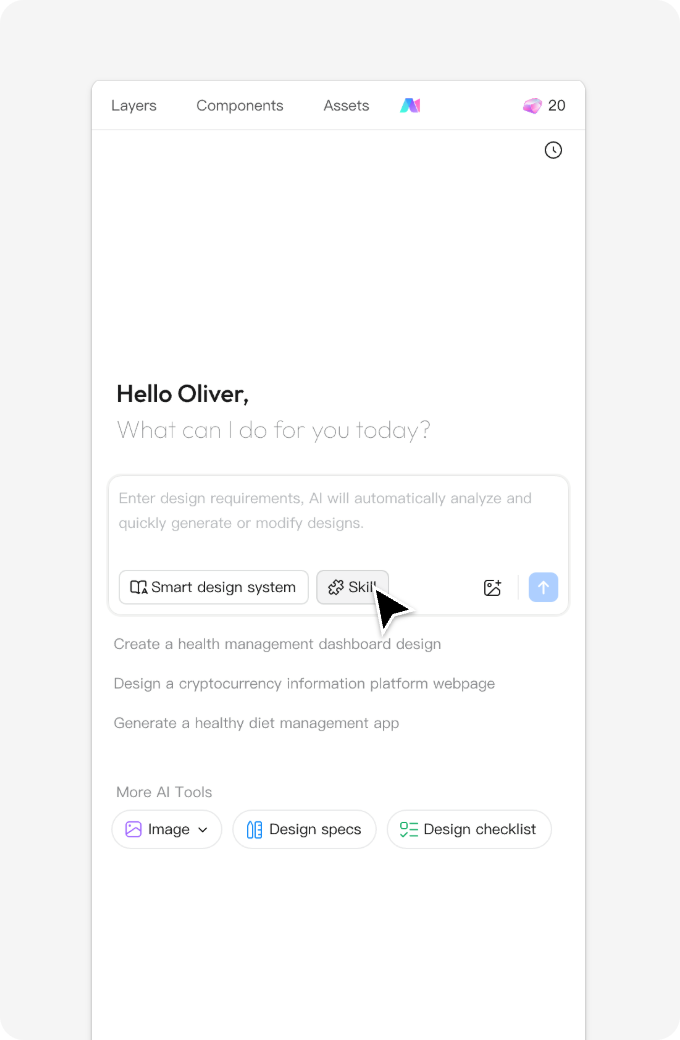
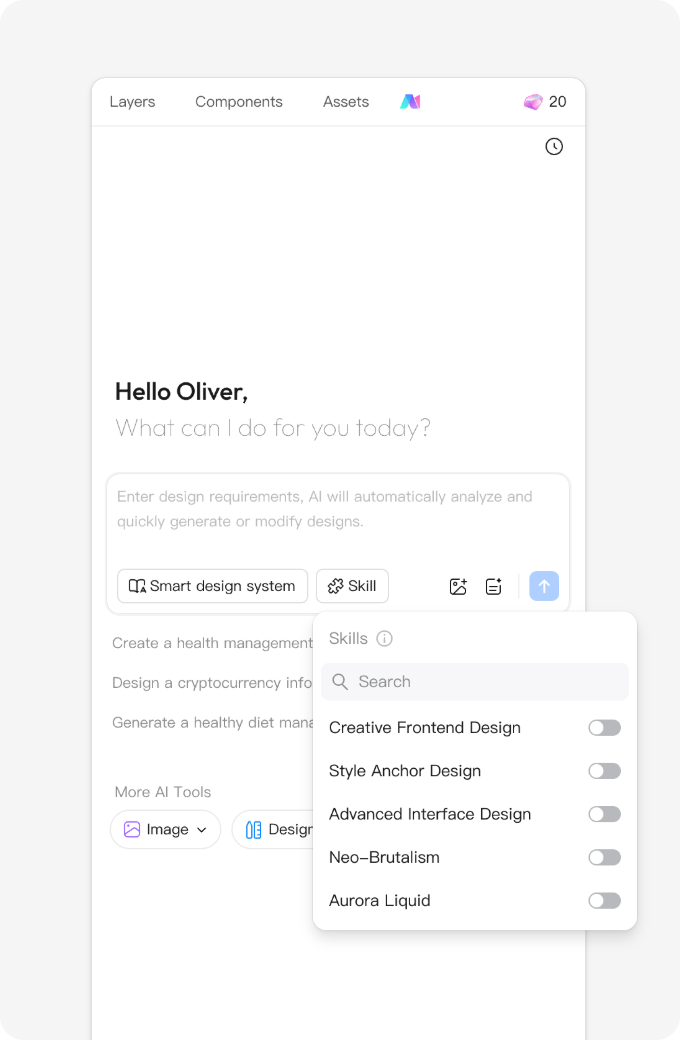
- Search for or select the skill you want to use in the "Skills" dropdown panel, and click to enable it. Hover over any skill to view its description.
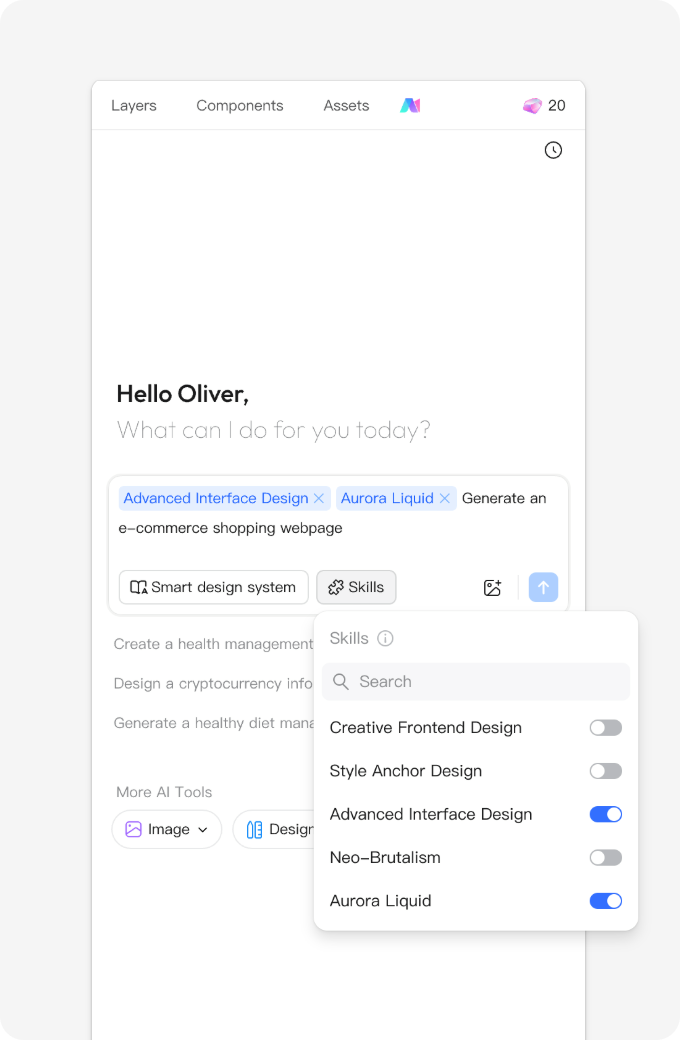
- You can select multiple skills. Once selected, the skill names will appear in the AI chat box. Enter your prompt to send both the prompt and skills to the AI.
Try it out: Experience AI Skills
Use "Skills" to supercharge your AI and make your designs stand out!
Give it a try
Enable the required skills in the AI chat box, enter your prompt, and send it to the AI. See the generated results, and compare the effects of using versus not using skills.
Prompt 1:
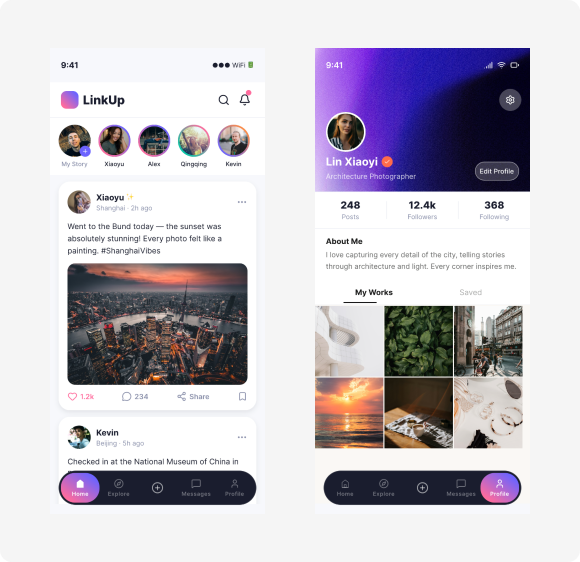
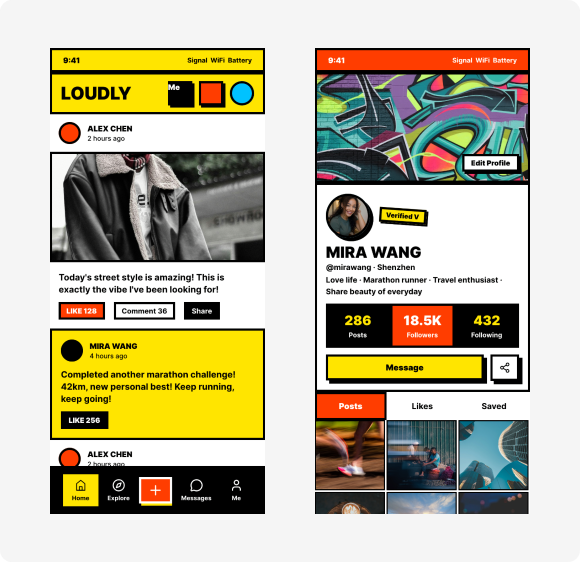
Generate a social media app using the style of this skill.
Without Skills
With Skills (Neo-Brutalism)
Conclusion
The evolution of digital design workspace automation has redefined what it means to be a modern creator. By combining traditional skills with modern AI, designers can bypass the repetitive pixel-pushing phase and move straight from abstract ideas to responsive, system-compliant interactive prototypes. The balance of skills is shifting rapidly toward human-AI collaboration. Platforms like Pixso lead this transformation, proving that when professional human taste meets deep vector automation, the possibilities for product creation are virtually limitless.
![[Full Guide] Filter UI Design](https://pixso.net/assets/media/filtering-ui-61ba100ed07d6af6.webp)