Scott
A plan downgrade changes what people can do with work they already depend on. A lower price and a list of missing features are not enough. Before confirmation, explain when the change takes effect, what happens to existing objects, which actions become unavailable, and what the account manager can still reverse.
Keep those answers visible after the confirmation screen closes. Someone returning to the workspace tomorrow should be able to distinguish a scheduled downgrade from an active lower plan without reading an old email or attempting an action that will fail.

Define the downgrade contract before designing the screen
GitHub's downgrade instructions ask personal and organization account users to review the capabilities they will lose on the next billing date. They also identify concrete consequences, such as losing advanced code review tools on private repositories when moving from Pro to Free. The useful design lesson is specificity: explain the affected work, not just the new plan's name. GitHub's resource policies are not a template for another product's rules.
For the worked example below, imagine an invented project-management app and a workspace called Harbor. Its billing administrator, Dana, schedules a move from Studio to Core on 20 October 2026. The change takes effect at the next billing boundary: 1 November 2026, 00:00 UTC. These plans, dates, limits, and policies belong only to this teaching example.
Harbor has five active projects: Website, Mobile app, Client portal, Support center, and Brand library. Core applies a three-active-project limit to creating, duplicating, or restoring projects. It allows existing projects above that limit to remain readable and editable under their existing permissions. The downgrade itself neither deletes nor archives them. Archived projects do not count as active; restoring one adds to the active count.
Separate billing authority from project permissions
In this example, billing administrators can schedule or cancel a pending plan change. That role alone does not grant access to project contents or permission to archive them. Define the remaining roles just as clearly:
| Role | Allowed action | Boundary |
|---|---|---|
| Billing administrator | Manage the workspace plan and view aggregate usage. | Cannot open or archive a project without separate project permission. |
| Project manager | Create projects; edit, duplicate, restore, and archive projects they manage. | Cannot change billing unless also a billing administrator. |
| Editor | Edit an assigned project. | Cannot archive it solely because they can edit it. |
| Viewer | Read an assigned project. | The plan change does not grant editing rights. |
Show Dana the usage total without revealing restricted project names. A project list can include only titles Dana is allowed to see. An editor who encounters a plan limit needs an explanation and an authorized contact, not an enabled billing button. A lower plan and insufficient permission are different reasons for an unavailable action.
Separate confirmation from the effective time
Stripe's customer portal configuration makes end-of-period downgrades an optional setting; immediate updates are the default for that setting. Its end-of-period option applies between prices for the same product. This is evidence that timing depends on configuration, not a rule that every subscription downgrade waits until renewal.
For Harbor, the confirmation should say “Schedule Core for 1 November,” followed by the exact time and timezone. Explain that Studio remains active until then. Do not use “Downgrade now” for a future change or show Core as the current plan immediately after scheduling.
Use an absolute date in the durable summary. “In 12 days” becomes stale in an email or screenshot. If the interface also shows the person's local time, label it and keep the stored effective instant consistent across billing details, confirmation, and notifications. A browser clock reaching midnight is not evidence that the server has applied the new plan.
Explain existing work separately from new work
“You are two projects over the limit” identifies a count, but not its consequences. Harbor's impact summary needs to distinguish reading, editing, archiving, creating, and restoring. Its rules are deliberately permissive for existing work; another product may require a different contract.
| Object or action | Before 1 November | After Core is active | What to do |
|---|---|---|---|
| Five existing active projects | Read and edit according to project permissions. | All five remain available under the same permissions. | No cleanup is required to keep this existing work editable. |
| Create or duplicate a project | Allowed by Studio for an authorized creator. | Blocked while the active count is three or more. | Ask an authorized project manager to archive enough projects, or discuss another plan with a billing administrator. |
| Archived projects | Readable to authorized participants; not editable until restored. | Keep the same access rules and remain outside the active count. | Open them for reference; do not describe archiving as deletion. |
| Restore an archived project | Available to its project manager under Studio. | Available only when the resulting active count will be at most three. | Free a slot first; restoration uses that slot. |
| Archive an active project | A project manager can archive a project they manage. | The same action remains available and reduces the active count. | Coordinate before making a working project read-only. |
Make the arithmetic explicit. Archiving two of Harbor's five projects leaves three active projects: the workspace is at its limit, so it still cannot create another. Archiving a third leaves two; an authorized creator can then add one. Avoid “Archive two to create a project,” even though two is the current overage.
Do not turn the cleanup suggestion into a requirement to complete the downgrade. Under this example's policy, Dana can schedule Core with all five projects active. Being a viewer or billing administrator alone does not authorize project creation. The plan limit is an additional check, not a replacement for role checks.
Confirm the actual decision, not a generic warning
The final review should bring together Harbor, Studio → Core, the effective time, current usage, and the specific blocked actions. Put the consequence beside the confirmation control: “All five existing projects keep their current permissions. New projects and restorations require fewer than three active projects.” Provide a normal way back without losing the review context.
Check the current plan, usage, authority, and pending changes again when Dana confirms. A second administrator may have changed the plan or scheduled something else. If a material consequence differs from the preview, explain the difference and ask for a fresh decision. Do not silently replace someone else's schedule.
While the request is in progress, prevent duplicate submission without implying success. If its outcome is uncertain, retrieve the workspace's actual scheduled state before offering another attempt. The success message should confirm a recorded schedule, not merely that Dana clicked the button.
Keep the scheduled change visible and reversible where supported
After scheduling, the billing page should show both “Current plan: Studio” and “Scheduled: Core from 1 November 2026, 00:00 UTC.” Repeat the relevant project consequence and provide the same impact summary on return visits. A temporary toast is not the workspace's record of a future restriction.
Harbor permits a billing administrator to cancel the scheduled downgrade before it takes effect. Label that control “Cancel scheduled downgrade,” not “Cancel subscription.” On success, show that Studio will continue and that no downgrade remains scheduled. If the request races with the effective time, read the server result: do not promise cancellation after Core is already active.
Usage can change before November. If Harbor grows to six active projects, refresh the summary to six; do not preserve five as though it were the live count. The existing-work policy still applies, but the work required to make room for a new project has changed. Inform affected project managers without exposing billing amounts or restricted project details to unauthorized recipients.
Explain restrictions where they are encountered
Once Core is confirmed active, show that as the current plan. Beside the new-project action, a useful message is “5 active projects. Core allows new projects when fewer than 3 are active. Existing editors can keep working.” Keep existing projects visible; replacing the workspace with an upgrade wall would contradict Harbor's stated policy.
Offer only actions the current person can perform. A project manager can review their archivable projects; an editor can contact the appropriate manager. If someone has permission to create but another person takes the last slot first, preserve the proposed project name and explain the updated count after the server rejects creation. Do not imply that a pending creation already exists.
If the billing change and feature access are still being reconciled, describe that state accurately. Do not show “Core active” solely because the scheduled time passed, or retain a Studio badge indefinitely after the backend confirms the change. Agree on the authoritative plan state and recovery path with engineering.
Separate restoring capability from changing a bill
For this example, scheduling the downgrade makes no immediate charge and creates no credit for the current period. Core's recurring plan price applies from the new period. Existing unpaid invoices or separate charges are not erased by the downgrade. Retrieve the applicable billing preview; do not calculate a promised total from a marketing price card when taxes or other items may affect it.
Before the effective time, cancelling the schedule keeps Studio. Afterward, returning to Studio is a new plan change, with its own price, effective time, and any required payment confirmation. Show those terms before confirmation; restore capabilities only when the service confirms the new entitlement. Do not label this action “Undo” if it cannot reverse the invoice history.
Refunds, credits, retained data, and access recovery are separate policy questions. A product that offers a credit must say what it covers and when it applies; a product that cannot promise recovery must not hide that behind “Upgrade to get everything back.” No billing-provider setting alone defines a workspace's data-retention policy.
Design the Harbor decision in Pixso
In a Pixso file, build three connected screens for this fictional application: Harbor's impact preview, the scheduled-change summary, and the active Core workspace with new-project creation unavailable. Keep the project count, date, role, and policy wording consistent. These are subscription screens being designed on the canvas, not Pixso's own billing controls.
Ask a teammate playing Dana to schedule the change and then return to billing. Can they identify the current plan, explain what happens on 1 November, and cancel only the pending downgrade? In a second pass, use a project-manager role after activation. Ask whether archiving two projects allows a new one. Their reasoning will reveal whether the interface explains the actual limit.
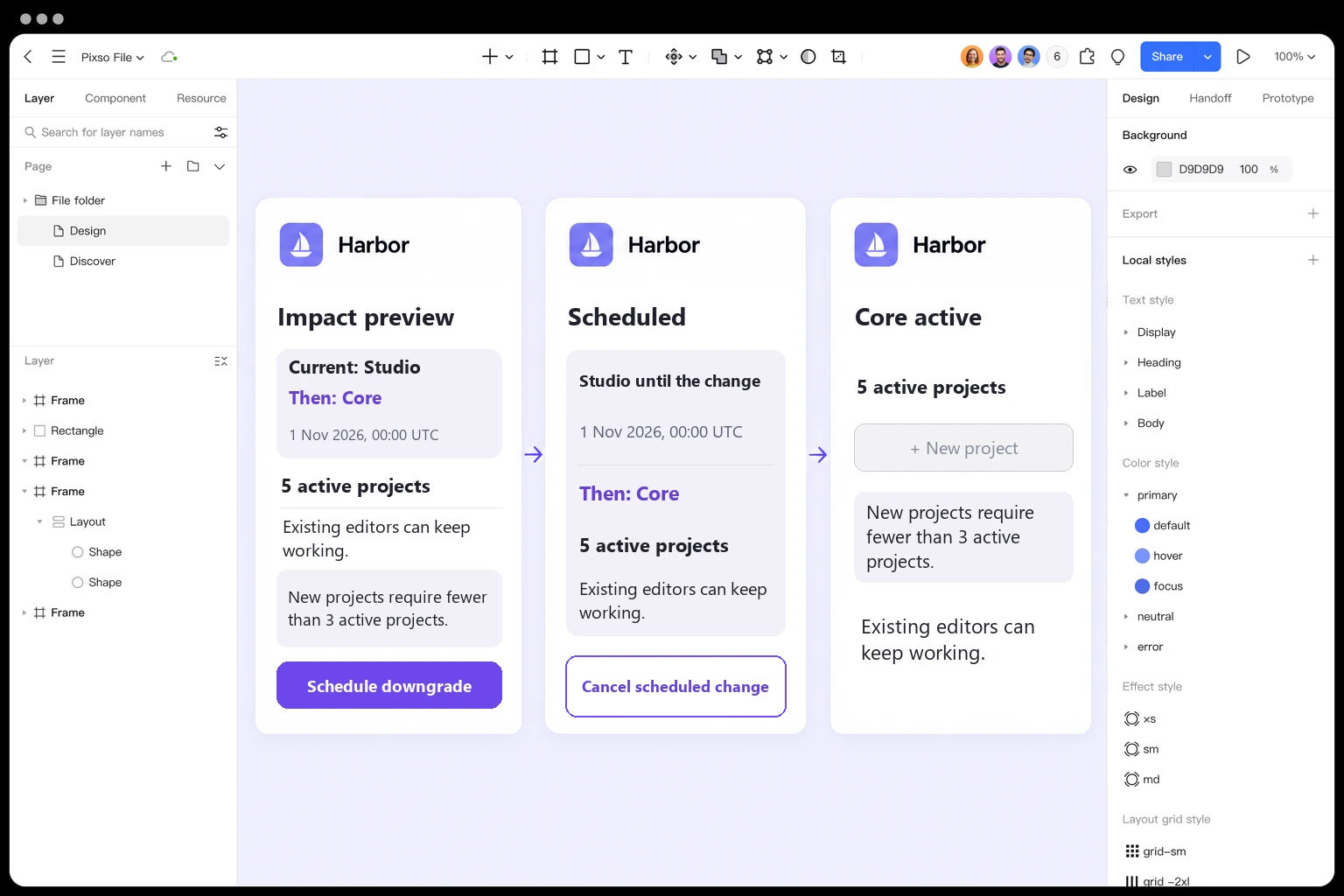
Design a clear plan downgrade flow in Pixso →
Finally, test a changed usage count, a revoked billing role, competing schedules, an uncertain response, and cancellation at the effective boundary. The goal is not just a successful plan-change request. People should understand which work remains available, why a particular action is restricted, and which recovery path they are actually authorized to take.