Scott
A recurring event edit needs two answers: what changes, and which occurrences receive that change. Show both before the user commits. When future dates already contain individual changes, include those exceptions in the preview. A short scope label cannot carry the whole consequence.
Consider a design review that happens every Thursday at 09:00 in London. One November meeting has already moved to 11:00. The organizer now wants the remaining regular meetings to start an hour later. Applying the new time indiscriminately would undo an earlier arrangement that still matters.
The date-picker UI design guide covers entering dates, ranges, constraints, and time zones. Once the value is valid, recurring event edit UX must connect it to the right part of the schedule. That is the focus of this four-date prototype exercise.
Give the series a readable shape
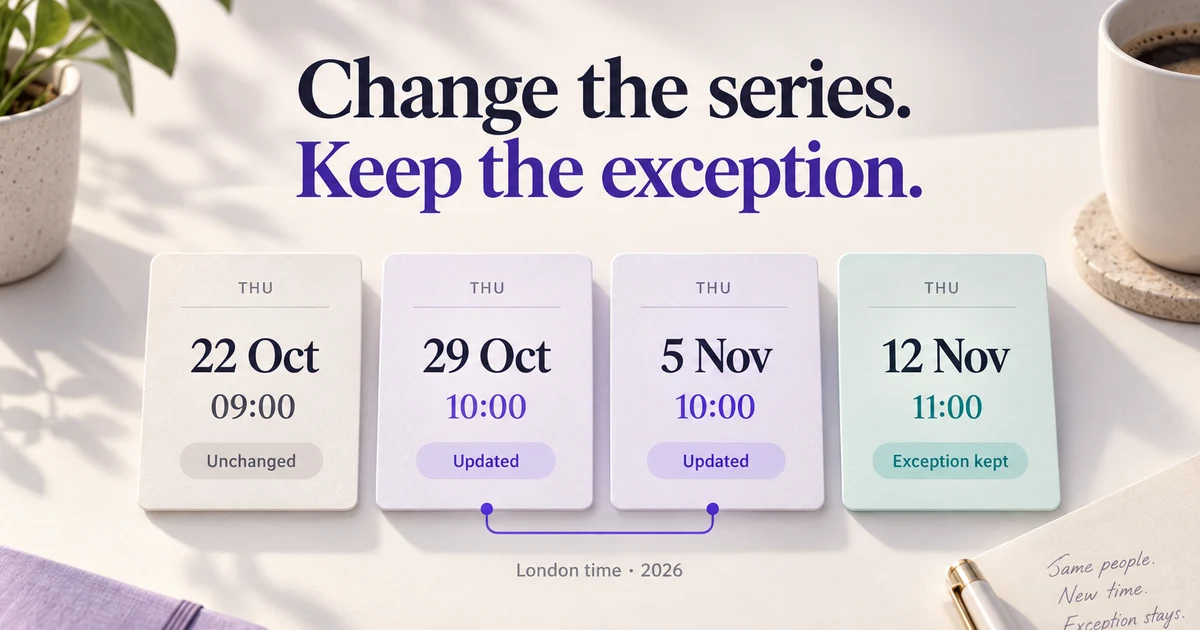
Use a finite series for the first design pass: four 45-minute reviews on 22 October, 29 October, 5 November, and 12 November 2026. Their normal start time is 09:00, with the 12 November occurrence individually moved to 11:00. In the exercise, the organizer opens the 29 October event before it starts and changes the normal time to 10:00 from that date onward.
Display the event title, selected date, duration, schedule time zone, and recurrence summary together. “Every Thursday · 4 occurrences · London time” gives the organizer something recognizable. Mark 12 November as “Time changed to 11:00” when viewing its details. The interface should explain a visible difference without asking the organizer to understand a recurrence rule string.
An occurrence also needs to retain its relationship to the original series after it moves. Google Calendar's recurring-event documentation distinguishes an instance's current start from its original start, which identifies the instance within the series. For the interface, this means a moved Thursday meeting should remain recognizable as that Thursday's review, even if its new date is Friday. It should not appear to be an unrelated extra meeting.
Make each scope choice concrete
Keep the selected occurrence visible while choosing scope. In this exercise, place the scope choice after the time has been edited, beside a summary of the proposed change. Selecting a scope updates the preview; it does not save anything yet.
| Scope label | Meaning in this exercise | Detail to show |
|---|---|---|
| This event | Change only the 29 October review. | Thursday 29 October, 09:00 → 10:00. |
| This and following events | Change the regular start from 29 October onward, keeping existing individual time changes. | Two reviews change; the 12 November exception stays at 11:00. |
| Entire series | Change the regular time across all four dates, keeping existing individual time changes. | Three regular reviews change, including 22 October. |
These are the exercise's explicit product rules. An actual service may handle past events or exceptions differently. Agree on those behaviors with the product and engineering team before choosing the labels. If a command affects only remaining events, “Entire series” is an inaccurate name. If the selected event is itself an exception, explain whether its individual override or the underlying regular time is being edited.
Use one selection control for these mutually exclusive choices. Let its description include the first affected date and exception count. Avoid carrying a broad scope forward from a previous edit without making it apparent: changing one event's room should not inherit an earlier decision to reschedule an entire series.
The final action can be “Save changes to 2 reviews.” Put the exact dates immediately above it. For an unbounded series, use the start boundary and a limited preview, such as “Every Thursday from 29 October,” without inventing a finite total.
Preview regular dates and exceptions together
For “This and following events,” show the complete four-date result. Keeping unchanged rows visible here gives the organizer context that a changed-only list would hide.
| Review date | Before | After | Reason |
|---|---|---|---|
| 22 October 2026 | 09:00 | 09:00 | Before the selected boundary. |
| 29 October 2026 | 09:00 | 10:00 | Selected occurrence changes. |
| 5 November 2026 | 09:00 | 10:00 | Following regular occurrence changes. |
| 12 November 2026 | 11:00 | 11:00 | Existing individual time change is kept. |
Label the table “All times are London time.” A useful confirmation sentence is: “Move 2 reviews to 10:00 from 29 October. Keep 12 November at 11:00.” Color can highlight changed rows, but the before/after text and reason must explain the result independently.
Preserving overrides is a deliberate policy in this exercise, not a promise made by every calendar. If the actual operation replaces individual changes, list the affected exceptions and their resulting values before saving. For a long series, show a count with an expandable list. An exception with an edited room but an unchanged time also needs consideration: resetting every field could erase information unrelated to the organizer's request.
More complicated edits can remove an exception's original place in the schedule. Changing Thursday to Tuesday raises a different question from moving the start one hour: what happens to a review previously moved from Thursday to Friday? Have the service return the actual resulting occurrences for preview. Do not let the visual design quietly assume that every saved exception will be retained, moved, or discarded.
State what stays stable across clock changes
“Every Thursday at 09:00” still needs a time basis. A team meeting can stay at 09:00 in a named time zone while its UTC time changes. A schedule fixed at 08:00 UTC has a different result on a London clock.
The UK clocks go back on 25 October 2026. Using the original, unedited review time, the dates on either side illustrate the difference:
| Schedule rule | 22 October | 29 October |
|---|---|---|
| 09:00 in Europe/London | 09:00 London · 08:00 UTC | 09:00 London · 09:00 UTC |
| 08:00 UTC | 09:00 London | 08:00 London |
Choose the basis that matches the task, then state it near the recurrence summary. For this review, “09:00 London time” keeps the team's local meeting time stable. Showing “Your time” can help a remote attendee, but it must not silently replace the schedule's governing zone. When an organizer changes that zone, preview whether the event keeps its local clock time or its previously scheduled instant.
RFC 5545 distinguishes UTC, local time with a time-zone reference, and floating local time without one. Floating time is not a safe shorthand for an international meeting: its wall-clock value is independent of a particular zone. The same specification says invalid dates and nonexistent local times generated by recurrence rules are ignored. A monthly “31st” or a time during a spring clock change therefore deserves an actual occurrence preview, not dates guessed from a mockup.
For a product serving those cases, bring the recurrence engine's result into the design review. Decide how an omitted or adjusted date will be explained according to the service's real policy. Keep the explanation near the affected date; a general time-zone footnote several screens away cannot explain a missing appointment.
Treat cancellation and save outcomes as part of the edit
Give cancellation the same scope clarity. “Cancel the 5 November review” and “End the series before 5 November” have different consequences. The first leaves the later review; the second removes remaining scheduled reviews according to the service's rules. A vague “Delete event” confirmation conceals that difference.
After one cancellation, make the outcome findable in the event history or another appropriate place. The prototype should also show the later event still present. Offer restoration only if the product supports it, and explain whether restoring the occurrence also restores its previous individual changes.
While a change is being saved, keep the requested scope and preview visible and prevent accidental duplicate submission. If the request fails, retain the organizer's edit. If the response is uncertain, establish the current saved state before inviting another save. A confident “Nothing changed” message is wrong when the client simply does not know the outcome.
Someone else may have moved the 12 November review while this preview was open. Show the newly changed occurrence and ask the organizer to review the updated consequence before committing. Preserve their proposed 10:00 start so they can reconcile the change without rebuilding it.
Separate saved state from notification state when the service can distinguish them. “2 reviews updated” describes the schedule. “Invitations sent” describes another outcome and should appear only when confirmed. The design should not promise that every attendee has seen or accepted the new time.
Prototype the decision in Pixso
Build five connected frames in Pixso: the selected 29 October review, the edited time with scope choices, the four-date preview, an expanded view of the retained 12 November exception, and the saved calendar. Keep dates, duration, and time-zone labels identical across the frames. Reuse a review-row component so changing a selected or pending state does not accidentally change its data.
Pixso's prototyping workflow supports connecting interface elements to destination frames, setting a starting frame, and previewing the interaction. Connect each scope choice to its corresponding preview, including a cancellation path. The frames represent the agreed scheduling behavior; the prototype itself does not calculate recurrence or update a live calendar.
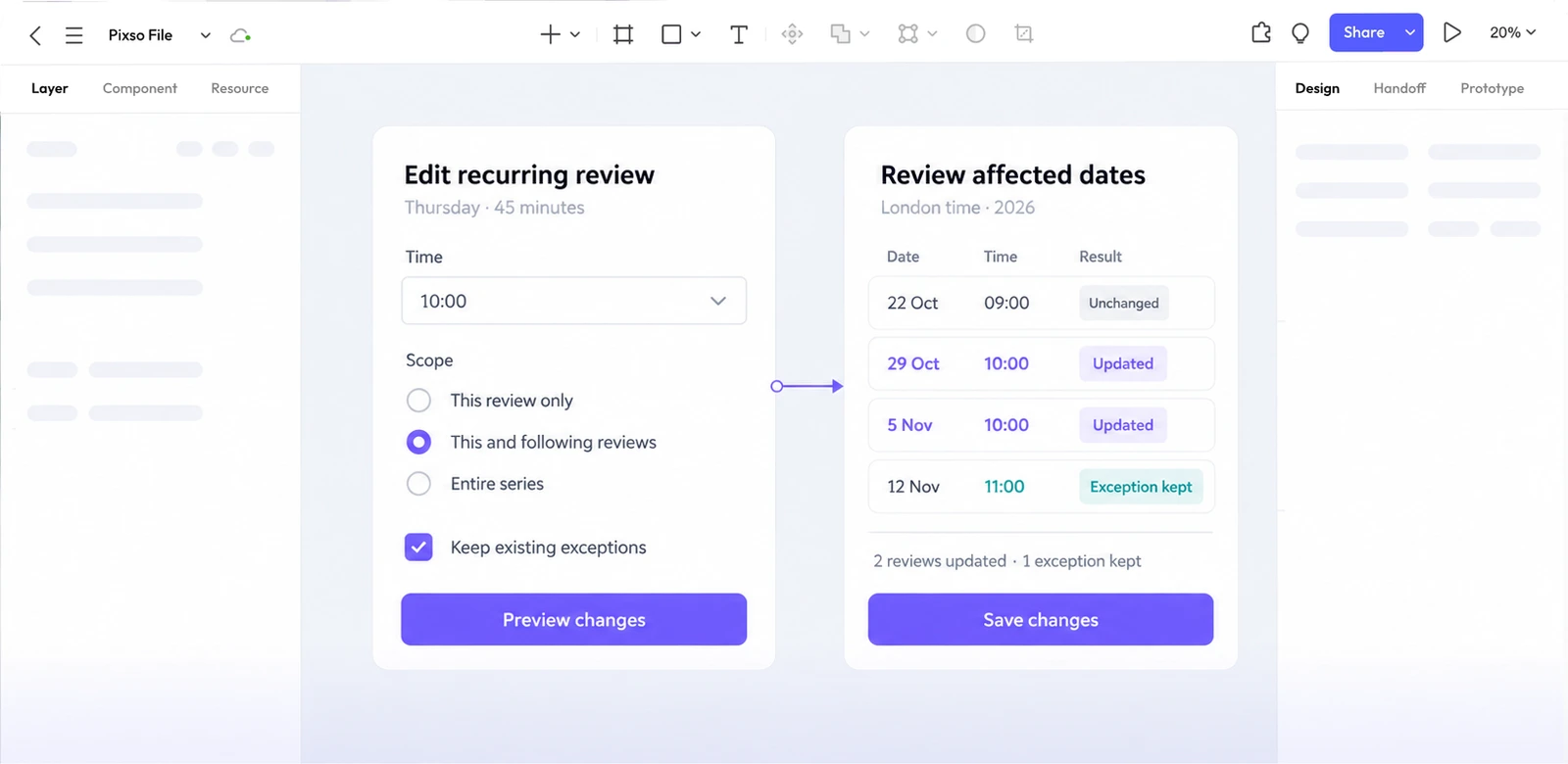
Ask a participant to move the regular reviews from 29 October to 10:00 while keeping the separately arranged November review at 11:00. Before they save, ask which dates will change. Afterward, ask them to find the exception and cancel only the 5 November review. Record where their prediction differs from the displayed result.
Then test a second request: keep a review at 09:00 London time across the October clock change. A participant who can select the correct scope but cannot explain the time basis still lacks a crucial piece of the decision. Revise the summary or preview where that misunderstanding occurs. The result to aim for is specific: the organizer can name the dates that move, the exception that stays, and the time everyone should follow.