On this page

Scott
Card sorting is a UX research method in which people arrange content items into groups. Use it when you need to understand which topics belong together in your users' minds—not when you already know the structure and want to check whether people can navigate it.
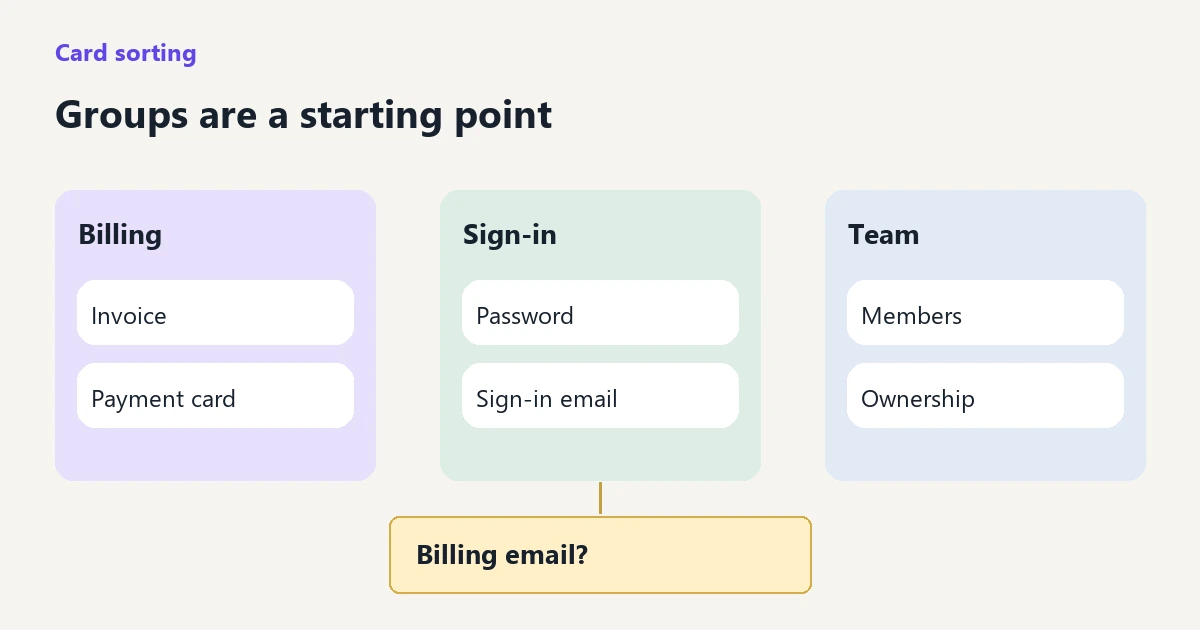
A useful card sort ends with a proposed information structure and the reasoning behind it. For example, should “Change the email that receives invoices” sit with payment settings or account details? The answer can inform a menu, but it does not tell you whether someone will find that menu item. Take the grouping into your UX design and prototype review, then test the actual task.
Choose open, closed or hybrid card sorting
In an open sort, participants create and name their own groups. A closed sort supplies the categories. A hybrid sort supplies some categories and allows new ones. NN/g's card-sorting guide explains these distinctions and their limitations: supplied categories influence grouping, and the labels participants invent are not automatically finished navigation labels.
Choose the format by the unresolved decision. If the team has no good reason for its current categories, an open sort gives people room to organize the content differently. If a small part of the structure must remain fixed, a hybrid sort can explore the rest—but keep the fixed categories visible in your interpretation. A closed sort can reveal how people allocate items among your labels. It still does not show the route they would take through a real menu.
For the example below, the team is redesigning a subscription product's help center. It wants to learn whether customers separate payment, sign-in and team administration topics. An open sort fits that question. This is a worked example, not a report of a study conducted by Pixso.
Prepare content cards at the same level
Start with the content people need, not the company's departments. “Finance,” “Manage my subscription” and “Download an invoice” describe three different levels. Mixing them lets someone place a specific answer inside a broader task and produces groups that are hard to compare.
Here is a compact 12-card set for the example. IDs keep the cards traceable; they do not appear as category cues. Every card describes one help topic. The team would check that each topic exists or is genuinely planned before using it in research.
| ID | Card text | ID | Card text |
|---|---|---|---|
| C01 | Download an invoice | C07 | Turn on two-step verification |
| C02 | Update the payment card | C08 | Invite a teammate |
| C03 | Check a refund's status | C09 | Remove a teammate |
| C04 | Change the email that receives invoices | C10 | Transfer workspace ownership |
| C05 | Change the email used to sign in | C11 | Choose which notifications you receive |
| C06 | Reset a forgotten password | C12 | Close the workspace permanently |
Cards C04 and C05 deliberately distinguish billing contact from sign-in identity. Calling both “Change email” would conceal that distinction. A short description can clarify an unfamiliar topic, but it should explain what the content covers rather than suggest where it belongs.
Give the cards the same visual treatment. Coloring payment cards blue would supply the category you are trying to discover. Keep the initial arrangement neutral and vary the order across sessions so the first screen does not quietly present a preferred grouping.
Collect individual sorts before discussing a team solution
Recruit people whose roles match the content. An everyday member, a workspace owner and the person paying invoices may expect different routes. Record that relevant context with each response. Do not average away a meaningful difference between someone administering a subscription and someone who has never seen its billing settings.
A short pilot can expose a confusing card or awkward interaction before you invite more participants. Select the study size according to the groups you need to understand and the strength of the decision you want to make; a handful of illustrative sessions is not a population estimate.
Ask each participant to arrange the topics in a way that makes sense to them, then name the groups. Let them change their mind, leave an unfamiliar item aside, or explain why a topic seems to fit in two places. Keep those observations rather than forcing every card into a neat final arrangement.
For a moderated session, useful follow-ups are specific and neutral: “What connects these topics?” or “What were you thinking about when you placed this here?” Avoid “Wouldn't this belong under Billing?” It supplies the answer and makes the completed board look more consistent than the person's original understanding.
Each person should start from an untouched card set. Several people sorting the same board together produce a group workshop outcome, influenced by discussion and other people's choices. That can be useful for team alignment, but it is not a collection of independent user sorts.
Keep raw groupings separate from your interpretation
For every completed session, retain the card IDs in each group, the participant's exact group name, unplaced cards and relevant comments. Use a participant code rather than putting identifying details on a shared synthesis board.
Suppose one participant calls a group “Money” and another calls a similar group “Payments.” You can assign both an analysis label such as “Payment topics,” while retaining the original names and membership. Do not merge every group called “Account”: one person might mean sign-in identity, while another means the entire workspace.
That distinction matters for C04. The following invented observations show three plausible explanations. They demonstrate how to read a sort; they are not findings about subscription customers.
| Placement of C04 | Participant explanation | Design question |
|---|---|---|
| With invoices and payment cards | “This is where the receipts go.” | Would a billing category make the purpose clear? |
| With sign-in email and password | “I would change my email in my account.” | Does the topic distinguish billing contact from personal identity? |
| Left between payment and team topics | “Someone else on the team receives these.” | Does the help need a route for an administrator changing another person's contact details? |
These observations point to different content or navigation needs. Renaming everything “Account settings” would make the disagreement disappear from the diagram without resolving it for users.
Count patterns without turning them into a success score
For a small set of manually recorded sorts, a spreadsheet can show how often two cards appear in the same group. Keep the raw records available so you can inspect the groups behind a count. Larger studies may justify a dedicated card-sorting platform with structured data collection and analysis.
As a simple invented calculation, imagine that all six example participants sorted both C01 and C02, and five placed them together. Their co-occurrence is 5 of 6 sorts. That supports examining a shared category for invoice and payment-card content. It is not an 83% navigation success rate: nobody has yet tried to find an invoice through the proposed menu.
If a participant leaves either card unplaced, record that state and define how it affects the denominator. Do not quietly count an unplaced card as evidence of a separate category. Likewise, a pairwise pattern does not determine a full hierarchy. Several pairs may belong together while one item connects two broader themes.
Look for groups that recur, items whose placements vary and differences tied to relevant roles. Then return to the participant's explanation. Frequent placement can suggest a candidate; it does not establish the best label, the number of menu levels or the prominence of the destination.
Use Pixso for the activity and the synthesis board
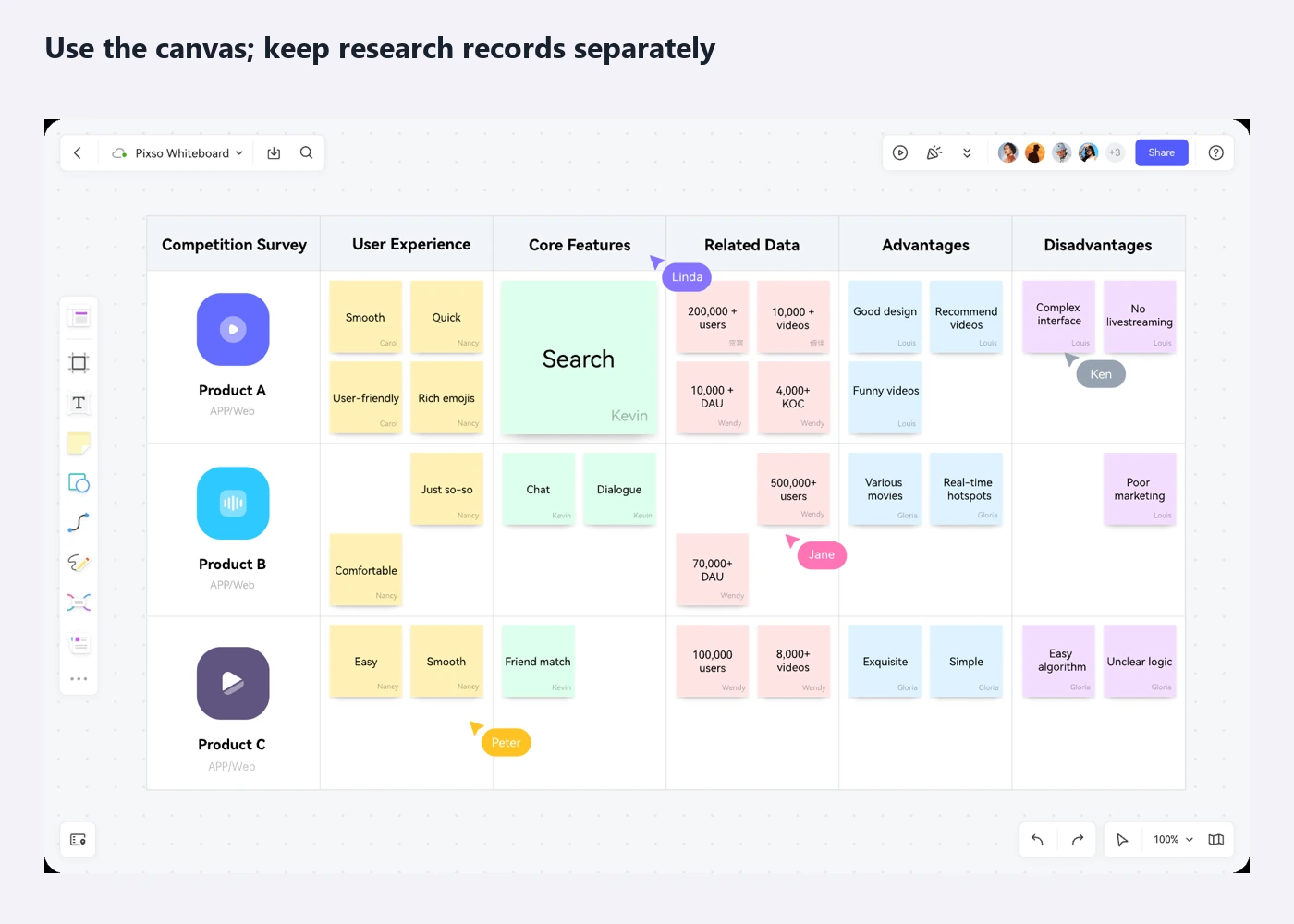
Pixso Whiteboard provides notes, text, shapes and a shared canvas for visual collaboration. You can use those tools for a moderated sorting exercise and to discuss the resulting structure with your team. Recruitment, research records and statistical analysis remain part of your research process; a board of grouped notes is not built-in card-sorting analytics.
Prepare equally sized notes from the card set and a clear working area. Give each participant a separate copy of the board, with access limited appropriately, so they cannot see another person's results. If someone cannot comfortably drag cards, let them direct a facilitator while the facilitator records their choices; note that session setup when comparing responses.
After collection, keep the original sorts intact. Make a separate synthesis board with three areas: recurring groupings, ambiguous topics and proposed navigation. Put card IDs and de-identified observation references beside your proposed changes. Reviewers can then see whether a recommendation came from a participant's wording, a repeated placement or a product constraint.
Turn the sort into a navigation candidate
For this help center, a first candidate could include Billing, Sign-in and security and Workspace members. Those are design proposals, not direct copies of the invented group names. C11 and C12 still need a justified location; do not hide difficult topics inside “Other” simply to complete the menu.
C04 might have its main article under Billing, with a related link from the account-email article. Both routes can lead to the same maintained answer. This is different from duplicating the help content under several competing titles. Confirm which roles are allowed to change the billing contact so the instructions answer the task as well as the classification question.
Now use tree testing to check the proposed navigation. A task such as “Your finance colleague should receive future receipts. Where would you find how to change that?” asks people to find the answer without naming the category. The existing tree-testing guide covers how to interpret the route and destination.
Once the hierarchy is promising, put it into the actual desktop and mobile interface. The visible menu, search, related links and page content can change what people do. A card sort gives the team a reasoned starting structure; the next test shows whether that structure helps someone accomplish the task.