Scott
A useful design critique ends with a decision, not a pile of opinions. Start by naming the user problem, show the evidence behind the work, and agree on one owner and one next action. A short agenda, visible criteria, and a decision log keep the review focused. For remote teams, a shared UI design collaboration workspace lets everyone inspect the same screen and leave feedback in context.

Choose the question before the meeting
Do not invite a group to “review the design” without a decision to make. Write one question such as “Can a first-time customer find the renewal date?” or “Which navigation label best matches the information architecture?” The question defines the evidence, the people who need to attend, and the result that counts as progress.
- Exploration: compare two directions and record the trade-off.
- Usability risk: identify the state or task that needs a test.
- Delivery readiness: surface missing states, content, or handoff details.
Run a 30-minute critique with four roles
Keep the group small enough to listen. A facilitator protects the question and timebox; the designer explains the intent without defending every pixel; reviewers point to evidence and name the risk; a recorder turns decisions into actions. Share the screen or prototype before the call so the first five minutes are not spent finding the right file.
- 0–5 minutes: read the user task, constraints, and success signal.
- 5–15 minutes: walk through the flow silently once, then collect observations.
- 15–25 minutes: group observations into decisions, experiments, and follow-up questions.
- 25–30 minutes: assign an owner, due date, and proof of completion for each action.
Separate evidence from preference
Mark each note as evidence, hypothesis, or preference. “The error copy is clipped at 320 pixels” is evidence; “people will not understand this icon” is a hypothesis; “I prefer the blue button” is a preference. This simple label prevents the loudest opinion from becoming an untested requirement.
Use a decision log with four columns: question, decision, reason, and next check. If the team chooses a direction because it reduces the number of steps, write the old and new step counts. If the decision is provisional, state what observation would reopen it.
Use a filled decision record
For example, a critique of an invite flow might record: question: can a new teammate recover from an expired invite; evidence: 3 of 5 test users missed the resend action; decision: place “Send a new invite” beside the expired-state message; owner: the product designer; next check: repeat the task on a narrow viewport. This record makes the change testable instead of turning a general concern into a permanent requirement.
When an observation is not yet strong enough to decide, log it as a hypothesis and assign the smallest check that could change the decision. Do not close the note until the result or the reason for deferring it is visible.
Turn the critique into a traceable design change
After the meeting, link each action to the frame or component it changes. In Pixso, keep the critique notes beside the working screen, resolve comments when the change is made, and use the prototype to check the affected path before sharing it with development. The goal is not a perfect meeting record; it is a visible chain from observation to interface change.
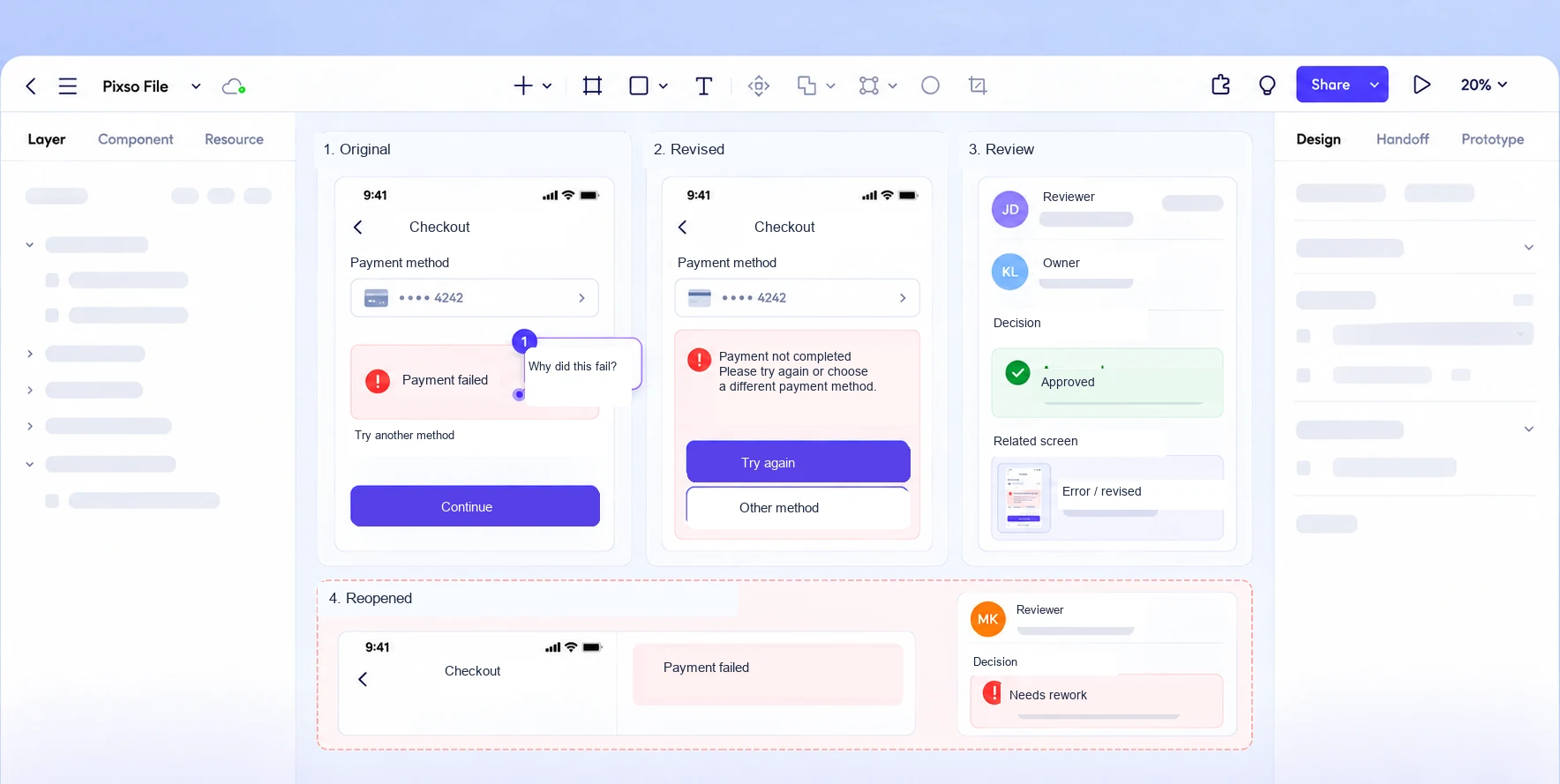
Close the loop with a short follow-up: show the changed state, name the decision it addresses, and record what remains uncertain. A critique is valuable when the next reviewer can understand why the screen changed without replaying the entire meeting.