Scott
Operating as a freelance ui designer today requires far more than just a decent eye for typography and spacing; it demands a fiercely optimized, lean workflow. As a solopreneur, you wear absolutely every hat. You are the creative director, the project manager, the account executive, and the billing department. You simply do not have the luxury of a sprawling agency budget or a dedicated engineering handoff team to clean up your files. The secret to surviving and remaining profitable is curating a tech stack that actively eliminates busywork. Instead of juggling expensive, disjointed subscriptions, modern creatives are leaning heavily toward consolidated platforms. In this guide, we will break down the essential setup, highlight the best tools for ui design, and explore why finding a robust free ui design tool can dramatically increase your profit margins this year.
Part 1: The all-in-one core engine for the solo creative
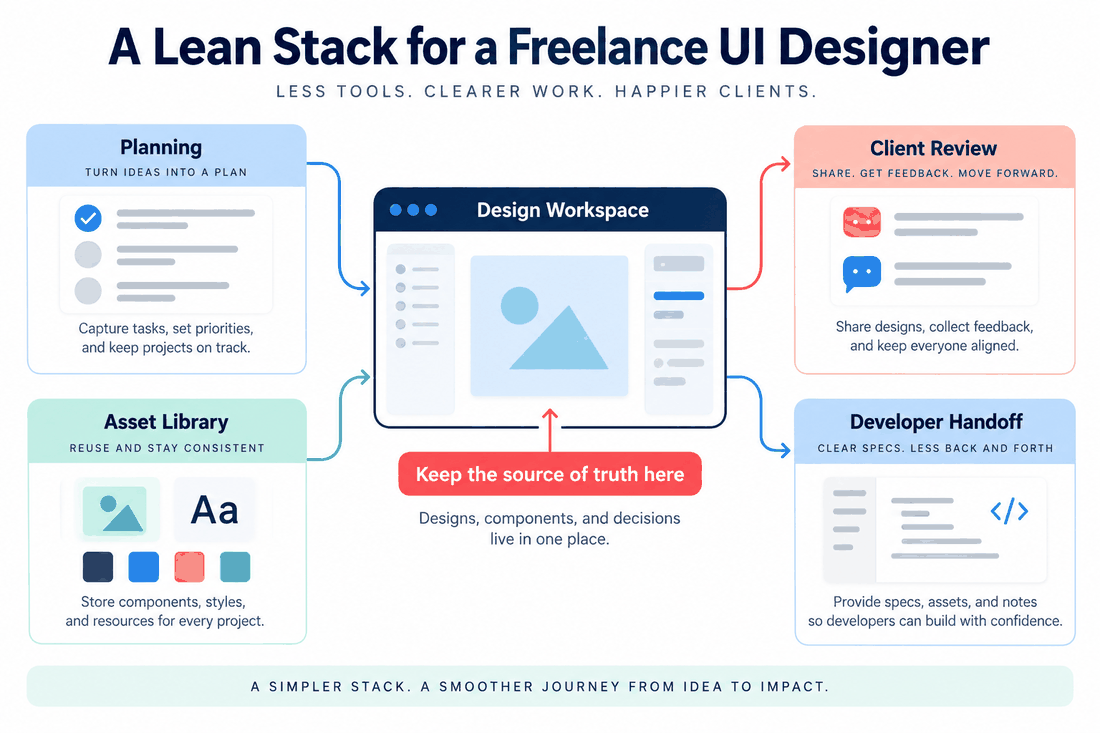
Let us look back at how things used to be. A few years ago, an independent creator might use Sketch to build wireframes, jump over to InVision to link up a clickable prototype, and then push everything into Zeplin so the developers could read the specs. That kind of software fragmentation is completely unacceptable in 2026. For a solopreneur, every extra subscription eats directly into your monthly take-home pay, and every time you switch between applications, you break your creative focus. You need an all-in-one core engine that handles interface creation, interactive prototyping, comprehensive component management, and developer delivery inside a single browser tab.
This is exactly why so many independents are aggressively migrating their operations to pixso. It has quickly become one of the best tools for UI design because it natively combines these distinct phases without the staggering price tag of traditional legacy competitors. If you are hunting for a highly capable free UI design tool, Pixso offers an unmatched tier that actually lets you do real client work without hitting arbitrary paywalls. It is fully cross-platform and cloud-native. This means you can design on your powerful Mac studio display at home, then log in on a client's Windows laptop at a coffee shop and immediately access your entire workspace. Furthermore, with deep AI integrations now actively generating base layouts and color palettes, pixso acts less like a blank canvas and more like an automated junior assistant, cutting your initial wireframing time down significantly.
Part 2: Establishing zero-barrier client collaboration loops
One of the most persistent headaches for any freelance ui designer is managing the client feedback loop. Clients are rarely tech-savvy enough to navigate complex creative software. If you force a busy startup founder to create an account, verify their email, and download a desktop app just to look at a mockup, they are going to ignore it. Instead, they will inevitably revert to sending you confusing, bulleted lists of changes hidden deep in an email thread. You need a zero-barrier feedback system.
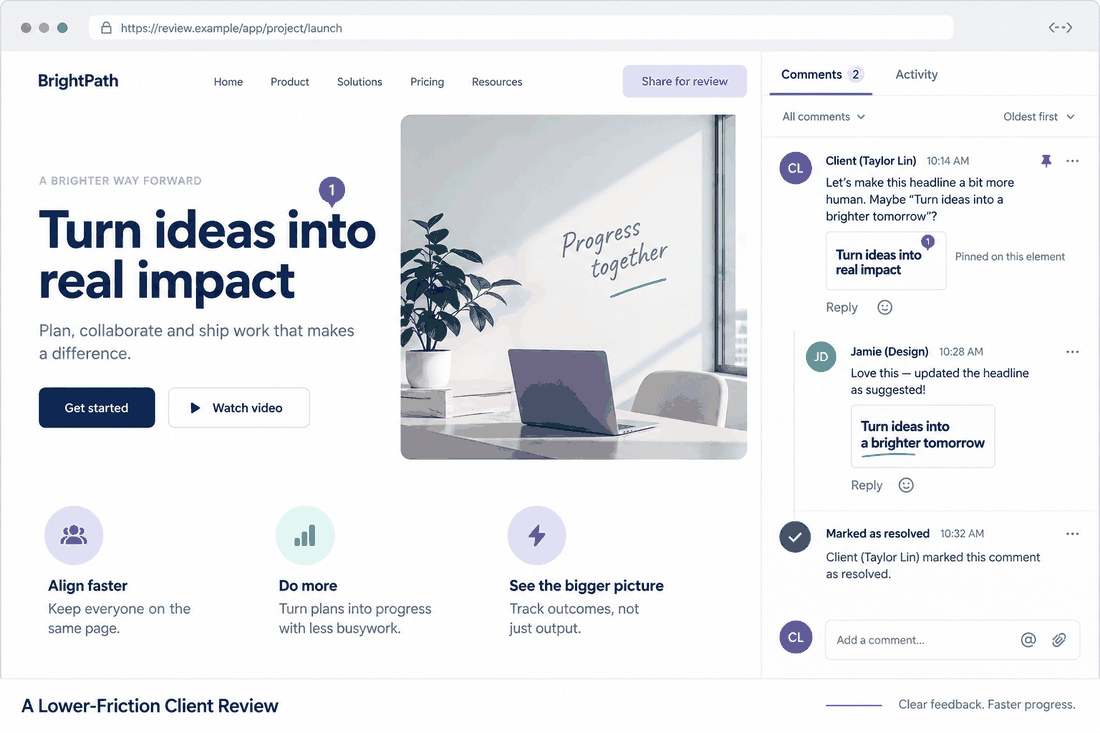
Pixso handles this friction brilliantly by completely removing the hurdles. When your mockup is polished and ready for review, you simply navigate to the top right corner of your workspace and click the 'Share' button. From this menu, you can generate a secure, password-protected public link and set the access permissions specifically to "Can View and Comment." Your client simply clicks the link you emailed them, and the prototype opens directly in their web browser. No registration required. If they decide the hero headline needs to be larger, they just press the 'C' key on their keyboard to activate the comment tool. They click directly on the text block they want to change and type their request. These visual annotations appear right on your canvas as threaded conversations. You can reply to ask for clarification, make the edit, and then click the 'Resolve' checkmark to archive the task. This keeps communication crystal clear and ensures every piece of feedback is implemented without any frustrating guesswork.
Part 3: Centralized asset management and rapid reuse
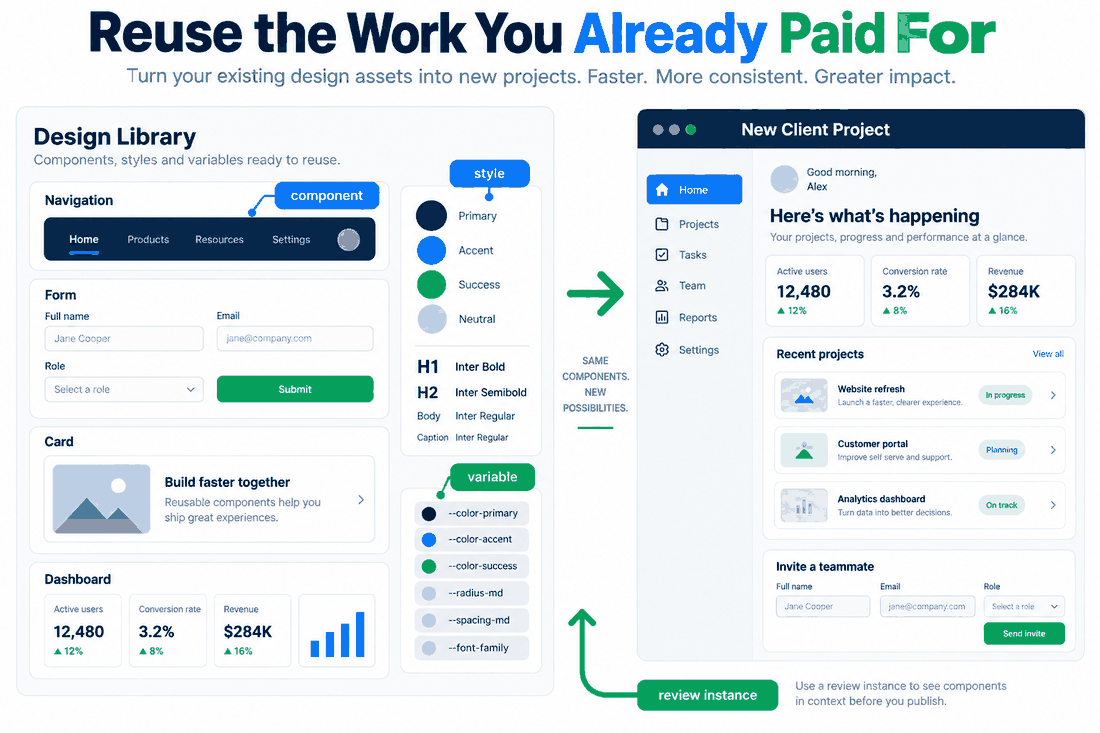
Time is literal money when you work for yourself. Starting every single client project from an entirely blank canvas is a massive drain on your hourly rate and your mental energy. The most profitable independent workers rely heavily on a centralized asset reuse system. You need a unified cloud environment where your custom UI kits, typography styles, wireframe templates, and brand assets are instantly accessible the second you land a new contract.
When utilizing the best tools for ui design, you should be building a personal master library. Within pixso, you can design your favorite standard elements—like e-commerce shopping carts, navigation bars, and SaaS dashboard form fields—and publish them as global components. The next time you sign a new client, you do not start from scratch. You open a fresh file, navigate to the Assets panel on the left-hand sidebar, and drag in your pre-built, fully responsive components. Additionally, the AI capabilities embedded in modern platforms allow for incredible batch processing. You can instantly populate a complex data table or fifty user profile cards with realistic, AI-generated names, dates, and avatars in seconds, rather than manually typing out placeholder data. This drastically lowers your repetitive manual labor and accelerates your project kickoff speed, ultimately allowing you to take on more clients each quarter.
Part 4: Eliminating the gap with automated handoffs
A freelance ui designer is only ever as good as the final, shipped product. You can design the most beautiful interface in the world, but if the developers hired by your client cannot understand your files, the end result will look terrible. That broken website reflects poorly on your portfolio, making it harder to win the next job. You absolutely have to eliminate the delivery gap by using automated developer handoff features.
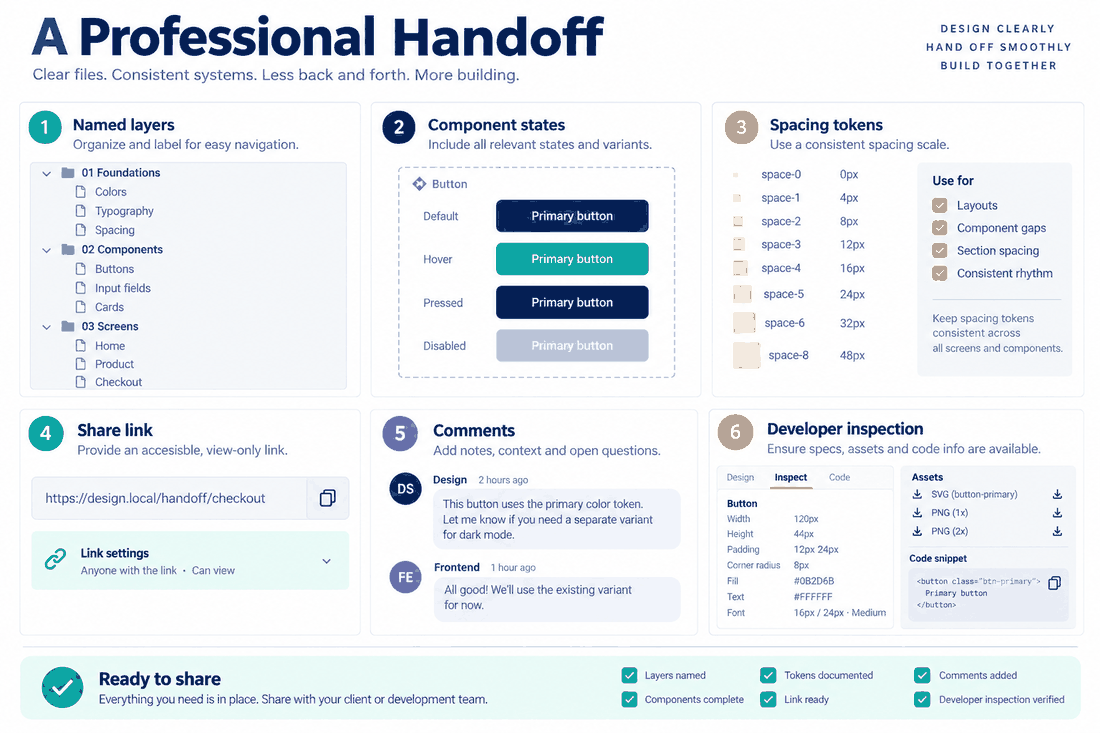
Gone are the days of manually typing out margin measurements, padding rules, and hex codes into a static PDF document. In pixso, the transition from design to development is a completely automated experience. Once the client approves the final screens, you do not need to prepare a special export file. You simply guide their development team to toggle the 'Dev Mode' switch, located neatly at the top of the right-hand properties panel. By clicking on any element on the canvas, the developer can instantly view and copy the auto-generated CSS, iOS, or Android code snippets. The platform automatically exports your design tokens, spacing rules, and sliceable graphic assets like SVGs. Because this functionality is built natively right into your primary free UI design tool, you do not need to pay for an expensive third-party handoff plugin. It dramatically reduces the chance of front-end visual errors, cuts down on those annoying late-night emails from coders asking for hex codes, and significantly elevates your professional reputation.
Part 5: Lightweight business and project tracking integration
Beyond the creative canvas, a solopreneur has to run an actual, functional business. Managing client proposals, tracking billable hours, scoping new work, and chasing down unpaid invoices can easily eat up twenty percent of your workweek if you are not incredibly disciplined. While you obviously need the best tools for ui design to do the actual heavy lifting, you also need lightweight business support applications that integrate smoothly into your daily routine.
Many successful independent workers are pairing their core creative software with streamlined project management apps like Notion, or lightweight time trackers like Toggl and Clockify. The primary goal here is keeping costs low while maximizing efficiency. Because modern platforms like pixso are built heavily on open web standards, they integrate incredibly easily with these external business tools. For example, you can embed a live, fully interactive prototype directly into a Notion client portal page. This means your client can log into one single webpage to view the project timeline, read the latest invoice, and click through the newest design iteration all at once. By keeping your operational business stack light, inexpensive, and interconnected, you prevent tedious administrative tasks from cannibalizing your valuable, billable creative hours.
Part 6: Future-proofing your solo practice for 2026 trends
The landscape for the freelance ui designer is shifting rapidly this year. Client expectations are higher than ever, turnaround times are shrinking, and the underlying technology is evolving at breakneck speed. To stay competitive and secure the best contracts, your chosen tech stack must be highly adaptable to the latest industry trends.
First and foremost, AI-native workflows are no longer optional gimmicks; they are mandatory for survival. Clients expect faster results, and tools that leverage generative artificial intelligence to assist with layout structuring, color theory generation, and empty-state illustrations are essential for keeping pace. Second, there is a massive industry push toward open-source friendliness and avoiding rigid vendor lock-in. If you use a tool that holds your files hostage in a proprietary, closed format, you risk losing years of portfolio work if that company suddenly decides to triple their subscription prices. Lastly, data security and compliance are becoming huge factors, even for solo workers. If you land a lucrative contract with a healthcare startup, a government agency, or a fintech company, they will legally demand strict data privacy. A platform that offers secure cloud infrastructure and complies with enterprise-level security standards gives you a massive, tangible edge during contract negotiations. By deliberately choosing software that aligns perfectly with these emerging trends, you ensure your solo business remains resilient.
Conclusion
Building a highly successful solo practice is never about hoarding the most expensive software on the market; it is entirely about strategic consolidation. The modern freelance ui designer thrives by minimizing friction and maximizing actual, uninterrupted creative time. By leveraging a comprehensive, highly capable free ui design tool like Pixso, you can handle absolutely everything from the initial low-fidelity wireframe to the final developer handoff inside one seamless environment. When you combine the best tools for ui design with smart, centralized asset management and zero-barrier client collaboration links, you operate with the speed and efficiency of a full-scale agency. It is time to audit your current stack, drop the redundant monthly subscriptions, and fully embrace the unified platforms built specifically for the future of independent work.