Scott
Every time a new artificial intelligence tool drops, UI/UX teams inevitably panic. Not because they actually fear losing their jobs, but because they absolutely dread the thought of rebuilding their entire daily process from scratch. Adopting cutting-edge tech usually means dealing with broken files, disconnected third-party plugins, and weeks of tedious onboarding. But it really doesn't have to be this way. The true promise of smart design is about fitting into your daily routine invisibly. By focusing strictly on smart design principles, product teams can successfully eliminate mind-numbing grunt work without ever sacrificing their creative control or upsetting the engineering team. In this comprehensive guide, we will break down exactly how to adopt an intelligent assistant that respects your daily habits, ensuring a smooth transition that boosts output on day one.
Part 1: The automation philosophy: killing the repetitive, keeping the creative
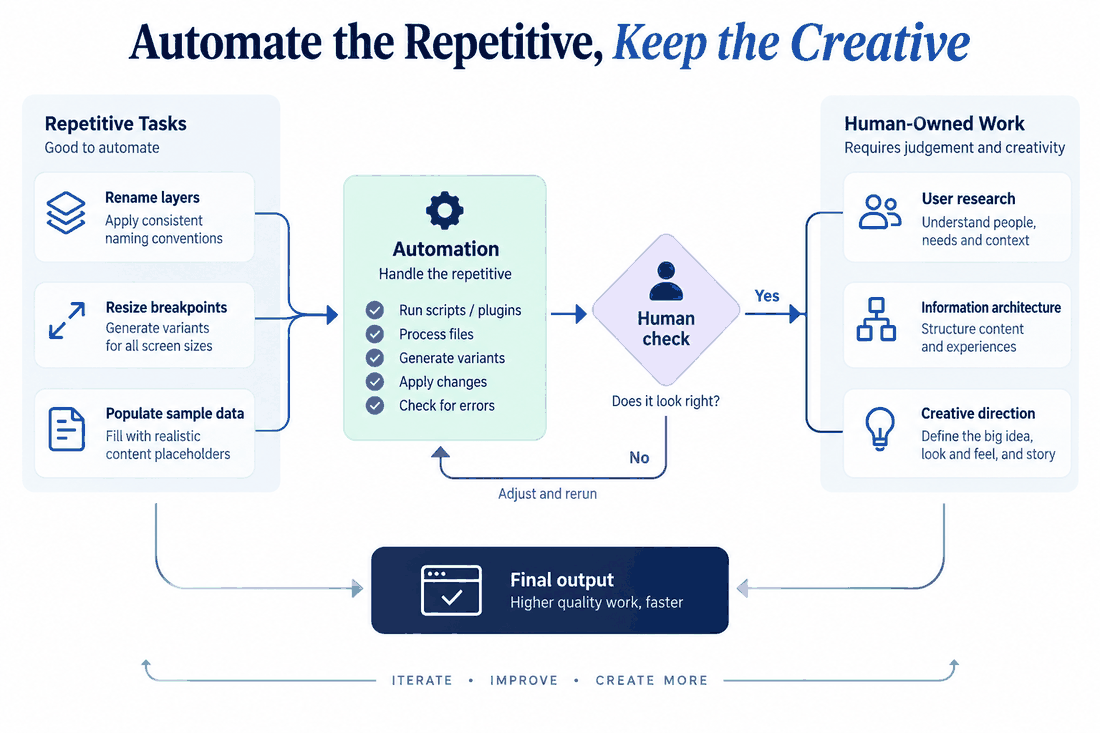
Let’s get real about what product teams actually need on a daily basis. Nobody sitting in a sprint planning meeting wants a machine to guess the emotional resonance of an onboarding screen. Empathy, creative direction, and strategic problem-solving are fundamentally human traits. The actual bottleneck in a standard design workflow isn't a lack of brilliant ideas; it’s the massive mountain of mechanical, pixel-pushing execution required to bring those ideas to life.
When we talk about upgrading to smart design, we are specifically targeting the boring, soul-crushing stuff. Think about the sheer mental toll of resizing thirty different artboards for various mobile and tablet breakpoints. Think about spending your Friday afternoon renaming hundreds of grouped layers so the developers don't yell at you, or meticulously copying and pasting fake user data into complex administrative data tables. That is where hours go to die.
The ultimate goal is to implement AI automation workflows for lead UI/UX designers that act as a silent digital production assistant. You want a setup that effortlessly handles batch layouts, tedious layer organization, and rapid format adaptations. When you actively offload this repetitive pixel-pushing, you preserve your mental energy for high-level strategy—like conducting deep user research, planning information architecture, and analyzing live user testing data. You keep your hands firmly on the creative steering wheel; the machine just accelerates the engine so you arrive at the finish line faster.
Part 2: Seamless integration: why Pixso AI fits right in
The biggest friction point with adopting any new technology is the dreaded learning curve. If integrating a new digital assistant requires your team to migrate to a completely different ecosystem, export files back and forth, or learn a proprietary prompting language, they simply won't use it. You will end up with a severe case of plugin fatigue. The solution has to be a frictionless drop-in.
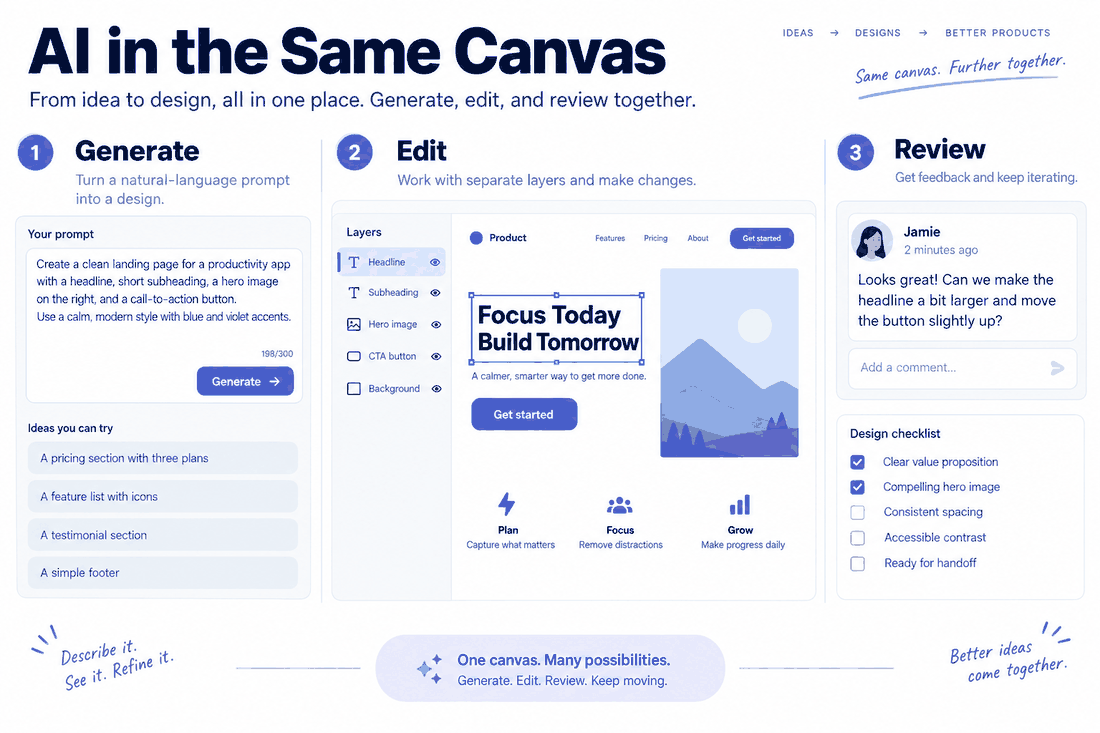
This exact lack of friction is why Pixso AI is gaining so much serious traction among agile product teams. Instead of forcing you to string together five different third-party plugins that constantly break every time there is a software update, it acts as a natively integrated powerhouse right inside your drafting canvas. It offers an absolute zero-learning-curve experience. You just type what you need using natural language, and the platform delivers immediately. Because pixso ai is built directly into the core drafting environment, it seamlessly embeds into your existing toolchain without asking you to change how you work.
For managers obsessed with creating highly optimized process designs, this native approach offers an incredibly low barrier to entry with an immediate, high-return payoff. The very first time a senior designer uses it to instantly generate a baseline layout or pull together a cohesive color palette, the time saved is undeniable. There is no massive process rebuild required. You just open your file, start wireframing, and let the native features handle the heavy lifting.
Part 3: Respecting the source of truth: design systems and tokens
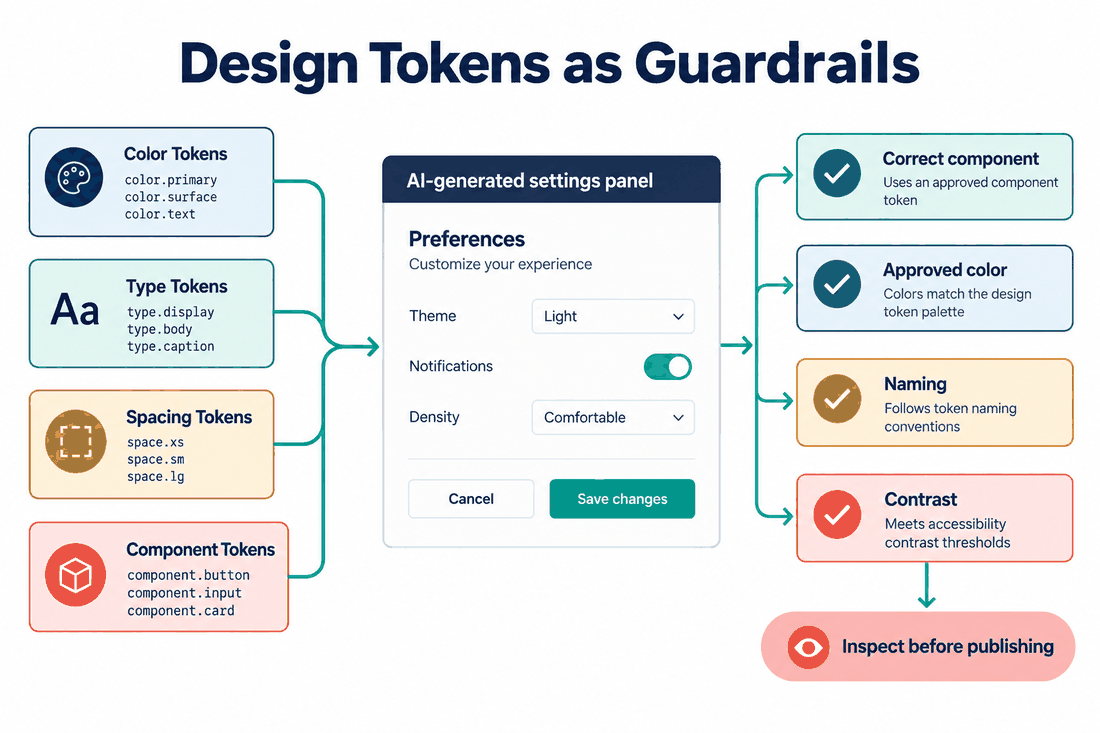
Here is a nightmare scenario every senior designer knows well: an automated generator spits out a visually stunning dashboard, but it completely ignores your company's official typography scales, border radii, and color tokens. That output is basically useless. In fact, it’s actually worse than useless, because now a lead designer has to spend two hours picking apart the vector file just to manually align it with the strict brand guidelines.
True smart design deeply understands technical context. A reliable system must strictly adhere to your established design system. It needs to know that your primary destructive button uses a very specific red hex code, a fixed four-pixel border radius, and an exact drop shadow value that your front-end team has already coded into their CSS variables.
When you leverage a professional-grade platform like pixso ai, you aren't just getting random aesthetic guesses pulled from the ether. The system taps directly into your team's custom component libraries. It automatically maps and applies your established design tokens and UI patterns to whatever it generates. If you prompt it to build a user settings menu, it constructs that menu using the exact toggles, sliders, and typography rules your developers already expect. This critical feature ensures that every piece of output is fully compliant, visually consistent, and entirely ready for production. Building optimized process designs relies heavily on this level of rigid consistency.
Part 4: Killing the black box: transparency and full editability
One of the most valid criticisms of early generative tech was the infuriating "black box" problem. You typed a prompt, crossed your fingers, waited thirty seconds, and received a flattened, uneditable image file. If the client loved the layout but asked you to move a text box two pixels to the left, you couldn't do it. You were completely locked out of the underlying structure and had to trace the entire thing from scratch.
A functional design workflow demands total transparency and structural editability. Design leads need to be able to rip apart a layout, inspect the auto-layout padding, and swap out nested components without breaking a sweat. When evaluating AI automation workflows for lead UI/UX designers, require generated layouts to use standard, layered, editable vector files.
The output should look exactly like something a meticulous human built. The layers need logical, readable names, the text needs to be actual editable font files, and the container constraints must make logical sense. Furthermore, you need the absolute safety net of a clear version history. If an automated generation completely misses the mark, or if an indecisive stakeholder suddenly changes their mind, you need to be able to instantly roll back to a previous version with one click. This transparent, non-destructive approach guarantees that you never lose your hard work or your sanity.
Part 5: Fostering collaboration and streamlining handoff
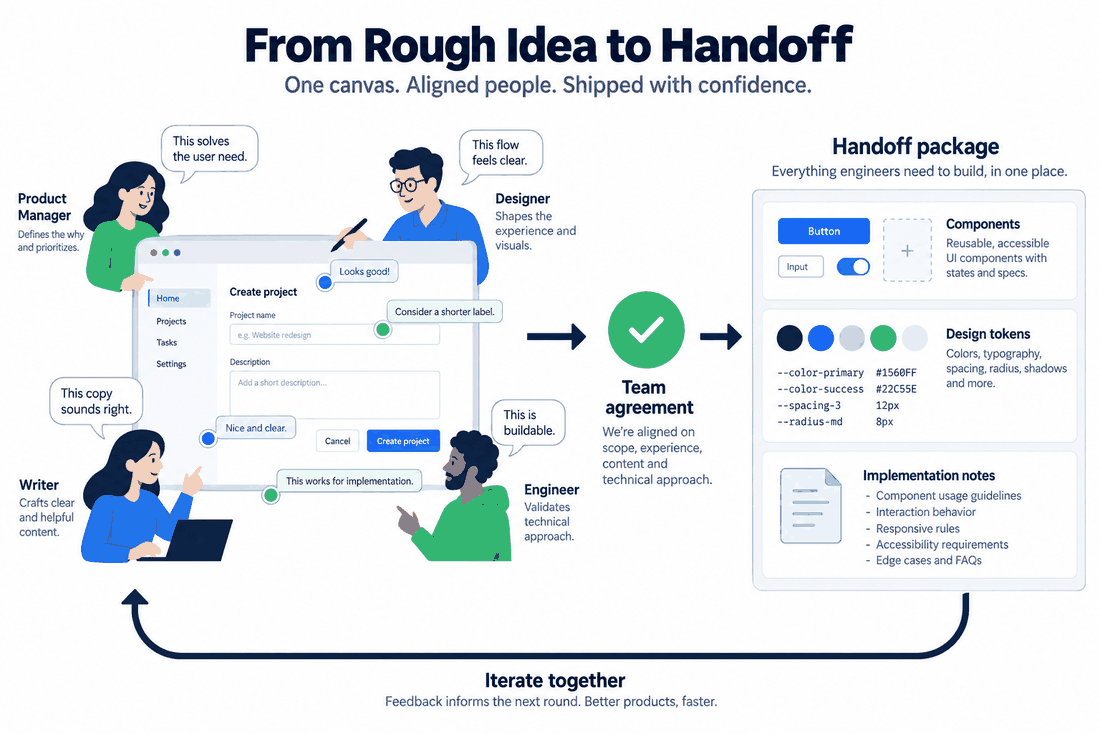
Product development is essentially a multiplayer sport. It involves product managers, copywriters, researchers, and engineers constantly iterating, arguing, and collaborating on the same files. Introducing automation into this mix should never disrupt this delicate balance or alter the existing hierarchy of responsibilities. Instead, smart design should act as a bridge that brings everyone closer together and speeds up the feedback loop.
By focusing on optimized process designs, teams can use intelligent generation to drastically improve communication, especially in remote or hybrid setups. Imagine a common scenario where a product manager is struggling to verbally explain a new feature concept during a morning Slack huddle. Instead of waving their hands and pointing at a blank virtual whiteboard, a designer can use the built-in assistant to generate a quick, rough wireframe right on the collaborative canvas in real time.
This provides instant visual context for the whole team. Everyone can jump into the file, leave pinned comments, provide immediate feedback, and align on the overall direction before a single hour of manual, high-fidelity polishing is spent. More importantly, because the generated assets strictly follow the team's approved component library, the eventual handoff to developers is incredibly smooth. The engineers get clean, standard code snippets and correct spacing tokens, completely eliminating the friction that usually plagues the transition from the design team to the development team.
Part 6: Security, compliance, and intellectual property
We have to address the massive corporate elephant in the room: data privacy. You absolutely cannot casually dump proprietary company data, unreleased mobile app concepts, or sensitive client information into a random, unvetted web portal. Enterprise IT departments and legal teams will shut that down before you even finish your morning coffee. Security isn't just a nice-to-have bullet point; it is a fundamental, non-negotiable requirement for any serious agency or in-house product team.
When evaluating tools to permanently upgrade your design workflow, strict security protocols and legal compliance must be top priorities. The platforms you choose to adopt need to explicitly guarantee that your private data isn't being quietly scraped to train public models without your consent.
This is another critical area where professional-grade solutions prioritize your peace of mind. A robust platform ensures that data processing is handled securely, often prioritizing localized execution or strictly protected cloud environments. It protects your copyright, ensuring that the interface layouts you build and the proprietary component libraries you connect remain exclusively yours. By prioritizing these enterprise-level security protocols, companies can plan AI automation workflows for lead UI/UX designers alongside their legal and security teams.
Conclusion
Upgrading your daily toolset shouldn’t feel like tearing down a house just to renovate the kitchen. The transition to smart design is entirely about seamless integration, not chaotic disruption. By adopting a system that actively automates the mundane chores, rigorously respects your brand guidelines, and keeps you fully in control of the editable vector output, you dramatically increase your team's overall efficiency. Platforms like Pixso AI prove that you can achieve highly optimized process designs without sacrificing enterprise security, team collaboration, or the deep human empathy that makes digital products truly successful. Stop letting tedious mechanical tasks dictate your schedule. Embrace a native, frictionless workflow, and finally take back the time you need to do your best work.