Scott
A large export needs more than a spinner. People need to know whether the request started, whether they may leave, where the result will appear, and what to do if the file is no longer available. Consider a fictional design team generating a handoff package from 42 interface screens. The package might take several minutes to prepare, but its exact duration is unknown. This guide turns that one task into a clear sequence of states that a team can sketch and review in Pixso's prototyping workspace.

Define the job and its destination first
The example handoff package contains 42 selected screens, the current design specifications, and a list of linked assets. The requester chooses a file format and starts generation. Before designing the waiting state, write down four product rules: what the package includes, whether the server keeps working after the tab closes, where finished packages are listed, and when a download link expires. Those are product and backend decisions; a polished progress animation cannot substitute for them.
Show the chosen scope on the request screen: “42 screens in Autumn launch,” the selected format, and the destination folder. If some screens cannot be included, identify them before the request or provide a post-export warning naming the omissions. Do not turn a partial package into an unqualified “Export complete” message. In this fictional example, a finished package is available for seven days. That is a design parameter, not a statement about Pixso's own file retention or export features.
The request needs one stable job identity. A person who moves to another page should be able to find the same job rather than inadvertently start a duplicate. The backend should define whether a second click resumes, shows the existing job, or creates a new version. Design the UI to match that contract.
Show only progress the system can actually know
“Preparing package” is useful if it is followed by an observable next state. A bar labeled 73% is not useful when the denominator is invented. For this example, the server can report “queued,” “assembling files,” “packaging,” and “ready,” but it cannot estimate remaining time reliably. Show the current stage and an indeterminate indicator instead of an artificial percentage. If a later implementation can measure total units consistently, a determinate bar becomes appropriate.
| What the system knows | What the interface should show | What to avoid |
|---|---|---|
| The request is accepted but not started | “Queued” with the job name and a stable place to find it | A frozen progress bar implying work has begun |
| The current stage, but not a reliable total | Stage name and an indeterminate activity indicator | An invented percentage or countdown |
| Measured units with a stable denominator | Completed units, total units, and a determinate progress bar | Jumping backward without an explanation when units change |
| The package is ready | File name, format, size if known, and download action | Leaving the screen at 100% with no result |
If the job contains multiple stages, avoid claiming the entire export is 100% merely because the first stage ended. State “assembling files” and then “packaging” in plain language. When a measured total changes, explain why—for example, some selected screens were excluded—rather than silently moving the indicator backward. Progress should answer a user question, not decorate the screen.
Let people leave without losing the task
A multi-minute job should not hold the designer on a modal screen if the backend continues processing after navigation. In the example, the confirmation state says “You can keep working. Find this package in Exports.” The user can close the panel, open another design file, and return from an Exports list. The list shows the same job's name, creation time, current stage, and any action that is actually available.
If the backend stops when the tab closes, do not promise background processing. That is a functional requirement to resolve before writing the copy. If jobs can survive navigation but not a signed-out session, say so only if the team has verified the rule. A notification can draw attention to a ready package, but the Exports list remains the durable recovery path; notifications can be missed, disabled, or delivered after the user leaves.
Make duplicate requests distinguishable. “Autumn launch — PDF — started 10:42” is more useful than five rows all labeled “Export.” If two jobs have identical inputs, the UI can show which is newest, but it should not silently replace an earlier finished file. Keep the action to cancel separate from leaving the panel; closing a view should not necessarily cancel a server job.
Turn “ready” into a usable download
The ready state should name the file, format, approximate size when known, and the action “Download package.” If the link lasts seven days in this example, display the actual expiry date and time in the user's locale. A vague “available for a while” does not help someone who will hand the file off tomorrow. Provide a durable route back to the job until the retention period ends.
A browser download is a separate step from job completion. The user may have a blocked download, a disconnected browser, or insufficient disk space even though the server produced the package. Show the job as ready until the server's retention rule ends; avoid changing it to “failed” solely because one local download attempt did not finish. The HTTP Content-Disposition documentation explains how a response can be presented as an attachment with a suggested filename. That implementation detail does not replace a clear on-page file name and download action.
When the link expires, do not strand the user on a generic 404. Show “This package is no longer available” alongside the package name and a way to create a fresh export with the prior scope preselected if that scope is still valid. If the original design has changed, identify that the new package will reflect the current version rather than promising a byte-for-byte duplicate.
Make failed and uncertain states recoverable
Not every failure means the same thing. A validation error before the job starts should name the missing permission, unavailable screen, or unsupported file type. A processing error after the job has started should keep its job record, explain that no usable package is ready, and offer a retry if it is safe. An expired download is not a processing failure and should not be counted as one in the interface.
Network loss while submitting the request is ambiguous: the job may exist even if the browser never received a reply. Before offering “Try again,” look up the job by request identity or check the current Exports list. Otherwise the user may create two large packages unintentionally. During retry, say whether the existing job restarts, a new version is created, or a partial package is resumed. The design needs one answer from the actual job service.
For cancellation, specify whether the backend can stop work, whether partial files remain, and when the interface changes to “Canceled.” A button that says “Cancel export” but only hides the progress panel is misleading. If cancellation is unavailable, an honest “Close panel” action is better.
Make status accessible, then prototype the whole sequence
Give each job a readable name and expose changing status as text, not color alone. A measured progress bar needs its current value and limits available to assistive technology; when the total is unknown, do not invent a value. The W3C meter guidance explicitly distinguishes a meter from task progress, for which the progressbar role is intended. W3C also describes a live-region technique for announcing status changes: a visual bar alone may not announce updates to a screen-reader user.
Draw the request screen, queued state, active stage, background list row, ready download, expiry, failure, and uncertain submission in Pixso. Connect them into two walkthroughs: one in which the designer stays on the page, and one in which they leave and later return. Ask a reviewer: “Is my job still running?”, “Where will I find it?”, and “What happens if the download is gone?” If the prototype cannot answer those questions, revise the state and copy before handoff.
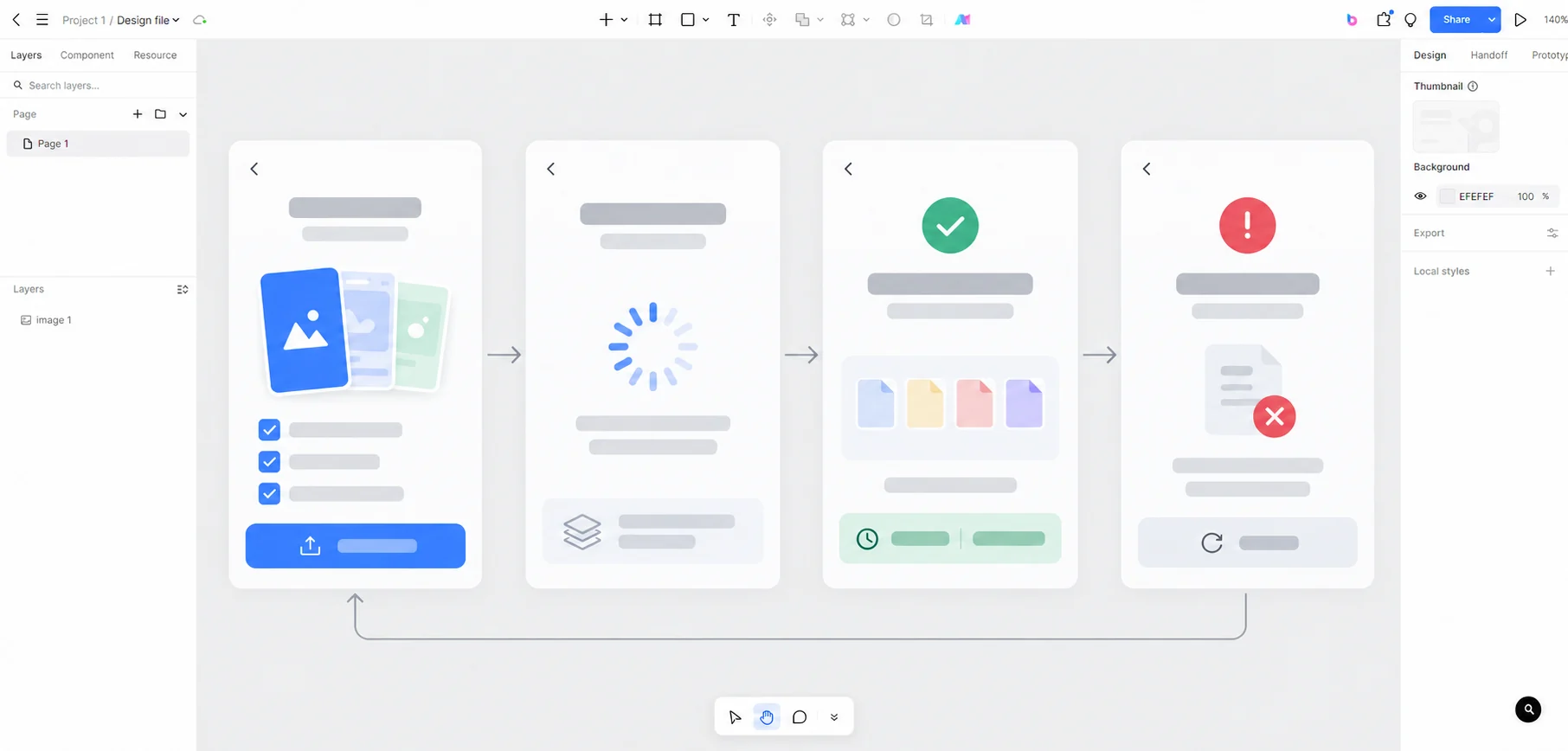
Share the prototype with engineers together with the actual job-status events, retention policy, retry behavior, and authorization rules. Pixso helps the team design and review the interaction; the production service must provide the job processing and downloadable file. Open Pixso to map the export flow.