On this page

Scott
Design tokens make repeated decisions visible: a color role, spacing step, type scale, or elevation value can be reused across components and platforms. The difficult part begins when a token is wrong, ambiguous, or no longer fits the product. Renaming it or replacing its value in a single sweep can break contrast, layout, documentation, and code at the same time.
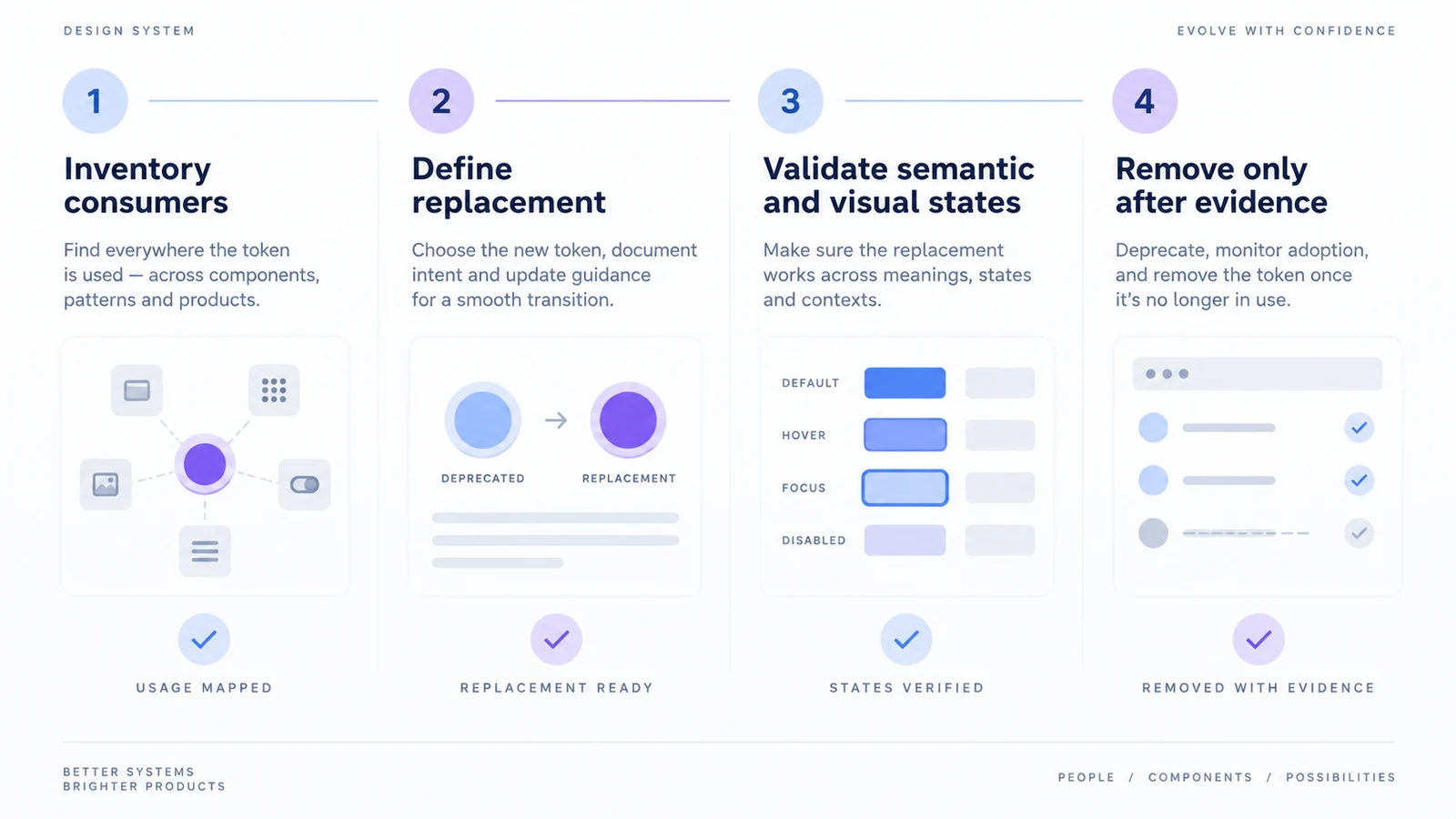
A safer approach treats token change as a migration. First discover where the old decision is used, then introduce a clearer replacement, move consumers in small groups, and retire the old name only when evidence says it is safe. This is different from creating a token set from scratch. It is a maintenance practice for teams that already have a design system and need it to evolve.
For foundations, see the existing guide for design tokens and the overview of design tokens in Pixso. This article narrows the problem to deprecation, ownership, and migration evidence.
Why token changes become risky
An old token can appear in more places than a search result reveals. A semantic color may feed a button, chart, disabled state, and a partner brand theme. A spacing token may be copied into a component override or translated into a platform-specific constant. A name such as blue-500 may look harmless until people use it as a success color in one product and an accent color in another.
Migration risk usually comes from four gaps:
- The team does not know the token’s consumers.
- The replacement changes meaning as well as value.
- Design and code move on different schedules.
- No one defines what “done” means for the old token.
The remedy is not to freeze the system. It is to make the dependency and decision visible before a replacement is announced.
Inventory tokens by role, not just by name
Start with a table that describes intent and usage. Include the token name, category, semantic role, supported modes, consuming components, owner, and proposed action. Do not infer a semantic role from a hex value alone. Two tokens with the same value may serve different jobs, while a single token may need different values in light and dark themes.
| Field | Example question |
|---|---|
| Current name | Is the name stable, descriptive, and unique? |
| Role | Does it describe intent such as surface-raised or only a raw value? |
| Consumers | Which components, templates, and product surfaces use it? |
| Modes | What changes in dark, high-contrast, or brand themes? |
| Owner | Who can approve the replacement and answer questions? |
| Action | Keep, alias, replace, or remove? |
Record evidence instead of trying to perfect the taxonomy on the first pass. A small, accurate inventory is more useful than a large list with guessed dependencies. The design token naming guide can provide naming principles, but the migration decision still belongs to the team that owns the consuming products.
Decide whether to rename, alias, or replace
These actions solve different problems.
Rename for clarity
Use a rename when the token’s meaning is sound but its name is misleading or inconsistent. Keep an alias from the old name to the new name for a defined transition period. A rename should not silently change contrast or spacing at the same time; otherwise the team cannot tell which change caused a regression.
Alias for compatibility
A compatibility alias lets an old name keep resolving while its consumers move to a replacement. Give that particular alias an owner and a retirement condition. Keep this separate from a permanent semantic reference: a token such as text-secondary can legitimately refer to a foundation color for the life of the system. Referencing another token does not by itself make either token deprecated.
Replace the semantic decision
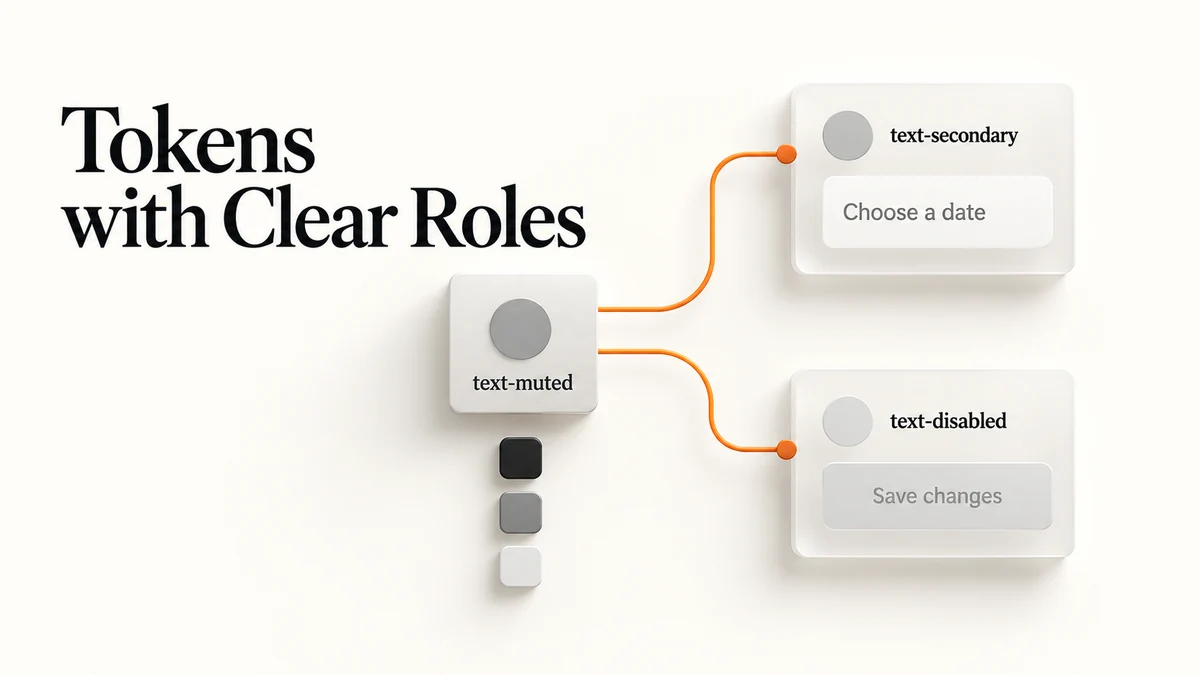
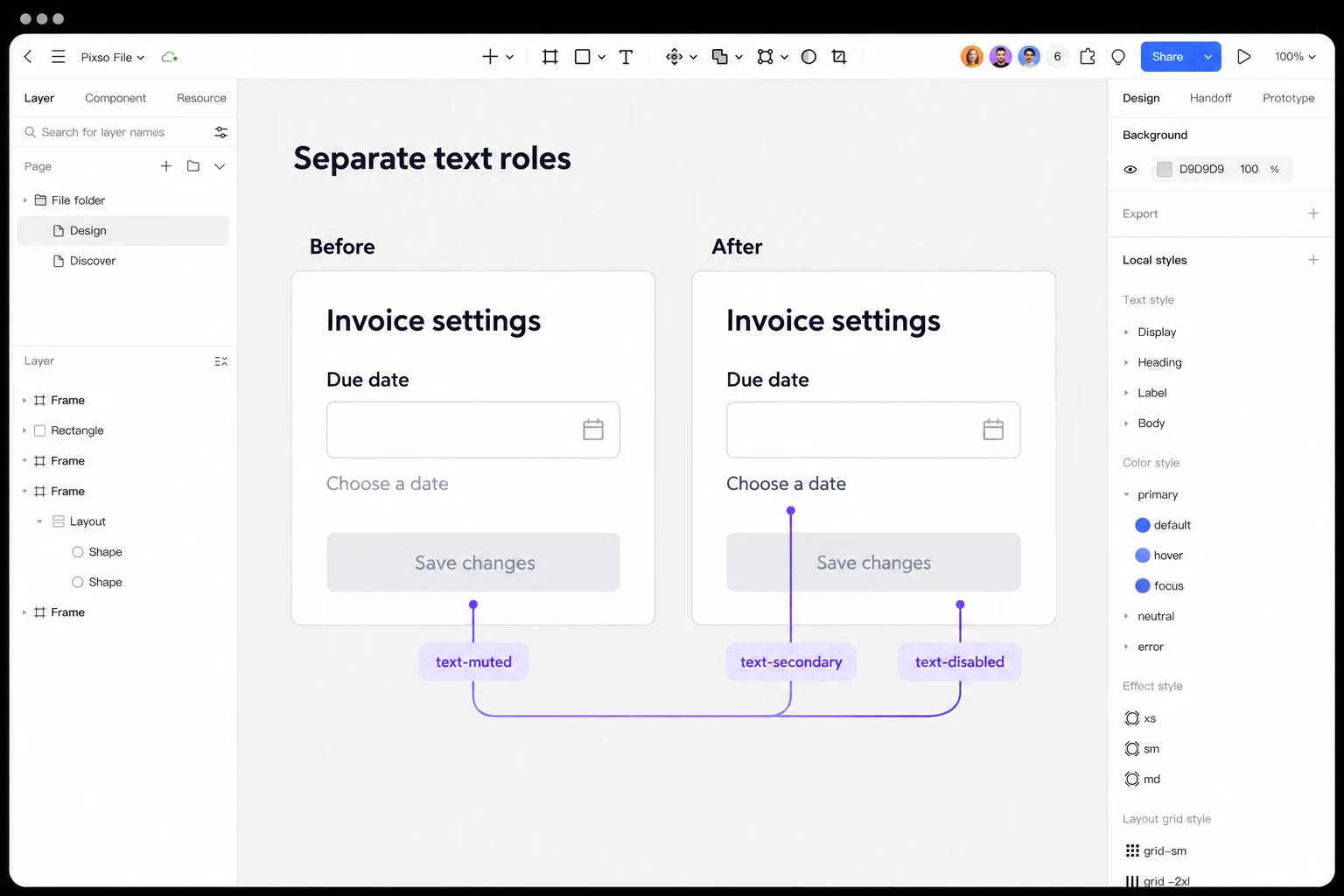
Replace the semantic decision when a single name covers incompatible uses. Suppose text-muted appears on both readable form guidance and disabled button labels. Split it into text-secondary for supporting information and text-disabled for inactive controls. The old name cannot map correctly to both through one global replacement; review each use by its role.
| Existing use of text-muted | Replacement | Decision to verify |
|---|---|---|
| “Choose a date” helper text | text-secondary | The guidance is available to read and still meets the applicable text contrast requirement |
| “Save changes” on an inactive button | text-disabled | The control is actually unavailable, and its inactive appearance remains understandable |
| Unknown or undocumented use | Keep temporarily pending review | An owner identifies the role before the reference changes |
Remove only after the consumer set is empty
Deletion is the final step. If an old token is still used by a package that the team cannot inspect, record that boundary and keep the token deprecated. A missing token that causes a build fallback is not proof of successful cleanup.
Create a replacement that can be evaluated
The replacement should have a one-sentence definition, allowed contexts, modes, and examples of correct and incorrect use. If it changes a value, show the before and after on real components rather than only as swatches. Review focus, hover, disabled, selected, error, and high-density states; token defects often hide in states that are not shown in the default component.
Supporting text still has to be readable; a lighter tone is not permission to ignore contrast. WCAG’s inactive-control exception is tied to the actual control state, not to a token name containing “disabled.” For other token categories, inspect line wrapping, spacing, focus visibility and theme behavior on the consuming component. A value that works in a swatch may fail in its context.
Add a migration note beside the replacement:
text-mutedis deprecated for new use. Map readable supporting copy totext-secondaryand labels on inactive controls totext-disabled. Keep existing consumers on the old value until their component is reviewed. The component owner records each migration and confirms when the compatibility path can be removed.
Specific scope keeps the note useful for designers, developers, and reviewers who encounter an old reference in a pull request.
In a focused Pixso file, compare the same settings card before and after separating text-muted into text-secondary and text-disabled. Keep the layout and wording fixed: “Choose a date” must remain readable, while “Save changes” represents an unavailable action. Annotate which role each label uses, then review the two components with the implementation owner. Record the corresponding code mapping separately and publish the approved design-library update when the review is complete.
Migrate consumers in meaningful slices
Choose slices that can be reviewed and rolled back: one component family, one product surface, or one theme. Moving every token in a large file may look efficient but makes visual regressions hard to localise. Start with a representative component that exercises the token across normal, interactive, disabled, and error states.
For each slice, record:
- the old and new token names;
- the affected components and states;
- the expected visual or semantic change;
- design and code owners;
- verification screenshots or links;
- the date the slice can leave the alias path.
This is where a shared design workspace helps the team compare states and review decisions. The existing design-system examples and scaling design systems articles provide broader context; the migration record should stay concrete and tied to the current components.
Check semantic and visual regressions separately
Visual comparison is necessary but not sufficient. A replacement can look close while changing meaning, contrast, focus indication, or a code consumer’s fallback. Use two checklists.
Semantic checks
- Is the token used only in the documented role?
- Does the value meet the project’s contrast and state requirements?
- Does the token behave consistently in each supported theme?
- Are exported names and platform mappings stable?
- Is an unsupported use rejected or at least visible in review?
Visual checks
- Do text lines wrap differently at expected widths?
- Are borders, dividers, and focus rings still distinguishable?
- Do overlays and menus keep the intended hierarchy?
- Does a data-heavy screen retain density and scanability?
- Do mobile and desktop components remain aligned?
The two checklists keep a pleasing screenshot from hiding a serious state or accessibility regression. Attach evidence to the component review, then update the token’s status only after both lists pass.
Communicate deprecations as a product change
Give consumers a concrete migration notice: the old name, the reason for changing it, the replacement rule, affected components, owner and intended removal release. If your token files use the Design Tokens Format Module, $deprecated can mark a token and carry an explanation. That metadata communicates status; it does not discover consumers or move their references for you.
Use a status vocabulary that the whole team understands:
| Status | Meaning |
|---|---|
| Active | Approved for new work and existing consumers |
| Transitional | Existing consumers may remain; new use is discouraged |
| Deprecated | A replacement exists; migration is required |
| Removed | No supported consumer remains and the old name is unavailable |
Keep the status next to the token and in the release note. The design token release documentation can be linked from the team’s internal migration index, but project-specific dates should not be implied by a generic product page.
Retire the old token with evidence
Before removal, run a final consumer search in design files, code packages, documentation, and exported assets. Ask owners of external or archived surfaces to confirm their boundary. Check generated files as well as source files; a build may continue to pass while a generated package still carries the old name.
Define a clear exit record:
- No supported consumer still requires the old name. If an exception remains, retain a compatible path for that consumer before removing the token from other packages.
- The replacement has passed semantic and visual checks in all supported modes.
- The alias and migration note have an announced removal date.
- Documentation, examples, and code autocomplete no longer recommend the old name.
- A rollback path exists if a late consumer appears.
Remove the old token only from a package whose supported consumers have migrated. Keep the last working package version, mapping and verification examples together so a rollback restores the previous contract. If a late consumer appears, restore compatibility while its owner reviews the mapping; do not silently substitute a visually similar value.
Keep an exception register
Some consumers cannot migrate on the same schedule. A mobile release may be frozen, a partner package may expose a public token name, or a legacy theme may not support the replacement yet. Record each exception with its owner, affected surface, reason, and review date. An exception is safer when it is explicit and temporary than when the team quietly leaves an alias in place.
The register should also say what users will see during the transition. If a legacy theme keeps the old value, document the expected difference and the states that have not been validated. When the owner confirms that the boundary has changed, update the consumer inventory and remove the exception rather than allowing a second, undocumented migration path. This habit keeps token governance honest as products and packages evolve independently.
Close the migration at the consumer level
For the settings card, closure means the helper text and disabled label use their documented roles in both design and implementation, the supported themes have been reviewed, and no supported instance still depends on text-muted. Keep any unresolved consumer on the migration record. The old name can leave the package when those dependencies are gone, rather than when the new token looks finished in isolation.