On this page

Scott
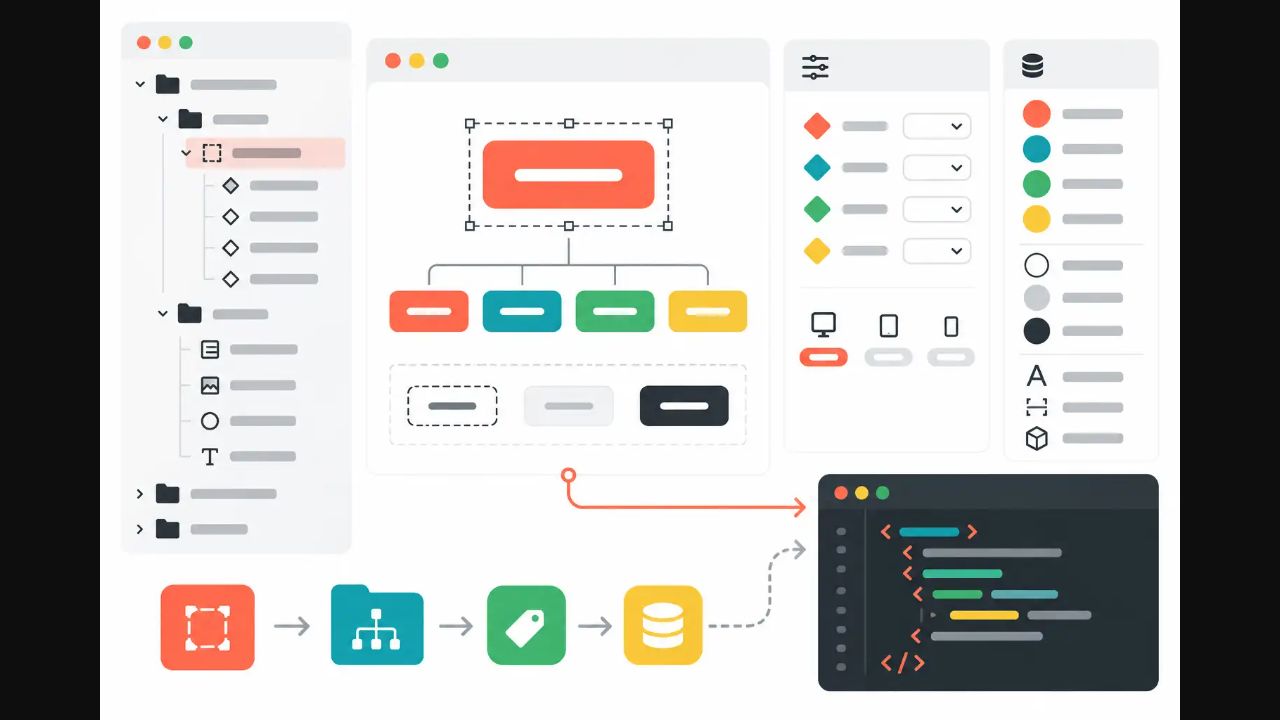
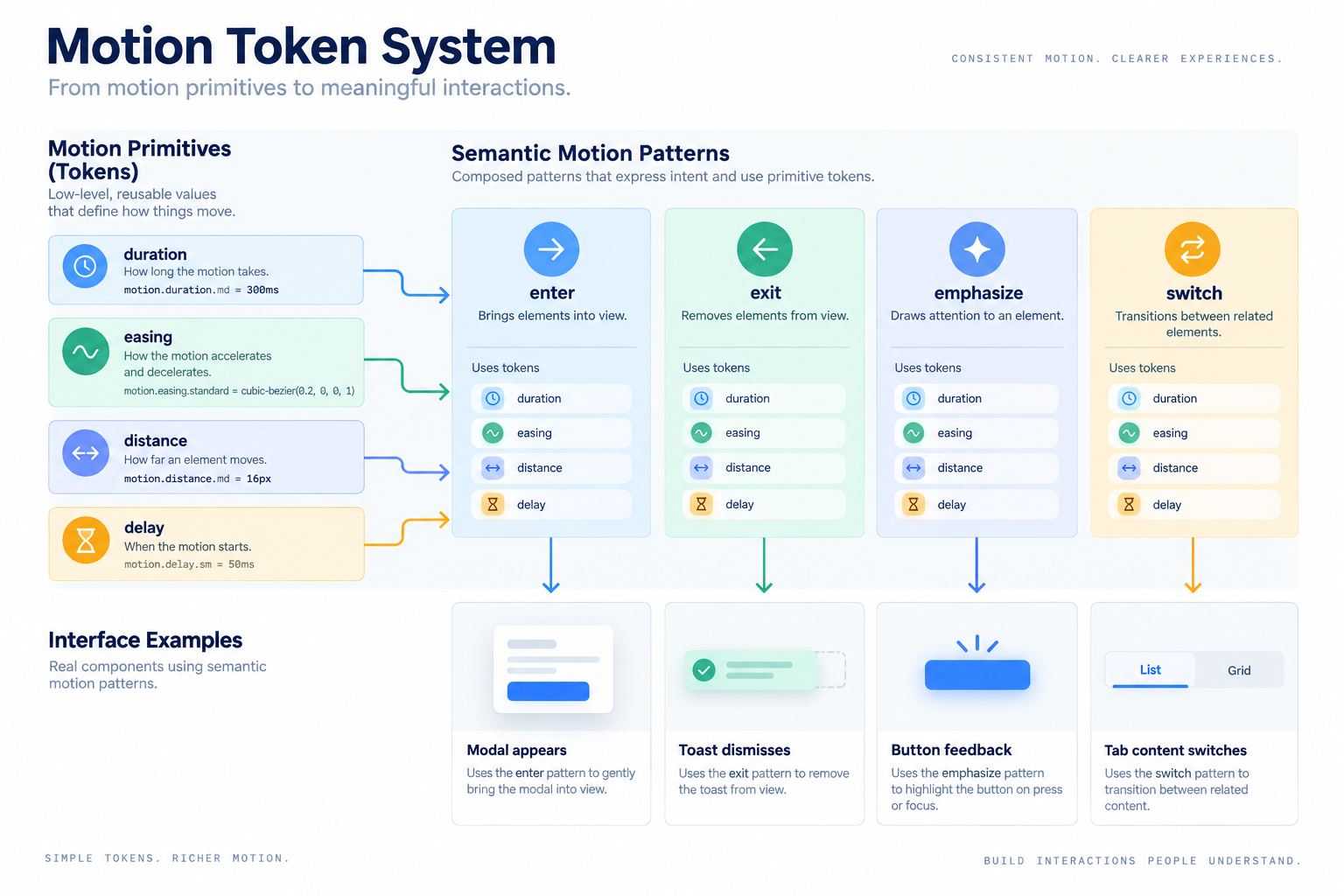
Motion design tokens turn repeated animation decisions into named, reusable values and semantic patterns. A practical system separates duration, easing, distance, and delay primitives from intents such as enter, exit, emphasize, and switch. It also defines reduced-motion alternatives. The goal is not to animate everything; it is to make necessary state changes predictable across design and code. Organize the component examples in a Pixso design-system workspace while keeping the authoritative motion values in your agreed code source.
Decide what belongs in the motion system
Before creating motion design tokens, inventory repeated transitions in the product. Include navigation changes, overlays entering and leaving, expand-and-collapse, selection changes, loading-to-content transitions, drag feedback, and status updates. Exclude decorative marketing animation unless it follows the same product rules.
For each transition, record the user event, element, property, start and end states, distance, duration, easing, interruption behavior, and reduced-motion alternative. If two animations share a duration but communicate different intent, they may use the same primitive while keeping different semantic names.
A token system should not hide poor motion decisions. If an animation delays a frequent action, draws attention away from the task, or makes content harder to track, remove or simplify it. Motion earns its place by explaining continuity, hierarchy, causality, or feedback.
Define duration primitives
Duration tokens express time in a consistent unit. The Design Tokens Community Group format supports duration values in milliseconds or seconds. Use a small scale such as instant, fast, moderate, and slow rather than a different number for every component. The exact values should come from product testing, platform expectations, distance, and complexity.
Example primitives might be:
motion.duration.instantfor state changes that should feel immediate.motion.duration.fastfor small, frequent control feedback.motion.duration.moderatefor an overlay or content-region transition.motion.duration.slowfor a large spatial change that users need to follow.
These names communicate relative intent, not a universal value. A mobile platform and a large-screen application may map them differently. Avoid adding “extra-fast-2” whenever a designer wants a slightly different feel. First ask whether distance, easing, or component behavior is the real difference.
Pair easing with direction and intent
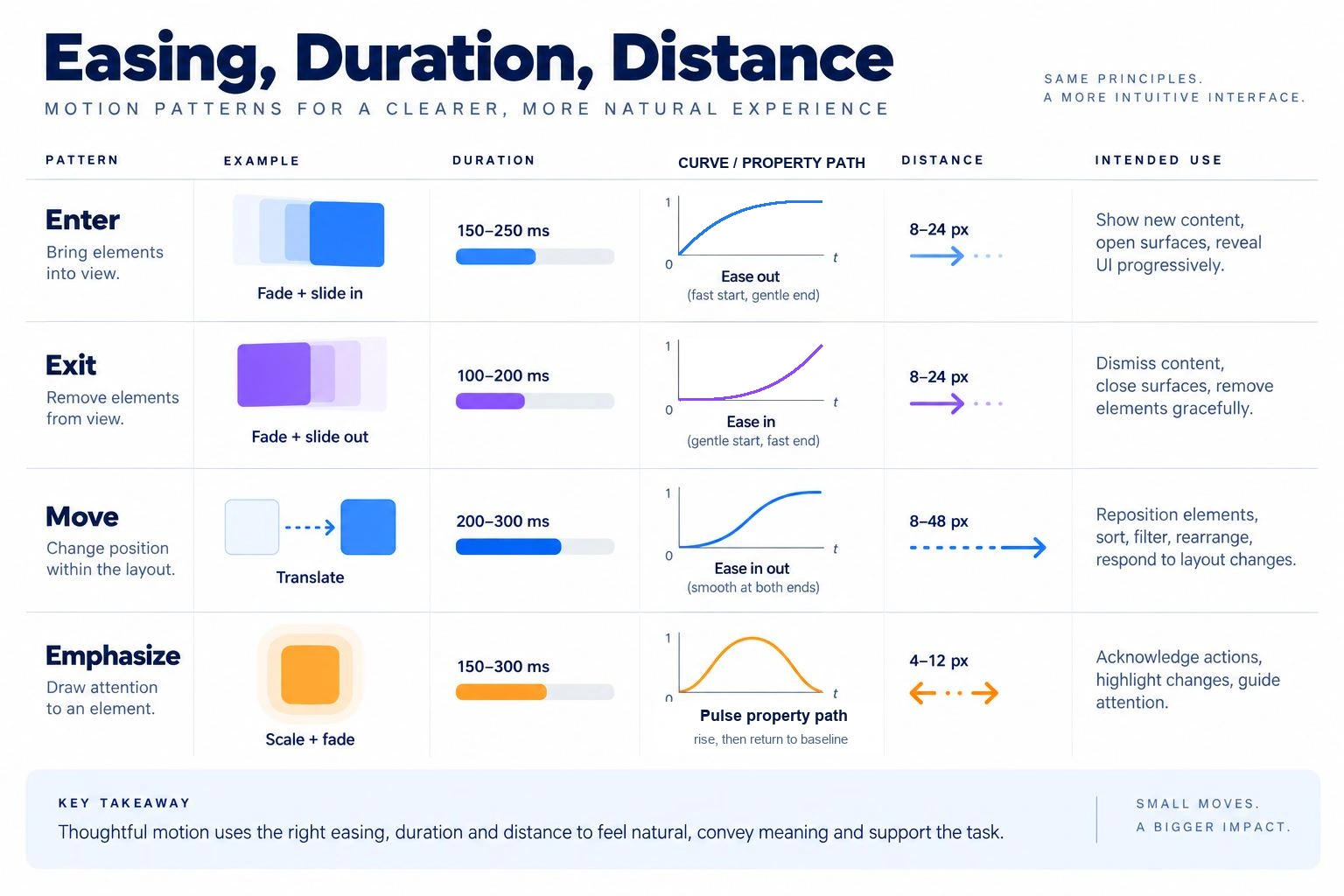
Easing describes how velocity changes over time. Interfaces commonly distinguish an element entering, leaving, or moving within the screen. Material 1’s historical duration and easing guidance, for example, treats entering and exiting curves differently and adjusts duration for distance and surface change. Use such systems as references, then test values in your product rather than copying them without context.
Create easing primitives with readable names and documented curves. A decelerating curve can help an entering element settle. An accelerating curve can help an exiting element leave promptly. A standard curve can support movement between visible positions. Linear motion may suit continuous progress but often feels mechanical for spatial UI movement.
Store the actual cubic-bezier or spring parameters in the code-facing token source. A design label such as “ease out” is not enough when platforms interpret names differently. Motion design tokens should make the implementation value inspectable and versioned.
Add distance, delay, and property rules
Duration and easing are not the complete motion contract. Distance changes perceived speed. A 12-pixel menu shift and a full-screen panel transition should not automatically use identical timing. Define a short spatial scale only where movement communicates origin or relationship.
Delay should be rare in product UI. Staggered entrance can reveal hierarchy, but it can also slow access and create noise. If the system uses stagger, define a small delay primitive and cap the total sequence. Never delay access to essential controls for decoration.
Document which properties may animate. Transform and opacity are usually easier to render smoothly than layout-heavy properties, but engineering must verify performance in the target platform. Avoid animating blur, large shadows, or many independent layers without measurement. A token name does not guarantee acceptable performance.
Create semantic motion tokens
Primitive values become meaningful through semantic motion tokens. A semantic token describes why the transition exists: motion.enter.contextual, motion.exit.contextual, motion.switch.view, motion.expand.section, or motion.emphasize.update. Each references duration, easing, distance, and allowed properties.
| Semantic token | Intent | Example | Reduced-motion behavior |
|---|---|---|---|
| motion.enter.contextual | Reveal a surface connected to a trigger | Popover enters near button | Fade or appear without spatial travel |
| motion.exit.contextual | Remove the contextual surface promptly | Popover closes | Immediate or short fade |
| motion.switch.view | Maintain continuity between peer views | Tabs change content | Instant content replacement with focus retained |
| motion.expand.section | Reveal content within the page | Accordion opens | Immediate expansion or minimal fade |
| motion.emphasize.update | Draw attention to a confirmed change | Saved status updates | Static icon and text change |
Semantic naming prevents component teams from choosing raw curves independently. It also allows the organization to tune motion globally without changing every call site. Do not force every transition into one token; the taxonomy should reflect meaning while staying small enough to govern.
Keep motion design tokens independent from a single component name when multiple patterns share the same intent. A contextual surface may be a popover today and a compact panel tomorrow; the semantic enter and exit behavior can remain stable while the component implementation changes.
Design reduced-motion behavior at the same time
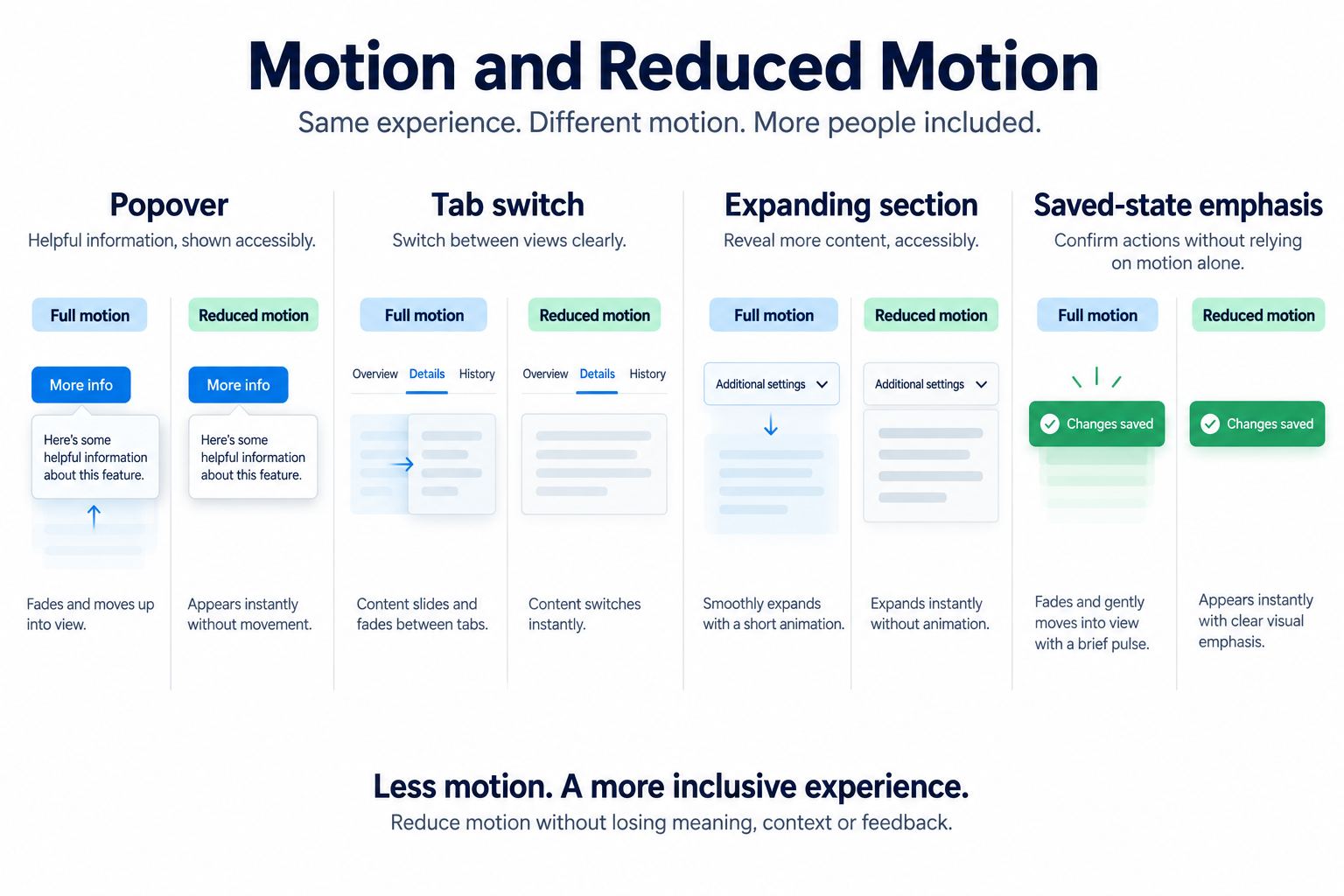
Reduced motion is not “set every duration to zero” without review. Some transitions help users understand context, while others can trigger discomfort or make tasks slower. Define an alternative for each semantic token: remove large spatial movement, reduce parallax, replace looping animation, preserve essential state change, and keep completion feedback visible.
Test the product with the operating system's reduced-motion preference enabled. Verify that content remains available, focus does not jump unexpectedly, loading remains understandable, and no important state depends only on animation. Product-specific controls may be appropriate when users need more choice.
Document motion specifications in Pixso
Pixso supports design systems through components, styles, variables or tokens where currently available, shared libraries, comments, and developer inspection. However, do not assume that every motion parameter is a native exportable token in the editor. Keep the authoritative motion-token values in the system your design and engineering teams have agreed to use.
Use a Pixso design file to create a motion reference page with component state pairs, timing labels, curve values, distance diagrams, and reduced-motion alternatives. The input is the approved token source and interaction inventory. The editable output is a visual specification that shows how the tokens apply to real components. Reviewers can comment on the examples, and developers can inspect the relevant layouts and annotations.
Link the reference page to the code token source and version. If the value changes, update both through the team's governance process. Pixso's design-system workspace can help teams organize reusable component examples; the design-system guide covers components, styles, tokens, libraries, and maintenance. Motion implementation still requires platform-specific code and testing.
Map tokens to component examples
Create at least one worked example for each semantic token. Show a popover opening and closing, a tab switching views, an accordion expanding, and a saved status updating. Place the start and end states side by side with property, duration, easing, distance, interruption, and reduced-motion notes.
For an interruptible transition, define what happens when the user reverses direction mid-animation. Does it continue from the current value or restart? For repeated actions, define whether animations queue, merge, or skip. For loading, avoid looping motion that provides no additional information; pair progress with text or measurable status when possible.
The examples should make the contract clear without pretending a static board can validate frame rate, device performance, or vestibular comfort. Those checks occur in implementation on representative hardware.
Govern changes and handoff evidence
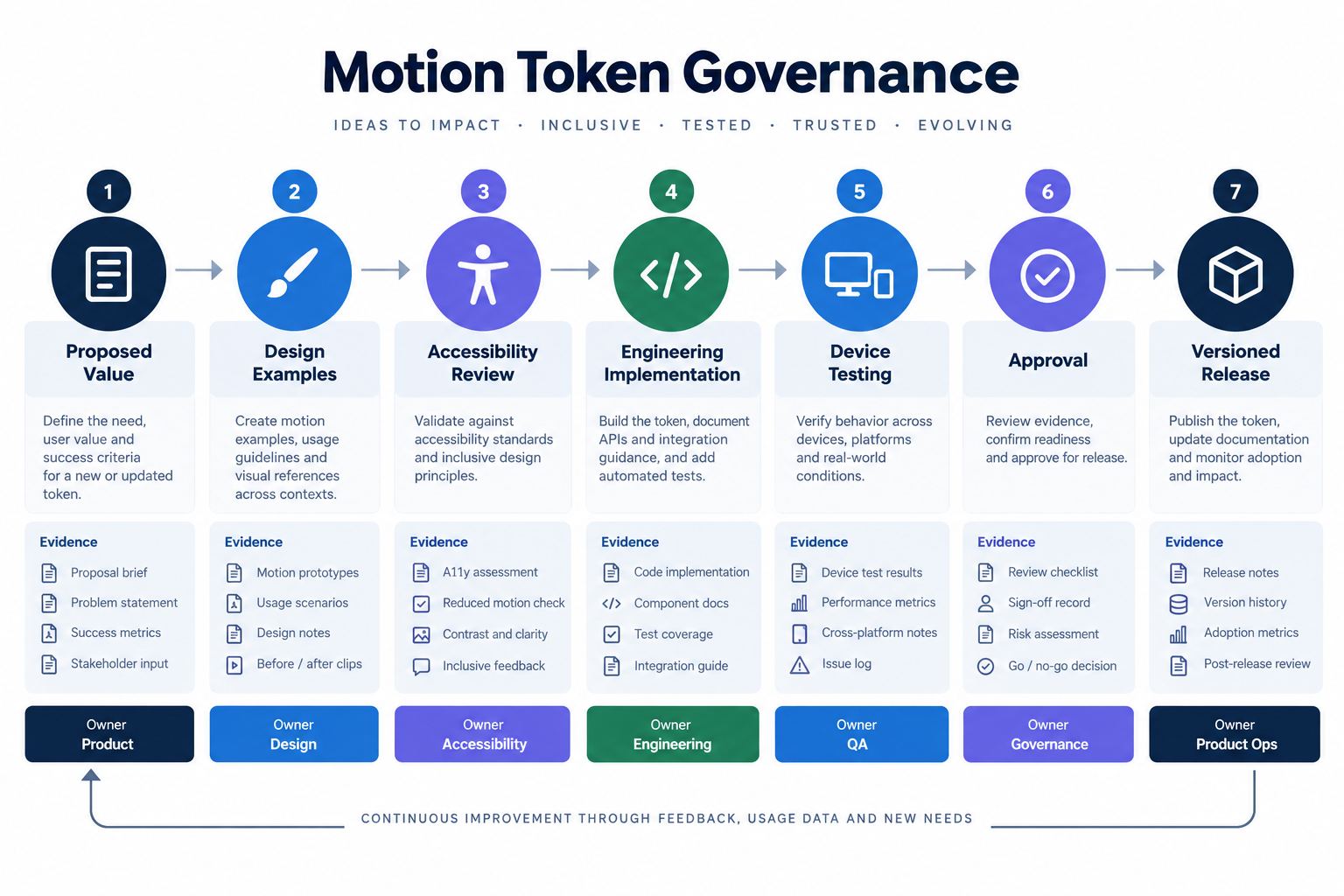
Assign an owner for the token source and an acceptance process for new values. A proposal should include the problem, affected components, before-and-after examples, reduced-motion behavior, implementation mapping, and test evidence. Review changes with design, accessibility, and engineering before release.
Audit motion design tokens periodically for unused values, aliases that resolve to identical behavior, and local component overrides. Consolidation should preserve intent and include regression tests; deleting a value merely because its number matches another can erase a useful semantic distinction.
Version the token set and record breaking changes. Renaming a token affects code references; changing its value can alter many interactions at once. Test representative components and critical journeys rather than reviewing a curve in isolation.
For handoff, provide the semantic token name, resolved platform value, component usage, interruption rule, reduced-motion mapping, and implementation status. Distinguish “design approved” from “implemented and device-tested.”
Motion design tokens are complete only when design examples, source values, and tested platform behavior refer to the same version.
Motion design token checklist
- The inventory covers repeated product transitions, not decorative one-offs.
- Duration, easing, distance, delay, and allowed properties are explicit.
- Semantic names describe intent rather than a specific component color or screen.
- Every pattern has a reduced-motion alternative.
- Start, end, interruption, repetition, and failure behavior are documented.
- The authoritative token source and version are clear.
- Pixso examples visualize application without claiming unsupported native export.
- Implementation testing covers responsiveness, performance, reduced motion, focus, and representative devices.
- Changes have an owner, review evidence, and versioned release path.
Conclusion
Motion design tokens make animation decisions consistent only when they connect values to intent, reduced-motion behavior, component examples, and tested implementation. Start with a small duration and easing scale, add spatial rules where needed, and create semantic tokens for repeated transitions. Use Pixso to document editable examples and review context while keeping the authoritative code values, accessibility checks, and performance evidence explicit.