Scott
Early UI design is rarely about committing immediately to a single polished screen. It is about discovering which architectural direction deserves deeper team investment. That discovery phase requires evaluating multiple layout hypotheses, weighing structural tradeoffs, and generating enough early variations to challenge initial assumptions.
Within Paico AI, designers can select Alibaba Cloud's Qwen3.7-Plus (labeled in the in-app interface as Qwen-3.7 Plus) as a dedicated lower-credit model for rapid concept exploration. Described in the model selector as offering "low credit cost, slower speed, best for exploration & concepts", it provides a cost-effective option when teams want to generate preliminary UI layouts across multiple design hypotheses.
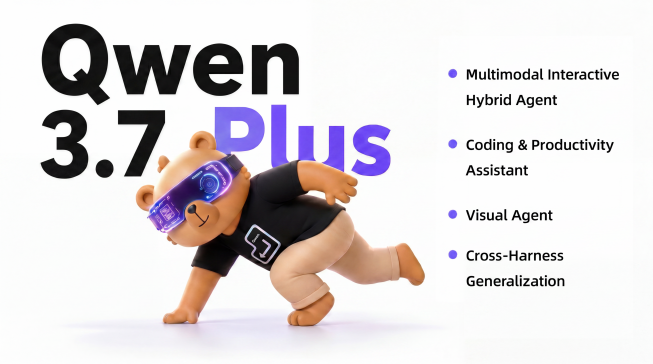
Image source: Qwen Official Website
Part 1: What "Lower-Credit" Means for Qwen in Paico
In Paico's model selector, Qwen-3.7 Plus is characterized by three operational traits: lower credit consumption, slower generation speed, and an explicit focus on early exploration and conceptual drafting.
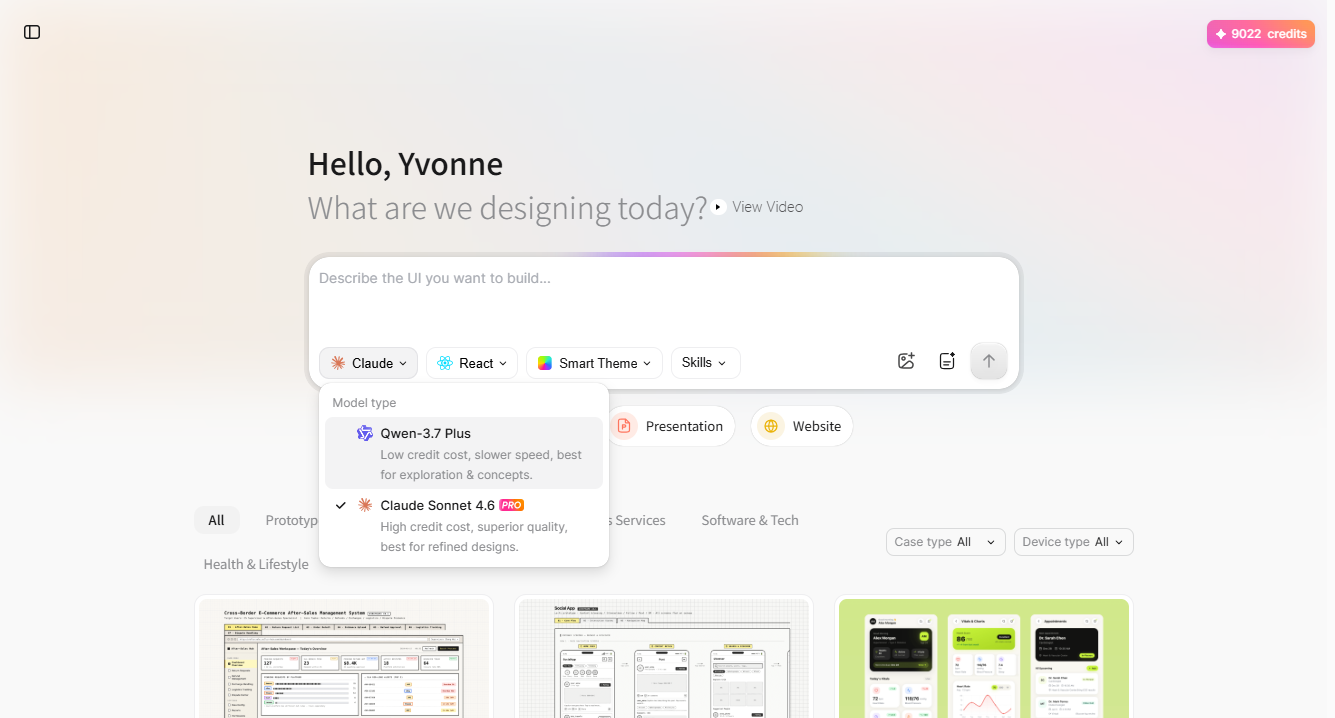
The term "lower-credit" refers strictly to Paico's internal AI credit deduction per generation compared to premium options like Claude Sonnet 4.6 PRO. It is not an external price guarantee or a claim that Qwen is the cheapest model across the broader market.
This profile fits discovery work. Product teams often need to test three different navigation structures or content densities before committing to a detailed visual specification. Lower credit consumption enables broader comparative testing, while a slightly slower response time is acceptable when each generation is answering a specific structural question.
Qwen3.7-Plus is best utilized when architectural breadth matters more than final aesthetic polish: early concept framing, low-fidelity interactive previews, landing page layout alternatives, and responsive structure studies. It does not replace customer research or guarantee production-ready interface code.
Part 2: Why Concept Exploration Needs a Structured AI Workflow
Paico converts natural-language requirements into interactive web interfaces, mobile screens, presentations, and prototypes, allowing cross-functional teams to discuss concrete artifacts early.
The purpose of exploratory AI UI design is not to produce finished visual decoration. It is to make intentional structural decisions visible early in the product lifecycle:
UI Exploration Matrix: Questions to Prototype
| Exploration Question | Useful Qwen3.7-Plus Output | Practical Decision the Team Can Make |
| What should users encounter first? | Alternative page hierarchies and hero block arrangements | Determine which primary content group best supports the user's core task |
| What information density is appropriate? | Side-by-side compact vs. spacious card grids | Establish data density thresholds for desktop vs. mobile viewports |
| Which navigation pattern fits the scope? | Top-bar navigation vs. persistent left sidebar layouts | Choose the navigation architecture that scales best with planned features |
| How should complex features be introduced? | Modal-driven wizards vs. inline progressive disclosure | Identify the onboarding path that minimizes user drop-off |
| How does the layout adapt across viewports? | Desktop, tablet, and mobile reflow structures | Confirm which modules must stack, collapse, or hide on smaller screens |
To maximize credit efficiency, treat each generation as a single hypothesis test. Generating multiple completely randomized prompts creates visual clutter without actionable learning. Instead, hold core content constant and change only one independent variable—such as navigation placement or layout density.
Part 3: Step-by-Step: Configuring Qwen3.7-Plus in Paico
Paico places its primary generative controls directly inside the prompt frame on the workspace homepage:
- Sign In: Navigate to Paico and log in to your account.
- Access the Prompt Bar: Click into the main input field labeled "Describe the UI you want to build...".
- Open the Model Selector: Click the model dropdown button (defaulting to Claude or the currently active model) to open the Model type menu.
- Select Qwen-3.7 Plus: Choose Qwen-3.7 Plus (subtext: "Low credit cost, slower speed, best for exploration & concepts").
- Select Framework: Choose React for interactive, component-based applications, or HTML for rapid static page previews.
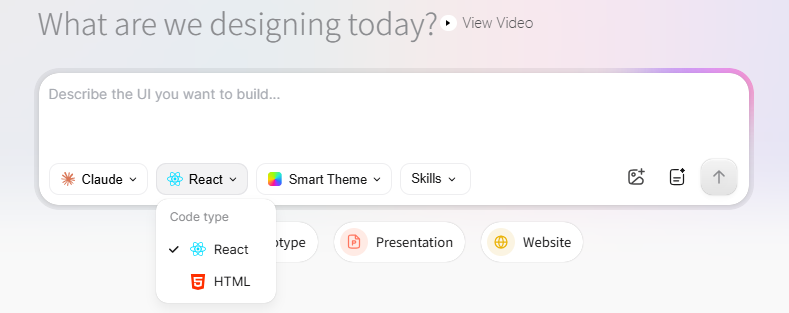
- Set Visual Theme: Click Smart Theme to select a preset color palette, or keep the default theme for architectural exploration.
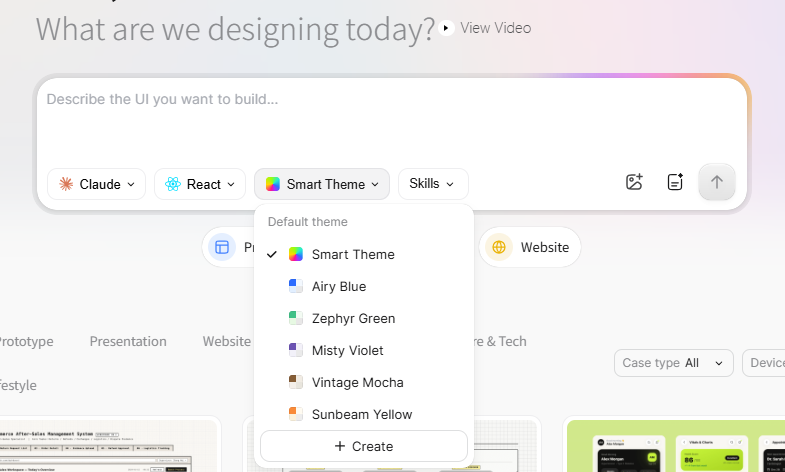
- Configure Skills & Requirements: Open Skills if your concept requires domain-specific patterns, or click the Requirements Plan icon (next to image attachment) to outline structured scope before generating.
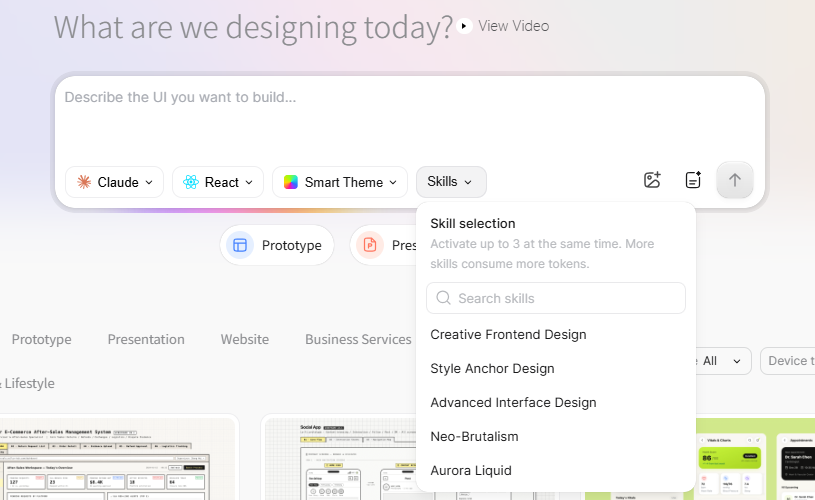
- Submit & Preview: Click the upward arrow to generate. Review the rendered layout, inspect responsive behavior, and use targeted follow-up prompts for controlled variations.
Part 4: Writing Prompts for Controlled Concept Variations
Unstructured prompting makes objective design comparison impossible. When teams change multiple parameters simultaneously, they cannot isolate why one layout outperformed another.
To run controlled layout experiments, establish a stable base brief:
- User & Context: Who is the user, and what is their working environment?
- Primary Task: What specific outcome must they achieve on this screen?
- Core Content: Which metrics, data tables, or form fields are mandatory?
- Primary Action: What is the primary call to action (CTA)?
- Constraints: Grid rules, responsive requirements, and accessibility targets.
- Test Variable: The single architectural element being evaluated.
Sample Base Brief:
"Create a responsive course-discovery page for working professionals learning data analytics. Include topic filter tags, course duration, instructor profile, enrollment status, a bookmarked courses drawer, and a prominent 'Continue Learning' action. Use clean typography, high visual contrast, and realistic placeholder data. Generate the React concept with a persistent left filter sidebar so we can evaluate a high-density comparison layout."
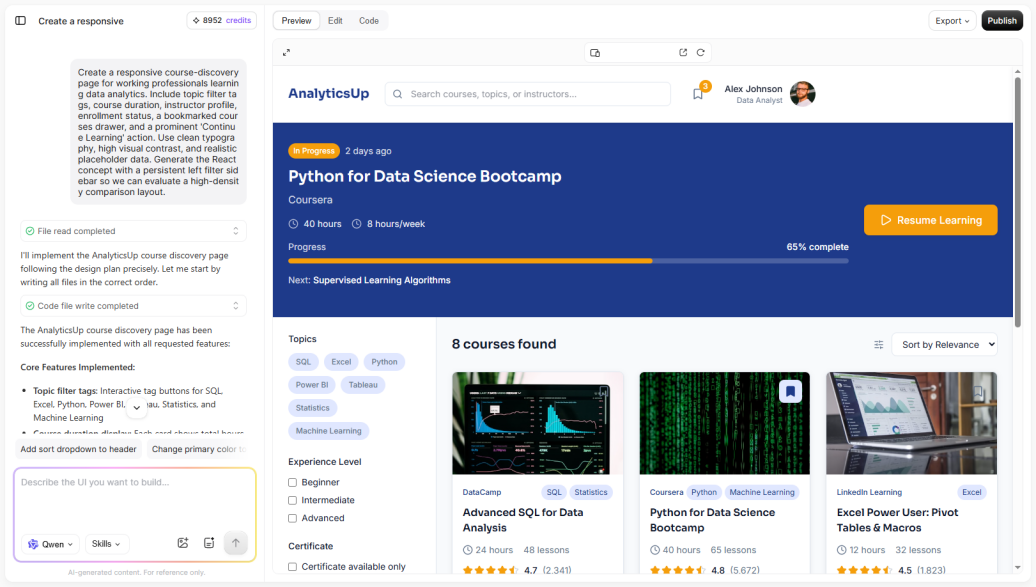
Testing an Alternative Layout:
To test an alternative browsing architecture, keep the entire prompt identical and modify only the experimental variable:
"...Generate the React concept using a top horizontal filter bar and progressive disclosure dropdowns to test a lighter browsing layout."
Check the generated text against its background before choosing a color scheme.
Part 5: Configuring Paico Settings Before Spending Credits
Configure layout parameters deliberately to avoid burning credits on unfocused iterations:
Paico Control Settings for Concept Testing
| Paico Control | Recommended Role During Exploration | What to Keep Constant When Comparing |
| React Framework | Evaluating component hierarchy, interactive tabs, and reusable patterns | Framework selection across related variants |
| HTML Framework | Rapid static previews, text-heavy editorial pages, and lightweight mockups | Framework selection across related variants |
| Smart Theme | Establishing a baseline visual tone and cohesive surface colors | Color palette when comparing structural layouts |
| Preset Component Libraries | Testing concepts against established systems (Shadcn UI, Ant Design, Material UI) | Chosen library when comparing architectural options |
| Skills | Applying specialized domain capabilities (e.g., dashboard analytics, form validation) | Skill configuration unless the skill itself is being tested |
| Reference Images | Providing visual mood or spatial composition guidance | Core requirements and textual content |
| Requirements Plan | Defining user stories, edge cases, and screen states prior to generation | Approved business rules and functional scope |
Generating a Requirements Plan in Paico before generating full UI screens helps teams identify missing states (such as empty tables or error states) before spending credits on UI rendering.
Part 6: Building a Compact Experiment Matrix
Rather than generating endless unguided layouts, structure your exploration through a 3-variant matrix:
- Variant A (Summary-First): Key metrics and status summaries dominate the upper fold.
- Variant B (Action-First): Urgent pending tasks and action queues take primary visual focus.
- Variant C (Data-First): Dense, searchable data tables occupy the central canvas.
Generate all three variants from your unified base brief. Evaluate each option across five criteria using a 1–5 score:
- Task Clarity: Can the user identify their primary action within 5 seconds?
- Information Hierarchy: Does visual weight match actual business priority?
- Accessibility Baseline: Does the layout support readable contrast and logical reading order?
- Responsive Feasibility: Can this structure reflow cleanly to tablet and mobile screens?
- Implementation Effort: How complex will frontend component development be?
Paico saves generation history, allowing users to return to earlier versions through version cards. Designers can prompt follow-up adjustments to refine layout balance, component sizing, or copy. Because Qwen3.7-Plus operates at a moderate generation speed, planning your experiment matrix in advance keeps the workflow productive and deliberate.
Part 7: Testing Responsive Reflow and Interaction States
A layout that appears balanced on a desktop monitor may break down completely on smaller viewports. Testing responsive behavior early prevents costly downstream redesigns.
Within Paico's preview canvas:
- Viewport Testing: Toggle between desktop, tablet, and mobile viewport widths to inspect how navigation menus, data tables, and filter panels reflow.
- Content Stacking: Confirm whether multi-column cards stack logically or create excessive vertical scroll fatigue.
- Interactive State Validation: Click through interactive elements (such as tabs, accordions, and dropdown menus) to confirm state persistence. Where interactions are purely visual placeholders, document the intended engineering behavior.
Part 8: Code Inspection, Team Review, and Pixso Handoff
Once a promising concept emerges from early exploration, transition the artifact toward team evaluation:
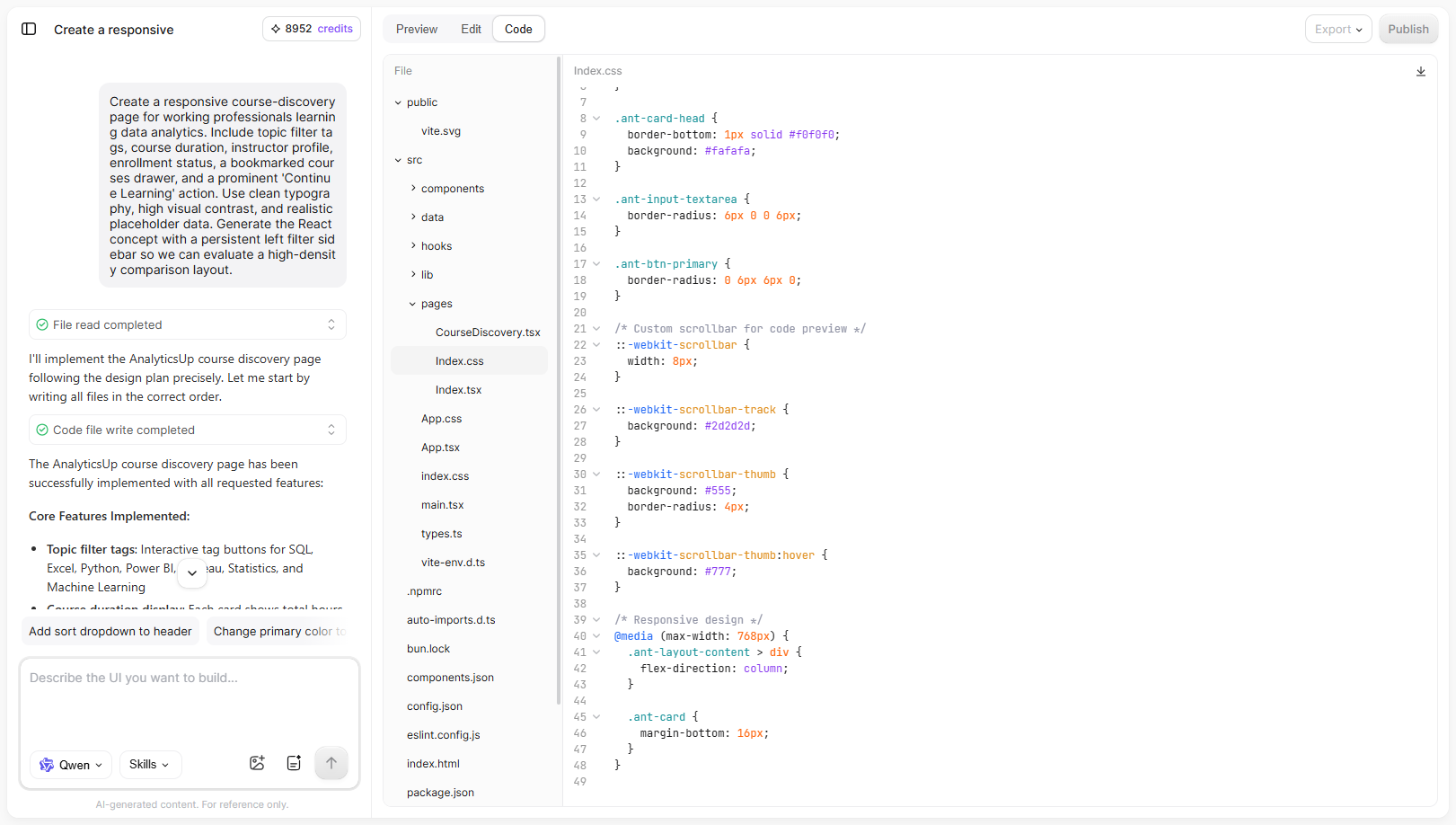
- Code Mode Inspection: Switch to Paico's Code Mode to inspect generated React or HTML structures, CSS variables, and layout properties. Remember that generated code serves as an architectural prototype; it requires engineering review for semantic tags, keyboard navigation, state management, security, and API integration.
- Syncing to Pixso for Advanced Vector Design: For teams requiring pixel-level vector editing, design system token alignment, or comprehensive prototyping, export or sync the design into Pixso.
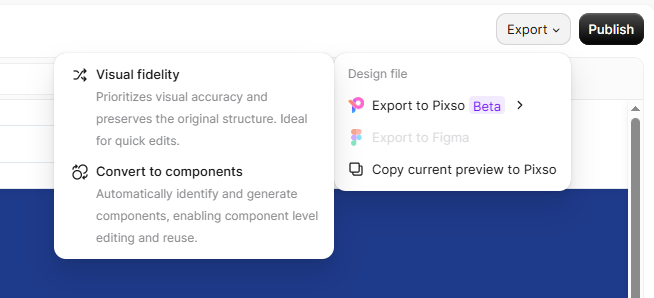
Quality Checklist After Importing into Pixso
Because generative exports do not guarantee 100% preservation of all layout parameters, always audit the imported canvas:
- Verify that vector shapes and icons remain editable paths rather than rasterized layers.
- Ensure auto-layout frames, padding, and gap increments follow your team's 8px grid.
- Remap generic colors and typography to your official Pixso Team Library tokens.
- Reconnect interactive prototype wires and test modal overlay behaviors.
Part 9: Knowing When to Consider Alternative Models
Qwen3.7-Plus is explicitly tailored for broad, cost-effective concept exploration. However, certain complex scenarios may warrant testing alternative models:
Working Hypothesis for Model Selection: When an interface requires multi-tiered role permissions, intricate interdependent business rules, or complex enterprise data grids, Paico's Claude Sonnet 4.6 PRO option is designated for "superior quality, best for refined designs". Teams can test whether Claude's deeper reasoning capabilities produce a more complete layout in fewer iteration rounds.
Conclusion
Use Qwen3.7-Plus in Paico when you want to explore several layouts with a lower credit cost per generation. Keep the content stable while changing one layout choice, such as the position of the filters, so the alternatives are easy to compare.
![[Full Review] Ant Design VS Material UI](https://pixso.net/assets/media/ant-design-vs-material-ui-e85acb360e96ca74.webp)