Scott
A good user onboarding flow does not teach every feature. It helps a new user complete one meaningful task, understand what happened, and know what to do next. Start with the first outcome, remove choices that do not matter yet, and make every interruption recoverable. This guide shows how to map the first-run path, choose the right amount of guidance, write the states, and validate the experience before launch.
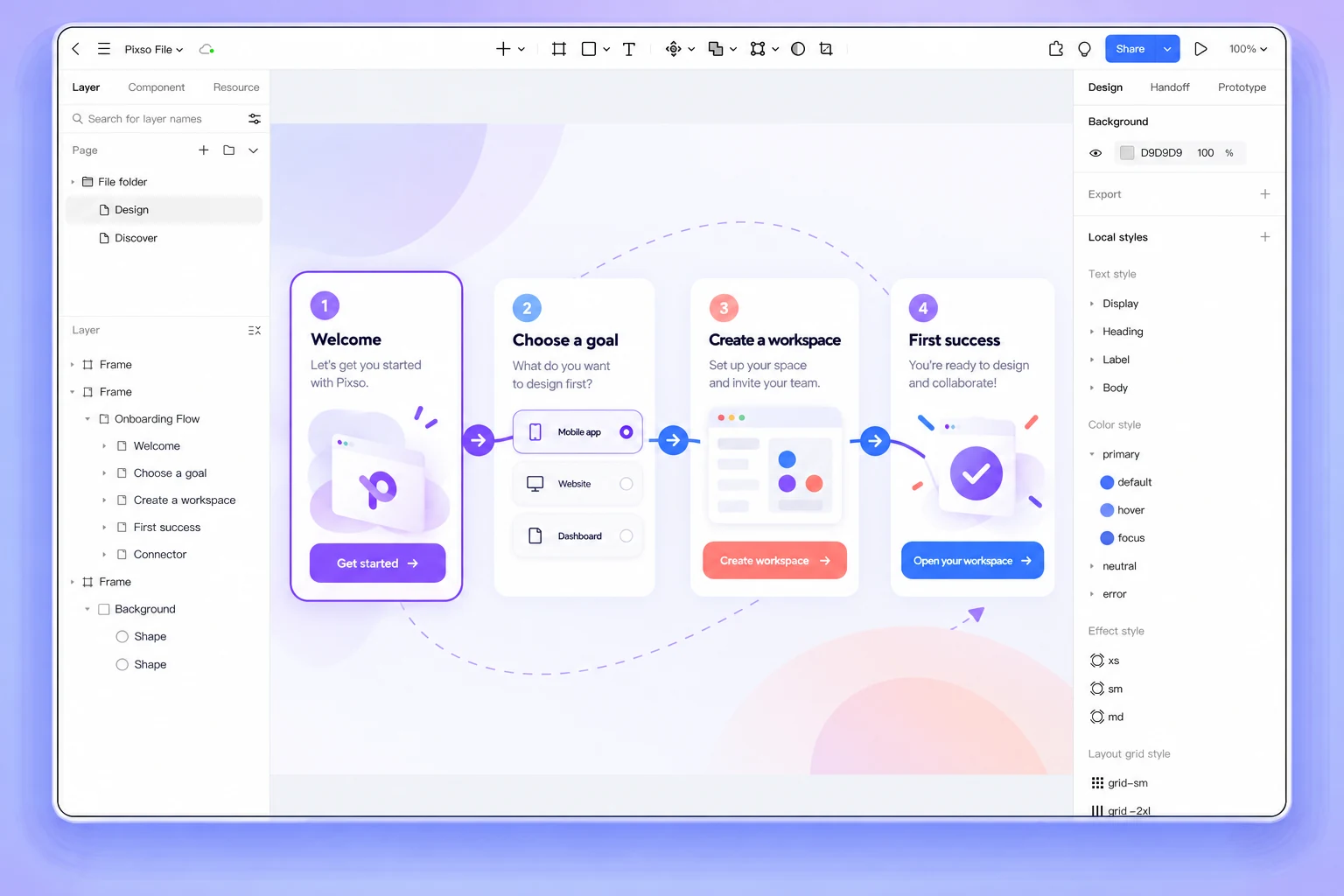
When the flow crosses product, content, and design decisions, the Pixso UX design collaboration workspace keeps the journey map, interface frames, comments, and prototype review connected. The tool does not decide your activation metric; it gives the team one visible place to test the path.
1. Define the first success before drawing the welcome screen
“Complete onboarding” is not a user outcome. A first success is the smallest action that proves the product is useful in the user’s context: creating a project, importing a file, inviting a teammate, or publishing a draft. Write the outcome as an observable event and name the user who should reach it.
| Weak goal | Better first-success definition | Evidence in the UI |
|---|---|---|
| Understand the product | Create the first project and see its editable canvas | Project created, next task suggested, exit path visible |
| Explore collaboration | Invite one teammate to review a real file | Invite sent, role explained, pending state recoverable |
| Learn the editor | Make one change and preview the result | Editable state, saved confirmation, preview action |
Choose one primary success for the first session. Secondary education can follow after the user has context; putting it before the outcome increases cognitive load without proving value.
2. Map the path as decisions, not a tour of screens
Draw the path from entry to outcome as a sequence of user decisions. For each step, record the trigger, the information the user needs, the action, and the consequence. Include the branch for skipping, returning later, or changing an earlier choice.
- Entry: explain why this step appears and what the user can accomplish.
- Choice: ask only for information that changes the next screen or the product setup.
- Action: provide a clear primary control and a safe way to go back.
- Result: show what was saved, what is ready, and the next useful action.
- Recovery: preserve input and explain how to retry when a request fails.
Put the map beside the first-run frames in a Pixso file. Invite product and engineering to challenge permissions, data dependencies, and default values before the prototype looks finished.
3. Use progressive disclosure to protect attention
Progressive disclosure means the user sees the decision needed now and can access detail when it becomes relevant. It is not an excuse to hide important constraints. Keep required information close to the action; move optional education into a later step, expandable explanation, or contextual help.
- Ask for a workspace name when it is needed to create the workspace, not on a generic welcome screen.
- Introduce advanced settings after the primary task is complete, with a clear way to revisit them.
- Use a short example or prefilled value when it makes the next action obvious, but label it as an example.
- Let users skip nonessential tours and provide the same guidance at the point of use.
Check every hidden detail against accessibility and support needs. If a policy, permission, or data-handling rule changes the outcome, it belongs in the primary path.
4. Design the states that make onboarding trustworthy
Onboarding feels broken when the interface only covers the happy path. Design the loading, empty, validation, error, success, and return states as part of the same flow.
| State | What the user should know | Design decision |
|---|---|---|
| Loading | Whether the setup is still working and what can be done safely | Use a stable progress message; do not invite duplicate submission |
| Validation | Which value needs attention and how to fix it | Keep entered data and place the message beside the field |
| Error | Whether retrying is safe and what happens next | Explain the recovery action; preserve the user’s progress |
| Success | What was created and which next action has the highest value | Confirm the result and make the next step explicit |
| Return | Where the user left off and how to resume | Offer a resume path without forcing the tour again |
5. Write onboarding copy that answers the next question
Short copy can still be specific. A useful label names the action, a helper explains why an input matters, and an error tells the user how to recover. Avoid claims such as “this will take only a few seconds” unless the product can consistently support them.
Test the copy with a realistic task: can a new user explain what will happen before pressing the primary button? Can they identify what is optional? Can they recover after a failed invite or import without starting over? The answers reveal where the interface is relying on a tour instead of clear design.
6. Prototype the smallest complete path
A clickable prototype should cover the primary task, one meaningful alternate path, and the highest-risk recovery state. You do not need every account setting to test whether the first-run experience works. You do need realistic labels, permissions, content length, and feedback so reviewers are not judging placeholder behavior.
In Pixso, connect the welcome, setup, task, and result frames, then ask a reviewer to complete the task without narration. Record where they hesitate, what they expect to happen, and whether they can resume after an interruption. Convert each observation into a decision or a follow-up experiment.
7. Measure activation without turning onboarding into a funnel trap
Track the first-success event and the steps that prevent it, but read the numbers with context. A high completion rate can hide users who skipped the flow and never understood the product. Pair event data with a short qualitative prompt: what did the user expect to accomplish, and what blocked them?
Review the flow after meaningful product changes. New permissions, imports, pricing boundaries, or collaboration roles can make an old onboarding path misleading even when the screens still look polished.
FAQ
Should every new user see the same onboarding?
No. Keep the first-success goal stable, but adapt examples, defaults, and optional guidance when role or context changes the task. Avoid branching so early that the user must answer questions before seeing value.
Is a product tour enough for onboarding?
A tour can point out controls, but it cannot replace a complete task path. Combine contextual guidance with an editable first task, clear feedback, and a recovery path.
When should onboarding end?
End the mandatory path after the first meaningful success is visible. Let users continue learning through contextual help, templates, and optional next steps.
Conclusion
User onboarding flow design is a decision about attention and confidence. Define the first success, map the choices, disclose detail when it matters, design recovery states, and validate the complete path with realistic content. A focused Pixso prototype lets product, design, and engineering see the same journey before implementation turns assumptions into cost.