On this page

Scott
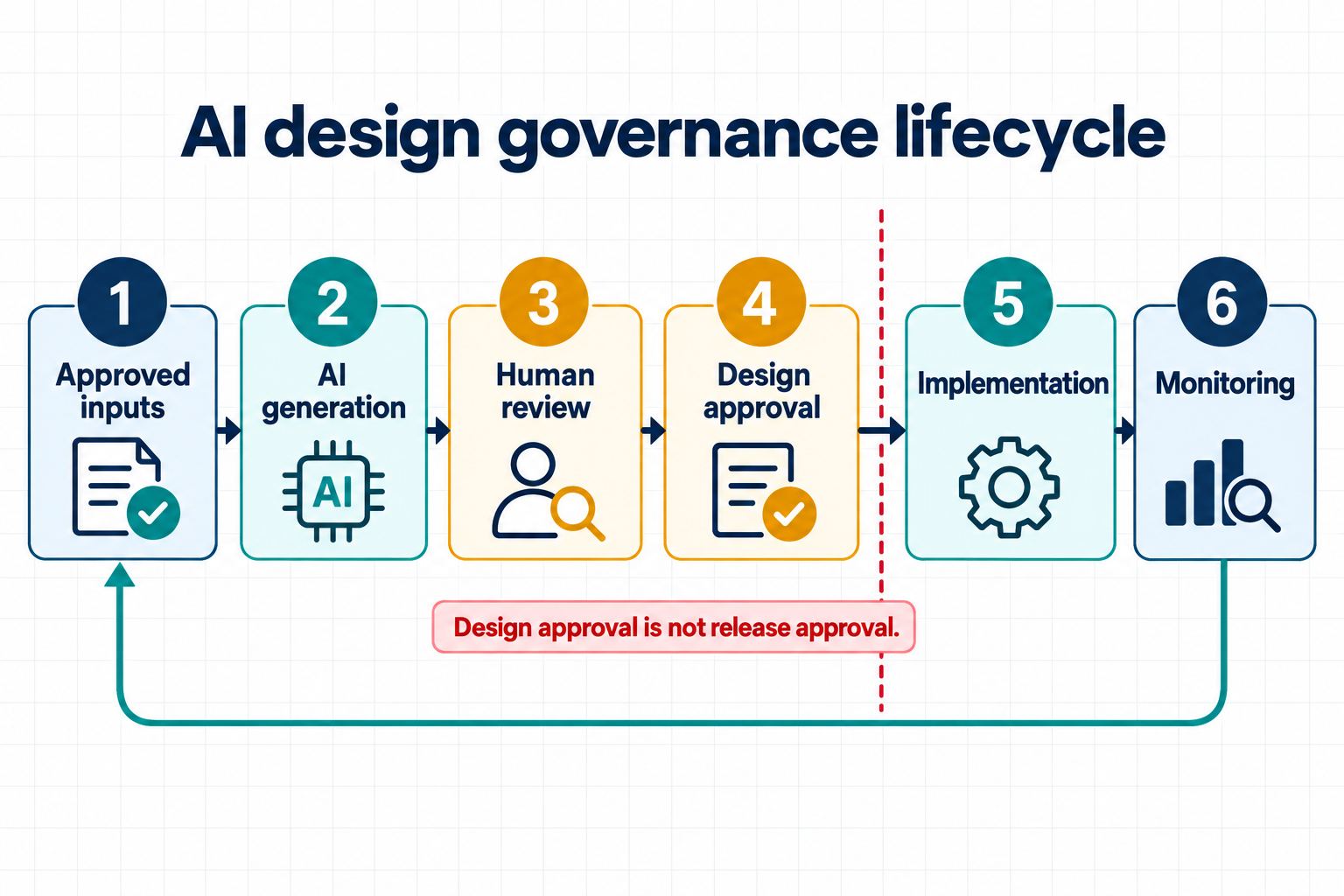
AI design governance is the operating system around generated interfaces: who may use AI, what inputs are permitted, how outputs are reviewed, what evidence is retained, and who can approve the result for the next stage. It is broader than a screen-quality checklist. This guide gives UI teams a practical AI design policy, risk tiers, review roles, evidence records, and approval gates that preserve human accountability while keeping AI-assisted work useful.
Part 1. Set the governance scope before choosing controls
An AI design policy should cover the full path from prompt to accepted design decision. That includes source material, model or feature selection, generated assets, edits, comments, approvals, exports, and later changes. It should also name what is outside its scope. Security, privacy, legal, accessibility, brand, and engineering teams retain their existing authority; a design policy coordinates those responsibilities rather than replacing them.
Start with an inventory of uses, not a list of tools. “Generate a low-risk onboarding concept from fictional data” and “rewrite a medical warning using customer records” may happen in the same interface, but they have very different consequences. Good AI design governance assigns controls according to the intended use, data, audience, and impact.
This approach aligns with the NIST AI Risk Management Framework Core, which organizes work around govern, map, measure, and manage and treats governance as continuous across the lifecycle. The framework is not a one-size-fits-all checklist; teams need a profile that fits their context and risk tolerance.
Part 2. Classify AI design work by consequence
Use a small number of risk tiers that people can apply consistently. The purpose is to determine required review, not to declare an interface universally safe. A low-risk visual exploration can still contain copyrighted material or confidential input; a high-risk workflow can still be explored when the right controls and specialists are involved.
The tiers below are a configurable organizational example, not fixed levels defined by NIST. Classify by the highest applicable consequence: the absence of sensitive data does not make a use Tier 2 when it can materially affect rights, safety, eligibility, finances, health, or another high-impact outcome.
| Tier | Typical use | Minimum control | Approval boundary |
|---|---|---|---|
| Tier 1: exploratory | Internal layout directions using fictional content | Designer review for scope, rights, brand, and obvious accessibility issues | May inform discussion; not handed to development |
| Tier 2: product design | Editable UI for a real feature with limited consequence; sensitive data is not permitted | Product, design, content, accessibility, and engineering review as relevant | May enter formal design review after evidence is complete |
| Tier 3: sensitive or consequential | Any sensitive-data use or material impact on rights, safety, eligibility, finances, health, or vulnerable users | Named specialist review, stricter data controls, documented alternatives, and accountable approval | No progression until required authorities accept residual risk |
| Prohibited | Disallowed data, unlawful use, deceptive interface, or unlicensed material | Stop and report through the organization’s process | No generation or reuse |
Write examples that match your products. A pricing-card variation may be Tier 1 during exploration but become Tier 2 when it contains real claims and enters an approved purchase flow. A risk tier follows the intended use and consequence, not the visual style. When a use matches more than one row, apply the higher tier; “no sensitive data” never overrides a Tier 3 impact condition.
Part 3. Control prompts, data, and source assets
The first gate in an AI approval workflow is the input. The requester should record the purpose, approved sources, prohibited data, output type, and required reviewers before generation. Do not rely on a generic “do not share secrets” banner.
- Data: prohibit personal, confidential, credential, customer, and regulated data unless an approved process explicitly permits it.
- Rights: confirm that source images, copy, brands, and design assets may be used for the intended purpose.
- Facts: identify which labels, prices, policies, dates, or claims require an authoritative source.
- Design system: specify the approved components, variables, and patterns that should guide the output.
- Boundaries: state which product rules, permissions, or safety decisions the model must not invent.
- Tool data handling: verify who receives the submitted data, applicable retention rules, whether the provider may use it for model training, and whether all conditions fit the organization’s approved scope.
These checks turn a general terms-of-use review into an actionable input decision. The NIST AI RMF Core explicitly includes risks from third-party software and data; each team should document the conditions that apply to its selected tool, plan, and deployment.
For Pixso AI, check the current feature and usage conditions before use. The official Pixso AI guide describes AI Design, image, layout, naming, design-system, checklist, and text workflows and warns that generated content can be inaccurate or biased. It also tells users to avoid infringing, illegal, harmful, or privacy-violating content. Your organization’s AI design policy may need stricter rules.
Part 4. Assign roles and preserve separation of duties
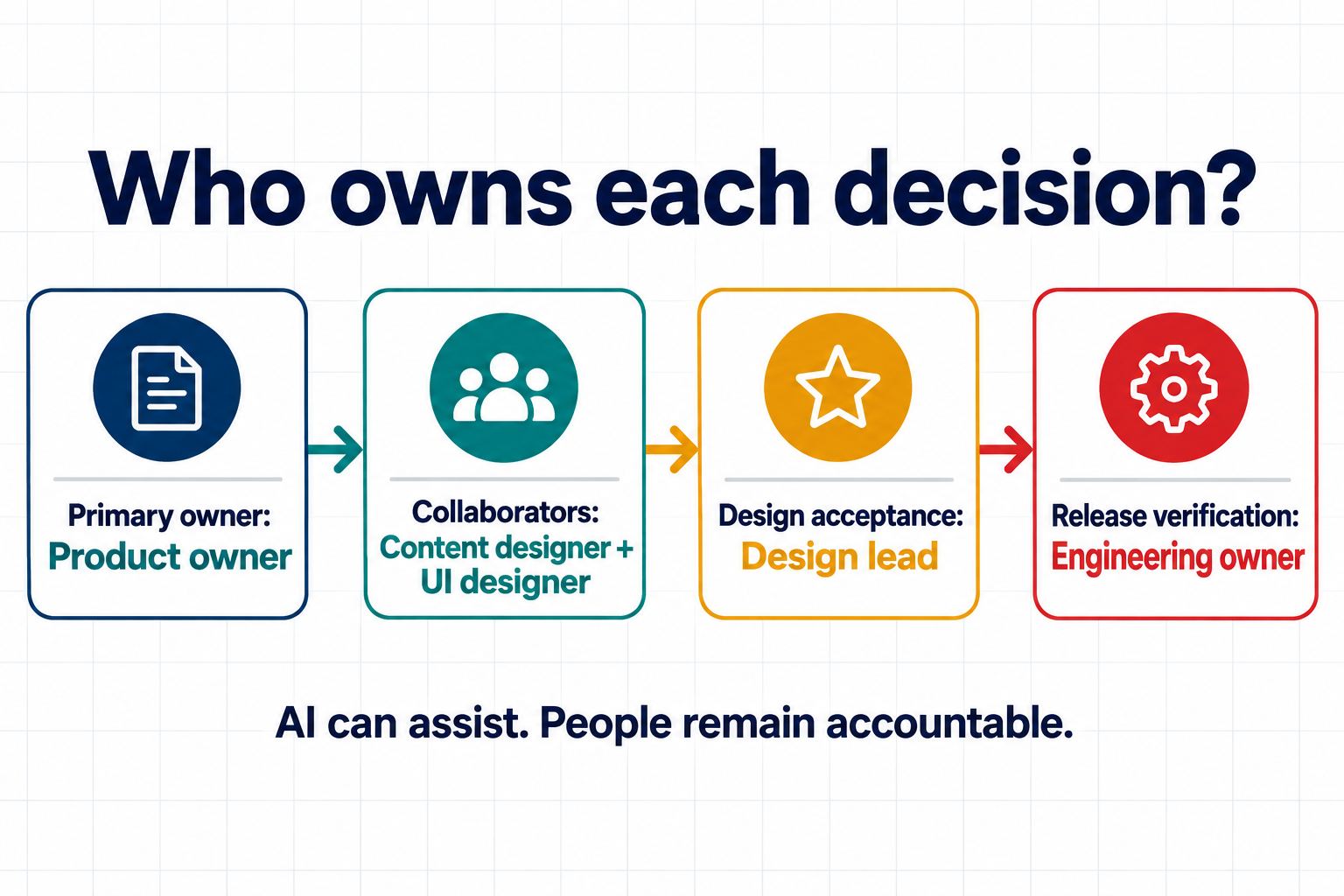
Human-in-the-loop design is meaningful only when the human has the right expertise, authority, time, and evidence. Asking the person who generated a screen to click “approved” does not create independent oversight. Separate generation, specialist review, and accountable acceptance when consequence warrants it.
| Role | Accountability | Evidence reviewed | Cannot delegate to AI |
|---|---|---|---|
| Requester | Purpose, approved inputs, and intended audience | Brief, sources, data classification | Whether the use is legitimate and in scope |
| Designer/operator | Prompt, editable output, changes, and known limits | Generation record and design file | Accuracy, usability, and brand judgment |
| Product owner | Rules, scope, claims, and success criteria | Requirement-to-screen mapping | Business decisions and acceptance |
| Specialist reviewer | Accessibility, privacy, security, legal, content, or domain risk | Relevant states, data path, copy, and tests | Professional or organizational sign-off |
| Engineering owner | Implementation feasibility and later software verification | States, contracts, annotations, and technical risks | Code quality, security, and production behavior |
| Approver | Gate decision and accepted residual risk | Complete review record and unresolved issues | Final accountable decision |
In small teams, one person may hold several roles. The record should still show which responsibility they were exercising. For Tier 3 work, require an independent specialist or accountable leader where policy demands it. This role clarity turns human-in-the-loop design from a slogan into an auditable operating practice.
Part 5. Review the generated interface with evidence
A generated UI review should test the output against its sources and intended use. A professional-looking screen is not evidence that the flow is lawful, accurate, accessible, or technically feasible. Review the editable file at four levels:
- Source fidelity: every claim, rule, required field, and user role matches an approved source or is labelled as an assumption.
- Task completeness: the primary task includes entry, progress, empty, error, recovery, and confirmed-success states.
- System consistency: shared functions and meanings use approved components, variables, naming, and content patterns.
- Risk controls: privacy, safety, accessibility, rights, localization, and misuse concerns have the required specialist review.
Pixso can support this work without becoming the approver. AI Design produces editable layered output; components, styles, variables, and team libraries help reviewers compare the draft with current standards; link sharing and contextual comments keep decisions near the relevant frame. Pixso AI’s Design Checklist may generate draft checks for a page type, but teams must adapt those checks to their own product and policy. For a broader workflow perspective, read how to integrate AI into an existing design process.

Do not use a visual prototype or presentation to claim that browser behavior is verified. A design can express expected focus order, keyboard paths, status messages, and responsive behavior. Engineering and quality teams must test the implemented interface with real browsers, devices, input methods, and assistive technologies.
Part 6. Use one issue record from discovery to closure
Every blocked generated UI review needs a record that another person can act on. Include location, source, observed problem, impact, severity, owner, required change, acceptance evidence, decision, and date. Define severity before review so teams do not use “high” to mean “I dislike it.”
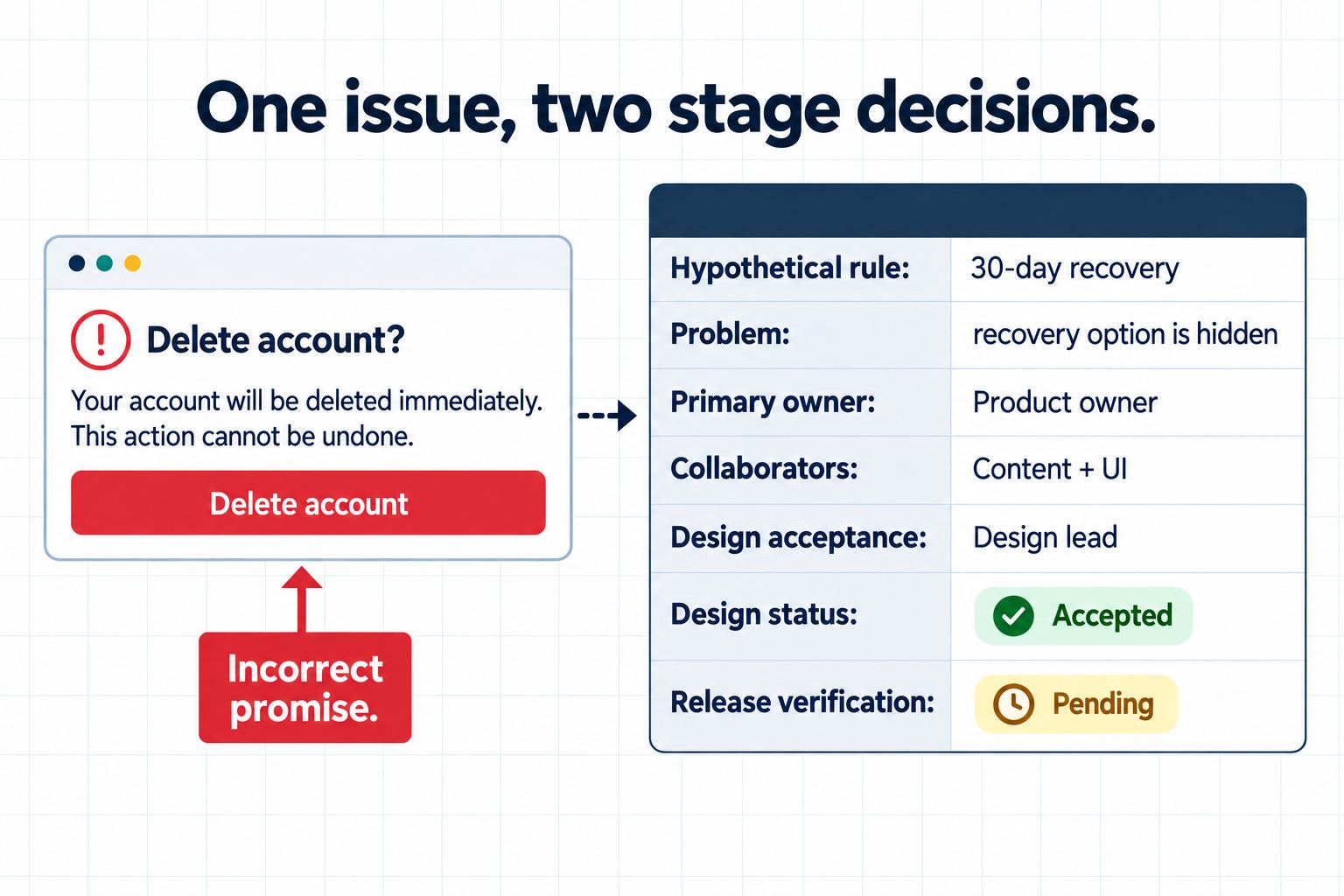
Location: Account deletion confirmation before submission. Hypothetical business rule: this example product allows account recovery for 30 days; that period is not a universal account-deletion policy. Problem: the generated pre-deletion screen promises immediate deletion and says the action cannot be undone, falsely hiding the recovery opportunity. Impact: users cannot make an informed decision about account status and recovery. Severity: high because the interface contradicts a material product rule. Primary owner: product owner. Collaborators: content designer and UI designer. Design acceptance reviewer: design lead. Design-stage evidence: the approved rule source, revised pre-deletion copy, corrected state flow, and reviewed file version UI-GOV-ACCT-DEL-v3. Design status: correction accepted for implementation after the design lead signs that version. Release verification: pending; the engineering owner must test the implemented recovery window before release.
This record uses two stage decisions rather than one ambiguous “closed” state. Gate 2 can accept the design correction while implementation verification remains open. Gate 4 closes the release-verification item only after the built behavior and evidence meet the stated rule. A color change alone cannot satisfy either decision.
Part 7. Define four gates and their exit criteria
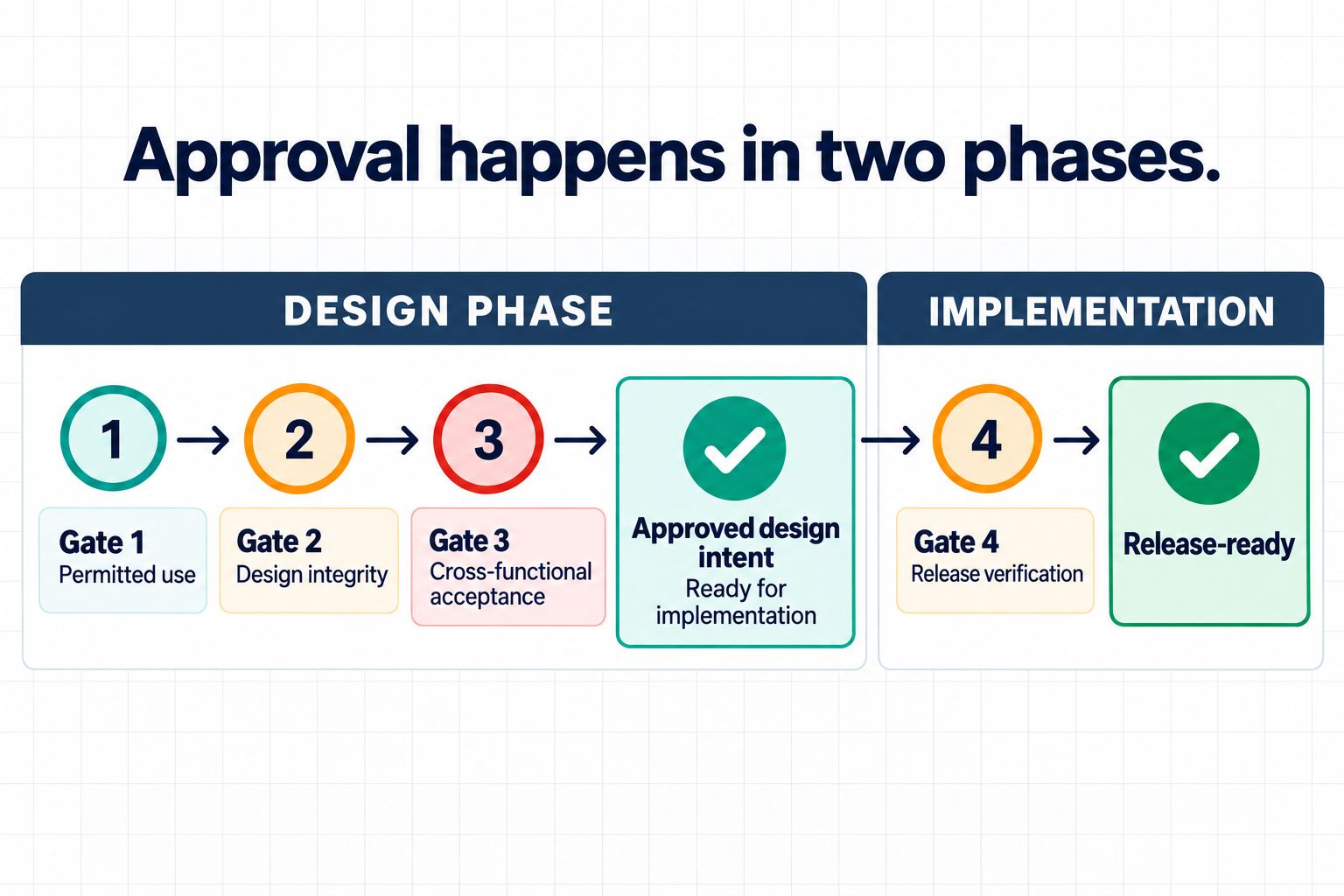
A lightweight AI design governance process can use four gates. Each gate answers a different question and produces a visible decision.
Gate 1: permitted use
Proceed only when the purpose, risk tier, data class, source rights, and permitted tool or feature are known. Exit evidence: approved use record and named reviewers.
Gate 2: design integrity
Proceed only when required content and states are present, invented rules are removed or approved, system patterns are used appropriately, and every high-severity design correction has been accepted against a named file version. Implementation checks may remain pending, but they must be recorded separately with an owner and release-blocking criterion. Exit evidence: reviewed editable file, source mapping, issue log, and design-acceptance decisions.
Gate 3: cross-functional acceptance
Proceed only when the required product, content, accessibility, privacy, security, legal, brand, and engineering reviewers have recorded decisions for their scope. “No comment” is not approval. Exit evidence: reviewer names, dated decisions, accepted residual risks, and a separate list of pending implementation-verification items with owners and Gate 4 pass conditions.
Gate 4: implementation and release
This gate happens only after implementation. The built product must be tested for semantics, keyboard behavior, assistive-technology support, security, privacy controls, performance, data accuracy, analytics, failure recovery, and platform compatibility. Each pending release-verification item needs test evidence tied to the implemented version. A passed design gate cannot pre-approve these facts; Gate 4 is what moves an implemented design to release-ready status.
The sequence is explicit: Gates 1–3 produce approved design intent that is ready for implementation; implementation then occurs; Gate 4 verifies the built result and produces release-ready status. This separation prevents “approved design” from becoming “safe to release.” Design reviewers approve documented intent and artifacts, while implementation owners approve working behavior.
Part 8. Retain enough evidence to reconstruct the decision
Evidence retention should be proportionate to risk and follow the organization's records, privacy, and legal policies. For approved work, retain the request, source references, tool and feature used, relevant prompt or instruction, generated version, material edits, risk tier, issue records, reviewer decisions, residual risks, and final approved artifact. Bind each approval to an exact file or revision identifier, such as a Pixso version name plus an exported evidence checksum; do not let an approval float across later changes. Do not retain prohibited or unnecessary sensitive data merely to make an audit trail complete.
Pixso version history, named files, comments, and shared design context can contribute to traceability. They are not automatically a compliant system of record for every organization. Decide which system is authoritative, who can access it, how long evidence is kept, and how a correction or incident is handled. Require re-review when a material change affects product rules, user-visible claims, permissions, data handling, critical states, shared components, accessibility behavior, or an accepted control; route the change back through every affected gate. For accepted residual risk, record the decision owner, acceptance conditions, affected version, expiration or review date, and the event that triggers reconsideration. The AI design policy should also explain how to suspend a workflow, revoke an approval, and notify affected owners when a new risk is found.

Part 9. Measure whether the process changes outcomes
A governance program should learn from use. Track signals that can improve controls: prohibited-input attempts, high-severity issue types, time to resolve, repeated source conflicts, accessibility defects found after handoff, unapproved tool use, overridden gates, and incidents. Do not reward teams for generating more screens or closing reviews faster if quality falls.
Review the AI design policy on a schedule and after material feature, model, legal, product, or incident changes. The NIST framework describes governance and risk management as continuous; a static policy cannot account for new capabilities and contexts. Feed recurring problems back into prompt patterns, training, approved source libraries, design-system rules, review templates, and risk tiers.
Part 10. Make accountability visible
Effective AI design governance makes speed conditional on evidence. Classify the use, control inputs, assign accountable roles, run a structured generated UI review, record issues, and separate design approval from release verification. Pixso can keep editable output, standards, and comments in shared context, but human-in-the-loop design still depends on qualified people making and documenting the decisions that AI cannot own.