On this page

Scott
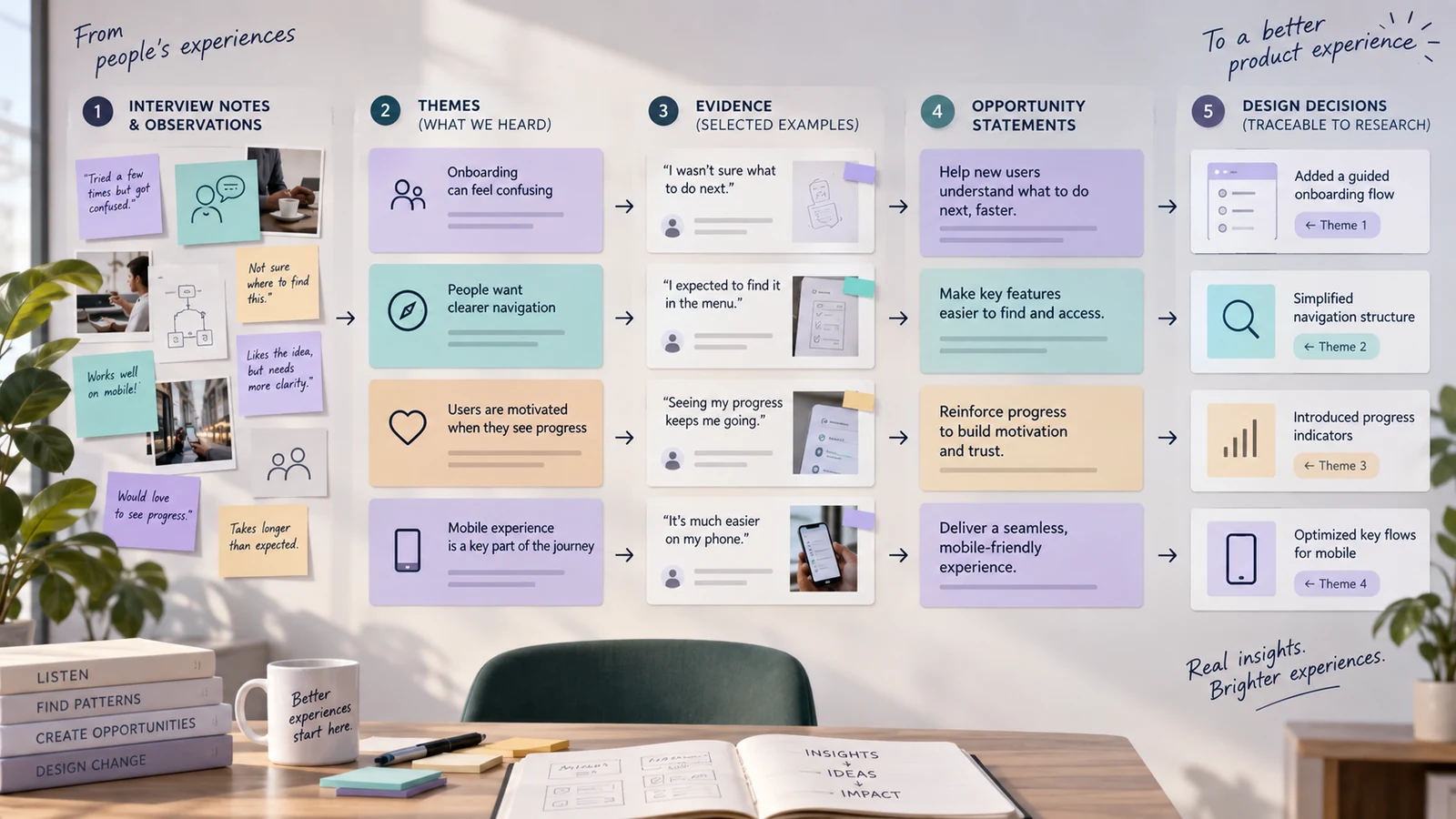
UX research synthesis turns session notes into a clear account of what people need, where they struggle, and which design decision should change. Its output is a set of findings connected to source evidence, followed by specific hypotheses the team can test.
In this guide, an invitation flow provides a running example: a workspace owner hesitates when choosing a teammate’s role. We will separate the observation from possible explanations, compare the evidence, and turn one finding into a change to the role selector. For choosing a study method, see design research tools.
Define the decision before grouping evidence
Start with a decision narrow enough for the study to inform. For the invitation flow, ask: “Should role selection explain access in place, offer a comparison, or stay as it is?” Specify whose task you are studying and where it happens. A new workspace owner inviting a teammate may need different guidance from an administrator managing an established team.
Set the boundary before grouping notes. An invitation study can reveal confusion about who may change a role; it cannot establish the right company-wide security policy. Flag policy questions for the owner who can answer them, and keep the interface decision separate.
Use a decision brief with five fields:
| Field | Invitation-flow example |
|---|---|
| Decision | Which role information belongs beside the selector? |
| Users | Workspace owners inviting their first teammate |
| Evidence | Invite-task observations, follow-up questions and relevant support requests |
| Constraint | Keep role selection inside the invitation form |
| Unknown | Does hesitation come from unclear capabilities, uncertainty about changing roles, or an approval policy? |
The brief becomes the filter for every later cluster and prevents an attractive but irrelevant quote from taking over the story.
Prepare notes without stripping their meaning
Remove duplicate notes and correct transcription errors while keeping the source wording. Separate an observed action, a participant’s explanation and the researcher’s interpretation. A pause at the role selector is observable; “the person thinks roles are permanent” is an explanation to investigate. The pause alone does not establish its cause.
Tag each note with a participant or session identifier, task step, source type, and confidence. Do not publish names or sensitive data in a shared board. When a quote is shortened, record the omission so the team does not mistake an edited fragment for a complete statement.
A note card can use this format:
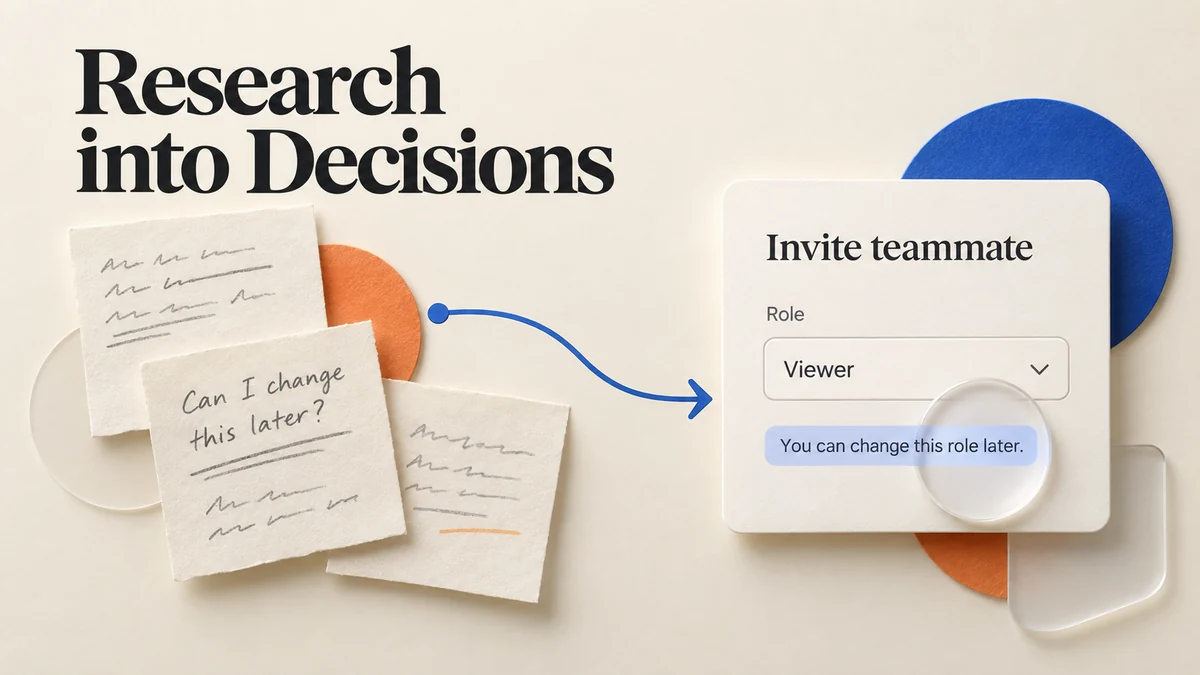
Observation: The owner opens the role menu, pauses, and asks, “Can I change this later?”
Context: First teammate invitation; the form does not explain how roles can be changed.
Interpretation to check: The owner may be treating the choice as permanent. They may instead be unsure who has permission to change it.
Source: Link the note to its session and timestamp before including it in a finding.
This separation makes later disagreement productive. The team can challenge the interpretation without denying the observation.
Cluster by behaviour and need, not by the interview script
Group notes around literal behaviors: “asks what a viewer can do,” “looks for a way to change a role,” and “checks with an administrator before inviting.” These groups expose different design problems. Combining them under “permission confusion” would hide the choice between better capability descriptions, a visible edit path and clearer approval rules.
After the first pass, group related observations into patterns. Each pattern should answer three questions:
- What behaviour or need repeats?
- In which context does it occur?
- What evidence makes it more or less credible?
A pattern can contain contradictory notes. A team may find that experienced users want fewer prompts while new users need more orientation. That is not a failed cluster; it is a segmentation clue. Preserve the contradiction and add the condition that explains it.
For remote workshops, a shared canvas can make the grouping visible to designers and researchers. The broader UI design collaboration tools discussion is a useful operational reference, but the synthesis board still needs clear evidence labels and ownership.
Score opportunity without pretending to measure truth
Prioritisation scores are decision aids, not scientific measurements. Choose a small set of dimensions that fit the decision: user impact, frequency in the relevant sample, business or operational consequence, confidence, and design effort. Define each scale before scoring so the team does not change the meaning of a “high” score midway.
For example, a pattern can be marked high impact, medium frequency, medium confidence, and low effort. That suggests a prototype, not a declaration that the problem affects every user. Keep the sample size and recruitment boundary beside the score.
Avoid multiplying uncertain numbers to create a precise-looking ranking. A simple table is often clearer:
| Pattern to investigate | Why it matters | Evidence to compare | Next step |
|---|---|---|---|
| Role choice appears permanent | An owner may delay an otherwise appropriate invitation | Questions about changing roles; attempts to find an edit path; counterexamples where owners proceed confidently | Test a helper sentence and a post-invite edit route |
| The owner needs approval | Better copy alone will not remove a policy constraint | Comments about approval; actual team rules; differences between owners and delegated administrators | Confirm policy, then test an approval explanation or route |
This format turns synthesis into an experiment queue rather than a verdict about users.
Write findings that carry their own boundaries
A finding should connect evidence, interpretation, and consequence. A reliable structure is:
When [context], [user group] tries to [task], they [observed behaviour], which suggests [careful interpretation]. The design should test [action].
Example:
When new workspace owners invite a teammate during setup, they pause at the role selector and ask whether access can be changed later. This suggests that role choice feels irreversible. The design should test a short explanation and a visible post-invite edit path.
Keep the finding tied to the people and task you observed. Record the counterexample as well: an experienced owner may understand the roles but wait for approval. That case should not be absorbed into a finding about unclear wording. It changes which users the proposed fix could help.
Move from findings to design hypotheses
Do not jump directly from “users struggled” to a finished component. Convert the finding into a hypothesis with a measurable behaviour:
If we show the role consequence next to the selector and link to the edit path, then more first-time owners will complete the invite task without asking for clarification.
Test the change with a task such as “Invite a colleague who should view the project but not edit it.” Observe the chosen role, requests for clarification and whether the person can explain how access can be changed afterward. Completing the form faster is not enough if they grant the wrong access. If they understand the copy but still need approval, revisit the policy route rather than polishing the sentence again.
Use the product’s existing process pages for sequencing and ownership. UI design process offers a broader structure, while the synthesis record should stay close to the evidence and the specific test.
For the role-selector example, place the finding beside an invitation screen in Pixso. The proposed change is small: explain what a viewer can do and state that the role can be changed later. Keep the finding, hypothesis and revised screen visibly connected so reviewers know what they are evaluating. Then link the next step into a prototype and check whether people understand the choice without extra explanation. Record the outcome with the original research notes.
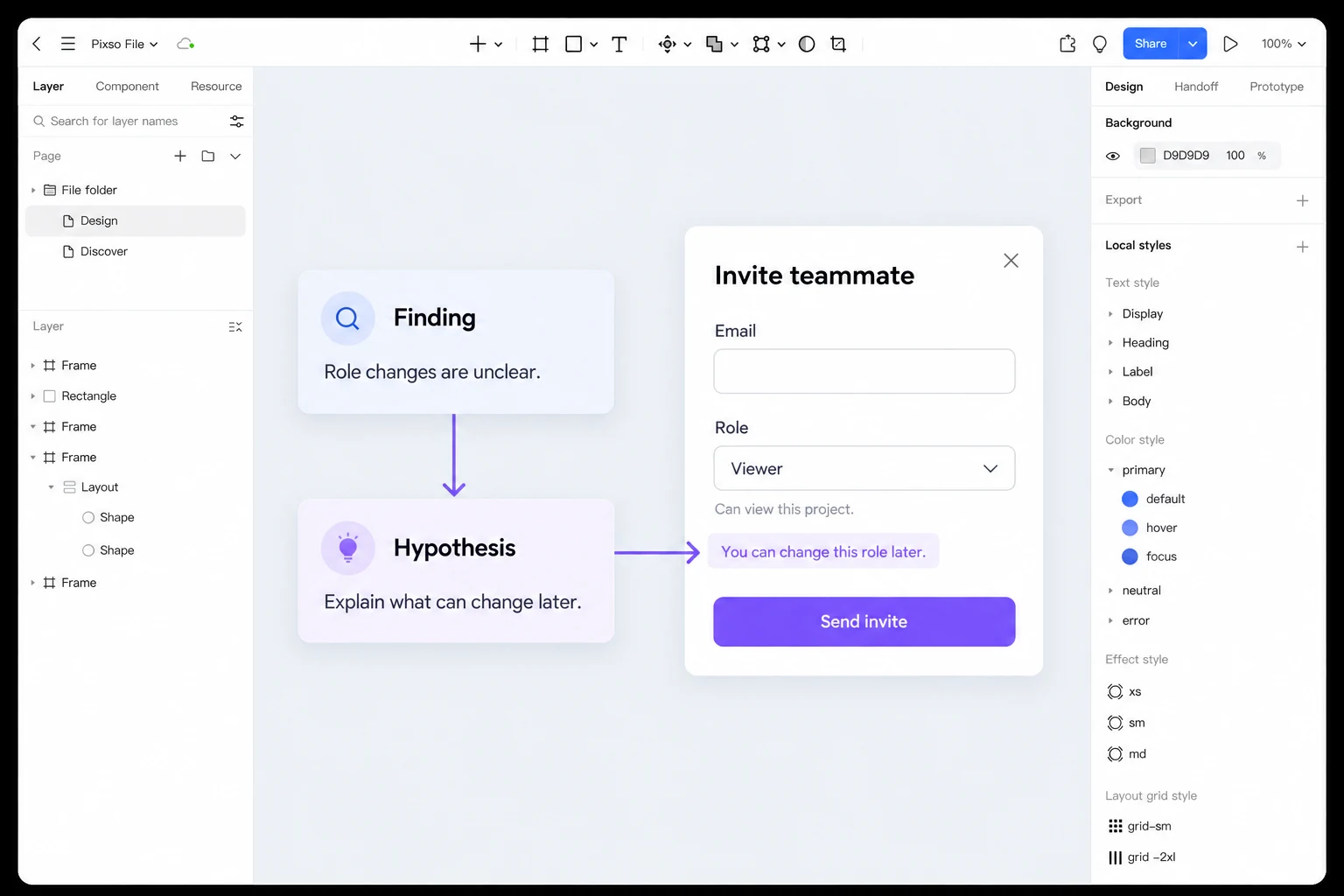
Turn a research finding into an interface hypothesis in Pixso →
Keep a traceability chain
Every high-priority design action should be traceable backward to source evidence and forward to an owner and validation step. A compact chain can use IDs:
P-07 pattern → F-03 finding → H-02 hypothesis → T-04 prototype test → D-09 decision
The IDs do not need a complex research repository. They only need to let a reviewer find the relevant notes and understand what changed. Link the prototype or design decision to the finding, and record when new evidence changes the conclusion.
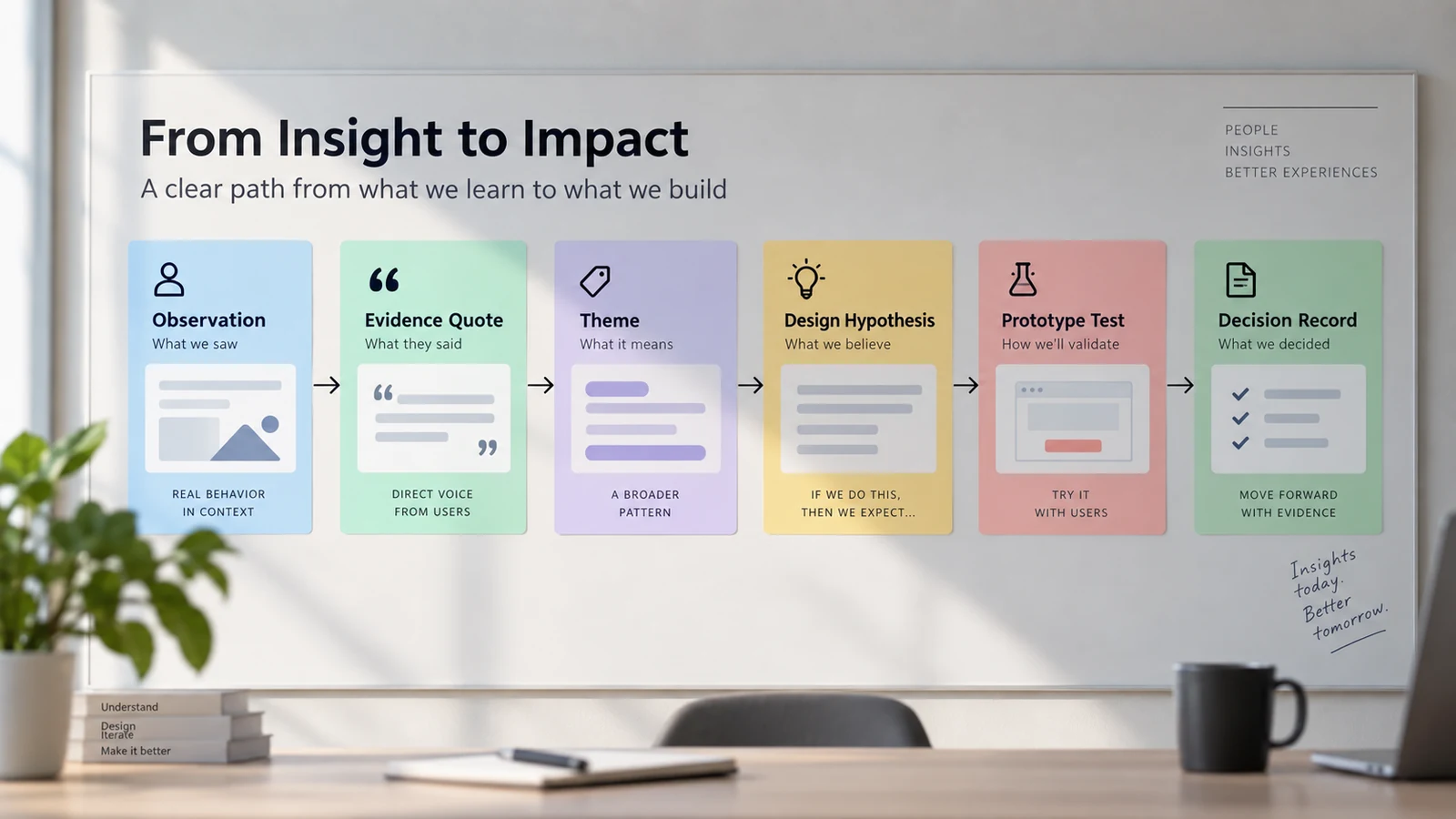
Traceability also prevents old findings from becoming permanent truths. If a later release changes the workflow, mark the finding as tested, superseded, or still open. Do not silently copy a quote into a new presentation with a different conclusion.
Facilitate disagreement with evidence, not authority
Invite product, design, engineering, support, and research to review the clusters. Ask each person to identify the evidence they trust, the assumption they see, and the next question they would test. The facilitator should record disagreements rather than forcing consensus in the meeting.
Useful prompts include:
- Which observation would change this pattern if it were false?
- Are we combining new and experienced users without a reason?
- Is this a usability issue, a missing policy, or a content problem?
- What would a user do after the proposed fix?
- What evidence is still missing before we commit?
This method keeps the session focused on decisions. It also makes research easier to explain to people who were not in the interviews.
Report results for readers who were not in the room
Lead with the decision, then show the strongest bounded findings, the evidence, and the recommended experiments. Use short quotes only when they add context; do not replace a pattern with a wall of transcripts. Include a methods note with sample, dates, tasks, and limitations.
A useful report structure is:
- Decision and scope.
- What we learned and how confident we are.
- Patterns with evidence and counterexamples.
- Design hypotheses and owners.
- Open questions and next research.
- Appendix with source links and note IDs.
The UX and UI design overview can serve as a shared vocabulary reference, but the report should use the team’s actual product terms. Clear language is more persuasive than exaggerated certainty.
Revisit the synthesis after the first design test
Synthesis should not end when the report is shared. After the first prototype or product change, return to the relevant findings and record what happened. A hypothesis can be supported, weakened, or replaced; each result is useful when it is connected to the original evidence. If a new segment behaves differently, add that boundary instead of rewriting the earlier finding as if it had always been true.
This review can be brief: link the test, note the observed behaviour, and state whether the decision remains open. The record helps a future team avoid repeating the same study and makes it easier to explain why a design changed. It also keeps a research repository from becoming an archive of attractive but untested statements.
If the result is inconclusive, keep it inconclusive. Note whether the sample, task, prototype fidelity, or recruiting criteria limited the test, then choose the smallest follow-up that can reduce that uncertainty. Honest uncertainty gives the next researcher a better starting point than a forced yes-or-no conclusion.
Choose the next design decision
Finish the invitation-flow synthesis with one decision record: the evidence behind the role explanation, the alternative explanation still open, the screen to test and the person responsible for the next session. Keep unresolved policy questions visible. After the test, update that record with the observed outcome so the next designer can see why the helper text stayed, changed or was removed.