On this page

Scott
Start an international address form with the destination country, show fields that fit the supported destination, and keep manual entry available when search cannot find the address. Let people inspect the complete address before continuing. A successful lookup is useful, but a building match can still leave out the company, floor or apartment that makes a delivery possible.
The broader form design workflow for defining field requirements helps establish what the service needs. Address design adds a more specific question: can this customer describe their destination accurately, including information your lookup provider does not know?
Choose the destination before choosing the field layout
A person's current location, interface language and delivery destination are separate facts. Someone using an English interface in London may be sending samples to a studio in Berlin. An account default can be a useful starting point, but the destination must remain visible and easy to change.
Consider a fictional textile supplier that delivers sample packs to the United Kingdom and Germany. Lea is ordering for Common Thread Studio in Berlin. The account's saved country is United Kingdom. If the form immediately asks for a UK postcode, Lea has to discover why the address does not fit. Put “Delivery country” before the address-dependent controls so she can correct the context first.
Show the actual delivery coverage at this point. “We do not deliver to this destination” is a service limitation. “Address search is unavailable here” is a lookup limitation. Those messages require different next steps: manual entry can solve the second problem, but must not suggest it bypasses the first.
Country-aware presentation has a standards basis: the HTML autofill specification describes differing administrative levels and encourages forms to adapt their fields and order to the country. That does not supply your supported-country list or carrier rules. Agree those with the teams that will actually use the address.
Choose structure according to what happens after submission
If a carrier integration needs separate postal-code and locality values, one large text area creates a parsing problem downstream. If the service only keeps an address for human correspondence, splitting every line into rigid components may ask for structure it never uses.
The GOV.UK address pattern makes this distinction: multiple inputs support separate address parts, while a text area can suit varied formats when those parts are not needed individually. Its UK lookup guidance also includes a manual route for missing and international addresses. Apply the reasoning to your service, rather than copying UK fields into every market.
For the sample supplier, use country-specific structured fields with room for additional address information. The customer can edit the final values whether they came from search, browser autofill or typing. Do not make “manual” a second, less capable form that omits company or unit details.
| Downstream need | Useful input model | Design consequence |
|---|---|---|
| Carrier requires named address components | Structured fields for supported destinations | Show the required parts without assuming every country has the same ones. |
| A person reads the complete address | Country plus a multiline address may suffice | Preserve line breaks and make the complete text easy to review. |
| Lookup assists either model | Suggestions followed by editable address details | A chosen suggestion must not close off corrections or additional lines. |
Make room for the information that does not fit a street field
The W3C's address-format overview shows why Street number, Street name, City and State cannot be treated as a universal compulsory set. Buildings may be identified by names; components can occupy several lines; and their expected order varies. A short input mask cannot resolve those differences.
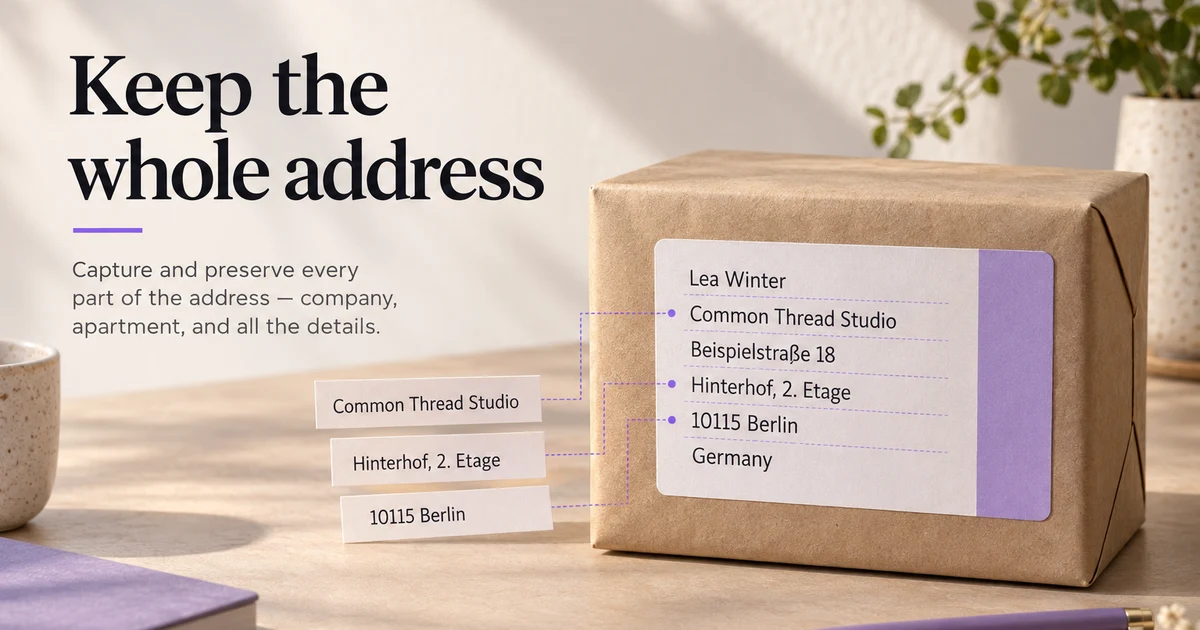
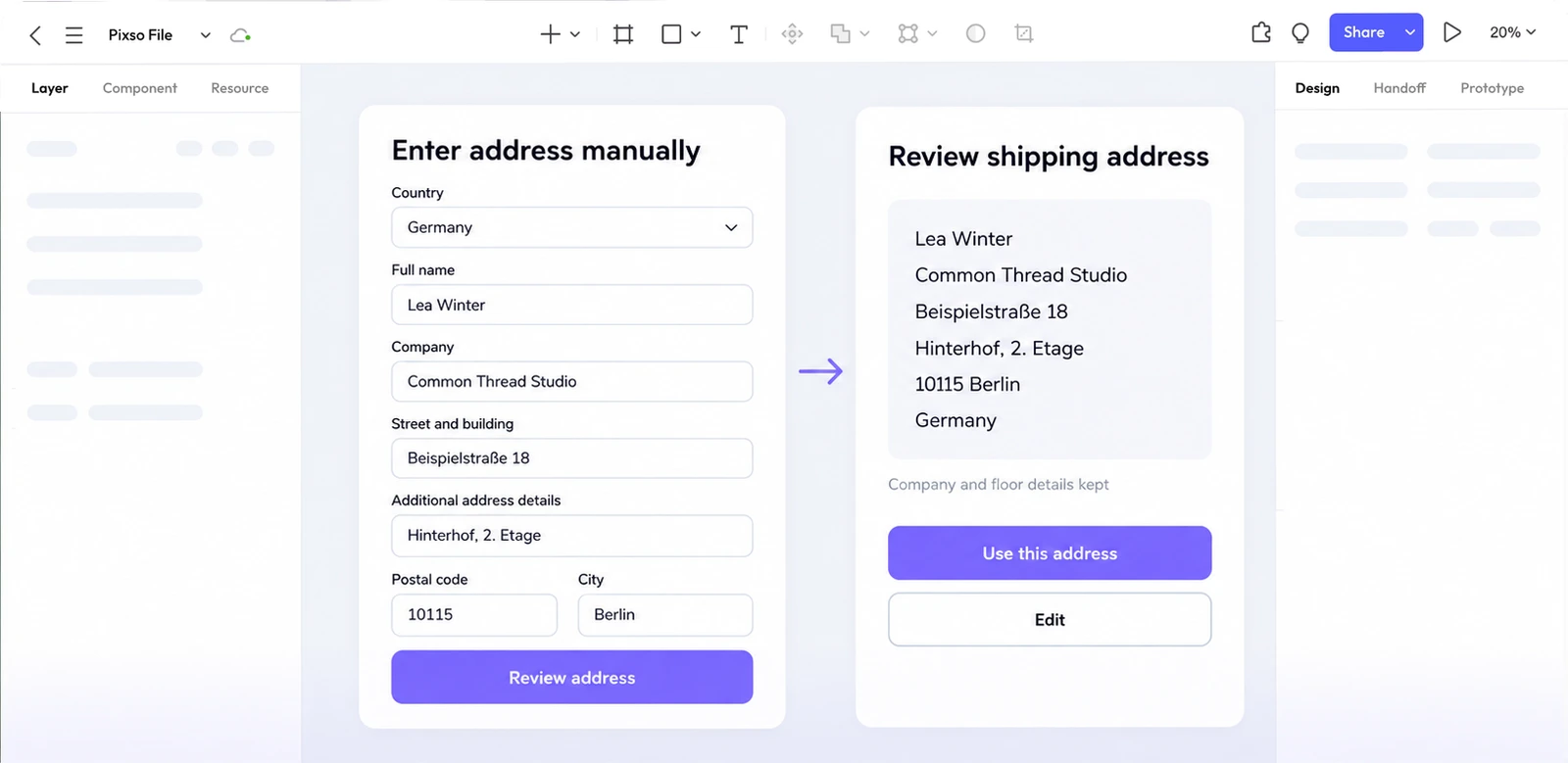
In the fictional Berlin example, Lea needs to retain “Common Thread Studio” and “Hinterhof, 2. Etage” as well as the street and locality. The second phrase supplies courtyard and floor details that must remain in the recipient’s original wording. The example uses “Beispielstraße 18” and “10115 Berlin” for the street and locality.
Use a visible optional address-detail field with an explanation suited to the supported market. A label such as “Apartment, floor or other address details” gives a better clue than an unexplained “Line 2.” If recipients commonly need a company name, give it an identifiable place rather than expecting everyone to squeeze it into the street field.
Requiredness must follow the selected destination and the delivery service's actual needs. Do not require a state or postal code merely because it was required in the first country your product supported. Equally, do not make a genuinely necessary carrier field optional just to remove a red error. Resolve the mismatch between the form and the delivery contract.
Treat a lookup result as a starting point
Lea searches for the fictional street, selects the matching building, and reaches the address details. The useful transition is “Here are the details we found; complete or change them.” It is not an immediate jump past the address to payment.
Keep the chosen destination visible, put the retrieved components into their appropriate fields, and leave the studio and floor information available to edit. If Lea typed the floor before choosing a result, do not replace it with an empty value merely because the provider returned no unit. Absence in a lookup response is not an instruction to erase something the customer entered.
There is a harder case when the selected result conflicts with an existing line. Suppose the form already contains “Hinterhof, 2. Etage,” but another suggestion points to the front building. Show the conflict beside the affected details and let Lea resolve it. Automatically combining unrelated fragments would produce a plausible-looking address that nobody actually chose.
The design should identify which information came from the customer and which was suggested. That distinction can remain an implementation note until it affects a decision; the public interface need not expose provider IDs or internal confidence scores. It should expose the consequence: a changed building, missing unit or different postal code.
Let manual entry recover from both missing results and outages
Place “Enter address manually” beside the search area, before a failure occurs. Customers who know search will not recognize their address should not have to perform an unsuccessful search to unlock the form.
Keep three outcomes distinct. A completed search with no match can say, “We could not find this address. Check the search or enter it manually.” A failed request can say, “Address search is unavailable. Try again or enter the address manually.” A destination outside the delivery area needs the separate availability message established earlier.
On manual entry, retain the selected country and any already confirmed components. Keep an unstructured search phrase visible as a reference when it cannot be mapped safely; do not guess that every phrase is a street. Lea should not find her postal code silently inserted into the company field.
Manual addresses should reach the same review stage as searched addresses. For this supplier, the proposed rule is that a complete manual address may continue if the carrier supports the destination. If an operational requirement genuinely demands verification, explain the remaining check and provide a real recovery route. A permanently disabled Continue button tells Lea nothing about how to finish.
A country change needs a preservation decision
Now replay the mistake: Lea entered the studio and floor details before noticing United Kingdom. Changing the country to Germany updates the relevant labels and requirements. It must not quietly delete her work or preserve a hidden UK lookup selection as if it still identified the new destination.
Retain clearly compatible information, such as the recipient and company, and mark the previous lookup result as no longer confirmed for the new country. Show address components that need review. For fields that disappear, keep their previous text recoverable within the current form interaction, but exclude it from the submitted destination until it has a valid, visible role.
A compact message can say, “Country changed to Germany. Check the address details below.” If the change genuinely requires replacing entered content, explain what will be removed before applying it and offer a way back. Do not add a modal to every harmless change; reserve interruption for an actual loss or consequential reinterpretation.
This also governs browser autofill. A stored address can supply a country that changes the form structure. The implemented sequence must establish the destination before validating dependent fields, rather than flashing irrelevant errors and then rearranging the inputs underneath them.
Show the complete address that will be used
The review block should include the recipient, company, floor or apartment, street, locality, postal code where applicable, and country in the appropriate output order. Lea can now see whether “Hinterhof, 2. Etage” survived. A green tick beside the street could not answer that question.
If validation proposes a correction, show the entered and suggested versions with meaningful differences called out in text. Let the customer edit the address or accept an appropriate suggestion. The Google Address Validation guidance distinguishes cases that need fixing from those that need confirmation; its signals are provider-specific inputs to a product decision.
A format suggestion is not proof that a parcel can be delivered. This supplier's review therefore separates “Address details checked” from the selected shipping service's availability. If the address changes, recheck any shipping option or charge that depends on it and make the change visible before the order is confirmed.
Put the missing floor into the Pixso walkthrough
In Pixso, build one small delivery-address project around Lea's example. Use reusable fields and Auto Layout for the address section, then create frames for a building selected without a floor, completed manual details, a country change requiring review, and the final delivery preview. Pixso supports linked frames, prototype review and comments through its prototyping workflow.
Connect the manual-entry action to the completed-detail path, and connect Change country to the review state. Keep the same studio and floor text across the frames. Add a design note beside the country-change frame explaining which hidden values must not be submitted. The address rules belong to the application you are designing; the prototype makes their visible consequences discussable.
Give a reviewer a concrete task: send the sample pack to the studio with its courtyard and floor details, starting with the wrong saved country and an unavailable lookup. Watch where they expect to change the destination and whether they can explain the final label. Record feedback beside the state that caused confusion.
Design your address flow in Pixso.
Turn an international address into a state contract
An address form should change its fields from the selected country, but it should never erase information when the country changes. Define the contract first: preserve typed values, explain a changed label, and validate the postal format only after the country is known.
| Transition | Preserve | Validate |
|---|---|---|
| Country selected | Name and address lines | Reveal country-specific fields. |
| Postal code edited | Raw input | Normalize spaces without changing the value silently. |
| Country changed | All text with a warning if needed | Recheck only fields whose rules changed. |
| Submit failed | Every entered field | Place the error beside the exact field. |
Use a component set in Pixso for country, loading, invalid, and accepted states so the team can inspect the same contract during review.