On this page

Scott
A UI design requirements checklist tells a product team whether work is ready to enter design, not how to write a full PRD. The practical test is simple: can a designer identify the user, task, content, rules, states, constraints, evidence, and decision owners without inventing them? Use the 30 questions below as a design readiness checklist, record blockers, and begin visual work only when the unknowns are understood and owned.
Part 1. Apply the 30-question readiness checklist
Define “ready for UI design” before the kickoff
Ready does not mean every detail is fixed. It means the team knows enough to explore responsibly and can distinguish a design question from a missing product decision. A UI requirements review should produce one of three outcomes: ready, ready with named assumptions, or blocked. That is more useful than a percentage score with no consequence. For teams that need to keep these decisions close to the work, the Pixso UI design collaboration workspace provides a shared place to review the related design context.
This UI design requirements checklist is deliberately different from a document template. If your team needs the structure of a requirements document, begin with what a PRD should contain. Use this checklist at the gate between product definition and interface design. It tests whether the product design requirements are actionable, not whether the brief looks complete.
| Decision | Passing condition | Team action |
|---|---|---|
| Ready | No unresolved issue can change the main task, policy, data, or required states | Start design and record normal design questions |
| Ready with assumptions | Each open point is bounded and reversible; it cannot change the core flow or a critical data-handling rule | Record the affected screens and states, temporary assumption, owner, approving product owner, and review date |
| Blocked | An unknown could change the core flow, user rights or safety, a critical data-handling rule, or whether success is possible | Resolve it, or have the accountable product owner explicitly remove the affected scope before design |
A data-related unknown is not automatically a blocker. A missing field limit, for example, may remain a medium assumption when it affects only a bounded layout decision and does not change validation, storage, security, permissions, or the core path. The record must name the affected screens and states, provide representative test values, set a review date, and identify the product owner who approves design work to continue. If the answer could change a critical data rule or the main task, the work is blocked.

Questions 1–5: problem, audience, and outcome
The first five questions prevent a feature request from becoming a layout exercise without a purpose.
- Who is the primary user for this release? Name a role and context, not “everyone.”
- What job must that user complete? Describe an observable outcome such as “assign an urgent case,” not “manage cases.”
- What triggers the task? Identify the event, entry point, or condition that brings the user to the interface.
- What business or user outcome defines success? State what changes after the task is completed.
- What is explicitly outside this design scope? Prevent adjacent requests from silently expanding the work.
Pass this group when the same user, task, trigger, outcome, and scope appear in the brief, ticket, and kickoff conversation. A vague answer to question two is a blocker because it changes the information hierarchy and action design. A missing secondary persona may be an assumption if the release explicitly targets one role.
Questions 6–10: flow, rules, and ownership
A screen cannot compensate for an undefined decision path. This part of the design readiness checklist asks whether the core sequence and its business rules are visible.
- What steps must happen from entry to completion? Keep the main path short enough to review.
- Which decisions can the user make at each step? Separate choices from system actions.
- What business rules change the path? Include eligibility, limits, timing, or approval conditions.
- Which roles may view, create, edit, approve, or delete? Name the source of authorization.
- Who owns unresolved product decisions? Every blocker needs one accountable person and a due date.
For a visual review, map these answers as a simple flow in Pixso Whiteboard. Its flowchart, PRD, brainstorming, and other structured whiteboard formats can help teams connect requirements to decisions and owners. The board does not resolve policy; it makes missing branches difficult to overlook. For flow conventions, the Pixso user-flow guide provides an adjacent reference.
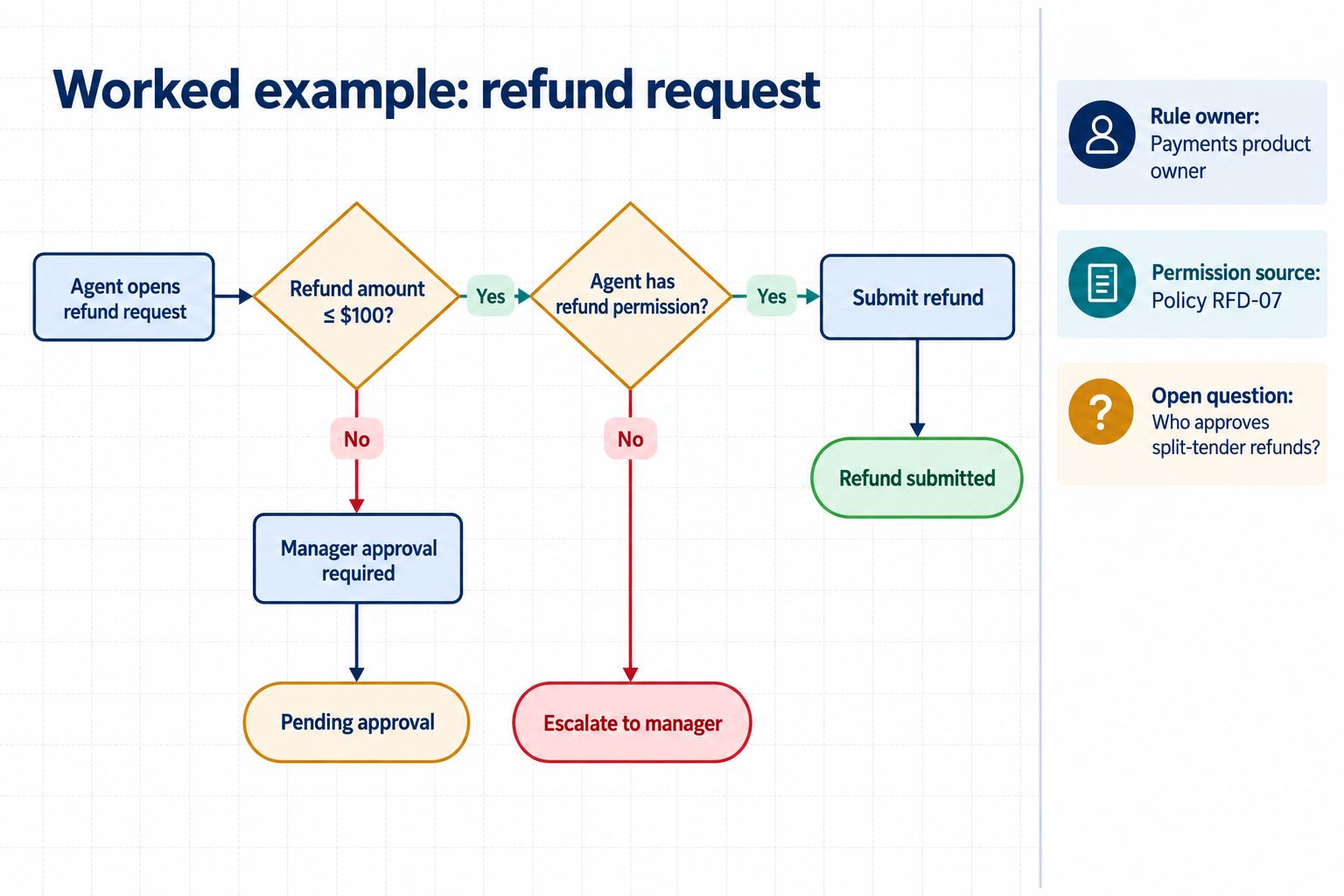
The worked example below uses hypothetical refund rules to show the required level of specificity. Each branch names its condition and result. The rule owner, authorization source, and unresolved question sit beside the flow as governance notes; they are not user actions or destinations.
Questions 11–15: content, data, and privacy
Placeholder text can conceal whether a layout works. A UI requirements review should identify the real content types and representative limits before high-fidelity design begins.
- Which fields, labels, messages, and actions are required? List content by purpose and source.
- What are realistic minimum, typical, and maximum values? Include long names, large numbers, and empty values.
- Which data may be missing, delayed, stale, or unavailable? Define how the UI should explain each condition.
- Which content is sensitive or regulated? Identify masking, retention, access, and review requirements with the responsible specialist.
- Who approves interface copy and localization? Assign terminology, legal, and translation ownership.
Pass when designers have safe, representative examples and know which sources are authoritative. Do not paste confidential records into design or AI tools to make examples realistic. Use fictional values that preserve length, format, and edge cases. If a sensitive field has no handling rule, mark the work blocked rather than guessing that masking or persistence is acceptable.
Questions 16–20: states, feedback, and recovery
The default state is only one part of an interface. These five questions make the design kickoff checklist useful for real software rather than presentation-only screens.
- What happens while data or an action is in progress? Define visible progress and repeat-action prevention.
- How do first use, no data, and no search results differ? Each empty condition needs a relevant next action.
- What validation can happen before submission? Separate local input rules from server decisions.
- What does failure preserve? Retain the non-sensitive input and context needed to understand and correct the problem.
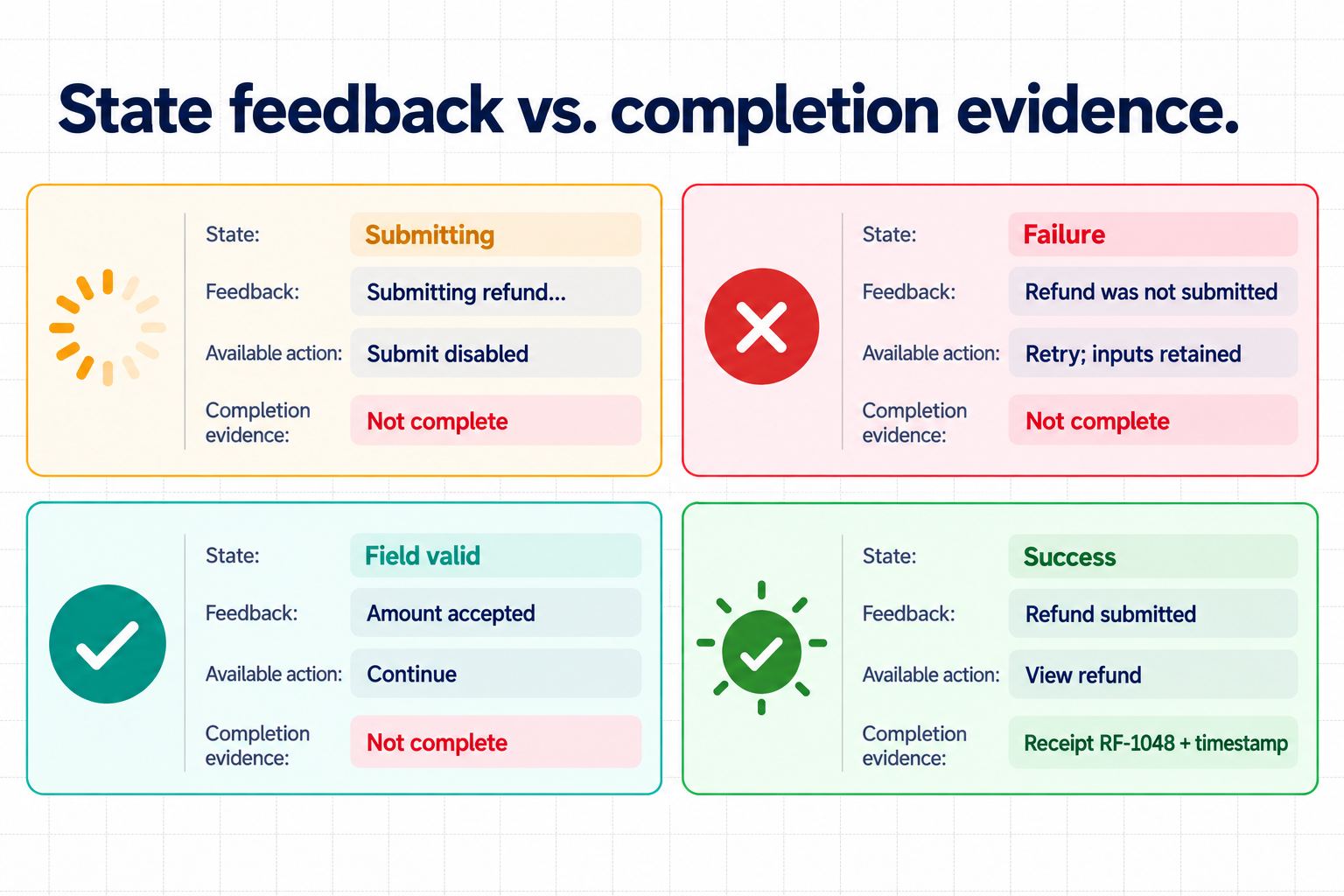
- How is successful completion confirmed? Distinguish a valid field from a completed transaction.
A passing answer names the state, trigger, message, available action, and recovery path. “Show an error” is not enough. The requirements should say whether the user can retry, edit, cancel, contact support, or safely continue later. Sensitive values may require stricter treatment than ordinary text, so preservation rules should be risk-based rather than absolute.
Do not label progress or failure feedback as completion evidence. A valid field proves only that one input passed its rule. Transaction success needs a distinct final state plus durable evidence such as a receipt identifier, timestamp, status change, or destination record.
Questions 21–25: platform, responsive behavior, and accessibility
Visual design needs target conditions. The next group turns device and accessibility expectations into inputs the team can design and later verify.
- Which devices, viewport ranges, input methods, and browsers are in scope? Use the project’s actual support policy.
- What content must remain visible as space changes? Define priority, stacking, wrapping, scrolling, and truncation rules.
- What keyboard path and focus order should the built interface support? A design may document intent, but implementation must be tested.
- What names, instructions, errors, and status messages will assistive technology need? Do not communicate meaning by color alone.
- Which contrast, text resizing, target-size, and motion requirements apply? Use the project’s accessibility standard and acceptance criteria.
Use the current WCAG 2.2 Recommendation as a standards reference, then translate applicable criteria into testable project requirements. Passing the design gate means the intended behavior and content are specified. It does not prove that the final browser interface has correct semantics, focus management, announcements, or zoom behavior; those need implementation testing.
Questions 26–30: design system, feasibility, and evidence
The final five questions connect the design kickoff checklist to the team’s reusable system and downstream review without turning this article into a handoff checklist.
- Which approved components, styles, variables, and patterns should be reused? Link to the current source of truth.
- Which new pattern might require system review? Name the owner before creating a local variant.
- Which technical constraints affect layout or interaction? Include data latency, platform limits, and integration dependencies.
- What evidence will reviewers use to approve the design direction? Examples include a scenario walkthrough, state coverage, content review, or accessibility annotation.
- What remains for implementation and release verification? Separate design evidence from code, security, analytics, performance, and assistive-technology tests.
Pixso can help teams keep this evidence close to the design. Components, styles, variables, and team libraries support reusable standards, while link sharing and contextual comments keep review attached to the relevant frame. The Pixso design system overview explains those product capabilities. Reuse still requires judgment: patterns with the same function and meaning should stay aligned, while every repeated decorative detail does not need to become a component.
Use a decision log so the checklist changes the work
A checklist is valuable only when each answer changes what the team does next. Convert the review into a short decision log with four fields:
| Field | Example | Why it matters |
|---|---|---|
| Question | Can an invited teammate view this report? | Preserves the exact decision under review |
| Evidence | Role matrix, policy note, or representative content | Separates a verified rule from a guess |
| Owner and state | Product owner — ready with assumption | Names who can unblock or approve the next step |
| Design impact | Permission branch and empty state must be prototyped | Connects the answer to screens, copy, and tests |
Keep the log beside the source requirements in a Pixso UI design collaboration workspace, then link the affected frame or prototype state. When a rule changes, the team can see which decisions and screens need another review instead of silently carrying an outdated assumption.
Part 2. Record blockers with a clear acceptance rule
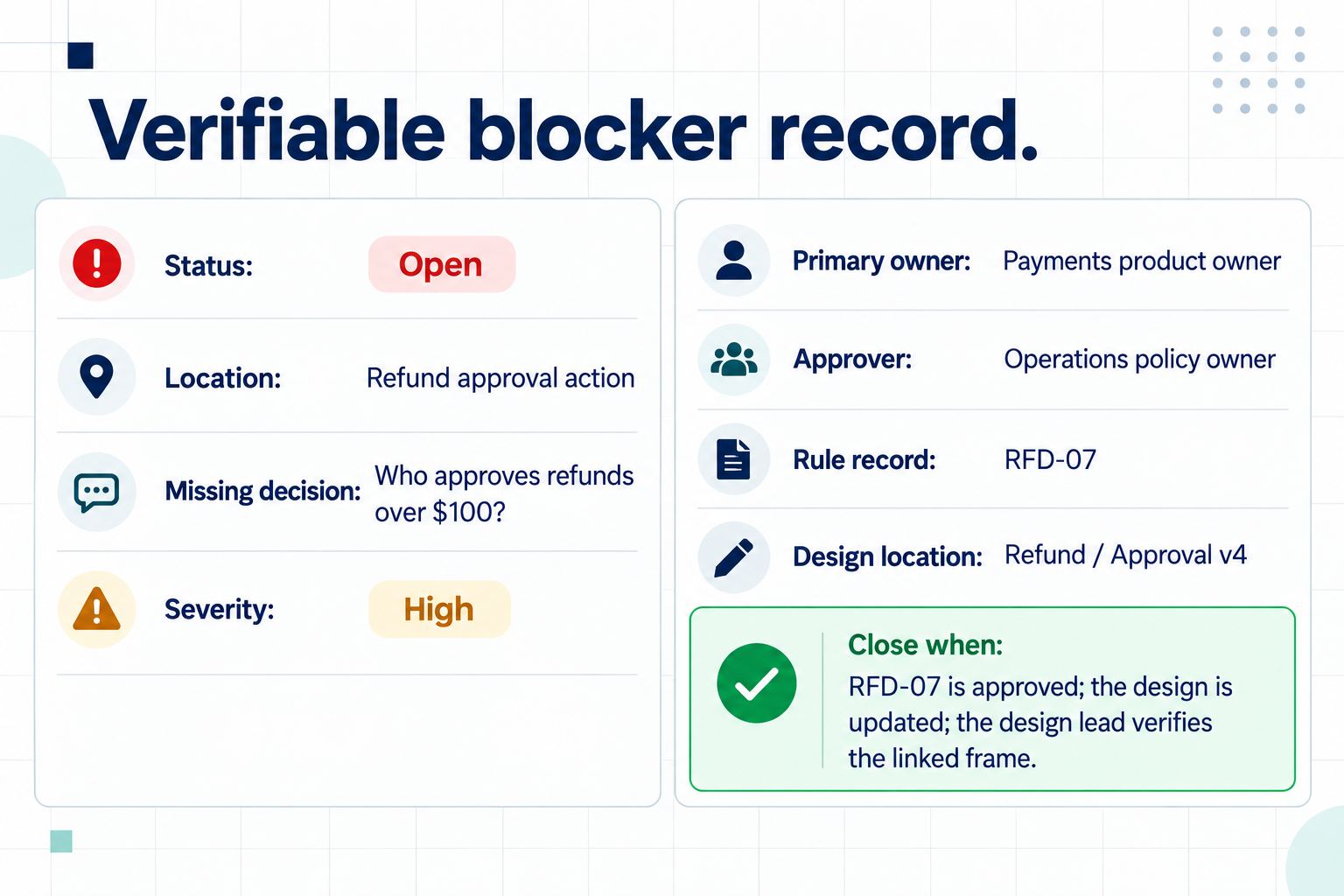
A checklist becomes operational when every failed item creates a useful record. Use a lightweight issue format: location, missing decision, impact, severity, owner, due date, and evidence required to close. Define severity by consequence rather than personal urgency.
| Issue | Impact and severity | Owner | Close when |
|---|---|---|---|
| Refund approval role is undefined | High: changes who can complete the core action | Product owner | Approved role and exception rule are linked |
| Maximum permitted order-name length is unknown | Medium: may change table wrapping, truncation, and edit-field behavior | Backend lead | The backend lead records the character limit and typical, long, and at-limit examples; the design lead verifies the table and field at target widths; the product owner approves the bounded assumption or final limit |
| Empty-state illustration is undecided | Low: does not change task or recovery | Design lead | Direction is selected during visual exploration |
High severity means the missing answer can change scope, user rights, safety, privacy, a critical data-handling rule, the core flow, or whether success is possible. Medium issues may change content, layout, or a secondary path, but design can continue only when the impact is bounded, the affected screens and states are named, representative examples are available, and the product owner approves the temporary assumption. Low issues are reversible details that do not block responsible exploration. The review is complete when every high issue is resolved or explicitly removed from scope, and every accepted assumption has an owner, approver, and review date.
Part 3. Run the 30-minute UI requirements review
Send the 30 questions before the meeting. The requester should complete every answer, add source links, and propose pass, assumption, or blocker status at least one working day in advance. Product, design, and engineering review the answers before the call; content, privacy, security, legal, or accessibility specialists join only where their decision is required. The meeting is for disputed or incomplete items, not for reading all 30 questions aloud.
| Time | Review action | Output |
|---|---|---|
| 0–3 minutes | Product owner restates the user, task, release scope, and highest-risk unknown | Shared decision frame |
| 3–10 minutes | Resolve or confirm blockers that could change the core flow, critical data rules, rights, safety, or success | Resolved item, owner and deadline, or explicit descope |
| 10–20 minutes | Review medium assumptions and representative content, states, permissions, and platform constraints | Bounded impact, test values, owner, approver, and review date |
| 20–26 minutes | Confirm closure evidence and link each open item to its source and design location | Actionable issue records |
| 26–30 minutes | Record the readiness decision and next review trigger | Ready, Ready with assumptions, or Blocked |
At minute 30, the accountable product owner records the final outcome after design and engineering confirm their areas. The product owner cannot override a required privacy, security, legal, accessibility, or domain block. Any item not discussed remains blocked unless it already meets the documented assumption rule; unfinished discussion is never treated as silent approval.
Keep the final readiness decision beside the source material in Pixso Whiteboard or the team’s approved workspace. Link decisions to the eventual design file, but preserve the authoritative product and technical sources. Pixso is useful for shared visual context and comments; it does not replace accountable approval, accessibility expertise, security review, or implementation tests.
Part 4. Start design with known constraints
A UI design requirements checklist should reduce invention, not demand perfect certainty. Confirm the user, task, rules, content, states, constraints, reusable system, and approval evidence, then record the work as Ready, Ready with assumptions, or Blocked. Run the review again when scope, policy, data handling, or a critical flow changes. The result is a defensible starting point and a named path for every unresolved decision.

![[Full Review] Ant Design VS Material UI](https://pixso.net/assets/media/ant-design-vs-material-ui-e85acb360e96ca74.webp)


