On this page

Scott
Information architecture is the structure that makes a product's content and functions understandable and findable. It defines what exists, how items relate, what they are called and how people can reach them. The navigation bar is one visible expression of that structure, not the whole architecture.
Start with the content and the tasks people need to complete. Define the main content types, group related items, agree on labels, and test routes to important destinations. Then bring the structure into your UX design and prototype work to see whether the actual interface helps people find and use it.
Information architecture, navigation and a sitemap are different
A sitemap shows pages and their hierarchical relationships. Navigation presents routes through an interface: menus, breadcrumbs, related links, search and filters. Information architecture also includes the content definitions and vocabulary that make those routes coherent.
NN/g's distinction between IA and navigation includes content inventory, grouping, taxonomy and descriptive metadata within architecture. That distinction matters when an apparently small menu problem is actually a content problem. Moving a label will not help if several pages contain different versions of the same answer.
For example, a learning platform might expose “Courses,” “Topics” and “Learning paths” in its menu. Before drawing those links, the team needs to agree on what each thing means. Is a learning path a course, an ordered collection of courses, or simply a marketing page? The answer changes the links, metadata and user expectations.
Define the content and the tasks it must support
Use a compact example: a platform teaching practical design skills. A learner wants to find a course about user research, understand its prerequisites, start the appropriate lesson and return later. A more experienced learner might want one specific lesson without following a full path.
Inventory the current content before proposing a new menu. Record a stable ID, title, content type, purpose, current location, owner and status. Include duplicate, outdated and planned material as separate states. A list of attractive page titles is not enough to decide whether the underlying content answers a task.
| ID | Item | Type | Purpose |
|---|---|---|---|
| C01 | Research foundations | Course | Teach a coherent sequence of introductory research skills. |
| L01 | Write neutral questions | Lesson | Help a learner prepare questions that do not suggest an answer. |
| T01 | User research | Topic | Connect relevant courses across different levels. |
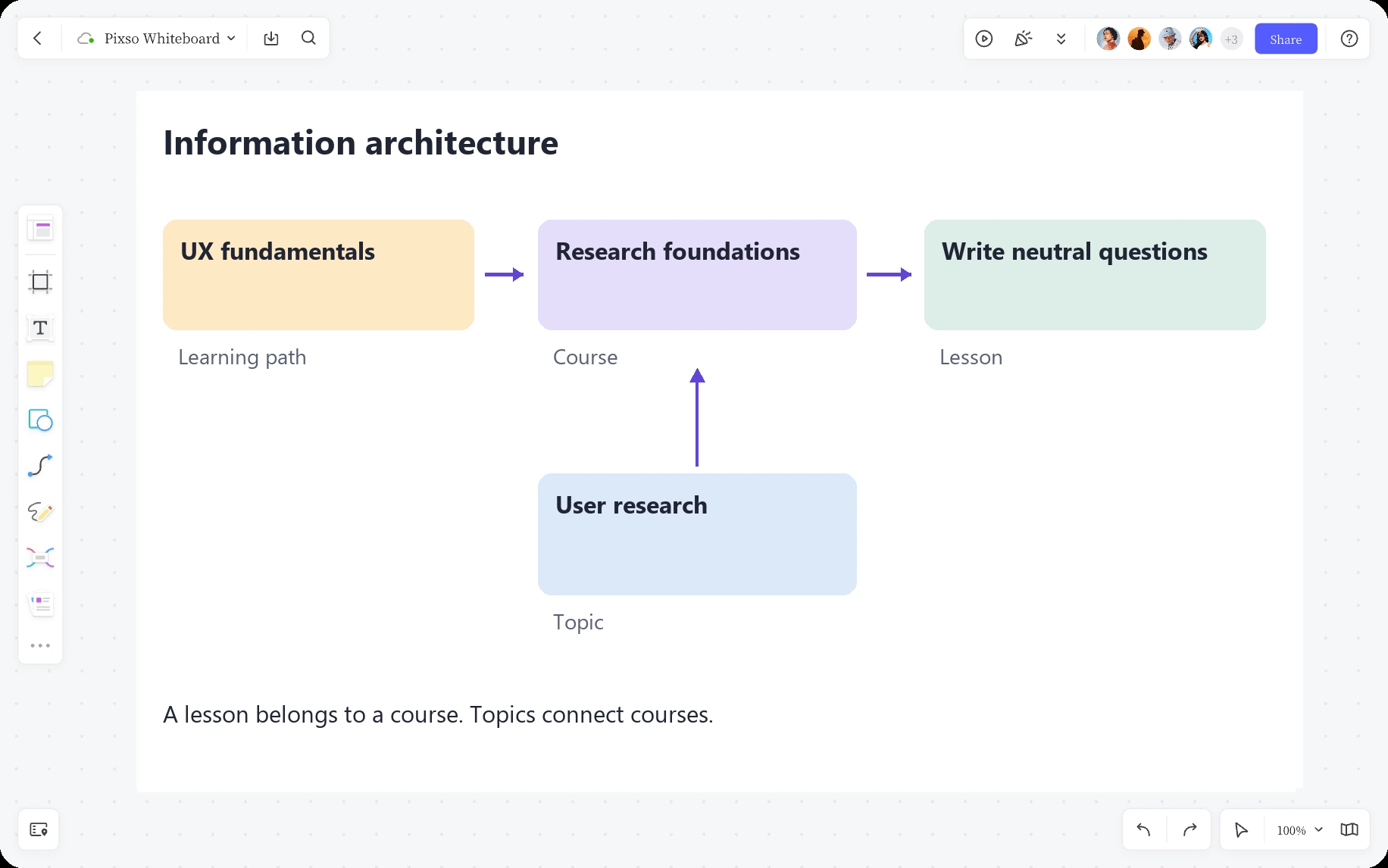
| P01 | UX fundamentals | Learning path | Recommend an order for several related courses. |
This is an illustrative inventory. The IDs help explain the model; they do not need to appear in the user interface. In a real product, the content owner must verify what each item actually contains before the architecture treats it as a useful destination.
Model relationships before drawing a large hierarchy
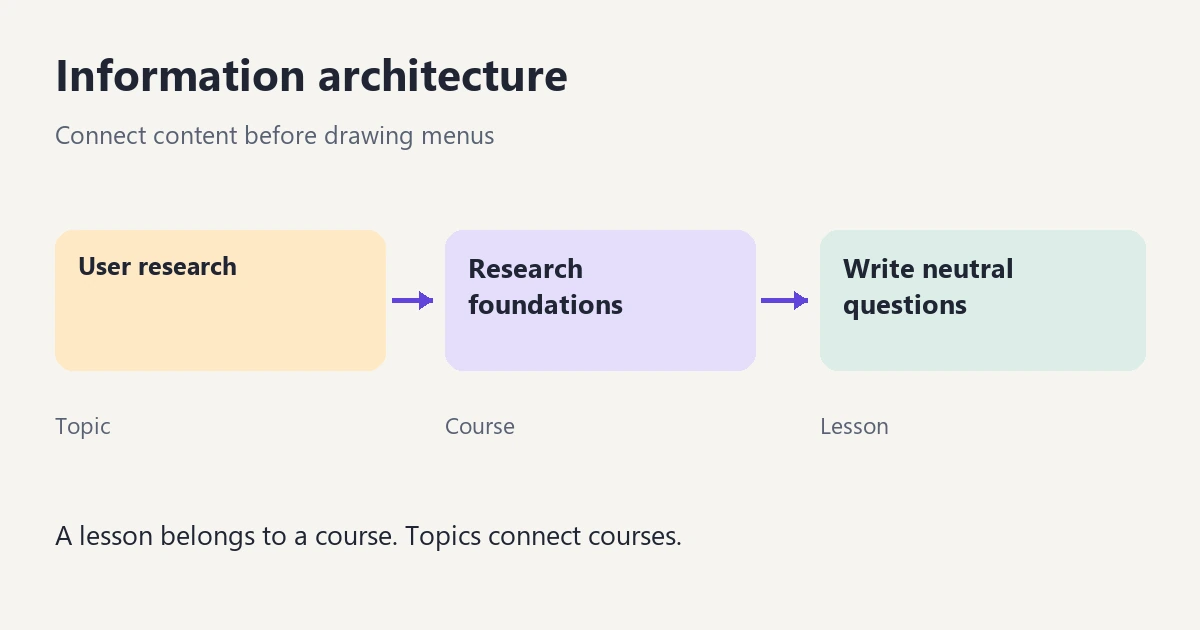
Define a course as an ordered set of lessons. A lesson has one maintained content record and a known place in the course sequence. A topic describes subject matter and can connect several courses. A learning path recommends an order across courses without copying their lesson content.
For the example, Research foundations contains Write neutral questions. The course is associated with the User research topic and included in the UX fundamentals path. These relationships answer different questions: “What comes next?”, “What else is about this subject?” and “Where should I start?”
Do not force every relationship into a single parent-child tree. A course can belong to more than one topic while still having one maintained course page. A path can link to that page instead of creating a second copy with a slightly different title. This keeps updates consistent and makes the destination more predictable.
Write the rules explicitly. Can a lesson be reused by another course? If so, where is progress and sequence shown? Can a course be in more than one learning path? What happens when a course is retired? These are architecture decisions with interface consequences, not implementation details to leave until the menu is finished.
Choose labels that distinguish the content
Define a small controlled vocabulary for the fields users rely on. For this platform, it could include topic, experience level and content type. Agree on a label and meaning for each value. If “Beginner,” “Introductory” and “Foundations” all mean the same level, decide which term the interface should use and which can remain search synonyms.
Keep concepts separate. “Short” describes duration, not difficulty. “Popular” describes behavior or promotion, not a topic. Combining them in one category list makes it difficult to compare options or predict what a filter does.
Test labels against real content and user language. “Research operations” might be a valid professional term but a poor destination for a learner looking for their first interview lesson. A label should reveal what is behind it, not merely reflect the department that owns the content.
When users and editors disagree about grouping, a card-sorting study can help investigate how people relate content. It supplies evidence for a proposal; it does not automatically produce a finished architecture or choose the best label.
Give each item a clear home and useful alternate routes
A first structure could offer a course catalog, topic pages and learning paths. The course catalog supports comparison; a topic page supports exploration within a subject; a path supports guided progression. Each route can lead to the same course detail page.
For Research foundations, the course page should explain what the learner will be able to do, prerequisites, the lesson sequence and how to start or continue. A topic page should help choose among related courses. A path page should explain why its courses are ordered that way. Repeating the same introduction across all three would leave their different roles unclear.
Use related links for meaningful connections. After a neutral-question lesson, a link to a relevant practice exercise may help more than a generic block of “popular content.” Define the metadata that makes such a relationship reliable instead of expecting editors to guess it independently on every page.
Once these roles are clear, choose the visible controls with the navigation-design guide. A desktop mega menu and a mobile disclosure menu can expose the same underlying architecture differently without changing the content's meaning.
Visualize the model and its interface in Pixso
Use a Pixso Whiteboard canvas to draw one example of each content type. Label connectors with their relationship: a course “contains” lessons, a topic “groups” courses, and a path “orders” courses. Those verbs prevent a line from meaning several different things.
Place a simple page hierarchy beside the relationship model, keeping the two views distinct. Then add the key interface frames or reference links: course catalog, course details and lesson view. Review whether the content model supplies the information each screen needs.
For the course card, show the actual title, level and learning outcome rather than placeholder text. For the lesson view, include the course context and next lesson. Testing the model with real-sized content often reveals a missing field or an ambiguous relationship before visual polish hides it.
Test findability and the usefulness of the destination
Write tasks that describe a need without repeating the intended label. For example: “You are preparing your first customer interview and want help phrasing questions without suggesting the answer. Where would you look?” Check both the route someone chooses and the page they consider an answer.
A tree test can examine a proposed hierarchy before detailed screens exist. It does not evaluate the full experience of search results, cards, filters or page content. After the hierarchy is promising, test the same need in the actual prototype.
Separate the failure types. If people choose the wrong category, inspect the labels and grouping. If they reach the right course but cannot tell whether it covers their need, improve the destination's content. If they find the lesson but lose the course sequence, address context and continuation. One overall success number would conceal these different changes.
Maintain the architecture as content grows
Give each content type and vocabulary a responsible owner. A new course should have a clear subject, level, prerequisite rule and relationship to existing material. If an editor cannot place it without creating “Other,” review whether the content or the model is missing a meaningful distinction.
When retiring or merging content, review its incoming routes, path membership and next-lesson links. A tidy catalog can still contain a broken learning path. Keep a decision record for structural changes so future editors know why a course has one home and several alternate access routes.
The result is a structure that helps learners choose, understand and continue. The menu becomes easier to design because the team has already agreed on what the product contains and how those pieces belong together.